> This is part 1 of 2 of the full documentation (pages 1–100 of 109).
> The content is paginated: fetch every part to see all of it.
> Next part: https://docs.native.org/native-dev/llms-full.txt/1
> Page index: https://docs.native.org/native-dev/llms.txt
> Agents can also search and read this documentation through its [MCP server](https://docs.native.org/native-dev/~gitbook/mcp).
# What is Native
Native is a Non-custodial, Autonomous Trading Infrastructure for Value Exchange.
It is the first vertically integrated liquidity stack that **decouples pricing logic from asset settlement**: a sovereign, on-chain matching engine provides high-performance price discovery and order matching, while permissionless vaults host assets for settlement across different chains.
The result is institutional-grade liquidity that is **permissionless, non-custodial, and fully transparent** — seamlessly integrated to any chain and any distribution surface, from wallets and aggregators to professional market makers.
## Why Native
The industry has spent years trying to force high-performance trading into general-purpose environments, leaving traders stuck with opaque off-chain pricing engines, high-latency RFQ models, or MEV-exploited AMMs.
Native is built to close that gap: an on-chain price discovery and execution system with ultra high-performance order matching, deterministic settlement and proactive liquidity.
## What We Are Building
The wallet/aggregator module that streams Core prices and routes orders into Native.
# Benefits for Key Players
{% tabs %}
{% tab title="Traders" %}
Get an institutional-grade experience with fully on-chain visibility:
* **High-performance CLOB execution:** Real order-book trading with limit and market orders, deterministic order matching, and sub-second finality.
* **On-chain transparency:** Every order, match, and balance update is publicly auditable.
* **Unified cross-chain balance:** Deposit from any supported network and hold a **single balance** for trading.
{% endtab %}
{% tab title="Asset Issuers" %}
Bootstrap real order-book liquidity and price discovery:
* **Real CLOB listing:** List and bootstrap liquidity with a real central limit order book on Native Core.
* **Capital-efficient provision:** Native's market infrastructure helps market makers use capital efficiently, supporting deeper liquidity at lower cost.
* **Chain abstraction:** Unified, multi-chain liquidity with Native Relay.
{% endtab %}
{% tab title="Market Makers" %}
Direct API access to the trade interface:
* **Direct, exchange-grade access:** Get real-time data and place orders on the Native Core CLOB through the Native Pro direct-access APIs.
* **Capital-efficient:** Onboard via spot margin — start making instantly without maintaining large, static inventories.
{% endtab %}
{% tab title="Wallets, Aggregators & Solvers" %}
Connect your existing order flow:
* **Backward-compatible:** Integrate via Native Relay mode RFQ or mode intent without changing any userflow.
* **Best execution, high success rate:** Access Native Core prices, and route trades with deep, transparent liquidity and ultra low latency.
* **Single point of access:** One integration reaches the entire Native Core liquidity across all supported chains.
{% endtab %}
{% endtabs %}
# Native Core
Matches Orders in High-Performance, On-chain CLOB
**Native Core** is a high-performance, first-in-first-out (FIFO) central limit order book (CLOB) that is fully on-chain — the sovereign state machine where Native's **pricing logic and order matching are finalized transparently**.
It is built for traders who want ultra high performance with full on-chain verifiability.
* **Fully On-chain Verifiable:** all actions are publicly auditable.
* **High Throughput, Low Latency:** high bandwidth with sub-second finality.
* **Fair Execution:** non-biased FIFO (first-in-first-out) order matching
#### Explore Native Core
{% embed url="" %}
* 50ms block finality time
* Max 1M TPS
#### Learn more
{% content-ref url="/pages/KXAldygxVc3Iy5yW5jDO" %}
[Deposit / Withdrawal on Native Core](https://docs.native.org/native-dev/modules/native-core/deposit-and-withdrawal-on-native-core)
{% endcontent-ref %}
# Deposit / Withdrawal on Native Core
{% hint style="info" %}
#### Special Note
* A one-time account activation fee of approximately $1 applies.
* Minimum deposit and withdrawal amounts vary by asset. Please check the UI.
* The minimum trade size is $10 in notional value.
* A small withdrawal fee applies and varies by asset. Please check the UI for details.
{% endhint %}
## How to Deposit Funds into Native Core
Follow the steps below to connect your wallet, deposit funds, activate your Native Core account, and begin trading.
### Step 1: Connect Your Wallet
1. Visit [Native Core](https://app.native.org/markets/ETH-USDT).
2. Click **Connect Wallet** in the upper-right corner.
3. Select the wallet you want to connect.
4. Confirm the connection request in your wallet.
### Step 2: Deposit Funds and Activate Your Account
Once your wallet is connected, click **Deposit** in the upper-right corner.
{% hint style="info" %}
Make sure your wallet has enough of the network’s native gas token to cover the initial account activation and subsequent on-chain transactions.
{% endhint %}
To make a deposit:
1. Select the asset and network you want to use.
2. Make sure your wallet is connected to the selected network.
3. Enter the amount you want to deposit.
4. Click **Approve** and confirm the approval request in your wallet.
5. Confirm the deposit transaction in your wallet.
{% hint style="info" %}
A one-time account activation fee applies when you make your first deposit to Native Core.\
\
1 USD notional value chain, paid in native token with the deposit tx. (e.g. ETH for Ethereum, BNB for BNB chain)
{% endhint %}
Once the deposit is complete, click **Done**. You can also select **View Transaction** to review the deposit on the relevant blockchain explorer.
### Step 3: Establish a Trading Connection
After completing your deposit:
1. Click **Establish Connection** in the website pop-up.
2. Approve the signature request in your wallet.
### Step 4: Start Trading
Once the connection is established:
1. Select your preferred trading pair.
2. Choose either a **Market Order** or **Limit Order**.
3. Enter the order details and confirm your order to begin trading.
{% hint style="info" %}
The minimum trade size is USD 10 in notional value. The required asset amount varies based on its current price. Please refer to the trading interface for the applicable minimum.
{% endhint %}
## How to Withdraw Funds from Native Core
Follow the steps below to withdraw assets from your Native Core account.
### Step 1: Open the Withdrawal Page
1. Click the **address tab** in the upper-right corner.
2. Click the **Withdraw** icon to open the withdrawal page.
### Step 2: Enter the Withdrawal Details and Submit
1. Select the asset you want to withdraw.
2. Select the destination network.
3. Enter the amount you want to withdraw.
4. Review the withdrawal details carefully, then click **Confirm** to submit your request.
{% hint style="info" %}
Please note:
* A small withdrawal fee applies and varies by asset. The fee is deducted from the asset being withdrawn.
* The minimum withdrawal amount varies by asset. Please refer to the withdrawal interface for the applicable minimum.
{% endhint %}
### Step 3: Wait for Processing
At this stage, withdrawal requests may be processed instantly or within **T+1**, depending on the withdrawal amount and available liquidity. You can track the status of your request in the **Account History** tab below.
# Native Pool
Earn yield on supported assets with Native Pool
Native Pool is Native Core's earn product. Deposit supported assets to earn yield, and withdraw them whenever you choose.
To start earning, you can:
* Deposit supported assets from an EVM network directly into Native Pool.
* Deposit into Native Core first, then move your available Core balance into Native Pool.
Yield is funded by demand for capital on Native Core, including market maker utilisation and trading fees generated through Native Relay. It is distributed to eligible earning balances on a daily basis.
### Withdrawing from Native Pool
You can choose the withdrawal option that suits your needs:
* **Scheduled withdrawal:** request a withdrawal and claim it once the displayed pending period ends.
* **Instant withdrawal:** withdraw immediately, subject to the fee and availability shown in the app.
Assets in a pending scheduled withdrawal no longer earn yield. You can review the current terms, supported assets, and status for each position in the Native app.
### Learn more
{% content-ref url="/pages/743GTOR4X7SeJf1SwAvL" %}
[Deposit / Withdrawal / Earn / Migrate for Native Pool](https://docs.native.org/native-dev/modules/native-pool/deposit-withdrawal-earn-migrate-for-native-pool)
{% endcontent-ref %}
{% content-ref url="/pages/3tzMbDny0B25gtANtoaT" %}
[Native Pool Yield](https://docs.native.org/native-dev/modules/native-pool/native-earn)
{% endcontent-ref %}
{% content-ref url="/pages/HCGsKuRZmyn6bSAwssR9" %}
[Native Pool FAQ](https://docs.native.org/native-dev/modules/native-pool/native-earn-faq)
{% endcontent-ref %}
# Deposit / Withdrawal / Earn / Migrate for Native Pool
Native Pool allows you to supply supported assets from an EVM wallet or your Native Core balance, withdraw assets through scheduled or instant withdrawal, and migrate eligible legacy Liquidity Pool positions.
### How to Supply Assets from an EVM Wallet
#### Step 1: Connect Your Wallet
1. Go to the **Native Pool** page.
2. Click **Connect Wallet** in the upper-right corner.
3. Select your wallet and confirm the connection request.
#### Step 2: Select an Asset
1. Browse the list of supported assets.
2. Click **Supply** next to the asset you want to supply.
#### Step 3: Enter and Confirm the Supply Details
1. Select **From EVM Wallet**.
2. Select the **Source Chain**.
3. Enter the amount you want to supply.
4. Click **Approve** and confirm the approval request in your wallet.
5. Confirm the supply transaction in your wallet.
{% hint style="info" %}
If your address has not previously activated a Native Core account, a one-time account activation fee of \~ $1 applies to your first deposit. The fee is paid in the source chain’s native gas token, such as ETH on Ethereum or BNB on BNB Chain. Make sure your wallet has enough of the source chain’s native token to cover both the activation fee and subsequent on-chain transaction fees.
{% endhint %}
#### Step 4: Check Your Position
Once the supply is complete:
1. Open the **History** tab to review the transaction record.
2. Open the **Assets** tab to view your current position on the right side of the page.
### How to Supply Assets from Your Native Core Balance
#### Step 1: Connect Your Wallet
1. Go to the **Native Pool** page.
2. Click **Connect Wallet** in the upper-right corner.
3. Select your wallet and confirm the connection request.
#### Step 2: Select an Asset
1. Browse the list of supported assets.
2. Click **Supply** next to the asset you want to supply.
#### Step 3: Enter and Confirm the Supply Details
1. Select **From Native Balance**.
2. Enter the amount you want to supply.
3. Click **Supply** and confirm the request in your wallet.
#### Step 4: Check Your Position
Once the supply is complete:
1. Open the **History** tab to check the transaction status.
2. Open the **Assets** tab to view your current position on the right side of the page.
### How to Withdraw Assets from Native Pool
Native Pool offers two withdrawal methods:
* **Scheduled Withdrawal:** Request a fee-free withdrawal and claim it after the waiting period shown in the UI.
* **Instant Withdrawal:** Withdraw immediately by paying the fee shown in the UI.
#### Step 1: Open the Withdrawal Form
1. Connect your wallet using **Connect Wallet** in the upper-right corner.
2. Locate the position you want to withdraw from and click **Manage**.
3. Select **Withdrawal** in the pop-up window.
#### Scheduled Withdrawal
1. Select **Scheduled**.
2. Enter the amount you want to withdraw.
3. Click **Review Withdrawal**.
4. Review the withdrawal details.
5. Click **Confirm Withdrawal** and confirm the request in your wallet.
{% hint style="info" %}
Check the waiting period shown in the UI carefully before confirming. For example, the displayed waiting period may be three days. The amount placed in a scheduled withdrawal stops earning yield during the waiting period.
{% endhint %}
Once the waiting period ends:
1. Click **Claim**.
2. Confirm the request in your wallet to move the assets back to your Native Core balance.
#### Instant Withdrawal
1. Select **Instant**.
2. Enter the amount you want to withdraw.
3. Click **Review Withdrawal**.
4. Review the withdrawal fee shown in the UI.
5. Click **Confirm Withdrawal** and confirm the request in your wallet.
{% hint style="info" %}
The instant withdrawal fee may vary (for example 1%). Always review the fee displayed in the UI before confirming.
{% endhint %}
### How to Migrate a Legacy Liquidity Pool Position
If you have an eligible position in a legacy Liquidity Pool, you can migrate it to Native Pool and continue earning yield.
#### Step 1: Open the Migration Form
1. Go to the **Native Pool** page and connect your wallet.
2. If an eligible legacy position is detected, a migration notice will appear at the top of the page.
3. Click **Migrate**.
#### Step 2: Confirm the Migration
1. Click **Migrate to Native Pool** in the pop-up window.
2. Confirm the approval and migration requests in your wallet.
Once the migration is complete, your position will appear in Native Pool and continue earning under the current Native Pool terms.
# Native Pool Yield
Native Pool is an earn product on Native Core: deposit supported assets to earn yield, and withdraw them when you need to. To deposit, use your balance from Native Core. Or, use direct EVM deposit if you are a new user or wish to deposit directly from EVM.
Native Pool is designed for users who want to earn on assets that are actively used for trading liquidity but without the need for actively managing a position or perform complex liquidity provisions.
### How yield works
Yield is supported by demand for capital on Native Core:
* **Market Makers:** verified market makers utilise the capital to support trading and settlement on Native Core, generating funding fees.
* **Native Relay:** Native Relay utilises the capital to execute atomic trades on EVM networks, generating trading fees.
Native distributes yield to eligible earning balances. The amount you receive is based on your eligible balance for each asset when a distribution is made. The app shows current yield information and asset-specific terms.
### Deposit and start earning
You can start earning in either of these ways:
1. Deposit a supported asset from an EVM network directly into Native Pool.
2. Deposit into Native Core, then transfer an available Core balance into Native Pool.
Once the transfer into Native Pool is complete, the balance is eligible for subsequent yield distributions. Minimum deposit requirements and any first-time account-activation fee are displayed before you confirm a deposit.
### Withdraw your assets
Native Pool offers two withdrawal options:
* **Scheduled withdrawal:** move an amount from your earn balance into a pending withdrawal. Claim it after the pending period shown in the app.
* **Instant withdrawal:** receive the available amount immediately, less the fee shown before confirmation.
An amount in a scheduled withdrawal stops earning yield. Before it becomes claimable, you can cancel a pending request to return the amount to your earn balance. Only one scheduled withdrawal can be pending at a time.
### Existing positions
If you have a legacy position, use the Legacy entry in the app to review it. Eligible positions can be migrated into Native Pool, one-time account activation fees may apply.
### Important considerations
Yield is variable and depends on product activity. The availability, terms, and fees for each supported asset may change. Review the app carefully before you deposit or withdraw.
# Native Pool FAQ
#### What is Native Pool?
Native Pool is an earn product on Native Core. You deposit supported assets to earn yield and can withdraw them at any time using the available withdrawal options.
#### How do I start earning?
You can deposit a supported asset directly into Native Pool from an EVM network, or deposit into Native Core and move your available Core balance into Native Pool. Check the app for the currently supported assets, minimum deposit requirements, and any first-time account-activation fee.
#### Where does yield come from?
Yield is funded by demand for capital on Native Core, including verified market maker utilization and trading fees generated through Native Relay. Yield is variable; it is not a guaranteed rate of return.
#### How is yield distributed?
Native distributes yield to eligible earning balances. Your allocation is based on your eligible balance for that asset when a distribution is made. The app displays current yield information and balance details.
#### What happens when I request a scheduled withdrawal?
The requested amount moves from your earn balance into a pending withdrawal and stops earning yield. You can claim it after the pending period displayed in the app. You may cancel a request before it becomes claimable to return the amount to your earn balance. Only one scheduled withdrawal can be pending at a time.
#### Can I withdraw immediately?
Yes. An instant withdrawal is available subject to the fee and availability shown in the app. Review the amount you will receive before confirming.
#### What happened to Fixed-Term and Flexible Earn?
New deposits use Native Pool. If you have a legacy position, use the Legacy entry in the app to review it and, where available, migrate it to Native Pool.
#### What are the risks?
The value of deposited assets can change, and yield can vary with market and product activity. Smart-contract, operational, liquidity, and market risks may also affect the product. Review [Risks](https://docs.native.org/native-dev/concepts/risks) before participating.
#### How does Native protect assets?
Native applies controls including monitored market maker access, collateral and liquidation processes, independent balance checks, and the ability to pause relevant product activity during an incident. These controls reduce risk but cannot eliminate it.
# Native Pro
Connects Institutional Players to Native Core
Native Pro is the institutional integration module that exposes Native Core’s matching engine via direct, high speed and low latency interfaces.
It is the on-chain equivalent of an institutional market-making connection: real-time data, deterministic matching, and full order management — settled transparently on Native Core.
* **Institutional-Grade Performance:** stream real-time bid/ask and place, amend, and cancel maker orders directly on the Native Core CLOB.
* **Programmatic access:** standardized APIs/SDKs for low-latency, automated strategies.
#### Build with Native Pro
{% content-ref url="/pages/1b405ed682a71c04700578aa049caa32042a8dc5" %}
[Native Core API](https://docs.native.org/native-dev/build-with-native/native-core)
{% endcontent-ref %}
# Native Relay
Enables Direct-Access for Professional Market Makers
**Native Relay** is an integrator SDK/API that streams prices and routes trades into Native Core.
It lets existing distribution partners tap into the deep Native Core liquidity **without changing any user flow**.
#### Modes
Relay meets each partner where they already operate. See [Integration Modes](https://docs.native.org/native-dev/concepts/integration-modes) for the full breakdown.
* **RFQ mode:** Lowest-friction path for existing DEX aggregators.
* **pAMM mode:** Fully onchain quotes and swaps. No offchain API and no RFQ signature.
* **Intent mode:** Used for meta-aggregators, intent platforms, solvers, and cross-chain UIs.
#### Who It's For
* **DEX aggregators** — Native Core as a DEX liquidity source.
* **Wallets & Meta-aggregators** — Native Core as a swap service provider.
* **Intent platforms & solvers** — Native Core as a solver.
#### Compatibility with Native V2
Native's earlier V2 Swap API product now lives inside **Native Relay's mode RFQ.**
The same firm-quote, backward-compatible integration partners already use — while pricing, matching, and settlement move on-chain to Native Core.
### Build with Native Relay
RFQ and pAMM swap paths for aggregators and integrators are documented under Swap Aggregators.
{% content-ref url="/pages/8ob8Fc9urTQsyZF5LW3m" %}
[Wallets, Aggregators & Solvers](https://docs.native.org/native-dev/build-with-native/swap-aggregators)
{% endcontent-ref %}
# CLOB
The **Central Limit Order Book (CLOB)** is the matching mechanism at the heart of [Native Core](https://docs.native.org/native-dev/modules/native-core). Unlike an AMM, which prices trades along a bonding curve, a CLOB matches discrete buy and sell orders by **price-time priority**.
### How It Works on Native Core
* **Order types:** limit orders (fill at a specified price or better) and market orders (fill at the best available price) are supported.
* **On-chain order book:** the full order book state is stored on-chain. Every placement, cancellation, and fill is the result of an on-chain transaction.
* **Auditable matching:** the order sequence is canonical, matchings are deterministic and auditable.
### Why It Matters
A CLOB gives traders the familiar order types and price precision of other liquidity venues, while keeping execution fully transparent. Combined with a dedicated app chain, it delivers professional-grade execution without the MEV and slippage characteristic of AMMs.
# Liquidity Relaying
Native Core liquidity is accessible through Native Relay in several integration modes, each suited to a different venue type and user flow. All are compatible with how existing on-chain swap infrastructures operate.
#### Mode — RFQ
The user requests firm quotes on public networks.
* Native Relay generates firm-quote calldata based on Native Core liquidity.
* Lowest-friction for existing DEX aggregators, wallets, and solvers.
See [FirmQuote Swap APIs](https://docs.native.org/native-dev/build-with-native/swap-aggregators/firmquote-swap-apis).
#### Mode — pAMM
The user quotes and swaps fully onchain.
* No offchain quote API and no RFQ signature. Call `PropAMMEngine.getQuote`, then `NativeRouter.tradePAMM`.
* Single hop only. There is no RFQ fallback on the direct path.
See [pAMM Swap APIs](https://docs.native.org/native-dev/build-with-native/swap-aggregators/pamm-swap-apis).
#### Mode — Intent
The user commits an intent on public networks.
* Native Relay executes the trade on Native Core, and settles with the user on public network.
* Ideal for meta-aggregators, intent platforms, and cross-chain UI.
#### Mode — Direct
* Users deposit and trade directly on Native Core.
* Ideal for users who want full CLOB access with all the available order types. (limit, market)
#### Choosing a Mode
Partner type
Recommended mode
DEX Aggregators / Wallets / Solvers
Mode — RFQ
DEX Aggregators wanting an onchain-only AMM path
Mode — pAMM
Meta-Aggregator / Intent & Cross-chain Platforms
Mode — Intent
Venues wanting full CLOB access
Mode — Direct
# Non-custodial Accounts
Native Core accounts are **non-custodial**: an account is identified by an owner address and is controlled by signatures, with no separate registration. Every trading action is a signed transaction, so the chain can verify exactly who authorized each order, cancel, or modify.
#### Non-custodial Owner Accounts
* The owner address is the account's root authority.
* Trading actions are authorized by a recoverable signature over the canonical transaction payload.
#### Delegated Keys
Rather than signing every order with the owner key, an owner can authorize an **agent** — a delegated key that signs on the owner's behalf. Agents are how bots and automated strategies operate without exposing the owner key.
# On-chain Verifiability
With Native Core, trading is verifiable: the sequence of every transaction, the result of every match, and every balance change are produced with consensus and published on-chain, so anyone can independently audit them.
#### How Trust Is Established
* **Publicly verifiable:** orders, cancels, and modifies are submitted as transparent transactions.
* **Deterministic execution:** nodes execute matching deterministically over the canonical order, so the same sequence always produces the same order book and balances.
* **Finality:** once a block is finalized, its transactions and their effects are settled and cannot be reordered.
# Order Types
When placing an order on the Native Core [CLOB](https://docs.native.org/native-dev/concepts/central-limit-orderbook), you choose an **order type** (how the order is priced) and a **time-in-force** (how long it stays active and how it is allowed to fill).
#### Order Types
* **Limit** — fills at a specified price or better. If it cannot fully fill on entry, the remainder rests on the order book.
* **Market** — fills at the best available price. A market order does not rest on the book; any unfillable remainder is cancelled.
#### Time in Force
TIF
Name
Behavior
gtc
Good-Til-Cancelled
Rests on the book until filled or explicitly cancelled.
ioc
Immediate-Or-Cancel
Fills as much as possible immediately; cancels any remainder.
fok
Fill-Or-Kill
Must fill in full immediately, or the entire order is cancelled.
alo
Add-Liquidity-Only (post-only)
Only rests as a maker order; rejected if it would immediately match and take liquidity.
# Markets, Assets & Decimals
Trading on Native Core is organized around **assets** and **markets**. Understanding how they are identified and how their numbers are scaled is essential for reading the order book and placing orders correctly.
#### Assets
An asset is a token tracked on Native Core, identified by a numeric `asset_id` and a unique `symbol`.
* **`balance_decimals`** — the internal scale used for balances and settlement of that asset.
* **`issuer`** — the owner account bound to an asset (via the operator listing action). It is a record-keeping binding only and confers no admin privileges; genesis and legacy-listed assets show the zero address.
#### Markets
A market is a tradable pair, identified by a numeric `market_id`, with a base asset and a quote asset. Each market carries its own scaling metadata:
* **`base_quantity_decimals`** — lot scale for order quantity in the base asset.
* **`price_decimals`** — decimal places for price (quote units per 1 base unit).
* **`max_price_sig_figs`** — maximum significant figures allowed for non-integer display prices.
* **`quote_balance_decimals`** — the quote asset's `balance_decimals`, included so clients can convert quote notional without a separate lookup.
#### Quote Assets & Minimum Notional
Only allowlisted **quote assets** may be used as the quote side of a market. Each carries a **minimum order notional** (`min_quantity`) so dust orders are rejected. For example, the genesis allowlist uses USDC and USDT with a `10` minimum, ETH with `0.01`, and BNB with `0.02`. Orders below the configured minimum are rejected with `MinTradeSpotNtl`.
#### Raw Atoms vs Display Values
Native Core executes on **integers only**. Public APIs accept and return human-readable decimal strings, while the signed transaction payload carries raw integer **atoms**:
```
raw_quantity = display_quantity * 10^base_quantity_decimals
raw_price = display_price * 10^price_decimals
```
Submitting more fractional digits than a market's `price_decimals` or `base_quantity_decimals` allows is rejected (`InvalidPricePrecision` / `InvalidQuantityPrecision`). For the full conversion rules and worked examples, see the Decimal Units reference.
# Unified Balance
A **Unified Balance** is the single account balance a user holds on Native Core, usable across all markets. Instead of juggling funds across chains, pools, and trading pairs, users deposit once and trade everywhere with one balance.
#### Balance Components
* **Available balance** — free to trade or withdraw.
* **Locked balance** — reserved by open orders.
When an order is placed, the required funds are **locked atomically**; they are unlocked on cancel or released on fill.
# Firm Quote
A **firm quote** is a committed, executable price returned with signed calldata for on-chain execution. It is the basis of Native Relay's [RFQ integration mode](https://docs.native.org/native-dev/concepts/integration-modes): an integrator requests a quote via the `/firm-quote` endpoint and executes the returned calldata on-chain.
For further details, refer to the following link:
{% content-ref url="/pages/beek4O43pUvSY0qlQmTr" %}
[FirmQuote Swap APIs](https://docs.native.org/native-dev/build-with-native/swap-aggregators/firmquote-swap-apis)
{% endcontent-ref %}
#### **The Swap Process**
1. The integrator query the `/orderbook` endpoint to obtain pricing and depth information and generate an initial quote.
2. The integrator submit the swap parameters, including the amount and token addresses, via the `/firm-quote` endpoint to receive a firm quote and executable calldata.
3. The calldata is executed on the blockchain to finalize the swap.
# Fees
### Native Core
Standard maker and taker fees are applied:
Markets
Taker Fee
Maker Fee
Stablecoin & softpeg markets
0%
0%
Majors & RWAs
0.1%
0.02%
Selected markets
0.001%
0%
For actual fee rate, please refer to the numbers listed in market page, under the trade panel.
Fee rebates program coming soon.
### Integration Partners
For integrators routing through Native Relay, we collaborate with partners such as aggregators, wallets, and other taker/flow sources to establish customized fee rates based on individual requirements. Typically additional Relay fee is set at zero or minimal to maintain a competitive offering in the market.
Please note that standard maker and taker fee rates are still applied in Relay.
# Pool Rewards
Native Pool distributes yield to eligible earning balances on Native Core.
### Where does yield come from?
Yield is funded by demand for capital on Native Core, including market maker utilization and trading fees generated through Native Relay.
Yield is variable and is not a direct rebate of a specific trade or fee. The app displays the current yield information for each supported asset.
### How is yield allocated?
Native distributes variable yield to eligible earning balances. Each distribution is allocated pro rata to eligible balances for the relevant asset.
Balances in a pending scheduled withdrawal are not eligible for yield until they are returned to the earn balance.
# Risks
## Smart contract risk
Although our smart contracts have undergone audits by third-party firms, it is theoretically possible for vulnerabilities to exist. Furthermore, integrated third-party projects, including utilities and listed token projects, may also present risks associated with smart contracts.
Mitigation:
* Engaging multiple professional third-party firms to audit smart contracts significantly mitigates the risk of vulnerabilities. Audit reports are available [here](https://docs.native.org/native-dev/resources/audits).
* Additionally, we implement a bug bounty program to incentivize individuals to identify vulnerabilities in our live code, serving as an additional measure to filter out potential issues.
* We meticulously evaluate any new tokens or utilities that we choose to list and utilize, collaborating exclusively with those that have undergone auditing and demonstrated a proven track record of robust security.
## Native Pool market and liquidity risk
The value of assets held in Native Pool can change with market prices. Yield is variable and depends on product activity, including demand for capital and trading activity.
**USD Value Loss of Deposited Assets:** The value of your deposited assets may decline in terms of USD due to price drops.
**Risk of Bad Debt:** In highly volatile or extreme market conditions, liquidation mechanisms may not execute as intended. Rapid price movements or network congestion can result in undercollateralized positions and potential bad debt.
Mitigation:
* Several automated risk monitoring mechanisms have been implemented throughout the system to maintain operational integrity.
* Conservative collateralization thresholds have been established to provide a sufficient buffer to counteract market volatility.
* Additionally, high-frequency, dynamic adjustments to the lending parameters have been instituted to ensure the system can promptly respond to any changes in market conditions.
# Native Liquidity Provisioning
Native provides the infrastructure for asset issuers to bootstrap and scale on-chain trading and liquidation liquidity. Native's orderbook, RFQ, settlement, and margin infrastructure help issuers improve market depth, execution quality, and distribution for their assets.
**Why Choose Native for Asset Liquidity:**
* **Zero Impermanent Loss:** Unlike traditional AMMs, our single-sided, loan-based model eliminates impermanent loss and the burden of active management.
* **High Capital Efficiency:** Powered by Native's CLOB + RFQ architecture, liquidity supplied will be tightly concentrate around the spread, maximizing capital utilization.
* **Customizable & Tailored Pricing:** Asset issuers can deploy tailored pricing models to optimize orderbook liquidity for specific goals, such as maintaining a robust peg, ensuring tight spreads, mirroring external prices, executing fixed-price distributions, and more.
* **Maximum Asset Distribution:** Native distributes your assets across 25+ integrated Web3 wallets and aggregators, ensuring your liquidity is accessible to users wherever they choose to trade.
Native's liquidity architecture empowers all types of asset issuers. Whether you are issuing Tokenized Stocks, Wrapped Majors, Stablecoins, or Yield-Bearing Assets, Native delivers tailored liquidity solutions that exceed traditional setups, building a robust and deep secondary market across chains.
# Tokenized Stocks & Equities (RWAs)
### Performance & Advantages
* **24/7 Trading:** Breaking the time constraints of Traditional Finance (TradFi), providing continuous on-chain liquidity and price discovery even during off-hours.
* **Advanced Depth & Spreads:** With orderbook infrastructure and PMMs, Native provides highly competitive depth and tight spreads on par with top-tier CEXs. Traders can execute large-size orders with greater certainty, without worrying about severe slippage.
* **Earning Sustainable Yields for RWA:** Earn yields while providing liquidity, especially for top-traded assets. This effectively lowering the overall cost of liquidity provisioning. The yield feature can also be an offering for asset holders and users, further increase utility, retention, and liquidity.
### Case Study: bStocks
Native has supported bStocks since day one, delivering 24/7 liquidity, deep market depth, and tight spreads for retail users, professional traders, and liquidators.
**Leading DEX trading volume share for bStocks**
* One Month after bStocks' launch, Native has processed \~$34M in trading volume, executed 70K+ trades, and captured \~50% of total DEX trading volume on BNB Chain, demonstrating the competitiveness of the infrastructure.
**Wide distribution to major gateways**
* Native makes bStocks and the liquidity easily accessible through multiple gateways and wallets. Users can access bStocks liquidity powered by Native through 10+ gateways on BNB Chain. With liquidity distributed everywhere, user can trade seamlessly from their preferred interface.
* Learn more in analytics:
**Capital-efficient liquidity for bStocks**
* Native's CLOB and PMM infrastructure supports deep, capital-efficient bStocks markets without relying on a traditional AMM liquidity pair. This helps market makers quote competitively while users access liquidity through their preferred trading interface.
**Liquidity for liquidations & composability**
* For bStocks’ on-chain utility to expand further, reliable liquidation liquidity is crucial. Liquidity powered by Native already supports bStocks collateral liquidations across leading lending protocols, including ListaDAO, Venus, and BNB Chain.
* See public references in:
* ListaDAO:
* Venus:
* TermMax:
**Competitive depth and spreads**
* Native delivers deep market depth and tight spreads for bStocks, enabling large trades to execute smoothly on-chain. For many top-traded bStocks, we’re already matching top CEX-level depth and spreads.
* Take NVDAB and SPCXB below as examples:
* Check real-time orderbook:
# Yield-Bearing Assets
### Performance & Advantages
* **Optimized Pricing:** Market makers quote based on mint/redeem values and real-time market data, ensuring executable, market-responsive prices.
* **Efficient Settlement:** Native's settlement and margin infrastructure supports market maker inventory and reliable swap execution.
* **Continuous Liquidity:** Market makers periodically rebalance the pool, such as redeeming stETH for ETH or trading on secondary markets, to maintain readiness for future swaps.
* **Easy Access:** Native’s pricing and liquidity are available directly through its Swap Engine API and integrated across major aggregators and gateways.
### Case Study: STONEUSD
STONEUSD is a yield-bearing asset backed by a delta-neutral funding rate arbitrage portfolio. Its rebalancing mechanism enables holders to continuously accumulate returns.
The STONEUSD contract maintains a fair price that governs direct minting and withdrawal. These functions, however, are restricted to allowlisted addresses that have completed KYB/KYC. For most users, swapping is therefore the primary method to acquire or exit the asset, making swap liquidity, pricing, and stability critical.
StakeStone, the issuer of STONEUSD, has partnered with Native to deliver optimal swap execution—offering superior liquidity, responsive pricing, and a seamless experience for both end-users and integration partners.
**Easily Accessible PMM Liquidity**
* The liquidity powered by Native's private market making (PMM) is easily accessible across various interfaces and aggregators, such as 1inch. Projects can also integrate it directly into their own frontends using the Native Swap API.
**Pricing Advantage and Stability**
* Leveraging its PMM pricing model and inventory support, Native provides users with an optimized price for swaps of various sizes, avoiding the price volatility inherent to AMM models. Currently, STONEUSD trades with a spread of less than 3 bps, which is among the best in the market.
**High Liquidity Utilization**
* With Native's PMM, all provided liquidity is actively utilized for trading at the optimal price point. This eliminates the common AMM issue where a significant portion of liquidity lies dormant at non-optimal price ranges. With an equivalent amount of liquidity, Native can offer significantly deeper tradable liquidity at competitive prices compared to typical AMM pools.
**Lower Cost for Supplying Liquidity**
* For asset issuers, establishing secondary market liquidity is essential. Native's capital-efficient market infrastructure can lower the cost of supporting secondary liquidity compared with traditional AMM approaches.
# User Guides for Products
Explore step by step user guides for Native's product and feature
{% content-ref url="/pages/KXAldygxVc3Iy5yW5jDO" %}
[Deposit / Withdrawal on Native Core](https://docs.native.org/native-dev/modules/native-core/deposit-and-withdrawal-on-native-core)
{% endcontent-ref %}
# Add Liquidity
#### **To Add Single-Sided Liquidity on Native:**
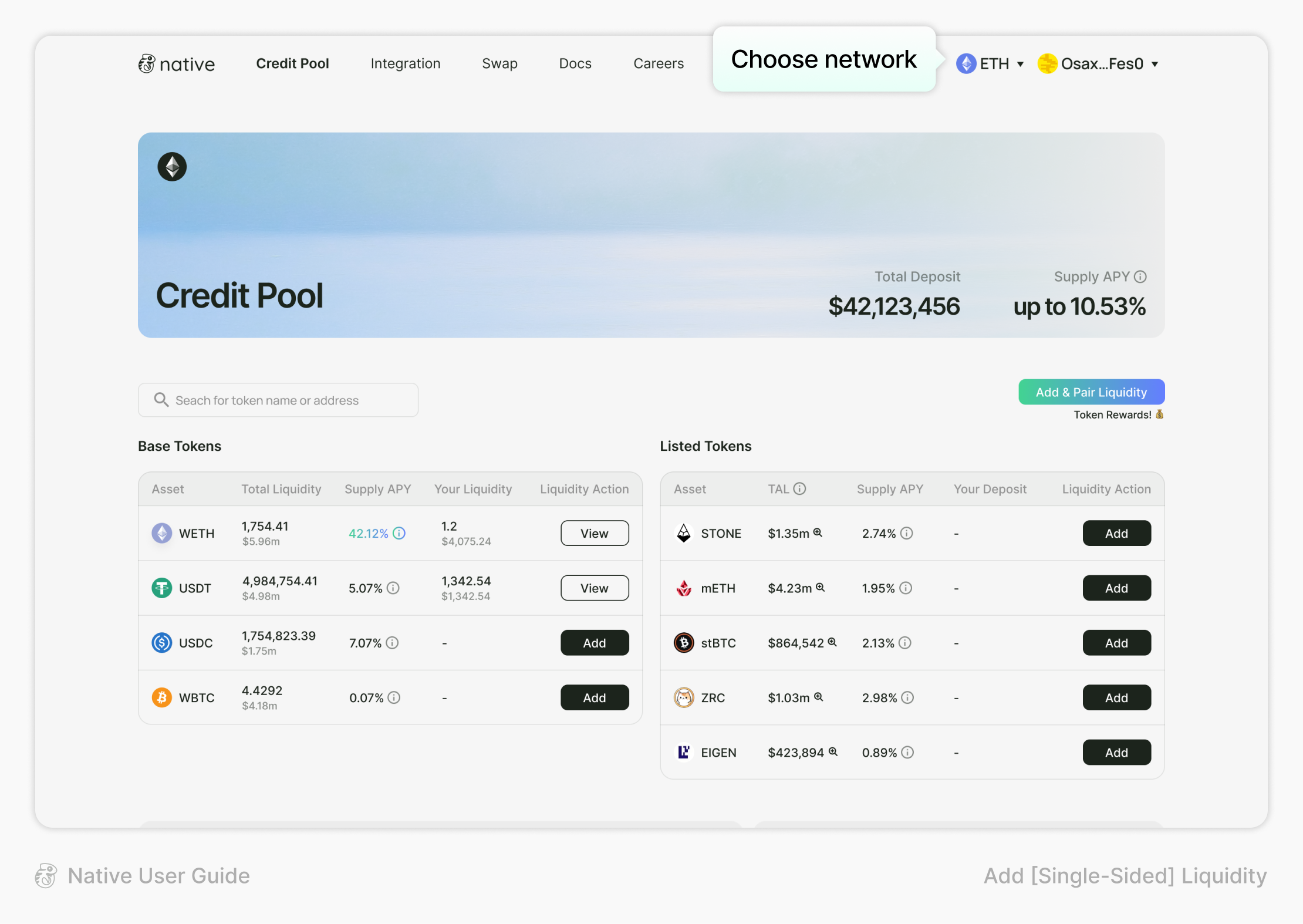
There are two token lists on Credit Pool, Base Tokens and Listed Tokens.
1. After connecting your wallet, choose the network you want to use
**\[Base Tokens]**
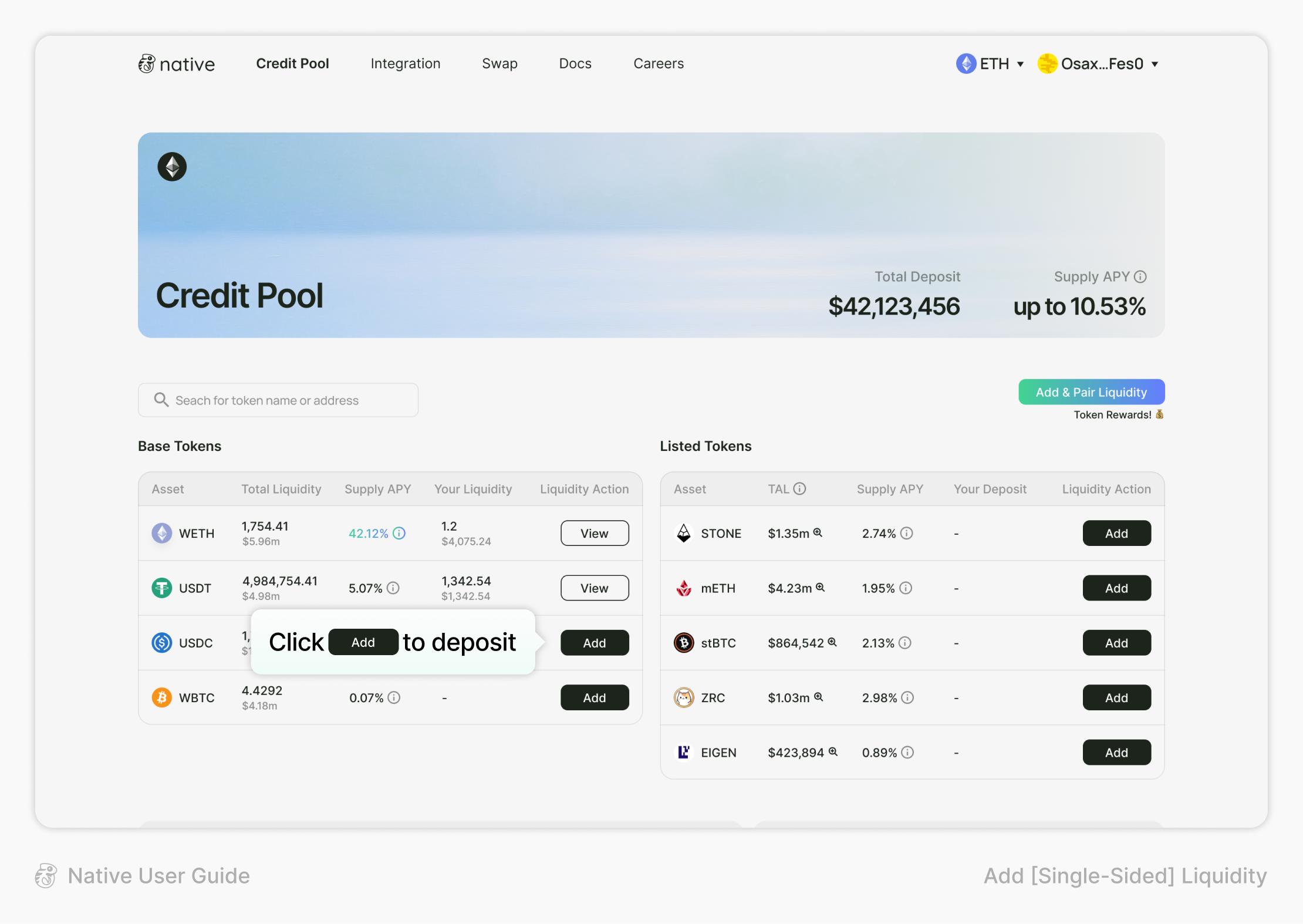
2. Select the token you want to deposit and click the “Add” button
3. Type the amount that you want to deposit and click the “Add” button
[Smart Pairing](broken://pages/1wbWwNCfKsnSSxuXjl2t)? Your base token can be paired to all the listed tokens on Native. Enjoy high APY for base token deposit on Native!
**\[Listed Tokens]**
2. Select the token you want to deposit and click the “Add” button
3. Type the amount that you want to deposit and click the “Add” button
# Pair Liquidity
**To Add and Pair Liquidity on Native:**
1. After connecting your wallet, choose the network you want to use
2. Click the “Add & Pair Liquidity” button
3. Select the base token and listed token, type the amount that you want to deposit
4. Check the APY including pairing incentive APR and click the “Add and Pair” button
You get to enjoy the “pairing incentive APR” given by token issuers as a reward for dedicating your base token to pairing
#### **To Check your Liquidity Status on Native:**
You can check the current liquidity status through each token’s view page
1. Click the “View” icon of WETH
2. You can view the current pairing status of your WETH and its APY
3. If you want to remove your liquidity, click the “-” icon on the status page to withdraw
# Claim Rewards
**To Claim Rewards on Native:**
You can check the current liquidity status through each token’s view page and claim rewards
1. After connecting your wallet, choose the network you want to use
2. Click the “View” button of your asset to check your liquidity
3. Check your liquidity and its pairing status
4. Click the “Claim” button to claim your rewards
5. Claim rewards from each of your paired assets
# Swap with Native
**To Swap on Native:**
1. Go to the Swap page and choose the network
2. Select the token from the token list
3. Type the amount that you want to swap and click the “Swap” button to execute a swap
4. Review the swap, click the “Confirm Swap” button, and sign the transaction using your own wallet
5. Transaction completed
# Native Core API
The Native Core API is the direct integration surface for the on-chain CLOB. Clients submit signed business actions with `POST /trade` and read business state with `POST /info`, or stream both over a [WebSocket](https://docs.native.org/native-dev/build-with-native/native-core/reference/websocket) connection. It serves market makers, trading bots, AI agents, and anyone integrating directly with Native Core.
Operational, recovery, and node-private interfaces are intentionally not part of this contract.
Native Core runs on **mainnet** (`https://api.native.org`), with a **testnet** (`https://api-test.native.org`) for integration and testing. See [environments](https://docs.native.org/native-dev/build-with-native/native-core/reference/api-access#environments) for base URLs and signing chain ids.
## Start here
New to Native Core? The guides take you from zero to a working integration — start with your first order over REST:
{% content-ref url="/pages/5JC27oaIFKtP8Lynpihz" %}
[Trade over REST](https://docs.native.org/native-dev/build-with-native/native-core/guides/trade-over-rest)
{% endcontent-ref %}
{% content-ref url="/pages/aST9Dbu8H4PwnSHtxHha" %}
[Guides](https://docs.native.org/native-dev/build-with-native/native-core/guides)
{% endcontent-ref %}
Prefer a client library? The official Python SDK wraps both REST endpoints and the WebSocket, signs `/trade` for you, and ships an MCP server for AI agents:
{% content-ref url="/pages/kgvwDdX8D6Nato8t4FFS" %}
[Python SDK](https://docs.native.org/native-dev/build-with-native/native-core/python-sdk)
{% endcontent-ref %}
## Conventions
* `API_URL` examples use `https://api.native.org` (mainnet); for testnet and signing chain ids, see [environments](https://docs.native.org/native-dev/build-with-native/native-core/reference/api-access#environments).
* Hex values are `0x`-prefixed lowercase strings unless noted otherwise.
* Protocol numeric fields in signed actions are decimal strings; integer-valued fields (ids, nonces) also accept an unsigned JSON integer, while decimal price/quantity/amount fields must be strings.
* Business query responses carry `query_height` and `app_hash` — the chain height the answer was read at.
* `POST /trade` is **synchronous**: it blocks for the execution outcome and returns `submission_status` (`accepted` / `rejected` / `timeout`) with a `tx_hash`. It reports that a write **landed**, not an order's fill state — read the outcome per the [Handle outcomes & timeouts](https://docs.native.org/native-dev/build-with-native/native-core/guides/handle-timeouts) playbook.
## Reference & concepts
The exhaustive contract — every endpoint, field, and error code — and the models it assumes:
{% content-ref url="/pages/bvXwck76OLcpKxE0m2te" %}
[Reference](https://docs.native.org/native-dev/build-with-native/native-core/reference)
{% endcontent-ref %}
{% content-ref url="/pages/dDPgRgNqokZSCB6vCaV0" %}
[Concepts](https://docs.native.org/native-dev/build-with-native/native-core/concepts)
{% endcontent-ref %}
# Guides
Task-oriented walkthroughs for integrating directly with the Native Core REST API.
Start here if you're integrating from scratch. Each guide is a short, linear walkthrough of one task; the [Reference](https://docs.native.org/native-dev/build-with-native/native-core/reference) has the exhaustive contract.
{% content-ref url="/pages/5JC27oaIFKtP8Lynpihz" %}
[Trade over REST](https://docs.native.org/native-dev/build-with-native/native-core/guides/trade-over-rest)
{% endcontent-ref %}
{% content-ref url="/pages/WhGkAZRuGFsnr3926BXm" %}
[Read market data](https://docs.native.org/native-dev/build-with-native/native-core/guides/read-market-data)
{% endcontent-ref %}
{% content-ref url="/pages/yrpTA01YXNFKNTf1fWuq" %}
[Stream over WebSocket](https://docs.native.org/native-dev/build-with-native/native-core/guides/stream-over-websocket)
{% endcontent-ref %}
{% content-ref url="/pages/SSw4gQ81FaDSAopyEfMQ" %}
[Manage agents & funds](https://docs.native.org/native-dev/build-with-native/native-core/guides/manage-agents-and-funds)
{% endcontent-ref %}
{% content-ref url="/pages/ZLzO3CMBhAhcbAQVVZXB" %}
[Handle outcomes & timeouts](https://docs.native.org/native-dev/build-with-native/native-core/guides/handle-timeouts)
{% endcontent-ref %}
{% content-ref url="/pages/NqjL7AzwgMyWPEARbVGp" %}
[Best practices](https://docs.native.org/native-dev/build-with-native/native-core/guides/best-practices)
{% endcontent-ref %}
# Trade over REST
Zero to a live order over REST — the fastest path to your first Native Core trade.
One signed request per call, and the call blocks for the outcome — no socket to manage. This page takes you from nothing to a working order.
The examples below use mainnet, `API_URL=https://api.native.org`. To integrate against testnet, swap in `https://api-test.native.org` and sign with the testnet chain id — see [environments](https://docs.native.org/native-dev/build-with-native/native-core/reference/api-access#environments).
## 1. Get an API wallet
An API wallet is an agent keypair you generate locally, authorized by one owner-signed `approveAgent`. It places and cancels orders but can **never** move funds. Three steps — covered in full, with the connection-bundle shape, under [creating an API wallet](https://docs.native.org/native-dev/build-with-native/native-core/reference/api-access#access-model-api-wallets):
1. Generate an agent keypair locally; its 20-byte address is the `agent`.
2. Deposit the quote asset you'll trade from your main wallet — your account is created on the first deposit.
3. Approve the agent: your main wallet signs one `approveAgent` (EIP-712). The [**Native web app**](https://app.native.org/markets/ETH-USDT?agentWallets=agents) does all three for you and hands back the agent key.
You end up holding the agent private key (your only signing secret) and your owner `accountAddress`. See [Account Types](https://docs.native.org/native-dev/build-with-native/native-core/concepts/account-types) if you were granted a credit account.
## 2. Find your market
Markets and their precision are public. You need the `market_id` and its decimals to build an order.
```bash
curl -sS -X POST "$API_URL/info" -H 'content-type: application/json' \
-d '{"type":"markets"}'
```
Note the `market_id`, `price_decimals`, and `base_quantity_decimals` for the pair you want to trade.
## 3. Get your agent\_epoch
Every trading write signed by an API wallet must carry `agent_epoch` — the current generation of your wallet's approval. Read it once at startup:
```bash
curl -sS -X POST "$API_URL/info" -H 'content-type: application/json' \
-d '{"type":"userAgents","user":""}'
```
Use the `epoch` of the slot whose `agent` matches your API-wallet address. Omit `agent_epoch` and the write is rejected with `DirectSignerIsActiveAgent`.
## 4. Sign and place an order
`signature` signs a canonical **binary** payload built from `action` + `nonce` + `agent_epoch` — not the JSON text. Two ways to produce it:
* [**Python SDK**](https://docs.native.org/native-dev/build-with-native/native-core/python-sdk) — signs, manages nonces, and turns each outcome into one decision to branch on. Recommended.
* **By hand** — the full byte layout and a TypeScript signer are in [Transaction Signing](https://docs.native.org/native-dev/build-with-native/native-core/reference/transaction-signing).
The assembled request:
```bash
curl -sS -X POST "$API_URL/trade" -H 'content-type: application/json' \
-d '{
"action": {
"type": "order", "market_id": "2",
"side": "bid", "order_type": "limit", "tif": "gtc",
"price": "3500.00", "quantity": "1.0000",
"cloid": "0x11111111111111111111111111111111"
},
"nonce": "1760000000000",
"agent_epoch": "3",
"signature": "0x…"
}'
```
Always set a `cloid` — it is how you reconcile a `timeout` (step 5). Send `price` and `quantity` as strings at the market's precision.
## 5. Read the outcome
`/trade` is synchronous: the call blocks until the transaction executes and returns the outcome. Typical latency is a block or two, and a slow call can take up to 10 seconds. **Set your client timeout above 10 seconds** — a shorter one abandons replies that were about to arrive and leaves you unsure whether the order landed.
```json
{
"submission_status": "accepted",
"tx_hash": "0x…",
"response": {
"type": "order",
"status": {
"open": { "oid": 1964626153570560, "cloid": "0x11111111111111111111111111111111" }
}
}
}
```
Read **both** fields. `submission_status: "accepted"` means the transaction landed; `response.status` is what actually happened to the order — `open` (rested), `filled`, `cancelled`, or `{"error":""}` if it failed at execution. A failed order still reports `accepted`, so branching on `submission_status` alone will read it as a success.
The other two outcomes — `rejected` and `timeout` — each need their own handling, and a `timeout` can double-fill you if you resubmit the wrong kind. The full decision playbook is one page:
{% content-ref url="/pages/ZLzO3CMBhAhcbAQVVZXB" %}
[Handle outcomes & timeouts](https://docs.native.org/native-dev/build-with-native/native-core/guides/handle-timeouts)
{% endcontent-ref %}
That is a full round trip. The order is working — list it with [`openOrders`](https://docs.native.org/native-dev/build-with-native/native-core/reference/post-info#openorders), and cancel with a [`cancel`](https://docs.native.org/native-dev/build-with-native/native-core/reference/post-trade#cancel) action.
Streaming its lifecycle instead of polling? [Stream over WebSocket](https://docs.native.org/native-dev/build-with-native/native-core/guides/stream-over-websocket).
## Next steps
* [POST /trade](https://docs.native.org/native-dev/build-with-native/native-core/reference/post-trade) — every action and envelope field
* [POST /info](https://docs.native.org/native-dev/build-with-native/native-core/reference/post-info) — every read
* [Transaction Signing](https://docs.native.org/native-dev/build-with-native/native-core/reference/transaction-signing) — sign it yourself
* [Error responses](https://docs.native.org/native-dev/build-with-native/native-core/reference/error-responses) — every code and what to do about it
# Read market data
Read markets, prices, order books, and your own positions over POST /info — no signing required.
Every read is a `POST /info` call, unauthenticated, dispatched on a top-level `type`. This guide points you at the query for each task; the full response shapes are in the [POST /info reference](https://docs.native.org/native-dev/build-with-native/native-core/reference/post-info). Query responses carry `query_height` and `app_hash` so you know which committed state you read. `/info` is rate-limited to **1 request/second per IP** — poll within that budget and back off on `429` (see [rate limits](https://docs.native.org/native-dev/build-with-native/native-core/reference/api-access#rate-limits-errors)).
Examples use mainnet; swap in `https://api-test.native.org` for testnet — see [environments](https://docs.native.org/native-dev/build-with-native/native-core/reference/api-access#environments).
{% hint style="info" %}
**Don't want to poll?** The same market data and account state stream over a [WebSocket](https://docs.native.org/native-dev/build-with-native/native-core/reference/websocket) connection — books, trades, fills, and order updates pushed as they happen. [Stream over WebSocket](https://docs.native.org/native-dev/build-with-native/native-core/guides/stream-over-websocket) is the walkthrough.
{% endhint %}
## Discover markets
Before you can sign an order you need the `market_id` and the market's precision.
```bash
curl -sS -X POST "$API_URL/info" -H 'content-type: application/json' \
-d '{"type":"markets"}'
```
* [`markets`](https://docs.native.org/native-dev/build-with-native/native-core/reference/post-info#markets) — `market_id`, `price_decimals`, `base_quantity_decimals`, `max_price_sig_figs` for every pair.
* [`assets`](https://docs.native.org/native-dev/build-with-native/native-core/reference/post-info#assets) — asset ids, symbols, `balance_decimals`.
* [`quoteAssets`](https://docs.native.org/native-dev/build-with-native/native-core/reference/post-info#quoteassets) — the per-quote-asset **minimum notional** an order must clear.
## Prices and the book
* [`l2Book`](https://docs.native.org/native-dev/build-with-native/native-core/reference/post-info#l2book) — aggregated bids/asks for one market (optional `depth`, default 20).
* [`markPrices`](https://docs.native.org/native-dev/build-with-native/native-core/reference/post-info#markprices) — mark prices (all, or filtered by `asset_ids`).
* [`oracleStatus`](https://docs.native.org/native-dev/build-with-native/native-core/reference/post-info#oraclestatus) — whether oracle marks are fresh.
## Your account
Pass your **owner** address as `user` (not the API-wallet address).
* [`userBalances`](https://docs.native.org/native-dev/build-with-native/native-core/reference/post-info#userbalances) — `available` / `locked` per asset.
* [`openOrders`](https://docs.native.org/native-dev/build-with-native/native-core/reference/post-info#openorders) — resting orders, with `filled_qty` / `remaining_qty`.
* [`userFills`](https://docs.native.org/native-dev/build-with-native/native-core/reference/post-info#userfills) — fill history over a height range.
* [`orderStatus`](https://docs.native.org/native-dev/build-with-native/native-core/reference/post-info#orderstatus) — the lifecycle of one order by `oid` or `cloid`. **This is where you see whether an order rested or filled** — `/trade` only tells you it landed.
* [`spotCreditPositions`](https://docs.native.org/native-dev/build-with-native/native-core/reference/post-info#spotcreditpositions) / [`spotCreditAccount`](https://docs.native.org/native-dev/build-with-native/native-core/reference/post-info#spotcreditaccount) — credit-account positions and credit line (see [Account Types](https://docs.native.org/native-dev/build-with-native/native-core/concepts/account-types)).
## Next steps
* [POST /info](https://docs.native.org/native-dev/build-with-native/native-core/reference/post-info) — every query and its full response
* [Trade over REST](https://docs.native.org/native-dev/build-with-native/native-core/guides/trade-over-rest) — place your first order
# Stream over WebSocket
From an open socket to a live book and your own fills — the fastest path to streaming Native Core.
Polling [`POST /info`](https://docs.native.org/native-dev/build-with-native/native-core/reference/post-info) costs you a request per read and a round trip of latency. One WebSocket connection replaces it: subscribe once, and the server pushes books, trades, fills, and order updates as they happen.
Examples use mainnet, `wss://api.native.org/ws`. For testnet, swap in `wss://api-test.native.org/ws` — see [environments](https://docs.native.org/native-dev/build-with-native/native-core/reference/api-access#environments).
## 1. Connect
No authentication, no headers.
```bash
wscat -c wss://api.native.org/ws
```
Use **one** connection and multiplex every subscription onto it — you get 10 subscriptions per connection, and the per-IP connection cap is 1. See [limits](https://docs.native.org/native-dev/build-with-native/native-core/reference/websocket#limits) for which caps refuse you today and which are still only being measured.
## 2. Subscribe to a market
Market channels are keyed by `coin` — the **`market_id` as a string** (`"2"`, not `"ETH"`). Read the ids from [`markets`](https://docs.native.org/native-dev/build-with-native/native-core/reference/post-info#markets) once at startup.
```json
{"method":"subscribe","subscription":{"type":"bbo","coin":"2"}}
{"method":"subscribe","subscription":{"type":"trades","coin":"2"}}
{"method":"subscribe","subscription":{"type":"l2Book","coin":"2"}}
```
Each is acked with a `subscriptionResponse`, then data starts:
```json
{
"channel": "bbo",
"data": {
"coin": "2",
"time": 1785332059496,
"bbo": [
{ "px": "1903.49", "sz": "24.8254", "n": 1 },
{ "px": "1904.56", "sz": "57.71", "n": 1 }
]
}
}
```
Pick the channel that matches how fast you need to react: `bbo` and `trades` push on every change, while `l2Book` is a throttled full snapshot. The [cadence table](https://docs.native.org/native-dev/build-with-native/native-core/reference/websocket#push-cadence) has the numbers.
## 3. Subscribe to your account
Account channels are keyed by `user` — your **owner** address, not the API-wallet address.
```json
{"method":"subscribe","subscription":{"type":"userFills","user":"0x…"}}
{"method":"subscribe","subscription":{"type":"orderUpdates","user":"0x…"}}
{"method":"subscribe","subscription":{"type":"openOrders","user":"0x…"}}
```
`userFills` opens with a snapshot of your 100 most recent fills marked `isSnapshot: true`, then streams each new one. `orderUpdates` reports every transition of your accepted orders — `open`, `filled`, `canceled`, and a family of `*Rejected` codes naming why an order died at execution (`badAloPxRejected` and friends; see [orderUpdates](https://docs.native.org/native-dev/build-with-native/native-core/reference/websocket#orderupdates)) — batched one frame per block.
For balances, subscribe to `spotState`. If you trade on a credit line, subscribe to `spotCreditState` instead — a credit account's spot balances are empty. See [Account Types](https://docs.native.org/native-dev/build-with-native/native-core/concepts/account-types).
## 4. Keep it alive
The server closes any connection it hasn't sent a frame to for 60 seconds. Send a ping every 30 seconds and stop worrying about it:
```json
{ "method": "ping" }
```
It answers `{"channel":"pong"}`. Your client library's built-in protocol-level ping works just as well.
## 5. Reconnect and backfill
Assume the connection will drop. On reconnect, resubscribe and take the first snapshot packet as your new baseline — `l2Book`, `openOrders`, `spotState`, and `spotCreditState` always carry complete state, and `userFills` replays its recent history for you.
`bbo`, `trades` and `orderUpdates` send no snapshot, so any of the three can leave a hole. `trades` and `orderUpdates` are pure increments; `bbo` simply stays silent until the top of book next moves, which on a quiet market can be minutes. Fill it from `POST /info`: [`userFills`](https://docs.native.org/native-dev/build-with-native/native-core/reference/post-info#userfills) takes a `from_height` / `to_height` range within the recent query window, and [`orderStatus`](https://docs.native.org/native-dev/build-with-native/native-core/reference/post-info#orderstatus) settles the fate of any single order by `oid` or `cloid`.
A disconnect is not the only way to lose frames. When the server's broadcast falls behind it drops the event frames outright — `trades`, `userFills`, `orderUpdates` — and re-pushes only the snapshot channels.
The connection stays up, so nothing tells you, and `userFills` does not replay. If your accounting needs every fill, poll [`userFills`](https://docs.native.org/native-dev/build-with-native/native-core/reference/post-info#userfills) on a timer and reconcile by `tid`.
{% hint style="info" %}
Deduplicate fills on `tid`. The snapshot, the live frame, and `POST /info` all report one value for a trade. Parse it as a `BigInt`, not a JS `Number`.
{% endhint %}
## Trade on the same socket
You do not need a second transport to write. `post` carries [`POST /info`](https://docs.native.org/native-dev/build-with-native/native-core/reference/post-info) and [`POST /trade`](https://docs.native.org/native-dev/build-with-native/native-core/reference/post-trade) bodies over the open connection:
```json
{
"method": "post",
"id": 1,
"request": {
"type": "action",
"payload": {
"action": {
"type": "order",
"market_id": "2",
"side": "bid",
"order_type": "limit",
"tif": "gtc",
"price": "1900.00",
"quantity": "1.0000",
"cloid": "0x11111111111111111111111111111111"
},
"nonce": "1760000000000",
"agent_epoch": "3",
"signature": "0x…"
}
}
}
```
The reply echoes your `id`. Any outcome `/trade` answers with HTTP 200 — accepted, rejected, and the wait-budget `timeout` — carries the same response `POST /trade` would have returned, `submission_status` and `response` envelope and all. Signing is unchanged — see [Transaction Signing](https://docs.native.org/native-dev/build-with-native/native-core/reference/transaction-signing). One request at a time, and the same per-IP rate budget as HTTP applies.
{% hint style="warning" %}
Anything else is flattened to a plain status string with no `submission_status` and no `tx_hash`: a rate limit (429), a suspension or backpressure reject (`PlaceOrderSuspended` / `TooManyPending`, 503), and the routing outcomes (`Unavailable` at 503, `NodeUnreachable` at 504). A 4xx string never executed, and so did neither 503 reject. The flattened string carries only the status and the code — the `retry_after_ms` that `POST /trade` returns for these is **not** available over the socket, so back off on your own schedule. Only the routing timeouts are indeterminate: reconcile by `cloid` and do not resubmit under a fresh nonce. Submit over `POST /trade` when you need the full outcome.
{% endhint %}
## Next steps
* [WebSocket](https://docs.native.org/native-dev/build-with-native/native-core/reference/websocket) — every channel, payload, and limit
* [Best practices](https://docs.native.org/native-dev/build-with-native/native-core/guides/best-practices#streaming) — the traps worth knowing before you go live
* [Handle outcomes & timeouts](https://docs.native.org/native-dev/build-with-native/native-core/guides/handle-timeouts) — what to do with each `submission_status`
* [Read market data](https://docs.native.org/native-dev/build-with-native/native-core/guides/read-market-data) — the poll-based equivalents
# Manage agents & funds
The owner-signed actions — approve or revoke an API wallet, withdraw, and de-risk a credit account.
A handful of actions move value or manage who can trade for you. They are **owner-signed**: your main wallet signs them under `auth_scheme: "eip712"`, never the API wallet — each is a real `POST /trade` action the API accepts directly, or do it through the [**Native web app**](https://app.native.org/markets/ETH-USDT?agentWallets=agents).
These sit outside the API wallet's reach — it can trade, but never move funds. For the full agent-vs-owner split and what each key may sign, see [Nonces & API Wallets](https://docs.native.org/native-dev/build-with-native/native-core/concepts/nonces-and-api-wallets).
{% hint style="warning" %}
If the account has an [account multisig](https://docs.native.org/native-dev/build-with-native/native-core/reference/account-multisig) Active, every action on this page is **quorum-signed instead of owner-signed** — a lone owner signature is rejected with `AccountMultisigRequired`.
{% endhint %}
## Approve or revoke an API wallet
* [`approveAgent`](https://docs.native.org/native-dev/build-with-native/native-core/reference/post-trade#approveagent) — authorize an agent key in a slot (`0`–`3`). This is what creates an API wallet; the web app returns the connection bundle.
* [`revokeAgent`](https://docs.native.org/native-dev/build-with-native/native-core/reference/post-trade#revokeagent) — retire a slot. The old agent's `agent_epoch` stops validating.
Both are owner EIP-712 signatures — or quorum-signed under an [account multisig](https://docs.native.org/native-dev/build-with-native/native-core/reference/account-multisig) — not batchable, and carry no `agent_epoch`.
**Do this before enabling an** [**account multisig**](https://docs.native.org/native-dev/build-with-native/native-core/reference/account-multisig)**.** Once one is Active the owner key can no longer sign trading actions, so an account with no approved API wallet cannot trade — and `approveAgent` itself then needs the quorum.
## Withdraw funds
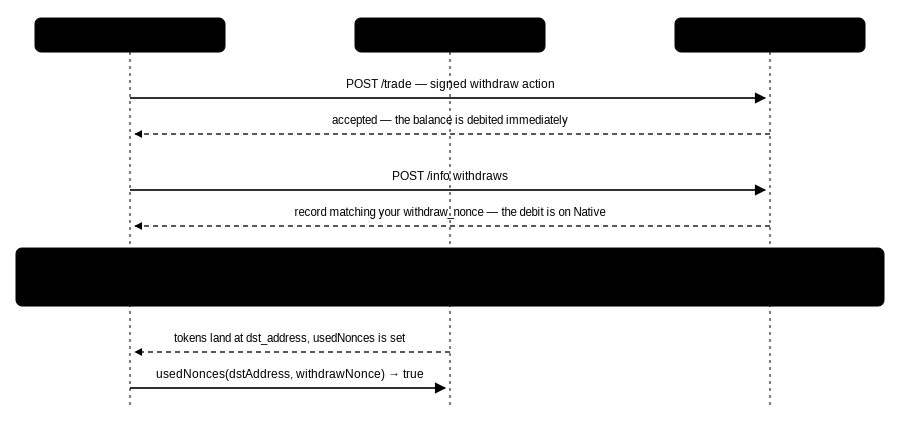
* [`withdraw`](https://docs.native.org/native-dev/build-with-native/native-core/reference/post-trade#withdraw) — move an asset off Native to a destination chain. Owner EIP-712; enforces per-chain/asset minimums and a withdraw fee. A credit account cannot withdraw.
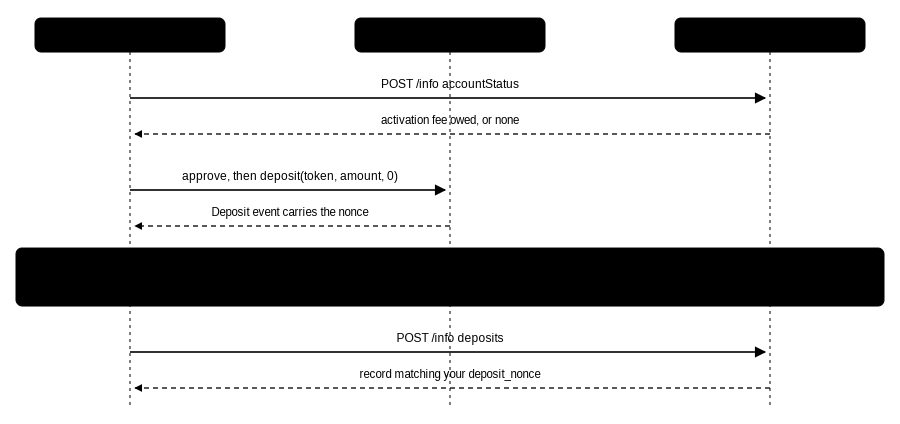
Deposits are not a `/trade` action — they are on-chain transfers into a vault contract on the source chain. [Deposit & Withdraw](https://docs.native.org/native-dev/build-with-native/deposit-withdraw) walks both directions end to end, including how to confirm each one settled.
## De-risk a credit account
Only relevant if the protocol granted you a [credit account](https://docs.native.org/native-dev/build-with-native/native-core/concepts/account-types).
* [`settle`](https://docs.native.org/native-dev/build-with-native/native-core/reference/post-trade#settle) — move a long position out of the credit account into a spot account's `available` balance.
* [`repay`](https://docs.native.org/native-dev/build-with-native/native-core/reference/post-trade#repay) — spend a spot account's balance to cover a credit account's short.
Both are owner EIP-712 — or quorum-signed under an [account multisig](https://docs.native.org/native-dev/build-with-native/native-core/reference/account-multisig) — and carry a required `cloid` used only for `txStatusByCloid` lookups.
## Signing
These use the **EIP-712 v4** scheme (MetaMask-compatible), not the legacy binary payload. Under an [account multisig](https://docs.native.org/native-dev/build-with-native/native-core/reference/account-multisig) they use the **v5** variant instead — different domain version and common fields, same action tail. The exact field list for each action is in [Per-action typed-data fields](https://docs.native.org/native-dev/build-with-native/native-core/reference/transaction-signing#per-action-typed-data-fields); note the typed-data names differ from the JSON ones (`slot_id` is `slotId`, `agent` is `agentAddress`).
## Next steps
* [POST /trade](https://docs.native.org/native-dev/build-with-native/native-core/reference/post-trade) — every action and field
* [Account Types](https://docs.native.org/native-dev/build-with-native/native-core/concepts/account-types) — spot vs credit accounts
* [Account Multisig](https://docs.native.org/native-dev/build-with-native/native-core/reference/account-multisig) — put a signer quorum in front of every action on this page
# Handle outcomes & timeouts
What to do with each /trade outcome — when to resend, when to reconcile, and how to never double-fill.
`POST /trade` is synchronous and returns the same JSON shape whatever the HTTP status, so **branch on `submission_status` in the body, not the status line.** (The one exception is a body the service rejects before it reaches the handler — over the 256 KiB limit — which comes back as plain text with no `submission_status` at all. Guard your parse.) This guide is the decision playbook; the full code catalog is in [Error responses](https://docs.native.org/native-dev/build-with-native/native-core/reference/error-responses).
## Read two fields, not one
`submission_status` tells you whether the **transaction** landed. It does **not** tell you whether the **order** succeeded — that lives in the `response` envelope, present on every `accepted` reply.
| `submission_status` | What happened | What to do |
| ------------------- | ------------------------------------------------------------------------------------------------------------------------------------------------- | -------------------------------------------------------------------------------------------------------------------- |
| `accepted` | The transaction landed and reached execution. | **Not done — read `response`.** It carries `{"open":…}`, `{"filled":…}`, `{"cancelled":…}`, or `{"error":""}`. |
| `rejected` | Refused before execution (shaping / rate limit / suspension / expiry / admission), or an envelope-level execution failure. `error.code` says why. | Fix the cause, submit a **fresh** action. One exception below. |
| `timeout` | The outcome was not observed in the 3-second wait budget, or the submission could not be routed. | Depends on the code — see [below](#reconciling-a-timeout). |
{% hint style="warning" %}
**`accepted` is not success.** An order that failed at execution — insufficient balance, below minimum notional, off the tick grid — still returns `accepted` with **no** top-level `error`; the code appears only inside `response`, at `response.status.error` for a single order. A client that branches on `submission_status` alone records a rejected order as live and will keep quoting against a position it never had.
{% endhint %}
```json
{
"submission_status": "accepted",
"tx_hash": "0x...",
"response": { "type": "order", "status": { "error": "insufficientspotbalance" } }
}
```
The full leaf vocabulary is in [POST /trade](https://docs.native.org/native-dev/build-with-native/native-core/reference/post-trade#what-accepted-carries). You only need [`orderStatus`](https://docs.native.org/native-dev/build-with-native/native-core/reference/post-info#orderstatus) afterwards to reconcile a `timeout`, or to re-read an order later in its life.
## Resending the same signed action
Three rejections are pure backpressure: nothing about your action was wrong, so back off and send the **same signed action** again.
| Code | HTTP | Back off by |
| ---------------------- | ---- | ----------------------------------- |
| `RateLimited` | 429 | `error.retry_after_ms` |
| `TooManyPending` | 503 | `error.retry_after_ms` (50 ms) |
| `QueryLagBackpressure` | 503 | a moment, until the node catches up |
Every other `rejected` needs a fresh action after you fix the cause — never blindly resend.
## Reconciling a timeout
Not every `timeout` is indeterminate. The `error.code` tells you whether the transaction ever reached a node, and the two cases need opposite handling.
| Code | HTTP | Reached a node? | What to do |
| ---------------------------------- | ---- | ------------------------------------------------- | -------------------------------------------------------------- |
| *(none)* — the wait budget elapsed | 200 | **Yes**, it is executing | Reconcile by `cloid`. **Never** resubmit under a new nonce. |
| `Unavailable` | 503 | **No** — refused before the write left the API | Resubmit the same signed bytes. There is nothing to reconcile. |
| `NodeUnreachable` | 504 | **Unknown** — the connection broke mid-submission | Reconcile by `cloid`. **Never** resubmit under a new nonce. |
Treating the whole 503 family as indeterminate silently drops every write for the duration of a leadership handoff, which is why it is worth separating. Treating the 200 and 504 cases as safe to resubmit is how you double-fill.
{% hint style="info" %}
`Unavailable` is returned only when the write was refused before it reached a node, so a resubmit cannot duplicate it. A failure that happens *after* the transaction went out returns `NodeUnreachable` instead, on a separate path — that one is the uncertain case, and the only one of the two you reconcile.
{% endhint %}
**Set your HTTP client timeout above 10 seconds.** The 3 seconds above is only part of it — a slow call can take up to 10. Giving up earlier turns a reply that was about to arrive into the uncertain case this page exists to resolve.
When a code is not in this table, reconcile.
To reconcile, look the action up by the `cloid` you sent:
* [`orderStatus`](https://docs.native.org/native-dev/build-with-native/native-core/reference/post-info#orderstatus) — an order's current lifecycle by `cloid`.
* [`txStatusByCloid`](https://docs.native.org/native-dev/build-with-native/native-core/reference/post-info#txstatusbycloid) — a non-order action (`withdraw` / `settle` / `repay`) by `cloid`, within the recent window.
This is why every order should carry a `cloid` — it is your only handle for reconciliation.
## Batches
A [`batch`](https://docs.native.org/native-dev/build-with-native/native-core/reference/post-trade#batch) is one envelope with **one** `submission_status`, but its `response.statuses[]` carries one sub-response per item, in item order — so an accepted batch already tells you which items rested, filled, or failed. Read each item's outcome at `statuses[i].status`, one level below where a `cancelAll` leaf sits. Reconcile per item by `cloid` via [`orderStatus`](https://docs.native.org/native-dev/build-with-native/native-core/reference/post-info#orderstatus) only when the envelope came back `timeout`.
## Next steps
* [POST /trade](https://docs.native.org/native-dev/build-with-native/native-core/reference/post-trade#what-accepted-carries) — the full `response` envelope
* [Error responses](https://docs.native.org/native-dev/build-with-native/native-core/reference/error-responses) — every code and what it means
* [Trade over REST](https://docs.native.org/native-dev/build-with-native/native-core/guides/trade-over-rest) — the happy path
# Best practices
The core habits a live Native Core integration should follow.
## Orders & cancels
* **Give every action a unique `cloid`.** It is your only handle to reconcile an order after a network blip.
* **Refresh a stale quote by cancel + re-place**, not by chasing it with `modify`.
## Know the outcome
* **`accepted` is not success — read `response`.** An order that failed at execution still returns `submission_status: "accepted"` with no top-level `error`; the code is in `response.status.error`, or `response.statuses[i].status.error` for a [`batch`](https://docs.native.org/native-dev/build-with-native/native-core/reference/post-trade#batch) item. Branching on `submission_status` alone records a rejected order as live.
* **The fill state is already in the `/trade` reply.** `response.status` is `open` / `filled` / `cancelled` / `error`, and a `batch` carries the same per item under `response.statuses[]` — you don't need an [`orderStatus`](https://docs.native.org/native-dev/build-with-native/native-core/reference/post-info#orderstatus) poll to learn which.
* **`RateLimited`, `TooManyPending` and `QueryLagBackpressure` are safe to resend** — back off `error.retry_after_ms` and resend the same signed action. Every other rejection needs a fresh action.
* **On a `timeout`, branch on `error.code` before you decide.** `Unavailable` (HTTP 503) never reached a node — resubmit the same signed bytes, or you drop every write for as long as the condition lasts. Everything else may still land: reconcile by `cloid`, never resubmit under a new nonce. See [Handle outcomes & timeouts](https://docs.native.org/native-dev/build-with-native/native-core/guides/handle-timeouts#reconciling-a-timeout).
## Signing & nonces
* **One nonce source per API wallet** — a monotonic millisecond clock. Never run two writers on one key; they collide. Shard across [distinct API wallets](https://docs.native.org/native-dev/build-with-native/native-core/concepts/nonces-and-api-wallets).
* **Resolve `agent_epoch` live** from [`userAgents`](https://docs.native.org/native-dev/build-with-native/native-core/reference/post-info#useragents); don't hardcode it.
## Numbers
* **Send price and quantity as strings, never floats** — a binary float silently corrupts a price.
* **Snap to the market's precision before signing.** Take `price_decimals` / `base_quantity_decimals` from [`markets`](https://docs.native.org/native-dev/build-with-native/native-core/reference/post-info#markets) and the minimum from [`quoteAssets`](https://docs.native.org/native-dev/build-with-native/native-core/reference/post-info#quoteassets).
## Reads & rate limits
* **Query `/info` by the owner address**, not the API-wallet address — the agent address returns nothing.
* **Budget the default 1 request/second per IP on each endpoint.** Reads and writes hold separate buckets, so polling never eats your order rate — but neither bucket gives you a second request. Cache static metadata, poll on a fixed interval, and back off on `429` — see [rate limits](https://docs.native.org/native-dev/build-with-native/native-core/reference/api-access#rate-limits-errors). This is the default for an unregistered IP; if your strategy needs more, ask us to raise it for your source IPs rather than designing around the floor.
* **Once you need more than one read per second, stream instead of polling.** A [WebSocket](https://docs.native.org/native-dev/build-with-native/native-core/reference/websocket) subscription costs nothing against the request budget.
## Streaming
* **Quote off `bbo`, not `l2Book`.** On mainnet `l2Book` is a half-second snapshot — read it for depth and shape, never for the price you act on. `bbo` is not throttled at all: it pushes on every change to the top of book, so its rate is your market's, not ours.
* **`orderUpdates` is the event stream; `openOrders` is the reconciliation.** `openOrders` is a full replacement at most every half second, so driving state off it silently drops every transition in between. Track lifecycle on `orderUpdates` and use `openOrders` to catch drift.
* **A partial fill arrives as `status: "open"`.** Compare `sz` (remaining) against `origSz` on every update — branching on `status` alone misses partials entirely.
* **Never wait on the stream to confirm a submission.** `orderUpdates` carries only orders that reached the matching engine; a bad nonce or signature comes back on the `/trade` response and will never arrive as a frame.
* **Deduplicate fills on `tid`.** After a reconnect the `userFills` snapshot overlaps the live stream by design. Resubscribe and rebuild from the snapshot packets rather than trying to patch the gap. [`POST /info userFills`](https://docs.native.org/native-dev/build-with-native/native-core/reference/post-info#userfills) reports the same `tid`, so a backfill merges in on it too.
* **On a credit account, watch `pending_exposure`, not just `actual`.** It moves the moment an order rests or cancels, so it is your live risk ahead of settlement — see [`spotCreditState`](https://docs.native.org/native-dev/build-with-native/native-core/reference/websocket#spotcreditstate).
* **Don't share the `post` channel between market data and trading.** One `post` may be in flight per IP, and a synchronous `/trade` holds that slot for up to a block — a cheap `info` query queued behind it just gets a `429`.
## Degraded states
* **When suspended or frozen, keep cancelling.** During `PlaceOrderSuspended` or on a frozen account only `cancel` / `cancelAll` go through — use them to reduce exposure; don't bundle a new order into the batch.
# Reference
The complete contract — every endpoint, field, and error code.
The exhaustive spec behind the [Guides](https://docs.native.org/native-dev/build-with-native/native-core/guides): every request field, response shape, and error code. Reach for a detail here; onboard from the guides.
{% content-ref url="/pages/a1sRayUi0INLnbiKHake" %}
[API Access](https://docs.native.org/native-dev/build-with-native/native-core/reference/api-access)
{% endcontent-ref %}
{% content-ref url="/pages/ymw4xOGLPOW1dX7aL3tP" %}
[POST /info](https://docs.native.org/native-dev/build-with-native/native-core/reference/post-info)
{% endcontent-ref %}
{% content-ref url="/pages/2f1iTLbJG8HD9gz4V3yT" %}
[POST /trade](https://docs.native.org/native-dev/build-with-native/native-core/reference/post-trade)
{% endcontent-ref %}
{% content-ref url="/pages/gyXl8BUf3L2ieleFVraj" %}
[WebSocket](https://docs.native.org/native-dev/build-with-native/native-core/reference/websocket)
{% endcontent-ref %}
{% content-ref url="/pages/HuXGRf95Oiiq5dDwWhBC" %}
[Transaction Signing](https://docs.native.org/native-dev/build-with-native/native-core/reference/transaction-signing)
{% endcontent-ref %}
{% content-ref url="/pages/DuTcaMumFg7wrFevyWJF" %}
[Error Responses](https://docs.native.org/native-dev/build-with-native/native-core/reference/error-responses)
{% endcontent-ref %}
# API Access
How to reach Native Core — the endpoints, environments, API wallets, signing, and limits.
Native Core exposes two REST endpoints and one WebSocket endpoint:
* `POST /info` — **reads**. One endpoint for all public reads, dispatched by a top-level `type` field (market metadata, order books, balances, order status, fills).
* `POST /trade` — **writes**. One client-signed action per call (`order`, `cancel`, `cancelAll`, `modify`, `batch`, and the owner-signed `transfer` / `activateFor` / `withdraw` / `settle` / `repay` / `approveAgent` / `revokeAgent`).
* `/ws` — **streaming**. Push channels for books, trades, fills, and order updates, plus the same `/info` and `/trade` bodies sent over the socket. See [WebSocket](https://docs.native.org/native-dev/build-with-native/native-core/reference/websocket).
This page is the front door for anyone integrating **directly** with Native Core: market makers, trading bots, AI-agent builders, and aggregators.
There are two ways to integrate:
* **Call the API directly** — the endpoints documented on this page, plus the [WebSocket](https://docs.native.org/native-dev/build-with-native/native-core/reference/websocket) surface for push instead of polling. Full control, any language.
* **Use the** [**Native Core Python SDK**](https://docs.native.org/native-dev/build-with-native/native-core/python-sdk) — a thin, typed client over both REST endpoints **and** the WebSocket. It handles `/trade` signing and nonces, folds every outcome into one decision (`next_action`) — including which timeouts are safe to resend and which must be reconciled by `cloid` — and streams nine feeds on one connection with automatic reconnect and resubscribe.
Signing `/trade` by hand means building a canonical binary payload with recoverable secp256k1 signatures and per-signer monotonic nonces — fully specified below for building your own client. The Python SDK implements it for you.
## Environments
The API is served over HTTPS. Native Core runs on **mainnet**, with a **testnet** for integration and testing. Each environment has its own base URL and signing chain id:
| Environment | Base URL | WebSocket | `network` | Chain id (signing) |
| ----------- | ----------------------------- | ------------------------------ | --------- | ------------------ |
| **Mainnet** | `https://api.native.org` | `wss://api.native.org/ws` | `mainnet` | `696969` |
| Testnet | `https://api-test.native.org` | `wss://api-test.native.org/ws` | `testnet` | `969696` |
The chain id is folded into every signed `/trade` payload and must match the environment you target — sign for the wrong one and the API recovers a different authority and rejects the write (see [Transaction signing](https://docs.native.org/native-dev/build-with-native/native-core/reference/transaction-signing)). The examples below use mainnet:
```bash
API_URL=https://api.native.org
```
You fund a trading account by depositing assets from your main wallet. See the [access model](#access-model-api-wallets) below for depositing and creating the API wallet.
## Access model — API wallets
Writes are authorized by an **API wallet**: a protocol-level *agent* key scoped only to placing and cancelling orders. An API wallet can trade your account's balance, but it can **never** move funds off Native — deposits, withdrawals, and agent approval all require your main wallet. That scoping (and the fact that it is revocable) is what makes it safe to run in an unattended bot.
An API wallet is just an **agent keypair you generate locally**, authorized on one of your account's agent slots (`0`–`3`) by a single owner-signed `approveAgent`. Set it up directly against the API — no browser required:
1. **Generate an agent keypair** locally (any secp256k1 key). The private key is your only signing secret; it never leaves your process. Its 20-byte address is the `agent`.
2. **Fund the account.** Deposit a supported asset from your main wallet — the per-chain deposit contracts are in [`accountingDepositContracts`](https://docs.native.org/native-dev/build-with-native/native-core/reference/post-info#accountingdepositcontracts), and the supported assets, their `asset_id`s, and minimums in [`assets`](https://docs.native.org/native-dev/build-with-native/native-core/reference/post-info#assets) / [`accountingWithdrawTokens`](https://docs.native.org/native-dev/build-with-native/native-core/reference/post-info#accountingwithdrawtokens). Your trading account is created on the first deposit, which pays a one-time activation fee. [Deposit & Withdraw](https://docs.native.org/native-dev/build-with-native/deposit-withdraw) has the full flow for both directions.
3. **Approve the agent.** Your main wallet signs one `approveAgent` under `auth_scheme:"eip712"` and you `POST /trade` it:
```json
{
"action": { "type": "approveAgent", "slot_id": "0", "agent": "0x…agentAddress" },
"nonce": "1717000000007",
"auth_scheme": "eip712",
"signature": "0x…"
}
```
The typed-data fields are in [Transaction signing](https://docs.native.org/native-dev/build-with-native/native-core/reference/transaction-signing#eip-712-signing-auth_scheme-eip712); the action reference is [`approveAgent`](https://docs.native.org/native-dev/build-with-native/native-core/reference/post-trade#approveagent). After approval, read the slot's **`epoch`** from [`userAgents`](https://docs.native.org/native-dev/build-with-native/native-core/reference/post-info#useragents) — each entry is `{slot_id, agent, epoch}` — and send that value as the `agent_epoch` envelope field on agent-signed `/trade` writes.
Prefer a UI? The [**Native web app**](https://app.native.org/markets/ETH-USDT?agentWallets=agents) does these same steps for you — connect your main wallet and it generates the agent key, submits the `approveAgent`, and hands you a one-time **connection bundle**. Either way you end up holding the same three values:
```jsonc
{
"network": "mainnet", // the network the wallet is bound to
"accountAddress": "0x…", // your main wallet — the account the bot trades on
"agentPrivateKey": "0x…" // the only signing secret; sign /trade with this
}
```
`accountAddress` is used only locally to identify the account you trade on — it never goes on the wire. the API recovers the signer from the signature. For the API wallet's authority model, replay protection, and safety rules, see:
{% content-ref url="/pages/OpgbkMSkqQSQiVPQsHvK" %}
[Nonces & API Wallets](https://docs.native.org/native-dev/build-with-native/native-core/concepts/nonces-and-api-wallets)
{% endcontent-ref %}
## Making requests
Both endpoints take a JSON body over `POST` and return JSON. `POST /info` is unauthenticated; `POST /trade` carries a signed action.
### POST /info (reads)
Dispatch on the top-level `type`. Minimal example — list the tradable markets and their precision:
```bash
curl -sS -X POST "$API_URL/info" \
-H 'content-type: application/json' \
-d '{"type":"markets"}'
```
The full per-`type` reference (every query, its parameters, and its response shape) is here:
{% content-ref url="/pages/ymw4xOGLPOW1dX7aL3tP" %}
[POST /info](https://docs.native.org/native-dev/build-with-native/native-core/reference/post-info)
{% endcontent-ref %}
### POST /trade (writes)
One signed action per call. Minimal example — a resting limit bid (the `signature` is a secp256k1 signature over the canonical binary payload, not over this JSON text, so you cannot type it by hand — the SDK produces it):
```bash
curl -sS -X POST "$API_URL/trade" \
-H 'content-type: application/json' \
-d '{
"action": {
"type": "order",
"market_id": "2",
"side": "bid",
"order_type": "limit",
"tif": "gtc",
"price": "3500.00",
"quantity": "1.0000",
"cloid": "0x11111111111111111111111111111111"
},
"nonce": "1760000000000",
"signature": "0x..."
}'
```
The full per-action reference (envelope fields, every action type, and the constraints) is here:
{% content-ref url="/pages/2f1iTLbJG8HD9gz4V3yT" %}
[POST /trade](https://docs.native.org/native-dev/build-with-native/native-core/reference/post-trade)
{% endcontent-ref %}
### WebSocket (streaming)
Connect and subscribe — no authentication, no headers:
```bash
wscat -c wss://api.native.org/ws
> {"method":"subscribe","subscription":{"type":"bbo","coin":"2"}}
```
Nine push channels cover books, trades, mids, fills, order updates, and balances, and a `post` method carries the two request bodies above over the same connection. Every channel, payload, and limit is here:
{% content-ref url="/pages/gyXl8BUf3L2ieleFVraj" %}
[WebSocket](https://docs.native.org/native-dev/build-with-native/native-core/reference/websocket)
{% endcontent-ref %}
## Authentication & signing
Every `/trade` write is a **client-signed transaction**. The API reconstructs a canonical unsigned binary payload from `action`, `nonce`, `agent_epoch`, and `expires_after_ms`, then verifies the recoverable secp256k1 signature over that exact payload (a quorum frame also folds `auth_account` and `policy_epoch` into the payload, and must omit `agent_epoch`) — the transaction **authority** is the recovered signer, and the owner address is never sent. An [account multisig](https://docs.native.org/native-dev/build-with-native/native-core/reference/account-multisig) request is the one exception: it carries `auth_account` in the envelope, and that is the authority.
* **Trading actions** (`order`, `cancel`, `cancelAll`, `modify`, `batch`) use the default legacy binary scheme (`auth_scheme: "legacy"`) and are signed by the **API wallet** key.
* **Owner `/trade` actions** (`withdraw` / `settle` / `repay`) are **EIP-712** (`auth_scheme: "eip712"`) and are signed by your **main wallet** — not with the API wallet, and not part of a bot's hot path.
* **Agent approval** (`approveAgent` / `revokeAgent`) is also a main-wallet EIP-712 signature — it is how you create or revoke the API wallet. Do it in the [Native web app](https://app.native.org/markets/ETH-USDT?agentWallets=agents) or sign it yourself — both are `/trade` action types the API accepts directly.
The exact payload layout, encoding rules, and EIP-712 typed-data schemes are here:
{% content-ref url="/pages/HuXGRf95Oiiq5dDwWhBC" %}
[Transaction Signing](https://docs.native.org/native-dev/build-with-native/native-core/reference/transaction-signing)
{% endcontent-ref %}
## Numbers
Native Core executes on **integers only**. Public `order` / `modify` payloads accept human decimal strings for `price` and `quantity`; the write path converts them to raw atoms using each market's `price_decimals` and `base_quantity_decimals` (`max_price_sig_figs` is enforced at execution, not on the write path). Send prices and sizes as **strings**, never floats, and respect each market's precision — an out-of-precision value is rejected, not silently rounded.
{% content-ref url="/pages/599fbf416b30bce8b5c0a312787ecde004fbca64" %}
[Decimals & Units](https://docs.native.org/native-dev/build-with-native/native-core/concepts/decimals-units)
{% endcontent-ref %}
## Request correlation
`POST /trade` accepts an optional `x-trace-id` request header and **echoes it back** in the response, so you can line a write up with the API's own logs. If you omit it or send an invalid value, the API mints one; a `/trade` response always includes an `x-trace-id`. `POST /info` does not process or return `x-trace-id`.
```bash
curl -sS -X POST "$API_URL/trade" \
-H 'content-type: application/json' \
-H 'x-trace-id: client-trace-001' \
-d '{ "action": { ... }, "nonce": "...", "signature": "0x..." }'
```
## Rate limits & errors
Two limiters apply, both returning HTTP `429` with `error.code: "RateLimited"`:
* **Per IP** — **1 request/second** to `/info` and **1 request/second** to `/trade` by default, as two independent budgets, so a burst of reads never starves your writes. Each is a token bucket holding one second of allowance. Over-quota reads return `{"error":{"code":"RateLimited","message":"ip rate limit exceeded, retry after ms"}}`; over-quota writes come back in the trade-response shape with an `error.retry_after_ms` hint.
* **Per signer** — writes are additionally limited to **1000 requests/second**, keyed on the recovered [authority](https://docs.native.org/native-dev/build-with-native/native-core/concepts/nonces-and-api-wallets) over a 1-second sliding window, so one API wallet is one bucket.
At the default per-IP rate that budget is the one that binds: it applies before any signature is checked, so 1000 writes/second per signer is not reachable from a single address. **The per-IP rate is configurable per integration** — if your strategy needs more than the default, [contact us](https://docs.native.org/) with your source addresses and expected request rate before you build against the default.
Request bodies over **64 KiB** (`/info`) or **256 KiB** (`/trade`) are rejected with HTTP `413`.
A `post` request sent over the [WebSocket](https://docs.native.org/native-dev/build-with-native/native-core/reference/websocket#requests-over-the-socket) charges the same per-IP budget as the equivalent HTTP call and is answered with a `429` string in the reply envelope — the socket is a convenience, not extra quota.
The `/trade` error model keys on the **response body, not the HTTP status** — the API returns the same trade-response shape for HTTP 200 / 400 / 429 / 503 / 504, so a business rejection is **data**, not a transport error. Branch on `submission_status`, never the status line. What each outcome means and how to act on it is the [Handle outcomes & timeouts](https://docs.native.org/native-dev/build-with-native/native-core/guides/handle-timeouts) playbook; every code and its fix is in:
{% content-ref url="/pages/DuTcaMumFg7wrFevyWJF" %}
[Error Responses](https://docs.native.org/native-dev/build-with-native/native-core/reference/error-responses)
{% endcontent-ref %}
## Next step
The Python SDK wraps both REST endpoints and the WebSocket, signs `/trade` for you, and turns each of the outcomes above into a decision-ready field.
{% content-ref url="/pages/kgvwDdX8D6Nato8t4FFS" %}
[Python SDK](https://docs.native.org/native-dev/build-with-native/native-core/python-sdk)
{% endcontent-ref %}
# POST /info
All public reads use one endpoint with a top-level `type` discriminator.
A malformed body, or one whose `type` is missing or not a string, returns HTTP `400` with `error.code: "InvalidInfoRequest"`. A well-formed body whose `type` is not a known query returns HTTP `400` with `error.code: "UnsupportedInfoType"`:
```json
{
"error": {
"code": "UnsupportedInfoType",
"message": "unsupported public info type `...`"
}
}
```
### assets
```sh
curl -sS -X POST "$API_URL/info" \
-H 'content-type: application/json' \
-d '{"type":"assets"}'
```
Response:
See [Decimals & Units](https://docs.native.org/native-dev/build-with-native/native-core/concepts/decimals-units) for raw/display conversion and validation rules.
```json
{
"query_height": 180000,
"app_hash": "0x...",
"assets": [
{
"asset_id": 1,
"symbol": "USDC",
"balance_decimals": 8,
"withdraw_fee": "1",
"withdraw_fee_atoms": "100000000",
"issuer": "0x0000000000000000000000000000000000000000",
"credit_ltv": 100,
"credit_ltv_setting": null
},
{
"asset_id": 3,
"symbol": "ETH",
"balance_decimals": 8,
"withdraw_fee": "0.001",
"withdraw_fee_atoms": "100000",
"issuer": "0x0000000000000000000000000000000000000000",
"credit_ltv": 100,
"credit_ltv_setting": null
}
]
}
```
`credit_ltv` is the asset's loan-to-value percentage for credit accounts — the haircut applied when it counts toward a credit line. `credit_ltv_setting` echoes the per-asset override when one is configured, `null` otherwise.
`issuer` is the owner account bound to an asset by operator-managed metadata. Assets without an issuer binding surface as the zero address. The issuer is a per-asset binding only and confers no privileges beyond the recorded mapping. The `assets` response does not include `cloid`; client operation ids are only observable via `txStatusByCloid` while a transaction is in the recent query window. `withdraw_fee_atoms` is canonical asset metadata in asset-local atoms; `withdraw_fee` is formatted from atoms using `balance_decimals`. On a [withdraw](https://docs.native.org/native-dev/build-with-native/native-core/reference/post-trade#withdraw) this fee is recorded (in the event and `/info withdraws`) but is **not** deducted from the balance.
### queryStatus
```json
{ "type": "queryStatus" }
```
Returns public query-view metadata and the retained recent-height window. This is the public way to discover the height bounds to pass to windowed reads such as [userFills](#userfills). Node role, writable/readable state, control-plane status, and other operational fields remain internal-only.
```json
{
"query_height": 180000,
"app_hash": "0x...",
"oldest_available_height": 170001,
"latest_available_height": 180000,
"recent_query_window_blocks": 10000
}
```
All fields are `null` until the node has state to answer from.
### quoteAssets
```json
{ "type": "quoteAssets" }
```
Returns the current canonical quote-asset allowlist sorted by `asset_id`. `min_quantity` is the human-readable minimum order notional in the quote token; `min_quantity_atoms` is the raw integer atom quantity encoded as a decimal string for JavaScript safety.
```json
{
"query_height": 180000,
"app_hash": "0x...",
"quote_assets": [
{
"asset_id": 1,
"symbol": "USDC",
"balance_decimals": 8,
"min_quantity": "10",
"min_quantity_atoms": "1000000000"
}
]
}
```
### accountingWithdrawTokens
```json
{ "type": "accountingWithdrawTokens" }
```
Returns accounting withdraw-token rows sorted by `(chain_id, asset_id)`. `min_withdraw_atoms` is the canonical raw atom amount encoded as a decimal string; `min_withdraw_amt` is formatted using the asset's `balance_decimals`.
```json
{
"query_height": 180000,
"app_hash": "0x...",
"accounting_withdraw_tokens": [
{
"chain_id": 1,
"asset_id": 1,
"symbol": "USDC",
"balance_decimals": 8,
"min_withdraw_amt": "1.25",
"min_withdraw_atoms": "125000000"
}
]
}
```
### accountingDepositContracts
```json
{ "type": "accountingDepositContracts" }
```
Returns the configured deposit source contracts sorted by `src_chain_id`. No parameters.
```json
{
"query_height": 180000,
"app_hash": "0x...",
"accounting_deposit_contracts": [
{
"src_chain_id": 421614,
"src_contract": "0xaabbccddeeff00112233445566778899aabbccdd"
}
]
}
```
### multisigPolicy
Returns the dynamic non-admin multisig policy for one `scope`. Only the `ACCOUNTING` scope (`2`) is queryable; any other value returns HTTP 400 `InvalidMultisigScope`.
```json
{ "type": "multisigPolicy", "scope": "2" }
```
When a policy is set:
```json
{
"query_height": 180000,
"app_hash": "0x...",
"found": true,
"policy": {
"scope": 2,
"scope_name": "ACCOUNTING",
"threshold": null,
"signers": []
}
}
```
`threshold` and `signers` are always `null` and `[]` on this endpoint — the keys are present so the shape is stable, but the quorum itself is not published. Use `found` to learn whether a policy exists at all.
When none is set, `found` is `false` and the body echoes `scope` / `scope_name` instead of `policy`.
### markets
```json
{ "type": "markets" }
```
Response field `markets` is sorted by `market_id`. `price_decimals` and `max_price_sig_figs` are market metadata, as is `base_quantity_decimals`. `quote_balance_decimals` is derived from the quote asset and included as a convenience field for raw notional conversion. See [Decimals & Units](https://docs.native.org/native-dev/build-with-native/native-core/concepts/decimals-units).
```json
{
"query_height": 180000,
"app_hash": "0x...",
"markets": [
{
"market_id": 0,
"base_asset_id": 3,
"base_symbol": "ETH",
"base_quantity_decimals": 4,
"quote_asset_id": 1,
"quote_symbol": "USDC",
"quote_balance_decimals": 8,
"price_decimals": 2,
"max_price_sig_figs": 7,
"credit_trading": true,
"credit_trading_setting": null,
"maker_fee_milli_bps": 2000,
"taker_fee_milli_bps": 10000,
"fee_setting": null
}
]
}
```
`maker_fee_milli_bps` / `taker_fee_milli_bps` are the market's **effective** fee rates in milli-basis-points — never null, and the only programmatic source of what you will be charged. Divide by 1000 for basis points: `2000` is 2 bps maker, `10000` is 10 bps taker. `fee_setting` echoes the per-market override when one is configured, `null` otherwise.
`credit_trading` is the per-market gate for credit accounts. A credit account may trade a market when its own status is `active` **and** either `credit_trading` is true or the market appears in that account's `credit_trading_whitelisted_market_ids` (see [`spotCreditAccount`](#spotcreditaccount)). `credit_trading_setting` echoes the per-market override, `null` otherwise.
### l2Book
```json
{
"type": "l2Book",
"market_id": "0",
"depth": "20"
}
```
`depth` is optional, defaults to `20`, and is capped by the server.
```json
{
"found": true,
"query_height": 180000,
"app_hash": "0x...",
"market_id": 0,
"requested_depth": 20,
"depth": 20,
"max_depth": 100,
"query_time_ms": 1785338171446,
"last_update_height": 129475493,
"last_update_ts_ms": 1785338171296,
"bids": [
{ "price": "10", "quantity": "1.5", "order_count": 2 }
],
"asks": []
}
```
`query_time_ms` is the block time of the view you read; `last_update_height` / `last_update_ts_ms` are when **this market's** book last changed. Together they are the staleness signal: a wide gap between `last_update_ts_ms` and `query_time_ms` means the book is quiet, not that your read is stale.
### withdraws
Per-user retained withdraw records (3-day window), sorted by `(block_height, tx_index, withdraw_nonce)`. Requires `user`. Each record adds `withdraw_fee_atoms` (recorded, not deducted).
```json
{ "type": "withdraws", "user": "0x0000000000000000000000000000000000000001" }
```
```json
{
"query_height": 180000,
"app_hash": "0x...",
"user": "0x0000000000000000000000000000000000000001",
"withdraws": [
{
"tx_hash": "0x...",
"block_height": 179999,
"tx_index": 2,
"block_timestamp_ms": 1717000000500,
"asset_id": 1,
"amount_atoms": "500000",
"withdraw_fee_atoms": "1000",
"dst_chain_id": 1,
"dst_address": "0xbbbbbbbbbbbbbbbbbbbbbbbbbbbbbbbbbbbbbbbb",
"withdraw_nonce": "7",
"vault_address": "0xcccccccccccccccccccccccccccccccccccccccc"
}
]
}
```
`vault_address` is the [vault contract](https://docs.native.org/native-dev/build-with-native/deposit-withdraw/vault-contract) the withdrawal pays out from. It is `null` on records written before vault payouts were activated.
### deposits
Per-user retained deposit records. Requires `user`; the response key is `user`.
**This is a view of the replay-protection window, not a deposit archive — an empty `deposits` array does not mean the account never deposited.** The window retains records by committed block timestamp for three days, and pruning is lazy: it is materialised when a new record is written into the same window. Deposit windows are keyed by `(src_chain_id, src_contract)` and therefore **shared across every account depositing through that contract**, so anyone's deposit prunes everyone's expired records — in practice the window holds close to exactly the last three days. Withdrawals prune the same way but their windows are keyed per account, so a low-frequency account's own withdrawals can stay visible far longer than three days; do not read that asymmetry as a guarantee.
For deposit or withdrawal history beyond that, join on `tx_hash` from the [explorer](https://app.native.org/explorer) rather than treating these endpoints as a ledger.
```json
{ "type": "deposits", "user": "0x0000000000000000000000000000000000000001" }
```
```json
{
"query_height": 180000,
"app_hash": "0x...",
"user": "0x0000000000000000000000000000000000000001",
"deposits": [
{
"tx_hash": "0x...",
"block_height": 179998,
"tx_index": 0,
"block_timestamp_ms": 1717000000200,
"asset_id": 1,
"amount_atoms": "1000000",
"src_chain_id": 421614,
"src_contract": "0xaabbccddeeff00112233445566778899aabbccdd",
"deposit_nonce": "42"
}
]
}
```
### userBalances
```json
{
"type": "userBalances",
"user": "0x0000000000000000000000000000000000000001"
}
```
```json
{
"query_height": 180000,
"app_hash": "0x...",
"owner": "0x0000000000000000000000000000000000000001",
"balances": [
{
"asset_id": 0,
"symbol": "USDC",
"available": "1000",
"locked": "0"
}
]
}
```
### accountStatus
Whether an account exists and its freeze state.
```json
{
"type": "accountStatus",
"user": "0x0000000000000000000000000000000000000001"
}
```
```json
{
"query_height": 180000,
"app_hash": "0x...",
"owner": "0x0000000000000000000000000000000000000001",
"found": true,
"account_index": 5,
"status": "active"
}
```
`found` is `true` once the account exists (it is created on its first deposit). `status` is `"active"` or `"frozen"`, and is `null` when `found` is `false`. `account_index` is the protocol's internal account index, `null` before the account exists.
### accountMultisig
The [account multisig](https://docs.native.org/native-dev/build-with-native/native-core/reference/account-multisig) quorum configured over an account's owner-signed actions, if any.
```json
{
"type": "accountMultisig",
"user": "0x0000000000000000000000000000000000000001"
}
```
```json
{
"query_height": 198543355,
"app_hash": "0x...",
"owner": "0x0000000000000000000000000000000000000001",
"found": true,
"account_index": 93,
"enabled": true,
"role": null,
"threshold": 2,
"signers": ["0x...", "0x...", "0x..."],
"policy_epoch": "7"
}
```
`found` reports whether the **account** exists, not whether it has a multisig row — read `enabled` to decide that. `role` is non-null only for protocol-operated accounts; for an ordinary account it is always `null`. `policy_epoch` is the value every quorum-signed request must carry, and it advances on each configuration change, so re-read it after any `setAccountMultisig`.
### spotCreditAccount
{% hint style="info" %}
`spotCreditAccount` and `spotCreditPositions` read a **credit account** — a protocol-granted account type distinct from the default spot (balance) account that [`userBalances`](#userbalances) reads. If you have not been granted a credit line, these report no position. See [Account Types](https://docs.native.org/native-dev/build-with-native/native-core/concepts/account-types).
{% endhint %}
```json
{
"type": "spotCreditAccount",
"user": "0x0000000000000000000000000000000000000001"
}
```
```json
{
"query_height": 180000,
"app_hash": "0x...",
"owner": "0x0000000000000000000000000000000000000001",
"authorized": true,
"status": "active",
"credit_usd_atoms": 100000000000,
"available_usd_atoms": "99850000000",
"last_known_available_usd_atoms": "99850000000",
"oracle_status": { "status": "available" },
"credit_trading_whitelisted_market_ids": ["35"]
}
```
`credit_trading_whitelisted_market_ids` is always present. Its entries are market ids **as strings**, unlike every other market id in the API — compare them as strings.
For an owner with no credit line the response still returns every key, but `authorized` is `false` and `status`, `credit_usd_atoms`, `available_usd_atoms` and `last_known_available_usd_atoms` are all `null`. This is the common case, so type these four as nullable.
`status` is `"active"`, `"frozen"`, or `null`. `credit_usd_atoms` and the available fields are in `usd_atoms` (`USD_SCALE = 10^8`). [Credit & Margin](https://docs.native.org/native-dev/build-with-native/native-core/concepts/credit-margin) gives the formula behind `available_usd_atoms`, including the per-asset LTV and how a stale mark changes it. `available_usd_atoms` is `null` when the account cannot be valued: when a nonzero **short** position lacks a mark at the latest query height, or when the valuation overflows; a stale or missing mark on a long contributes `0` instead of nulling the figure. Accounts with no exposure can report their credit without marks. `last_known_available_usd_atoms` always uses the most recently committed marks regardless of staleness and is `null` only when a position asset has never had a mark. Negative fractional USD-atom position values are rounded down conservatively, matching the execution credit gate.
### spotCreditPositions
```json
{
"type": "spotCreditPositions",
"user": "0x0000000000000000000000000000000000000001"
}
```
```json
{
"query_height": 180000,
"app_hash": "0x...",
"owner": "0x0000000000000000000000000000000000000001",
"spot_credit_positions": [
{
"asset_id": 2,
"symbol": "ETH",
"pending_exposure_qty": "-3",
"actual_qty": "-2",
"pending_exposure_display": "-0.0003",
"actual_display": "-0.0002"
}
]
}
```
A resting order commits a single leg: a resting ask only debits the base asset; a resting bid only debits the quote asset. The other leg appears as `actual_qty` only when a fill produces a real settlement delta. The amount committed differs by side — see [Credit & Margin](https://docs.native.org/native-dev/build-with-native/native-core/concepts/credit-margin#the-calculation).
### oracleStatus
```json
{ "type": "oracleStatus" }
```
```json
{
"query_height": 180000,
"app_hash": "0x...",
"oracle_status": { "status": "available" }
}
```
When the oracle is unavailable, `oracle_status` is `{ "status": "unavailable", "reason_code": "ProviderError" }` (or `MissingRoute`, `StalePrice`, `InvalidPrice`).
### markPrices
```json
{ "type": "markPrices", "asset_ids": [2, 4] }
```
`asset_ids` is optional; omitting it returns all known marks. The response is sorted by `asset_id`:
```json
{
"query_height": 180000,
"app_hash": "0x...",
"oracle_status": { "status": "available" },
"mark_prices": [
{
"asset_id": 2,
"usd_atoms": 300000000000,
"updated_height": 180000,
"source_ts_ms": 1760000000000
},
{
"asset_id": 4,
"usd_atoms": 5000000000000,
"updated_height": 180000,
"source_ts_ms": 1760000000050
}
]
}
```
`usd_atoms` is the positive mark price scaled by `USD_SCALE = 10^8`. `updated_height` is the block in which that mark was last committed; a mark counts as **fresh** only when it equals the response's `query_height`, which is the comparison credit-account valuation uses — see [Credit & Margin](https://docs.native.org/native-dev/build-with-native/native-core/concepts/credit-margin#the-calculation). `source_ts_ms` is the upstream provider's per-feed timestamp (Binance spot: worker wall clock at response-fully-read; OKX: per-ticker `ts`; Binance futures: per-symbol `time` from `/fapi/v2/ticker/price`; Llama: per-coin `timestamp` (seconds) × 1000; cross routes use `min(base, quote)` of the inputs).
### openOrders
```json
{
"type": "openOrders",
"user": "0x0000000000000000000000000000000000000001",
"market_id": "0"
}
```
Pass `market_id: -1` (as the number `-1` or the string `"-1"`) to get the owner's open orders across **every** market in one call. The response echoes `"market_id": -1` and applies the same 500-item cap and `truncated` flag over the union.
**Which 500 you get is not arbitrary, and it is not the newest.** Orders are ordered by `market_id` ascending, then by `oid` ascending within each market, and the cap takes the first 500 of that. So the union response fills up from the lowest market ids: an owner resting orders in many markets sees the low-numbered ones in full and the high-numbered ones **not at all** — not a thinned sample of each. There is no cursor or offset, so the remainder is unreachable through this call.
If `truncated` is `true`, query per market instead — pass a concrete `market_id` for each market you quote. A per-market count is normally far under the cap, and the union call is still the right way to discover *which* markets you hold orders in as long as it is not truncating.
```json
{
"query_height": 180000,
"app_hash": "0x...",
"owner": "0x0000000000000000000000000000000000000001",
"market_id": 0,
"limit": 500,
"truncated": false,
"open_orders": [
{
"status": "open",
"owner": "0x0000000000000000000000000000000000000001",
"owner_index": 5,
"market_id": 0,
"oid": 773094113280001,
"cloid": "0x11111111111111111111111111111111",
"side": "bid",
"price": "10",
"original_qty": "1",
"filled_qty": "0",
"remaining_qty": "1",
"created_tx_hash": "0x...",
"created_height": 180000,
"created_time_ms": 1760000000000
}
]
}
```
`original_qty` is the submitted order quantity. For an order that partially fills and then rests on the book, `filled_qty` is nonzero and `remaining_qty` is the currently open quantity. `owner_index` is the protocol's internal account index for the owner; it also appears on the order objects returned by `orderStatus`.
This listing is deliberately lean. To read back how an order was placed — its `tif` and `order_type` — query [`orderStatus`](#orderstatus) for that single `oid`.
### userAgents
```json
{
"type": "userAgents",
"user": "0x0000000000000000000000000000000000000001"
}
```
```json
{
"query_height": 180000,
"app_hash": "0x...",
"owner": "0x0000000000000000000000000000000000000001",
"agents": [
{ "slot_id": 0, "agent": "0x00000000000000000000000000000000000000aa", "epoch": 3 }
]
}
```
`agents` holds the active agent (API-wallet) slots for the owner. To sign `/trade` writes, read the `epoch` of the slot whose `agent` matches your API-wallet address and pass it as the envelope `agent_epoch`. `agent` is `null` for an empty slot.
### userFills
```json
{
"type": "userFills",
"user": "0x0000000000000000000000000000000000000001",
"from_height": "179900",
"to_height": "180000",
"limit": "100"
}
```
`limit` must be positive and is capped at `max_limit` (500). Two different failure shapes, and the difference matters to your parser:
* A `limit` that is **missing, non-numeric, or beyond `u32`** is rejected with **HTTP 400** and `InvalidFillsQuery` — there is no `fills` key at all.
* A `limit` of `0`, a `from_height` above `to_height`, or a range wider than the recent window returns **HTTP 200** with an in-band `error` object (`InvalidFillsQuery`) and an empty `fills` array. A range that is short enough but starts *below* the retained window returns `HistoryWindowExceeded` instead, in the same shape — read `error.code`, not just the presence of `error`. On success the response echoes the effective `limit`, your `requested_limit`, and `max_limit`.
```json
{
"query_height": 180000,
"app_hash": "0x...",
"owner": "0x0000000000000000000000000000000000000001",
"from_height": 179900,
"to_height": 180000,
"limit": 100,
"requested_limit": 100,
"max_limit": 500,
"fills": [
{
"height": 180000,
"time": 1785338171296,
"tid": 98956046499840256,
"tx_index": 1,
"tx_hash": "0x...",
"market_id": 0,
"role": "taker",
"side": "B",
"maker_oid": 773094113280001,
"maker_cloid": "0x11111111111111111111111111111111",
"maker_owner": "0x...",
"taker_oid": 773094113280002,
"taker_cloid": "0x22222222222222222222222222222222",
"taker_owner": "0x...",
"price": "10",
"quantity": "1",
"fee_asset_id": 1,
"fee": "0.0001",
"fee_mode": "credit"
}
]
}
```
`time` is the fill's block timestamp in milliseconds. `side` is the **querying owner's own** direction (`B` bought, `A` sold), and is `null` once the taker order has aged out of the window.
`tid` is the unique id of the trade. The WebSocket [`trades`](https://docs.native.org/native-dev/build-with-native/native-core/reference/websocket#trades) and [`userFills`](https://docs.native.org/native-dev/build-with-native/native-core/reference/websocket#userfills) frames report the same value, so a backfill merges into a live stream on it. Parse it as a `BigInt`, not a JS `Number`.
Each fill reports only the **querying owner's side** fee (chosen by `role`). `fee_asset_id` is the asset the fee was charged in (the asset that side received: base for a bid, quote for an ask), `fee` is the decimal amount formatted with that asset's `balance_decimals`, and `fee_mode` is `"balance"` or `"credit"`. (Internally — in canonical events and the query model — the fee `amount` is a raw atom; only this public JSON `fee` is the formatted decimal string.) Trading fees activate at a network-specific height defined by the code protocol-rules schedule. There are two distinct null cases:
* **Pre-activation / no-fee fill** (below the network's fee activation height): `"fee_asset_id": null, "fee": "0", "fee_mode": null`.
* **Fee-active fill whose fee floored to zero**: non-null `fee_asset_id` and `fee_mode` with `"fee": "0"` — so clients can tell the fee regime is live.
The response shape is unchanged, but the `fee` amount may reflect code-defined per-market and per-account fee overrides (the effective rate is the minimum of the global rate and any matching market/account override). A fully waived market appears as a fee-active fill with `"fee": "0"` (the second null case above).
### userFillsByTime
Per-user fills over a wall-clock window, sorted oldest first. Requires `user` and `start_time_ms`; `end_time_ms` is inclusive like `start_time_ms` and defaults to the newest indexed block. At most 1000 fills per response, and only the 10000 most recent fills are available.
```json
{
"type": "userFillsByTime",
"user": "0x0000000000000000000000000000000000000001",
"start_time_ms": 1785338100000,
"end_time_ms": 1785338171296
}
```
```json
{
"fills": [
{
"height": 180000,
"time": 1785338171296,
"tid": 98956046499840256,
"tx_index": 1,
"tx_hash": "0x...",
"market_id": 0,
"role": "taker",
"side": "B",
"maker_oid": 773094113280001,
"maker_cloid": "0x11111111111111111111111111111111",
"maker_owner": "0x...",
"taker_oid": 773094113280002,
"taker_cloid": "0x22222222222222222222222222222222",
"taker_owner": "0x...",
"price": "10",
"quantity": "1",
"fee_asset_id": 1,
"fee": "0.0001",
"fee_mode": "credit"
}
]
}
```
To page, pass the last fill's `time` as the next `start_time_ms`. The bound is inclusive, so that fill repeats — deduplicate on `tid`.
### orderStatus
Query by server order id:
```json
{
"type": "orderStatus",
"oid": "773094113280001"
}
```
Query by client order id:
```json
{
"type": "orderStatus",
"user": "0x0000000000000000000000000000000000000001",
"market_id": "0",
"cloid": "0x11111111111111111111111111111111"
}
```
`orderStatus` checks the current open-order view, then falls back to the latest retained status record for that `oid` or `(user, market_id, cloid)`. Status records are action-result records, not a complete lifecycle stream: a successful incoming order writes one record even when it rests on the book, but later passive maker fills are exposed through `userFills` and open-order state changes rather than a new status record for the maker order. Explicit cancel and modify actions do write status records for the affected resting order. Outcome-stage failures inside a **`batch`** also write retained status records when execution has enough order context: `ioccancel`, `fokcancel`, `badalopx`, `marketordernoliquidity`, and `insufficientspotcredit` can be queried by `oid` or `(user, market_id, cloid)` inside the recent query window. A **single** `order` action that fails this way writes no such record — the whole transaction fails, and the outcome is only in the synchronous [`POST /trade`](https://docs.native.org/native-dev/build-with-native/native-core/reference/post-trade) response.
Order-validation failures write no status record at all. Tick size, minimum notional, and insufficient balance are checked *before* the order is assigned an order id, so there is nothing to look up: they are reported only on the synchronous [`POST /trade`](https://docs.native.org/native-dev/build-with-native/native-core/reference/post-trade) response. This is the same `found: false` you get for a tx whose block is not published yet, so `orderStatus` alone cannot tell a refused order from one still in flight — read the `/trade` response.
A partially filled order that is still on the book reports `status: "partiallyfilledresting"`, not `"open"` — match on both if you are testing for "still working".
For an in-flight order — a `/trade` you just sent — you do **not** poll `orderStatus` to learn the outcome: the synchronous `/trade` response already carries it in its [`response` envelope](https://docs.native.org/native-dev/build-with-native/native-core/reference/post-trade#what-accepted-carries). A just-submitted transaction reads back `found: false` here until its block is published.
Open order response:
```json
{
"found": true,
"query_height": 180000,
"app_hash": "0x...",
"status": "open",
"order": {
"status": "open",
"market_id": 0,
"oid": 773094113280001,
"cloid": "0x11111111111111111111111111111111",
"tif": "alo",
"order_type": "limit",
"remaining_qty": "1"
}
}
```
Terminal order response:
```json
{
"found": true,
"query_height": 180000,
"app_hash": "0x...",
"order": {
"status": "filled",
"market_id": 0,
"oid": 773094113280001,
"cloid": "0x11111111111111111111111111111111",
"tif": "gtc",
"order_type": "limit",
"filled_qty": "1",
"remaining_qty": "0",
"is_resting": false,
"updated_tx_hash": "0x...",
"updated_height": 180000
}
}
```
`tif` and `order_type` echo the [order action](https://docs.native.org/native-dev/build-with-native/native-core/reference/post-trade#order) the order was submitted with, in the same spelling you sent: `tif` is `"gtc"`, `"ioc"`, `"fok"`, or `"alo"`, and `order_type` is `"limit"` or `"market"`. They are most useful on the failure statuses — `ioccancel`, `fokcancel`, and `badalopx` are each explained by the `tif` the order carried:
```json
{
"status": "ioccancel",
"oid": 773094113280002,
"tif": "ioc",
"order_type": "market",
"filled_qty": "0",
"remaining_qty": "1",
"is_resting": false
}
```
The [`openOrders`](#openorders) listing does not carry either field — it is the bulk view, and a caller listing hundreds of its own resting orders already knows how it placed them.
Not found:
```json
{
"found": false,
"query_height": 180000,
"app_hash": "0x...",
"owner": "0x0000000000000000000000000000000000000001",
"market_id": 0,
"cloid": "0x11111111111111111111111111111111"
}
```
A bare `found: false` means there is no such order inside the retained window. When you look up by `oid` and that `oid` was created *before* the window starts, the response says so explicitly instead — still **HTTP 200**, with an in-band `error` beside the usual fields:
```json
{
"found": false,
"query_height": 199793262,
"app_hash": "0x...",
"oid": 3181166949566721,
"error": {
"code": "HistoryWindowExceeded",
"requested": 189612326,
"oldest_available_height": 199783263,
"latest_available_height": 199793262,
"recent_query_window_blocks": 10000,
"message": "This node keeps detailed query data only for the most recent configured block window. The requested data is older than the local query window."
}
}
```
Treat that as "too old to answer", not as "no such order"; `oldest_available_height` tells you where the window currently starts. The `user` + `market_id` + `cloid` form carries no height, so it cannot draw that distinction — an aged-out order comes back there as a plain `found: false`. For anything past the window, keep your own record of the order from when you placed it.
A query that carries neither a parseable `oid` nor a complete `user` + `market_id` + `cloid` triple is rejected with **HTTP 400** and `InvalidOrderStatusQuery`. A malformed `market_id` or `cloid` is rejected the same way, as `InvalidMarketId` / `InvalidCloid`.
### txStatusByCloid
Transaction status by `cloid` uses the transaction authority as the `user` namespace and does not require a market id. For `transfer`, `activateFor`, `withdraw`, `settle`, `repay`, and `setAccountMultisig`, `user` is the recovered signer authority — or, when the action was submitted under an [account multisig](https://docs.native.org/native-dev/build-with-native/native-core/reference/account-multisig), the `auth_account`.
```json
{
"type": "txStatusByCloid",
"user": "0x00ee41b8f0dd58806f14b30fb11994673769b25c",
"cloid": "0x11111111111111111111111111111111"
}
```
```json
{
"found": true,
"query_height": 180000,
"app_hash": "0x...",
"owner": "0x00ee41b8f0dd58806f14b30fb11994673769b25c",
"cloid": "0x11111111111111111111111111111111",
"tx_hash": "0x...",
"tx_index": 1,
"status": "success",
"action_type": "settle"
}
```
Failed retained tx responses use the lower-case committed execution error code as `status`, matching the `orderStatus` style where terminal failures are reported through the status string:
```json
{
"found": true,
"query_height": 180000,
"app_hash": "0x...",
"owner": "0x00ee41b8f0dd58806f14b30fb11994673769b25c",
"cloid": "0x11111111111111111111111111111111",
"tx_hash": "0x...",
"tx_index": 1,
"status": "invalidsettle",
"action_type": "settle"
}
```
If a failed retained tx has no single committed error code in its payload, `status` remains `"failed"`.
The public `settle`/`repay` actions also surface here, with `action_type` `"settle"` / `"repay"`. Their `user` namespace is the **recovered signer** (settle → margin owner; repay → cash owner) — or the `auth_account` under an [account multisig](https://docs.native.org/native-dev/build-with-native/native-core/reference/account-multisig) — so a counterparty named in the action body cannot find the tx. This window is the only `cloid`-keyed lookup for settle/repay: there is no idempotency, only recent-window visibility bounded by `max_recent_txs`. The same `cloid` resubmitted under a new envelope `nonce` is a separate tx; a lookup returns the latest retained one, and once a tx ages out of the window the response is `found: false`. A failed settle/repay is retained the same way and reports `status` `"invalidsettle"` / `"invalidrepay"` (or another lower-case committed error code).
# POST /trade
Submits one signed action.
```sh
curl -sS -X POST "$API_URL/trade" \
-H 'content-type: application/json' \
-H 'x-trace-id: client-trace-001' \
-d '{
"action": {
"type": "order",
"market_id": "0",
"side": "bid",
"order_type": "limit",
"tif": "gtc",
"price": "1000.00",
"quantity": "0.0025",
"cloid": "0x11111111111111111111111111111111"
},
"nonce": "1760000000000",
"expires_after_ms": "1760000005000",
"signature": "0x..."
}'
```
Request envelope fields:
| Field | Required | Description |
| ------------------ | ----------------------- | --------------------------------------------------------------------------------------------------------------------------------------------------------------------------------------------------------------------------------------------------------------------------------------------------------------------------------------------------------------------------------------------------------------------------------------------------------------------------------------------------------------- |
| `action` | yes | Action object. Public top-level types: `order`, `cancel`, `cancelAll`, `modify`, `batch`, `transfer`, `activateFor`, `withdraw`, `settle`, `repay`, `approveAgent`, `revokeAgent`, and `setAccountMultisig` (see [Account Multisig](https://docs.native.org/native-dev/build-with-native/native-core/reference/account-multisig)). Internal operator/accounting writes are not part of this public contract. See the full public list below. |
| `nonce` | yes | Decimal string `u64` Unix millisecond timestamp nonce. Use current `Date.now()`/Unix ms; if sending multiple requests in the same millisecond for the same signer, increment locally so each signed nonce is unique and monotonically nondecreasing. |
| `agent_epoch` | no | Decimal string `u64`; required only for agent-signed requests. Omit for owner-signed requests. Mutually exclusive with `auth_account` — sending both is rejected with `AgentEpochNotAllowedWithAuthAccount`. |
| `expires_after_ms` | no | Decimal string `u64` Unix milliseconds. An envelope already past `expires_after_ms` at the gateway clock is fast-failed with `submission_status: "rejected"`, `error.code: "ExpiredTx"` (before the node hop); execution also enforces expiry against the committed block timestamp. |
| `auth_scheme` | no | `"legacy"` (default) or `"eip712"`. Public `transfer`, `activateFor`, `withdraw`, `settle`, `repay`, `approveAgent`, `revokeAgent`, and `setAccountMultisig` require `"eip712"`; public trading actions (`order`/`cancel`/`cancelAll`/`modify`/`batch`) require `"legacy"`. Every account-auth request requires it too (`AccountAuthRequiresEip712`). See [EIP-712 signing](https://docs.native.org/native-dev/build-with-native/native-core/reference/transaction-signing#eip-712-signing-auth_scheme-eip712). |
| `signature` | yes unless account-auth | `0x`-prefixed 65-byte recoverable secp256k1 signature. Legacy v1, or — when `auth_scheme="eip712"` — an EIP-712 v4 single signature. Omitted on an [account multisig](https://docs.native.org/native-dev/build-with-native/native-core/reference/account-multisig) request, which carries `signatures` instead. Mutually exclusive with `signatures`. |
| `signatures` | no | Array of `0x`-prefixed 65-byte signatures. Sent **with** `auth_account` and `policy_epoch` to submit an [account multisig](https://docs.native.org/native-dev/build-with-native/native-core/reference/account-multisig) quorum request. Without `auth_account` it is an internal multisig submission, which is not part of this public contract and is rejected for public actions with `SignaturesNotAllowedForAction`. Mutually exclusive with `signature`. |
| `auth_account` | no | Owner address the quorum acts for, on an [account multisig](https://docs.native.org/native-dev/build-with-native/native-core/reference/account-multisig) request. Must be sent with `policy_epoch` and `auth_scheme:"eip712"`, and only for the actions a quorum can sign. |
| `policy_epoch` | no | Decimal string `u64` from the `accountMultisig` read; required whenever `auth_account` is present. A stale value is rejected with `AccountMultisigEpochMismatch`. |
The envelope is **strict**: exactly one of `signature` or `signatures` must be present (neither or both → `AmbiguousAuthFields`), and any field not in the table above is rejected as `InvalidJson`. Numeric fields (`nonce`, `agent_epoch`, `expires_after_ms`) accept a decimal string **or** an unsigned JSON integer, with the string form preferred above 2^53. Only `action`, `nonce`, `agent_epoch`, and `expires_after_ms` are folded into the signed payload — plus `auth_account` and `policy_epoch` on an [account multisig](https://docs.native.org/native-dev/build-with-native/native-core/reference/account-multisig) request, which are signed by every approval. `auth_scheme`, `signature`, and `signatures` are transport fields that select and carry the proof (see [Transaction Signing](https://docs.native.org/native-dev/build-with-native/native-core/reference/transaction-signing)).
Public actions are single-signature, except the eight an [account multisig](https://docs.native.org/native-dev/build-with-native/native-core/reference/account-multisig) covers (`transfer` / `activateFor` / `withdraw` / `settle` / `repay` / `approveAgent` / `revokeAgent` / `setAccountMultisig`) when one is Active. Trading actions can never be quorum-signed. For a public action, `signatures` without `auth_account` is rejected with `SignaturesNotAllowedForAction`. The transaction **authority** used for nonce/rate-limit and `txStatusByCloid` is the recovered signer — except on a quorum request, where it is the `auth_account` the quorum acts for, not any of the signing keys.
Nonce validation is authority-scoped. Execution accepts nonces within the committed block timestamp window (`block_timestamp_ms - 2 days` through `block_timestamp_ms + 1 day`), rejects duplicates, and retains the latest 100 consumed nonces per authority. When the retained window is full, a new nonce must be greater than the current minimum retained nonce.
### order
Places one order.
| Field | Required | Values |
| ------------ | -------- | ----------------------------------------------------------------------------------------------------------------------------------------------- |
| `type` | yes | `"order"` |
| `market_id` | yes | Decimal string market id. |
| `side` | yes | `"bid"` or `"ask"`; `"buy"` and `"sell"` are also accepted aliases. |
| `order_type` | yes | `"limit"` or `"market"`. |
| `tif` | yes | `"gtc"`, `"ioc"`, `"fok"`, or `"alo"`. |
| `price` | yes | Human decimal string display price. For limit orders this is the limit price. For market orders this is the protection price used by execution. |
| `quantity` | yes | Human decimal string base-asset quantity. |
| `cloid` | no | `0x`-prefixed 16-byte client order id. |
Limit order example:
```json
{
"type": "order",
"market_id": "2",
"side": "bid",
"order_type": "limit",
"tif": "alo",
"price": "3500.00",
"quantity": "1.0000",
"cloid": "0x11111111111111111111111111111111"
}
```
Protected market order example:
```json
{
"type": "order",
"market_id": "2",
"side": "ask",
"order_type": "market",
"tif": "ioc",
"price": "3490.00",
"quantity": "1.0000"
}
```
`POST /trade` is **synchronous**: the request blocks while the transaction is admitted, executed on-chain, and the outcome is read back. Typical latency is a block or two, and a slow call can take up to 10 seconds. **Set your client timeout above 10 seconds** or you will abandon replies that were about to arrive.
Response envelope:
```jsonc
{
"submission_status": "", // always present
"tx_hash": "0x…", // present once canonical bytes exist; omitted on a request-shaping reject
"error": { // present only on a non-successful outcome
"code": "",
"retry_after_ms": 1000 // present only on RateLimited / PlaceOrderSuspended / TooManyPending / Unavailable
},
"response": { … } // present only on `accepted` — the per-order outcome, see below
}
```
`submission_status` answers **"did the transaction land?"**, and it has exactly three values:
* `accepted` — the transaction landed and reached execution. There is no top-level `error`. **This does not mean the order succeeded** — see [what `accepted` carries](#what-accepted-carries) below.
* `rejected` — the write never reached execution: request-shaping, rate limit, expiry, place-order suspension, or a check before inclusion. `error.code` carries the reason; `tx_hash` is present once canonical bytes exist. Six envelope-level execution failures also land here — `badnonce`, `badsignature`, `expiredtx`, `malformedtx`, `invalidbatchlength`, `featuredisabled` — returned in their CamelCase display form (`BadNonce`, `BadSignature`, `ExpiredTx`, `MalformedTx`, `InvalidBatchLength`, `FeatureDisabled`).
* `timeout` — the outcome was not observed within the 3-second budget, or the submission could not be routed. Whether it can still land depends on the code — see [timeout](#timeout-can-it-still-land).
### What `accepted` carries
On `accepted` the reply includes a fourth field, `response`, holding the actual per-order outcome. **You do not need an `/info` round trip to learn whether an order rested or filled.**
`response.type` is the action type (`order`, `cancel`, `cancelAll`, `modify`, `batch`, or `default` for a non-order action). Where the outcome sits depends on the action:
* `order`, `cancel`, `modify` — one `status`, holding one leaf.
* `cancelAll` — `statuses[]`, one leaf per cancelled order. An empty array cancelled nothing and is still a success.
* `batch` — `statuses[]`, one **full sub-response** per item, in item order. Each element repeats the same `{"type", …}` shape, so a batch leaf sits one level deeper, at `statuses[i].status`. See [batch](#batch).
Each leaf is one of four shapes, keyed by its single field:
| Leaf | Meaning |
| ------------------------------------------------ | ------------------------------------------------------------------------------------------------------------- |
| `{"open":{"oid","cloid"}}` | The order rested on the book |
| `{"filled":{"total_sz","avg_px","oid","cloid"}}` | The order filled. `total_sz` and `avg_px` are display values, formatted exactly as `/info` formats them. |
| `{"cancelled":{"oid","cloid"}}` | The order was cancelled — by an explicit cancel, or by its own time-in-force / self-trade rule |
| `{"error":""}` | **The order failed at execution** — e.g. `insufficientspotbalance`, `mintradespotntl`, `tick`, `missingorder` |
{% hint style="warning" %}
A per-order failure keeps `submission_status: "accepted"` and puts the code in the `{"error":…}` leaf, with **no** top-level `error`. Branching on `submission_status` alone reads a rejected order as a success. Always inspect `response`.
{% endhint %}
{% tabs %}
{% tab title="Rested" %}
```json
{
"submission_status": "accepted",
"tx_hash": "0x...",
"response": {
"type": "order",
"status": {
"open": { "oid": 1964626153570560, "cloid": "0x4e5e6ffddbed6ed66c3d02cab8a4cac6" }
}
}
}
```
{% endtab %}
{% tab title="Filled" %}
```json
{
"submission_status": "accepted",
"tx_hash": "0x...",
"response": {
"type": "order",
"status": {
"filled": {
"total_sz": "0.01",
"avg_px": "1941.34",
"oid": 1949585043882752,
"cloid": "0x39791fa07ff1be03663c735d1f9cfd4a"
}
}
}
}
```
{% endtab %}
{% tab title="Failed at execution" %}
```json
{
"submission_status": "accepted",
"tx_hash": "0x...",
"response": {
"type": "order",
"status": { "error": "insufficientspotbalance" }
}
}
```
The transaction landed; the order did not enter the book. There is no top-level `error` — the code is only in the leaf.
{% endtab %}
{% tab title="Rejected" %}
```json
{
"submission_status": "rejected",
"tx_hash": "0x...",
"error": { "code": "MinTradeSpotNtl" }
}
```
A node-admission reject (CamelCase, verbatim): the order notional was below the market's quote-asset minimum. The transaction never reached execution, so there is no `response`.
{% endtab %}
{% tab title="Timeout" %}
```json
{
"submission_status": "timeout",
"tx_hash": "0x..."
}
```
{% endtab %}
{% endtabs %}
Request-shaping rejections (e.g. `InvalidQuantityPrecision`) carry no `tx_hash` because canonical bytes were never assembled; admission rejections include one.
### `timeout` — can it still land?
The `error.code` tells you, and the two cases need opposite handling:
| Code | HTTP | Did it reach a node? | Do next |
| ---------------------------------- | ---- | ---------------------------------------------------------------------------------- | ------------------------------------------------------------------- |
| *(none)* — the wait budget elapsed | 200 | **Yes.** It was admitted and is executing. | Reconcile by `cloid`. **Never** resubmit under a new nonce. |
| `Unavailable` | 503 | **No.** Refused before the write left the API. | Resubmit the same signed bytes. Nothing will be there to reconcile. |
| `NodeUnreachable` | 504 | **Unknown.** The connection broke mid-submission and the node may already hold it. | Reconcile by `cloid`. **Never** resubmit under a new nonce. |
When in doubt, treat it as the 504 case and reconcile. The [outcomes playbook](https://docs.native.org/native-dev/build-with-native/native-core/guides/handle-timeouts#reconciling-a-timeout) has the reasoning behind each row.
Beyond per-action outcomes, the API can refuse a write for operational reasons: `RateLimited` (HTTP 429 — the per-IP budget, 1 request/second by default, or the per-signer 1000/second, with `error.retry_after_ms`), `TooManyPending` (HTTP 503 with `error.retry_after_ms: 50` — too many synchronous writes are already in flight; retry immediately, it is transient), `PlaceOrderSuspended` (HTTP 503 — while the write path is degraded, only `cancel`/`cancelAll` and an all-cancel `batch` are accepted so you can reduce exposure; `order`, `modify`, any `batch` that mixes in a non-cancel item, and an empty `batch` are refused), `ExpiredTx` (HTTP 200), and the routing codes `Unavailable` (HTTP 503) and `NodeUnreachable` (HTTP 504), which come back as `submission_status: "timeout"`. A request body over 256 KiB is rejected with HTTP 413. See the full `/trade` error-code table in [Error responses](https://docs.native.org/native-dev/build-with-native/native-core/reference/error-responses).
**Limits on resting orders.** You may hold **1000 open orders per market** per account; the 1001st is rejected with `accountopenorderlimit`. A single order may take at most **100 fills** — one that would sweep more comes back as `maxfillsexceeded`, so split large market orders. Both arrive as leaf codes with `submission_status: "accepted"`.
### cancel
Cancels one order by exchange order id or client order id. Provide `oid` or `cloid`; if both are present, `oid` is used.
| Field | Required | Values |
| ----------- | ----------- | ------------------------------------------------------------------------ |
| `type` | yes | `"cancel"` |
| `market_id` | yes | Decimal string market id. |
| `oid` | conditional | Decimal string exchange order id. Required unless `cloid` is present. |
| `cloid` | conditional | `0x`-prefixed 16-byte client order id. Required unless `oid` is present. |
```json
{
"type": "cancel",
"market_id": "2",
"oid": "773094113280001"
}
```
```json
{
"type": "cancel",
"market_id": "2",
"cloid": "0x11111111111111111111111111111111"
}
```
### cancelAll
Cancels every open resting order for the effective owner (recovered signer or agent-resolved principal) in one market. The market must exist. A pure cancel skips admission entirely, so an unknown market is not a top-level reject: the envelope still comes back `accepted` and the failure appears in the `response` leaf as `marketnotfound`. A market that exists but has no open orders for this owner is a successful no-op.
Effects to confirm via reads:
* The owner's `openOrders` for this `market_id` becomes empty.
* Each previously-open `oid` reaches `orderStatus = "cancelled"` with `remaining_qty = 0`. Orders remain queryable by their existing `oid` and `cloid` (if any).
* Open orders in other markets and orders owned by other signers are unaffected.
| Field | Required | Values |
| ----------- | -------- | ------------------------- |
| `type` | yes | `"cancelAll"` |
| `market_id` | yes | Decimal string market id. |
`cancelAll` carries no `oid` and no `cloid` in the request. The `MissingOidOrCloid` parse error does not apply to it. Agent signatures are accepted (same allowlist as `cancel`). Submit precheck classifies it (and any pure-`cancelAll` or `cancel`/`cancelAll`-only batch) as a pure cancel: oracle freshness, frozen SpotCreditAccount, mark coverage, quote-min-notional, and duplicate cloid checks are skipped at admission.
```json
{
"type": "cancelAll",
"market_id": "2"
}
```
### modify
Replaces one open order using action-atomic cancel-plus-place semantics. Provide `oid` or `cloid`; if both are present, `oid` is used. `replacement` has the same shape as an order without `market_id`.
| Field | Required | Values |
| ------------------------ | ----------- | ----------------------------------------------------------------------------------------------------------------------------------------------- |
| `type` | yes | `"modify"` |
| `market_id` | yes | Decimal string market id. |
| `oid` | conditional | Decimal string exchange order id. Required unless `cloid` is present. |
| `cloid` | conditional | `0x`-prefixed 16-byte client order id. Required unless `oid` is present. |
| `replacement.side` | yes | `"bid"` or `"ask"`; `"buy"` and `"sell"` are also accepted aliases. |
| `replacement.order_type` | yes | `"limit"` or `"market"`. |
| `replacement.tif` | yes | `"gtc"`, `"ioc"`, `"fok"`, or `"alo"`. |
| `replacement.price` | yes | Human decimal string display price. For limit orders this is the limit price. For market orders this is the protection price used by execution. |
| `replacement.quantity` | yes | Human decimal string base-asset quantity. |
| `replacement.cloid` | no | `0x`-prefixed 16-byte replacement client order id, or `null` to omit one. |
```json
{
"type": "modify",
"market_id": "2",
"cloid": "0x11111111111111111111111111111111",
"replacement": {
"side": "bid",
"order_type": "limit",
"tif": "alo",
"price": "3490.00",
"quantity": "1.0000",
"cloid": "0x33333333333333333333333333333333"
}
}
```
### batch
`batch` is the only multi-item write action. Its `items` array may mix these item types in payload order under one envelope nonce:
* `order`
* `cancel`
* `cancelAll`
* `modify`
`cancel` and `modify` items use the same target rules as top-level actions: provide `oid` or `cloid`; if both are present, `oid` is used. A `cancelAll` item carries only `market_id` and behaves the same as a top-level `cancelAll`. A replacement has the same order shape as an order without `market_id`.
```json
{
"type": "batch",
"items": [
{
"type": "order",
"market_id": "2",
"side": "bid",
"order_type": "limit",
"tif": "alo",
"price": "3500.00",
"quantity": "1.0000",
"cloid": "0x22222222222222222222222222222222"
},
{
"type": "modify",
"market_id": "2",
"cloid": "0x22222222222222222222222222222222",
"replacement": {
"side": "bid",
"order_type": "limit",
"tif": "alo",
"price": "3490.00",
"quantity": "1.0000",
"cloid": "0x33333333333333333333333333333333"
}
}
]
}
```
Batch constraints:
* `items` must contain `1..=10` items. Anything outside that range fails while the API assembles the canonical bytes, so it comes back `rejected` with [`EncodeLengthOverflow`](https://docs.native.org/native-dev/build-with-native/native-core/reference/error-responses#full-trade-error-code-reference) and no `tx_hash`.
* Items execute in array order.
* The batch has one envelope nonce. Individual items may succeed or fail inside the batch execution result.
#### Reading a batch response
`statuses[]` answers the request item for item. Each element is a **full sub-response**, not a bare leaf, so the outcome you want is at `statuses[i].status`:
```json
{
"submission_status": "accepted",
"tx_hash": "0x...",
"response": {
"type": "batch",
"statuses": [
{
"type": "order",
"status": {
"open": { "oid": 1964626153570560, "cloid": "0x4e5e6ffddbed6ed66c3d02cab8a4cac6" }
}
},
{
"type": "order",
"status": { "error": "insufficientspotbalance" }
}
]
}
}
```
The first item rested; the second never entered the book. `submission_status` stays `accepted` for both, because it describes the envelope and not the items.
A failure leaf carries only `error` — no `oid`, no `cloid`. Array position is your only link back to the item you sent, so keep your own `items` array to match against.
A `cancelAll` item is itself multi-result, so it nests one level further, with bare leaves under its own `statuses[]`:
```json
{
"type": "cancelAll",
"statuses": [
{ "cancelled": { "oid": 1964626153571328 } },
{ "cancelled": { "oid": 1949585043882752 } }
]
}
```
### transfer
Moves an asset between two Native accounts (tag 10). **Owner-signed**: sign with the main wallet — `transfer` is not in the agent-signable set, so an API wallet cannot sign it. Under an [account multisig](https://docs.native.org/native-dev/build-with-native/native-core/reference/account-multisig) it is quorum-signed instead. `asset_id`/`amount` are raw atoms. `cloid` is a **required** 16-byte hex client operation id.
Both sides must be ordinary balance-mode accounts that already exist. The transfer is rejected if the **sender** is a `SpotCreditAccount` or the **recipient** is one (`ActionNotAllowedForSpotCreditAccount`), if `to` is unregistered (`AccountNotFound`) — this action never creates an account, use [`activateFor`](#activatefor) for that — if `to` equals the signer (`TransferToSelf`), or if `to` is the zero address or `amount` is `0` (`InvalidTransfer`). Only `available` balance moves — quantity locked by resting orders cannot be transferred, and a shortfall is `InsufficientSpotBalance`.
Requires `auth_scheme:"eip712"`. See [EIP-712 signing](https://docs.native.org/native-dev/build-with-native/native-core/reference/transaction-signing#eip-712-signing-auth_scheme-eip712).
```json
{
"action": {
"type": "transfer",
"to": "0x1111111111111111111111111111111111111111",
"asset_id": "3",
"amount": "4000",
"cloid": "0x000102030405060708090a0b0c0d0e0f"
},
"nonce": "1717000000006",
"auth_scheme": "eip712",
"signature": "0x..."
}
```
### activateFor
Creates a balance-mode account for `target_address`, paid for by the signer (tag 43). **Owner-signed**, `auth_scheme:"eip712"` only — this action has no legacy form at all. `cloid` is a **required** 16-byte hex client operation id.
There is deliberately **no fee amount field**: the activation fee is taken from the protocol schedule for `asset_id`, which must be one of the allowlisted activation assets (`InvalidActivationFeeAsset`). The fee is **exactly 1.0 unit** on both mainnet and testnet — `asset_id` `1` (USDC) or `2` (USDT), both 8-decimal, so `100000000` atoms. It comes out of the signer's **available** balance and goes to the protocol fee account, so quantity locked by resting orders cannot pay it; a shortfall is `InsufficientSpotBalance`. The allowlist is append-only and the listed amounts are frozen, so read the fee asset from the schedule rather than hardcoding the pair.
Rejections: the signer must already be registered (`AccountNotFound`) and must be balance-mode (`ActionNotAllowedForSpotCreditAccount`); `target_address` must not already exist (`AccountAlreadyActivated`) and must not be a registered API wallet (`AddressIsAgent`); a zero `target_address`, or a signer that is the protocol fee account, is `InvalidAccountActivation`.
```json
{
"action": {
"type": "activateFor",
"asset_id": "1",
"target_address": "0x2222222222222222222222222222222222222222",
"cloid": "0x000102030405060708090a0b0c0d0e0f"
},
"nonce": "1717000000007",
"auth_scheme": "eip712",
"signature": "0x..."
}
```
### withdraw
User single-signature withdrawal (tag 32). On success it debits `amount` from the signer owner's **available** balance. The asset's `withdraw_fee_atoms` is **recorded** (in the event and `/info withdraws`) but **not** deducted; `amount` must be strictly greater than the fee and at least the configured `min_withdraw_atoms` for `(dst_chain_id, asset_id)`. `amount` and `withdraw_nonce` are raw atoms/values. Uses `signature`, or — when the account has an [account multisig](https://docs.native.org/native-dev/build-with-native/native-core/reference/account-multisig) Active — `signatures` with `auth_account` and `policy_epoch`. `signatures` sent without `auth_account` is rejected (`SignaturesNotAllowedForAction`). New requests must include a fixed 16-byte hex `cloid` used only for `txStatusByCloid`; it is not an idempotency key.
Requires `auth_scheme:"eip712"`. See [EIP-712 signing](https://docs.native.org/native-dev/build-with-native/native-core/reference/transaction-signing#eip-712-signing-auth_scheme-eip712).
Clients should use the current Unix millisecond timestamp for `withdraw_nonce` and locally increment it if sending multiple withdrawals for the same account in the same millisecond.
```json
{
"action": {
"type": "withdraw",
"asset_id": "1",
"amount": "500000",
"dst_chain_id": "1",
"dst_address": "0xbbbbbbbbbbbbbbbbbbbbbbbbbbbbbbbbbbbbbbbb",
"withdraw_nonce": "1717000000004",
"cloid": "0x22222222222222222222222222222222"
},
"nonce": "1717000000004",
"auth_scheme": "eip712",
"signature": "0x..."
}
```
Withdraw consumes a windowed-unique business nonce with 3-day retention: a nonce at/below the pruned floor or already retained for its account window is rejected (`WithdrawDuplicateNonce`). A failed withdraw burns the envelope `nonce` but not the business nonce, so a retry reuses the business nonce under a new envelope `nonce`.
These are also rejected before inclusion when the current committed state already proves them invalid: missing accounting config, missing asset/config, invalid account shape, duplicate committed business nonce, withdraw amount/fee/minimum failures, or insufficient withdraw cash. Once a withdraw is accepted into ingress, its business nonce is also held in a live-only pending overlay, so a concurrent replay of the same business nonce is rejected before block inclusion. This overlay is not canonical state and is retired after the accepted transaction's result publishes to QueryView.
Parse errors include `MissingCloid` and `InvalidCloid`. Older records written before this field existed still replay without a cloid and are not queryable by `txStatusByCloid`.
### settle
{% hint style="info" %}
`settle` and `repay` move value between the two account types. A `SpotCreditAccount` is the **credit account**; a balance-mode / cash account is the default **spot account**. See [Account Types](https://docs.native.org/native-dev/build-with-native/native-core/concepts/account-types).
{% endhint %}
SpotCreditAccount de-risking (tag 33). The signer must be an **Active** `SpotCreditAccount` (the margin owner). It moves `amount` of `asset_id` out of the signer's long margin position (`actual_qty > 0`) into `cash_account`'s **available** balance, requiring the signer's post-position `available_usd >= 0`. `cash_account` may be **any existing balance-mode account** (it must not be a SpotCreditAccount). `asset_id`/`amount` are raw atoms. `cloid` is a **required** 16-byte hex client operation id. Uses `signature`, or — when the account has an [account multisig](https://docs.native.org/native-dev/build-with-native/native-core/reference/account-multisig) Active — `signatures` with `auth_account` and `policy_epoch`. `signatures` sent without `auth_account` is rejected (`SignaturesNotAllowedForAction`).
Requires `auth_scheme:"eip712"`. See [EIP-712 signing](https://docs.native.org/native-dev/build-with-native/native-core/reference/transaction-signing#eip-712-signing-auth_scheme-eip712).
```json
{
"action": {
"type": "settle",
"asset_id": "3",
"amount": "4000",
"cash_account": "0x1111111111111111111111111111111111111111",
"cloid": "0x000102030405060708090a0b0c0d0e0f"
},
"nonce": "1717000000005",
"auth_scheme": "eip712",
"signature": "0x..."
}
```
Parse errors: `MissingCloid` (cloid absent), `InvalidCloid` (not 16 bytes), `InvalidCashAccount` (not a 20-byte hex address), `InvalidAssetId`. Execution errors include `InvalidSettle` (signer not a credit account, `cash_account` missing/credit, zero amount, no settleable long, or over-settle), `SpotCreditAccountFrozen` (frozen signer), `OracleMarkPriceMissing` (a residual nonzero-net asset lacks a fresh mark), and `InsufficientSpotCredit` (post `available_usd < 0`). A full settle that clears the asset's net to zero needs no mark.
These same settle errors can come back before block inclusion when the current committed state already proves the settle invalid. Execution remains authoritative for any transaction accepted into ingress.
### repay
SpotCreditAccount de-risking (tag 34). The signer must be a **balance-mode** cash account. It spends `amount` of `asset_id` from the signer's available balance to reduce `margin_account`'s short (`actual_qty < 0`) toward zero. `margin_account` may be **any existing SpotCreditAccount**, Active **or Frozen** (repay does not unfreeze). There is **no** `available_usd` check and **no** oracle dependency — repay strictly de-risks. `asset_id`/`amount` are raw atoms; `cloid` is required. Uses `signature`, or a quorum under an [account multisig](https://docs.native.org/native-dev/build-with-native/native-core/reference/account-multisig).
Requires `auth_scheme:"eip712"`. See [EIP-712 signing](https://docs.native.org/native-dev/build-with-native/native-core/reference/transaction-signing#eip-712-signing-auth_scheme-eip712).
```json
{
"action": {
"type": "repay",
"asset_id": "3",
"amount": "5000",
"margin_account": "0x2222222222222222222222222222222222222222",
"cloid": "0x0f0e0d0c0b0a09080706050403020100"
},
"nonce": "1717000000006",
"auth_scheme": "eip712",
"signature": "0x..."
}
```
Parse errors: `MissingCloid`, `InvalidCloid`, `InvalidMarginAccount`, `InvalidAssetId`. Execution errors include `InvalidRepay` (signer is a credit account, `margin_account` missing/non-credit, zero amount, no short, or over-repay past zero) and `InsufficientSpotBalance` (signer's cash is too low).
These same repay errors can come back before block inclusion when the current committed state already proves the repay invalid. Execution remains authoritative for any transaction accepted into ingress.
Settle/repay carry **no** business nonce and provide **no** idempotency: the `cloid` is used only for `txStatusByCloid` lookups within the recent query window (see [txStatusByCloid](https://docs.native.org/native-dev/build-with-native/native-core/reference/post-info#txstatusbycloid)). The envelope `nonce` is the only replay protection — the same `cloid` resubmitted under a new envelope `nonce` is a distinct transaction. The lookup is keyed on the **recovered signer** (settle → margin owner; repay → cash owner), or on the `auth_account` under an [account multisig](https://docs.native.org/native-dev/build-with-native/native-core/reference/account-multisig); a counterparty cannot find the tx by `cloid`.
### approveAgent
Approves an agent (API-wallet) signing key on one of the owner's agent slots. **Owner-signed**: sign with the main wallet under `auth_scheme:"eip712"` — an API-wallet key cannot sign it. Carries no `agent_epoch`, takes one `signature` (or a quorum under an [account multisig](https://docs.native.org/native-dev/build-with-native/native-core/reference/account-multisig)), and cannot appear inside a `batch`. After approval, subsequent agent-signed writes reference the slot's current epoch via `agent_epoch` (read it from [userAgents](https://docs.native.org/native-dev/build-with-native/native-core/reference/post-info#useragents)).
| Field | Required | Values |
| --------- | -------- | --------------------------------------------------------- |
| `type` | yes | `"approveAgent"` |
| `slot_id` | yes | Owner agent slot, `0`–`3`. |
| `agent` | yes | `0x`-prefixed 20-byte agent (API-wallet) signing address. |
```json
{
"action": {
"type": "approveAgent",
"slot_id": "0",
"agent": "0xcccccccccccccccccccccccccccccccccccccccc"
},
"nonce": "1717000000007",
"auth_scheme": "eip712",
"signature": "0x..."
}
```
Parse errors: `InvalidAgentSlot` (slot outside `0`–`3`), `InvalidAgent` (not a 20-byte hex address). A legacy signature is rejected with `LegacySignatureNotAccepted`; supplying `agent_epoch` is rejected with `Eip712AgentEpochNotAllowed`.
### revokeAgent
Clears the agent approval on one owner slot. **Owner-signed** under `auth_scheme:"eip712"`, same constraints as `approveAgent` (no `agent_epoch`, one signature or a quorum, not batchable). After revocation, writes signed by that key are rejected with `UnknownAgent`.
| Field | Required | Values |
| --------- | -------- | -------------------------- |
| `type` | yes | `"revokeAgent"` |
| `slot_id` | yes | Owner agent slot, `0`–`3`. |
```json
{
"action": {
"type": "revokeAgent",
"slot_id": "0"
},
"nonce": "1717000000008",
"auth_scheme": "eip712",
"signature": "0x..."
}
```
Parse errors: `InvalidAgentSlot`. Same EIP-712 gating as `approveAgent`.
### setAccountMultisig
Creates or replaces the account's own signer quorum. **Owner-signed** under `auth_scheme:"eip712"` for a first-ever creation; once a configuration is Active, a replacement is itself quorum-signed.
| Field | Required | Values |
| -------------- | ------------------- | ---------------------------------------------------------------------------------------- |
| `type` | yes | `"setAccountMultisig"` |
| `threshold` | yes | Approvals required, `1` … `signers.length`. |
| `signers` | yes | 1–32 addresses, unique, non-zero, **sorted ascending**, and never the account's own key. |
| `creation_fee` | first creation only | 1,000 USDC or USDT, `selfPaid` or `sponsored`. Omit when replacing. |
| `cloid` | yes | 16-byte hex, for `txStatusByCloid` only. |
Enabling a quorum **permanently** stops the owner key from signing trading actions, and a configuration can never be removed. The full contract — setup order, the creation fee, sponsorship, the quorum-signed envelope, and the complete error list — is on [Account Multisig](https://docs.native.org/native-dev/build-with-native/native-core/reference/account-multisig). Read it before submitting this action.
# Transaction Signing
{% hint style="info" %}
This page specifies the byte-level methodology behind `/trade` signing, for building your own client in any language. The [Python SDK](https://docs.native.org/native-dev/build-with-native/native-core/python-sdk) signs the **trading** actions for you — `order`, `cancel`, `cancelAll`, `modify`, `batch` — so you need nothing from the legacy-payload sections below. It does not sign the owner-signed actions (`transfer`, `activateFor`, `withdraw`, `settle`, `repay`, `approveAgent`, `revokeAgent`); for those, see [EIP-712 signing](#eip-712-signing-auth_scheme-eip712).
{% endhint %}
`signature` is not a signature over the JSON text. The write path reconstructs the canonical unsigned transaction payload from `action`, `nonce`, `agent_epoch`, and `expires_after_ms`, then verifies the recoverable secp256k1 signature over that exact binary payload. For order and modify actions, public JSON `price` and `quantity` are display decimals; the signed binary action contains the raw atoms obtained from market `price_decimals` and `base_quantity_decimals`. The JSON action and signed binary action must describe the same action.
Canonical unsigned payload:
```rust
string("NATIVE_CORE_TX_SIGNING_V1")
u32(1) // tx codec version
u32(696969) // Native Core chain id (mainnet; testnet is 969696)
u64(nonce)
option(agent_epoch)
option(expires_after_ms)
action_bytes
```
The chain id is the target deployment's Native chain id (**mainnet: `696969`**, testnet: `969696`). It is folded into the signed bytes but is **never sent on the wire**, so it must equal the deployment you target — signing with the wrong chain id makes the API recover a different authority and reject the write.
Encoding rules:
* Integers are unsigned big-endian.
* `string` and byte vectors encode as `u32 byte_length` followed by raw bytes.
* `option` encodes as `u8(0)` for `null`/omitted, or `u8(1)` followed by `T`.
* Hex values are raw bytes after removing the `0x` prefix.
* The signing digest is `keccak256(unsigned_payload_bytes)`.
* `signature` is `0x` + 65 bytes encoded as `r || s || v`; `v` may be `0/1` or `27/28`. High-s signatures are rejected.
The legacy scheme above applies to trading actions. Authorization-sensitive actions use EIP-712 (next section).
### EIP-712 signing (auth\_scheme: "eip712")
Public `transfer`, `activateFor`, `withdraw`, `settle`, `repay`, `approveAgent`, `revokeAgent`, and `setAccountMultisig` must be submitted with `auth_scheme: "eip712"`. (The full cutover set also covers `deposit` and the operator `admin*` writes, which are not part of this public trading contract.) This is a **direct cutover**: the moment the new binary is live, legacy signatures over these actions are rejected (`LegacySignatureNotAccepted`), and there is no config switch, height activation, or grace window — clients must switch at deploy. Conversely, `auth_scheme="eip712"` on any non-target action (`order`/`cancel`/`cancelAll`/`modify`/`batch`) is rejected (`Eip712NotAllowedForAction`), and an EIP-712 request may not carry `agent_epoch` (`Eip712AgentEpochNotAllowed`).
The signature covers an EIP-712 typed-data digest, not a binary payload. Clients sign the **v4** scheme, which is MetaMask-compatible: the domain is `EIP712Domain{name:"Native Core", version:"1", verifyingContract:0x0000…0000}` — **no `chainId`** — so a wallet can sign while connected to any EVM chain. The Native chain id is instead a signed message field, `nativeChainId`, so replay separation across environments is preserved. Each target action has its own primary type whose fields mirror the action, prefixed by the common fields `uint256 nativeChainId, uint256 authKind, uint256 authScope, uint256 nonce, bool expiresAfterMsPresent, uint256 expiresAfterMs`. `nativeChainId` is the Native Core chain id; under this v4 scheme `authKind` is `1` (single) and `authScope` is `0` for these public user actions (under v5 `authKind` is `2` and `authScope` is removed entirely, not given a different value). Amounts are signed as canonical atoms; addresses as `address`; an optional `cloid` as `bool cloidPresent` + `bytes16 cloid`. The presence flags keep an absent value distinct from an explicit `0`. The transaction **authority** is the recovered signer, exactly as for legacy single-signature actions; under v5 it is the `auth_account` instead.
A superseded **v3** EIP-712 scheme (domain included `chainId`; no `nativeChainId` field) is retained only for historical decode/replay and is **not accepted at submit**. Because `/trade` carries no codec-version field, a request whose signature was produced under the old v3 scheme is assembled as v4 and recovers a different address, so it fails with a signature/authority error — re-sign with the v4 scheme.
A **v5** variant of the v4 scheme exists for accounts that have configured an [account multisig](https://docs.native.org/native-dev/build-with-native/native-core/reference/account-multisig): the domain `version` becomes `"2"`, `authScope` is replaced by `address authAccount, uint256 policyEpoch`, and `authKind` is `2`. It applies to the envelope's common fields only — every action tail below is unchanged under it. Which of the two you sign follows the envelope, not the action: a request carrying `auth_account` is v5, everything else is v4. One exception sits outside the envelope — the sponsor's `AccountMultisigSponsor` message is always signed under the v5 domain, even though the sponsored creation that carries it is owner-signed v4. See [Account Multisig](https://docs.native.org/native-dev/build-with-native/native-core/reference/account-multisig#eip-712-typed-data).
#### Per-action typed-data fields
Every primary type below is the six common fields verbatim, then the action's own tail. Field names are **camelCase and are not the JSON field names** — `slot_id` in the request body is `slotId` in the typed data, `agent` is `agentAddress`, and `slotId` is a `uint256` even though the JSON carries it as a string.
| Primary type | Tail after the common fields |
| -------------------- | ----------------------------------------------------------------------------------------------------------------------------------------------------------------------------------------------------------------------------------------------------------------------------------------------------------------------------------------------------------------------- |
| `Transfer` | `address to`, `uint256 assetId`, `uint256 amount`, `bool cloidPresent`, `bytes16 cloid` |
| `ActivateFor` | `uint256 assetId`, `address targetAddress`, `bytes16 cloid` |
| `Withdraw` | `uint256 assetId`, `uint256 amount`, `uint256 dstChainId`, `address dstAddress`, `uint256 withdrawNonce`, `bool cloidPresent`, `bytes16 cloid` |
| `Settle` | `uint256 assetId`, `uint256 amount`, `address cashAccount`, `bytes16 cloid` |
| `Repay` | `uint256 assetId`, `uint256 amount`, `address marginAccount`, `bytes16 cloid` |
| `ApproveAgent` | `uint256 slotId`, `address agentAddress` |
| `RevokeAgent` | `uint256 slotId` |
| `SetAccountMultisig` | `uint256 threshold`, `address[] signers`, `uint256 feeMode`, `uint256 feeAssetId`, `uint256 feeAmountAtoms`, `address feePayer`, `uint256 feePayerPolicyEpoch`, `bytes16 cloid` — the creation fee is **flattened**, not nested; see [Account Multisig](https://docs.native.org/native-dev/build-with-native/native-core/reference/account-multisig#eip-712-typed-data) |
`cloid` is handled three different ways and the difference is load-bearing: `Transfer` and `Withdraw` carry it as optional (`cloidPresent` + `cloid`), `ActivateFor`, `Settle`, `Repay` and `SetAccountMultisig` carry it as a bare required `bytes16` with no presence flag, and the two agent actions have no `cloid` field at all. Adding or dropping the flag changes the type string, which changes the digest, which recovers a different address. The JSON payload requires `cloid` on all six actions that have the field, so the presence flag is not a licence to omit it.
Written out, `ApproveAgent` is:
```
ApproveAgent(uint256 nativeChainId,uint256 authKind,uint256 authScope,uint256 nonce,bool expiresAfterMsPresent,uint256 expiresAfterMs,uint256 slotId,address agentAddress)
```
There is no way to detect a wrong type string from the response. A digest that differs by one field recovers an unrelated address, and the node answers `OwnerDoesNotExist` for that address — so the error names the symptom, never the mistake. Two attempts recovering to two *different* addresses is the signature of a digest mismatch rather than an unregistered account, since one key over one message always recovers the same address.
Public action tags:
| JSON action | Canonical tag | Notes |
| -------------------------- | ------------: | ----------------------------------------------------------------------------------------------------------------------------- |
| `order` | `0` | Top-level order. |
| `cancel` with `oid` | `2` | If both `oid` and `cloid` are present, `oid` wins. |
| `cancel` with only `cloid` | `4` | Canonical cancel-by-cloid. |
| `modify` with `oid` | `6` | If both `oid` and `cloid` are present, `oid` wins. |
| `modify` with only `cloid` | `8` | Canonical modify-by-cloid. |
| `cancelAll` | `26` | Cancel every open order for the effective owner in one market. No `cloid`. |
| `batch` | `18` | Batch item tags are `order=0`, `cancel by oid=1`, `modify by oid=2`, `modify by cloid=3`, `cancel by cloid=4`, `cancelAll=5`. |
These are the only top-level tags a client encodes; a `batch` additionally encodes one item tag per item, from the separate numbering in the `batch` row above. The tag space is not contiguous — some numbers in the same range are permanently retired and are never reassigned, so **do not infer a tag by counting from a neighbouring one**. A wrong tag is not reported as a bad tag: it changes the digest, so the request recovers an address you never used and comes back as `OwnerDoesNotExist` — the same symptom, and the same diagnosis, as the wrong type string described above. Owner-signed EIP-712 actions (`transfer`, `withdraw`, `settle`, `repay`, `activateFor`, `approveAgent`, `revokeAgent`) do not appear here because their clients sign typed data and never encode a tag at all.
Order action bytes:
```rust
u16(action_tag)
u32(market_id)
u8(side) // bid=0, ask=1
u8(order_type) // limit=0, market=1
u8(tif) // gtc=0, ioc=1, fok=2, alo=3
option(price)
u64(quantity)
option(cloid)
```
Cancel action bytes:
```rust
// by oid
u16(2)
u32(market_id)
u64(oid)
// by cloid
u16(4)
u32(market_id)
bytes16(cloid)
```
Modify action bytes:
```rust
// by oid
u16(6)
u32(market_id)
u64(oid)
replacement_order
// by cloid
u16(8)
u32(market_id)
bytes16(cloid)
replacement_order
```
`replacement_order` uses the same fields as `order` after `market_id`:
```rust
u8(side)
u8(order_type)
u8(tif)
option(price)
u64(quantity)
option(cloid)
```
CancelAll action bytes:
```rust
u16(26)
u32(market_id)
```
`cancelAll` carries no `oid` and no `cloid`. The signed payload is a single `u32` market id; the JSON body must match (`{ "type": "cancelAll", "market_id": "" }`).
Batch action bytes:
```rust
u16(18)
u32(item_count)
item_0
item_1
...
```
Each batch item starts with a `u8` item tag followed by the item payload without the top-level `u16` action tag:
```rust
0: order payload
1: cancel-by-oid payload
2: modify-by-oid payload
3: modify-by-cloid payload
4: cancel-by-cloid payload
5: cancelAll payload (u32 market_id)
```
TypeScript signing helper example for Node.js with `ethers`. The example uses Node's global `Buffer`; import it from `node:buffer` only if your TypeScript setup requires explicit Buffer types.
```ts
import { SigningKey, getBytes, keccak256 } from "ethers";
const NativeCore = {
chainId: 696_969, // Native Core mainnet chain id (testnet: 969_696) — must match the deployment you sign for
txCodecVersion: 1,
signingDomain: "NATIVE_CORE_TX_SIGNING_V1",
} as const;
const ActionTag = {
order: 0,
cancelByOid: 2,
cancelByCloid: 4,
modifyByOid: 6,
modifyByCloid: 8,
batch: 18,
cancelAll: 26,
} as const;
const BatchItemTag = {
order: 0,
cancelByOid: 1,
modifyByOid: 2,
modifyByCloid: 3,
cancelByCloid: 4,
cancelAll: 5,
} as const;
type TradeAction = OrderAction | CancelAction | CancelAllAction | ModifyAction | BatchAction;
type BatchItem = OrderAction | CancelAction | CancelAllAction | ModifyAction;
type Side = "bid" | "ask" | "buy" | "sell";
type OrderType = "limit" | "market";
type Tif = "gtc" | "ioc" | "fok" | "alo";
type OrderAction = {
type: "order";
market_id: string;
side: Side;
order_type: OrderType;
tif: Tif;
price?: string | null;
quantity: string;
cloid?: string | null;
};
type CancelAction = {
type: "cancel";
market_id: string;
oid?: string;
cloid?: string;
};
type CancelAllAction = {
type: "cancelAll";
market_id: string;
};
type ReplacementOrder = Omit;
type ModifyAction = {
type: "modify";
market_id: string;
oid?: string;
cloid?: string;
replacement: ReplacementOrder;
};
type BatchAction = {
type: "batch";
items: BatchItem[];
};
type MarketScale = {
price_decimals: number;
base_quantity_decimals: number;
};
type SignOptions = {
nonce?: bigint;
agentEpoch?: bigint;
expiresAfterMs?: bigint;
};
class Writer {
chunks: Uint8Array[] = [];
bytes() { return Buffer.concat(this.chunks.map((x) => Buffer.from(x))); }
raw(x: Uint8Array) { this.chunks.push(x); }
u8(x: number) { const b = Buffer.alloc(1); b.writeUInt8(x); this.raw(b); }
u16(x: number) { const b = Buffer.alloc(2); b.writeUInt16BE(x); this.raw(b); }
u32(x: number) { const b = Buffer.alloc(4); b.writeUInt32BE(x); this.raw(b); }
u64(x: bigint) { const b = Buffer.alloc(8); b.writeBigUInt64BE(x); this.raw(b); }
string(x: string) { const b = Buffer.from(x, "utf8"); this.u32(b.length); this.raw(b); }
none() { this.u8(0); }
some(f: () => void) { this.u8(1); f(); }
}
class NativeCoreTradeSigner {
constructor(
private readonly privateKey: string,
private readonly markets: Record,
) {}
sign(action: TradeAction, options: SignOptions = {}) {
const nonce = options.nonce ?? BigInt(Date.now());
const unsignedPayload = this.encodeUnsignedPayload(action, nonce, options);
const signature = this.signPayload(unsignedPayload);
return {
action,
nonce: nonce.toString(),
...(options.agentEpoch !== undefined
? { agent_epoch: options.agentEpoch.toString() }
: {}),
...(options.expiresAfterMs !== undefined
? { expires_after_ms: options.expiresAfterMs.toString() }
: {}),
signature,
};
}
private encodeUnsignedPayload(
action: TradeAction,
nonce: bigint,
options: SignOptions,
): Buffer {
const out = new Writer();
out.string(NativeCore.signingDomain);
out.u32(NativeCore.txCodecVersion);
out.u32(NativeCore.chainId);
out.u64(nonce);
this.writeOptionU64(out, options.agentEpoch);
this.writeOptionU64(out, options.expiresAfterMs);
out.raw(this.encodeAction(action));
return out.bytes();
}
private encodeAction(action: TradeAction): Buffer {
const out = new Writer();
if (action.type === "order") {
out.u16(ActionTag.order);
this.writeOrder(out, action);
} else if (action.type === "cancel") {
this.writeCancel(out, action, true);
} else if (action.type === "cancelAll") {
this.writeCancelAll(out, action, true);
} else if (action.type === "modify") {
this.writeModify(out, action, true);
} else {
out.u16(ActionTag.batch);
out.u32(action.items.length);
for (const item of action.items) {
this.writeBatchItem(out, item);
}
}
return out.bytes();
}
private writeBatchItem(out: Writer, item: BatchItem): void {
if (item.type === "order") {
out.u8(BatchItemTag.order);
this.writeOrder(out, item);
} else if (item.type === "cancel") {
this.writeCancel(out, item, false);
} else if (item.type === "cancelAll") {
this.writeCancelAll(out, item, false);
} else {
this.writeModify(out, item, false);
}
}
private writeCancelAll(out: Writer, action: CancelAllAction, topLevel: boolean): void {
if (topLevel) {
out.u16(ActionTag.cancelAll);
} else {
out.u8(BatchItemTag.cancelAll);
}
out.u32(this.u32String(action.market_id, "market_id"));
}
private writeCancel(out: Writer, action: CancelAction, topLevel: boolean): void {
if (action.oid !== undefined) {
topLevel ? out.u16(ActionTag.cancelByOid) : out.u8(BatchItemTag.cancelByOid);
out.u32(this.u32String(action.market_id, "market_id"));
out.u64(BigInt(action.oid));
} else if (action.cloid !== undefined) {
topLevel ? out.u16(ActionTag.cancelByCloid) : out.u8(BatchItemTag.cancelByCloid);
out.u32(this.u32String(action.market_id, "market_id"));
out.raw(this.hexBytes(action.cloid, 16));
} else {
throw new Error("cancel requires oid or cloid");
}
}
private writeModify(out: Writer, action: ModifyAction, topLevel: boolean): void {
if (action.oid !== undefined) {
topLevel ? out.u16(ActionTag.modifyByOid) : out.u8(BatchItemTag.modifyByOid);
out.u32(this.u32String(action.market_id, "market_id"));
out.u64(BigInt(action.oid));
} else if (action.cloid !== undefined) {
topLevel ? out.u16(ActionTag.modifyByCloid) : out.u8(BatchItemTag.modifyByCloid);
out.u32(this.u32String(action.market_id, "market_id"));
out.raw(this.hexBytes(action.cloid, 16));
} else {
throw new Error("modify requires oid or cloid");
}
this.writeReplacement(out, action.replacement, action.market_id);
}
private writeOrder(out: Writer, order: OrderAction): void {
out.u32(this.u32String(order.market_id, "market_id"));
this.writeReplacement(out, order, order.market_id);
}
private writeReplacement(out: Writer, order: ReplacementOrder, marketId: string): void {
const market = this.market(marketId);
out.u8(this.sideTag(order.side));
out.u8(this.orderTypeTag(order.order_type));
out.u8(this.tifTag(order.tif));
this.writeOptionU64(
out,
order.price == null ? undefined : this.decimalToAtoms(order.price, market.price_decimals),
);
out.u64(this.decimalToAtoms(order.quantity, market.base_quantity_decimals));
if (order.cloid == null) out.none();
else out.some(() => out.raw(this.hexBytes(order.cloid!, 16)));
}
private writeOptionU64(out: Writer, value?: bigint): void {
if (value === undefined) out.none();
else out.some(() => out.u64(value));
}
private signPayload(unsignedPayload: Buffer): string {
const digest = Buffer.from(getBytes(keccak256(unsignedPayload)));
const sig = new SigningKey(this.privateKey).sign(digest);
return (
"0x" +
Buffer.concat([
Buffer.from(getBytes(sig.r)),
Buffer.from(getBytes(sig.s)),
Buffer.from([sig.yParity]),
]).toString("hex")
);
}
private hexBytes(hex: string, length: number): Buffer {
const bytes = Buffer.from(getBytes(hex));
if (bytes.length !== length) throw new Error(`expected ${length} bytes`);
return bytes;
}
private u32String(value: string, field: string): number {
const n = Number(value);
if (!Number.isInteger(n) || n < 0 || n > 0xffff_ffff) {
throw new Error(`${field} must be a u32 decimal string`);
}
return n;
}
private sideTag(side: Side): number {
if (side === "bid" || side === "buy") return 0;
if (side === "ask" || side === "sell") return 1;
throw new Error(`invalid side ${side}`);
}
private orderTypeTag(orderType: OrderType): number {
if (orderType === "limit") return 0;
if (orderType === "market") return 1;
throw new Error(`invalid order_type ${orderType}`);
}
private tifTag(tif: Tif): number {
return { gtc: 0, ioc: 1, fok: 2, alo: 3 }[tif];
}
private market(marketId: string): MarketScale {
const market = this.markets[marketId];
if (!market) throw new Error(`missing market metadata for ${marketId}`);
return market;
}
private decimalToAtoms(value: string, decimals: number): bigint {
if (!/^[0-9]+(?:\.[0-9]+)?$/.test(value)) throw new Error(`invalid decimal ${value}`);
const [whole, fractional = ""] = value.split(".");
if (fractional.length > decimals) throw new Error(`too much decimal precision: ${value}`);
return BigInt(whole) * 10n ** BigInt(decimals) +
BigInt(fractional.padEnd(decimals, "0") || "0");
}
}
const signer = new NativeCoreTradeSigner("0x...", {
"2": { price_decimals: 2, base_quantity_decimals: 4 },
});
const request = signer.sign(
{
type: "order",
market_id: "2",
side: "bid",
order_type: "limit",
tif: "alo",
price: "3500.00",
quantity: "1.0000",
cloid: "0x11111111111111111111111111111111",
},
// Trading actions are signed by the API wallet (an agent key), so agent_epoch
// is REQUIRED. Read it from POST /info `userAgents` (the `epoch` of the slot
// whose `agent` is your API-wallet address). Omit it only for owner-signed actions.
{ agentEpoch: 3n },
);
await fetch(`${API_URL}/trade`, {
method: "POST",
headers: { "content-type": "application/json" },
body: JSON.stringify(request),
});
```
`agent_epoch` is mandatory for these API-wallet–signed trading actions: an API wallet is always an active agent, so a `/trade` write that omits `agent_epoch` is treated as direct-owner mode and rejected with `DirectSignerIsActiveAgent`. Read the current epoch from [`userAgents`](https://docs.native.org/native-dev/build-with-native/native-core/reference/post-info#useragents).
`/trade` is synchronous, so the response carries the outcome. `submission_status` is `accepted` (the transaction landed and executed), `rejected` (refused, or failed at execution), or `timeout`. **`accepted` is a verdict on the transaction, not on your order** — the order's own outcome is in the `response` envelope. See [POST /trade](https://docs.native.org/native-dev/build-with-native/native-core/reference/post-trade) and [error responses](https://docs.native.org/native-dev/build-with-native/native-core/reference/error-responses) for the full model.
Order outcome (the transaction landed; read `response.status` for what happened to the order):
```json
{
"submission_status": "accepted",
"tx_hash": "0x...",
"response": {
"type": "order",
"status": {
"open": { "oid": 1964626153570560, "cloid": "0x1111…" }
}
}
}
```
`response.status` is one of `open` (rested), `filled` (with `total_sz` and `avg_px`), `cancelled`, or `{"error": ""}`.
**A failed order still reports `accepted`**, so branching on `submission_status` alone reads it as a success. Most failures are never written to [`orderStatus`](https://docs.native.org/native-dev/build-with-native/native-core/reference/post-info#orderstatus) either, which makes the leaf the only trace — see [what a failed order leaves behind](https://docs.native.org/native-dev/build-with-native/native-core/reference/error-responses#execution-level-failures). The oid and the fill are here too, so there is no need to spend an `/info` read on them.
Rejected response (node-admission code, returned verbatim):
```json
{
"submission_status": "rejected",
"tx_hash": "0x...",
"error": {
"code": "MinTradeSpotNtl"
}
}
```
Request-shaping rejections usually have no `tx_hash` because canonical bytes were not assembled; admission and execution rejections include it. Rate-limit responses also include `error.retry_after_ms`. A `submission_status: "timeout"` means the outcome was not observed in time — either the wait budget elapsed (HTTP `200`, no `error`) or the submission could not be routed (`Unavailable` at HTTP `503`, or `NodeUnreachable` at HTTP `504`). The two cases need opposite handling — see [Handle outcomes & timeouts](https://docs.native.org/native-dev/build-with-native/native-core/guides/handle-timeouts#reconciling-a-timeout).
Malformed or non-decodable JSON is handled by the API and returns the `TradeResponse` shape with `error.code = "InvalidJson"`. This includes invalid action type tags and invalid field types. Negative numeric strings and malformed decimal strings are also `InvalidJson` — they are rejected inside deserialization, before any field-specific check runs. Failures caught after decoding, such as a precision violation, return their specific code in the same response shape. All such responses include `x-trace-id`.
### `/trade` error codes
Every `/trade` `error.code` — request-shaping, gateway, node-admission, and execution — is cataloged in [Error responses](https://docs.native.org/native-dev/build-with-native/native-core/reference/error-responses#full-trade-error-code-reference). Node-admission codes are returned **verbatim** (CamelCase) in top-level `error.code`. A lowercase execution code such as `tick` never appears there — for an order-ish action it comes back inside the [`response` envelope](https://docs.native.org/native-dev/build-with-native/native-core/reference/post-trade#what-accepted-carries) while `submission_status` stays `accepted`.
Supported public top-level action types:
* `order`
* `cancel`
* `cancelAll`
* `modify`
* `batch`
* `transfer` (owner single-signature, or quorum-signed under an account multisig; EIP-712 `auth_scheme:"eip712"`; see [transfer](https://docs.native.org/native-dev/build-with-native/native-core/reference/post-trade#transfer))
* `activateFor` (owner single-signature, or quorum-signed under an account multisig; EIP-712 `auth_scheme:"eip712"`; see [activateFor](https://docs.native.org/native-dev/build-with-native/native-core/reference/post-trade#activatefor))
* `withdraw` (user single-signature, or quorum-signed under an account multisig; EIP-712 `auth_scheme:"eip712"`; see [withdraw](https://docs.native.org/native-dev/build-with-native/native-core/reference/post-trade#withdraw))
* `settle` (user single-signature, or quorum-signed under an account multisig; EIP-712 `auth_scheme:"eip712"`)
* `repay` (user single-signature, or quorum-signed under an account multisig; EIP-712 `auth_scheme:"eip712"`)
* `approveAgent` (owner single-signature, or quorum-signed under an account multisig; EIP-712 `auth_scheme:"eip712"`; see [approveAgent](https://docs.native.org/native-dev/build-with-native/native-core/reference/post-trade#approveagent))
* `revokeAgent` (owner single-signature, or quorum-signed under an account multisig; EIP-712 `auth_scheme:"eip712"`)
* `setAccountMultisig` (owner single-signature for a first creation, quorum-signed for a replacement; EIP-712 `auth_scheme:"eip712"` only — see [Account Multisig](https://docs.native.org/native-dev/build-with-native/native-core/reference/account-multisig))
Operator/accounting writes (`deposit`, `adminSetAccountingWithdrawTokens`, `admin*`, `setMultisigPolicy`, `addAsset`, `openMarket`, …) are also accepted by the API but require operator/admin authority and are not part of this public trading contract.
# Account Multisig
Configure an account-level multisig quorum over your account's owner-signed actions, and submit quorum-signed requests.
An **account multisig** puts a signer quorum in front of your account's owner-signed actions. Once it is active, moving value or changing who can trade for you takes `threshold`-of-`signers` approvals instead of one owner signature.
It does **not** cover trading. Trading actions continue to be signed by a single [API wallet](https://docs.native.org/native-dev/build-with-native/native-core/concepts/nonces-and-api-wallets#api-wallets) key.
{% hint style="danger" %}
**Read this before enabling a multisig.** Two things change, and neither can be undone:
1. **The owner key stops being a trading key.** While your account holds an **Active** configuration, every `order`, `cancel`, `cancelAll`, `modify`, and `batch` must be signed by an API wallet; a direct owner-signed order is rejected with `AccountMultisigAgentRequired`. **Approve an API wallet first**, or you will be unable to trade until you do.
2. **A configuration cannot be removed.** You can replace the signer set and threshold at any time, but the account cannot be returned to plain single-owner control, and the owner key cannot be restored as a direct trading key. The quorum also **must not** include your own account key — see [Signer-set restriction](#signer-set-restriction).
{% endhint %}
## What a quorum can sign
| | |
| ---------------------------------------------- | -------------------------------------------------------------------------------------------------------------------- |
| **Covered** — needs the quorum | `transfer` · `withdraw` · `settle` · `repay` · `approveAgent` · `revokeAgent` · `activateFor` · `setAccountMultisig` |
| **Not covered** — API wallet, single signature | `order` · `cancel` · `cancelAll` · `modify` · `batch` |
Trading actions can never be quorum-signed. A request that carries `auth_account` together with a trading action is rejected with `AccountAuthNotAllowedForAction`.
## Setup order
Enabling a multisig locks the owner key out of trading, so the sequence matters:
1. **Approve an API wallet** with an owner-signed `approveAgent`, and confirm it can place and cancel an order. Do this *before* step 3 — afterwards the owner key can no longer sign trading actions, and `approveAgent` itself will need the quorum.
2. **Fund the account** with the creation fee — 1,000 USDC or 1,000 USDT — unless a sponsor is paying it.
3. **Submit `setAccountMultisig`**, owner-signed, with `creation_fee`.
4. **Read `accountMultisig`** and record `policy_epoch`. Every quorum-signed request from here on carries it, and it advances on each configuration change, so re-read it after any `setAccountMultisig`.
## Calling the API
`setAccountMultisig` is submitted to [`POST /trade`](https://docs.native.org/native-dev/build-with-native/native-core/reference/post-trade) like any other write, and the configuration is read from [`POST /info`](https://docs.native.org/native-dev/build-with-native/native-core/reference/post-info). Examples below use mainnet, `API_URL=https://api.native.org`; for testnet, substitute `https://api-test.native.org` and sign with the testnet chain id given on [Transaction Signing](https://docs.native.org/native-dev/build-with-native/native-core/reference/transaction-signing).
```sh
curl -sS -X POST "$API_URL/trade" \
-H 'content-type: application/json' \
-H 'x-trace-id: client-trace-001' \
-d '{ "action": { "type": "setAccountMultisig", ... }, "nonce": "...", "auth_scheme": "eip712", "signature": "0x..." }'
```
`POST /trade` is **synchronous** and answers with the standard envelope — `submission_status` of `accepted`, `rejected`, or `timeout`, plus `tx_hash` and an `error.code`. The full contract, including what `timeout` means for whether a transaction can still land, is on [POST /trade](https://docs.native.org/native-dev/build-with-native/native-core/reference/post-trade). Every code in [Errors](#errors) below arrives as that `error.code`.
`nonce` is a Unix millisecond timestamp and is validated per authority; see [Nonces & API Wallets](https://docs.native.org/native-dev/build-with-native/native-core/concepts/nonces-and-api-wallets). `expires_after_ms` is optional on every request here, except a [sponsored](#creation-fee) creation, which requires it.
## Reading your configuration
```json
{ "type": "accountMultisig", "user": "0xYourOwnerAddress" }
```
```json
{
"query_height": 198543355,
"app_hash": "0x…",
"owner": "0xYourOwnerAddress",
"found": true,
"account_index": 93,
"enabled": true,
"role": null,
"threshold": 2,
"signers": ["0x…", "0x…", "0x…"],
"policy_epoch": "7"
}
```
`found` reports whether the **account** exists, not whether it has a multisig row — read `enabled` to decide that. `role` is non-null only for protocol-operated accounts; for your own account it is always `null`. `policy_epoch` is the value every quorum-signed request must carry; it advances on each configuration change.
## `setAccountMultisig`
Creates the account's first configuration, or replaces the current one. The action is the same, but the envelope is not: the **first creation is owner-signed** with `signature`, as below; once a configuration is Active, a replacement is a covered action like any other and must be [quorum-signed](#submitting-a-quorum-signed-request) — an owner-signed replacement is rejected with `AccountMultisigRequired`. A first-ever creation additionally carries `creation_fee`.
```json
{
"action": {
"type": "setAccountMultisig",
"threshold": 2,
"signers": ["0x1111…", "0x2222…", "0x3333…"],
"creation_fee": {
"asset_id": "1",
"amount": "100000000000",
"payment": { "type": "selfPaid" }
},
"cloid": "0x000102030405060708090a0b0c0d0e0f"
},
"nonce": "1757203200000",
"auth_scheme": "eip712",
"signature": "0x…"
}
```
| Field | Type | Notes |
| -------------- | --------- | ---------------------------------------------------------------------------------------------------------------------------------- |
| `threshold` | number | Approvals required. `1` … `signers.length`. `0` is rejected. |
| `signers` | string\[] | 1–**32** addresses. Must be **unique, non-zero, and sorted ascending** — an unsorted array is rejected even if the set is correct. |
| `creation_fee` | object | **Only** on a first-ever creation. Omit it when replacing an existing configuration. |
| `cloid` | string | **Required.** 16-byte hex. Used only for `txStatusByCloid`; it is not an idempotency key. |
Field names are snake\_case and the payload is **strict** — an unrecognised field fails the request rather than being ignored. `asset_id` and `amount` are **decimal strings**, not JSON numbers, and `amount` is in raw atoms with no display decimals.
### Creation fee
Charged once, on the first configuration only.
| `asset_id` | Asset | `amount` (atoms) | Value |
| ---------- | ----- | ---------------- | ---------- |
| `"1"` | USDC | `"100000000000"` | 1,000 USDC |
| `"2"` | USDT | `"100000000000"` | 1,000 USDT |
The amount must match one of the rows above exactly — a different value is rejected with `InvalidAccountMultisigCreationFee`, not rounded or topped up.
**`selfPaid`** — the account pays its own fee from its available balance:
```jsonc
"payment": { "type": "selfPaid" }
```
**`sponsored`** — another account pays it. The sponsor signs a separate EIP-712 `AccountMultisigSponsor` message; its 65-byte signature rides inside the action:
```jsonc
"payment": {
"type": "sponsored",
"payer": "0xSponsorOwnerAddress",
"payer_policy_epoch": "3",
"signature": "0x…"
}
```
The sponsor signs its own EIP-712 message, under the quorum-signed domain (`version: "2"` — see [EIP-712 typed data](#eip-712-typed-data)):
```
AccountMultisigSponsor(uint256 nativeChainId,address targetAccount,uint256 payerPolicyEpoch,uint256 feeAssetId,uint256 feeAmountAtoms,uint256 expiresAfterMs)
```
`targetAccount` is the account being configured. `expiresAfterMs` is the value the request's `expires_after_ms` field carries — which is why that field is **required** on a sponsored creation; the sponsor's authorization expires with it. The signature is verified by recovering the signer and requiring it to equal `payer`. It is **not** part of the outer `SetAccountMultisig` digest — signing the outer message does not cover it, and it must be produced separately by the sponsor.
### Signer-set restriction
A configuration you submit **must not list your own account's key** among `signers`. This applies to both a first-ever creation and any replacement set. Violations are rejected with `InvalidAccountMultisigConfig` before the nonce is consumed.
## Submitting a quorum-signed request
Once a configuration is Active, the covered actions are submitted with an **account-auth** request: drop `signature`, and send the collected approvals in `signatures` along with the two account-auth fields.
```json
{
"action": {
"type": "withdraw",
"asset_id": "1",
"amount": "100000000",
"dst_chain_id": "1",
"dst_address": "0xDestinationAddress",
"withdraw_nonce": "1",
"cloid": "0x000102030405060708090a0b0c0d0e0f"
},
"nonce": "1757203200000",
"auth_scheme": "eip712",
"auth_account": "0xYourOwnerAddress",
"policy_epoch": "7",
"signatures": ["0x…", "0x…"]
}
```
| Field | Notes |
| -------------- | ------------------------------------------------------------------------------------------------------------------------------------- |
| `auth_account` | The account the quorum acts for. Must be sent **with** `policy_epoch`. |
| `policy_epoch` | From the `accountMultisig` read. A stale value is rejected with `AccountMultisigEpochMismatch`. |
| `signatures` | Array of 65-byte hex signatures, at least `threshold` of them, each from a distinct configured signer. **Order matters** — see below. |
| `agent_epoch` | **Must be absent.** Account-auth and agent-auth are mutually exclusive. |
Every signature covers the same [quorum-signed digest](#eip-712-typed-data), so the signers can sign independently and in any sequence — but the **array you submit must be ordered so that the recovered addresses ascend**. Collect the approvals in any order, then sort them by recovered signer address before submitting. An out-of-order array is rejected with `DecodeMultisigProofSignaturesNotSorted` even when every signature is individually valid, and the same signer appearing twice is rejected with `DecodeMultisigProofDuplicateRecoveredSigner` rather than counting as two approvals.
## EIP-712 typed data
Which scheme you sign follows the envelope, not the action.
**Owner-signed (the first creation)** — the standard **v4** scheme: the domain, the six common fields, and the encoding rules are exactly as specified on [Transaction Signing](https://docs.native.org/native-dev/build-with-native/native-core/reference/transaction-signing#eip-712-signing-auth_scheme-eip712), with `authKind: 1` and `authScope: 0`.
**Quorum-signed (every account-auth request)** — a v5 variant of that scheme. Every approval in a `signatures` array must be computed this way, and it differs from the v4 scheme in exactly three places:
* The domain `version` is **`"2"`**. Everything else about the domain — the name, the zero `verifyingContract`, the absence of `chainId` — is unchanged.
* The six common fields become **seven**: `authScope` is replaced by `address authAccount, uint256 policyEpoch`, signed with the same values the envelope's `auth_account` and `policy_epoch` fields carry:
```
uint256 nativeChainId,uint256 authKind,address authAccount,uint256 policyEpoch,uint256 nonce,bool expiresAfterMsPresent,uint256 expiresAfterMs
```
* `authKind` is **`2`** — including an array carrying a single approval.
The action tail after the common fields is identical under both schemes — for this action and for every other covered action. Written out in full, the **v4** primary type for `setAccountMultisig` is below; for the **v5** form, replace the six common fields at its head with the seven above and leave everything from `uint256 threshold` onward unchanged.
```
SetAccountMultisig(uint256 nativeChainId,uint256 authKind,uint256 authScope,uint256 nonce,bool expiresAfterMsPresent,uint256 expiresAfterMs,uint256 threshold,address[] signers,uint256 feeMode,uint256 feeAssetId,uint256 feeAmountAtoms,address feePayer,uint256 feePayerPolicyEpoch,bytes16 cloid)
```
Within that tail the fee is **flattened**, not nested. `feeMode` is the discriminator — `0` no fee (a replacement), `1` `selfPaid`, `2` `sponsored` — and every unused fee field is zero-valued: address zero for `feePayer`, `0` for the three numerics.
## Errors
Every code below is a fixed `CamelCase` string returned verbatim as `error.code`. Match on the exact string; the codes are grouped here by how far the request got, because that determines what you do next.
**Request-level** — the request is malformed and never reaches execution. `submission_status` is `rejected` and no `tx_hash` is returned:
| Error | Meaning |
| ------------------------------------------------------------ | ----------------------------------------------------------------------------------------------------- |
| `AuthAccountRequiresPolicyEpoch` | `auth_account` sent without `policy_epoch`. |
| `PolicyEpochRequiresAuthAccount` | `policy_epoch` sent without `auth_account`. |
| `AgentEpochNotAllowedWithAuthAccount` | Both agent-auth and account-auth fields present. |
| `SignaturesNotAllowedForAction` | `signatures` sent without `auth_account`. This is the usual shape of a forgotten `auth_account`. |
| `AccountAuthRequiresEip712` | `auth_account` sent without `auth_scheme: "eip712"`. |
| `AccountAuthNotAllowedForAction` | Account-auth used with an action a quorum cannot sign — a trading action, most often. |
| `AccountAuthNotSupported` | Account multisig is not available on the network you addressed. |
| `InvalidSigner` / `InvalidPayer` / `InvalidSponsorSignature` | Malformed hex, or a wrong length, in `signers`, `payer`, or the sponsor signature. |
| `DecodeMultisigProofSignaturesNotSorted` | `signatures` is not ordered by ascending recovered signer address. |
| `DecodeMultisigProofDuplicateRecoveredSigner` | The same signer appears twice in `signatures`. |
| `InvalidSignaturesLen` | `signatures` is empty, or holds more than 32 entries. |
| `DecodeMultisigProofRecoveryFailed` | A signature in the array does not recover to any address. |
| `LegacySignatureNotAccepted` | Submitted without `auth_scheme:"eip712"` — this action accepts no other scheme. |
| `InvalidAuthAccount` | `auth_account` is not a well-formed address. |
| `AmbiguousAuthFields` | Both `signature` and `signatures` were sent, or neither — a quorum request carries only `signatures`. |
**Execution-level** — the request was accepted and then rejected on chain. These split at the **nonce boundary**, and the side decides whether you can retry with the same nonce.
*Before the nonce is consumed* — the nonce is untouched, so correct the request and resubmit it unchanged:
| Error | Meaning |
| ------------------------------ | ---------------------------------------------------------------------------------------------------------------------------------- |
| `AccountMultisigAgentRequired` | The owner key submitted a trading action while a configuration is Active. Use an API wallet. |
| `AccountMultisigEpochMismatch` | `policy_epoch` is stale. Re-read `accountMultisig` and re-sign. |
| `AccountMultisigNotConfigured` | The account has no configuration. |
| `AccountMultisigNotActive` | A configuration exists but is not Active. |
| `AccountMultisigRequired` | The account's lifecycle requires a quorum, but a single owner signature was sent. |
| `UnauthorizedMultisig` | Fewer than `threshold` valid signatures, or a signature from an address outside the set. |
| `InvalidAccountMultisigConfig` | Structural problem — empty, unsorted, duplicated, zero address, threshold out of range, or the set includes the account's own key. |
| `FeatureDisabled` | The network is below the account-multisig activation height, so account-auth frames are not yet accepted. |
*After the nonce is consumed* — the nonce is spent. Fix the cause and resubmit with a **fresh** nonce:
| Error | Meaning |
| --------------------------------------- | -------------------------------------------------------------------------------------------------------------------- |
| `AccountFrozen` | The account is frozen and cannot reconfigure until an admin unfreezes it. A frozen sponsor is rejected the same way. |
| `AccountMultisigCreationFeeRequired` | First-ever creation submitted without `creation_fee`. |
| `UnexpectedAccountMultisigCreationFee` | `creation_fee` sent on a **replacement**. Only the first-ever creation carries one. |
| `InvalidAccountMultisigCreationFee` | `asset_id` or `amount` does not exactly match a creation-fee row. |
| `InvalidAccountMultisigFeePayer` | The sponsor is ineligible, frozen, or `payer_policy_epoch` is stale. |
| `AccountNotFound` | The account does not exist. Deposit to create it first. |
| `AssetNotFound` | The `asset_id` in `creation_fee` is not a known asset. |
| `AccountMultisigActiveLimitExceeded` | The network's cap of 10,000 active configurations is reached. |
| `AccountMultisigLifecycleLimitExceeded` | The network's cap of 100,000 lifecycle entries is reached. |
| `AccountMultisigEpochOverflow` | The global policy epoch counter overflowed. Not expected in normal operation. |
# Error Responses
The /trade error model — read the response body, not the HTTP status.
`POST /trade` is **synchronous** and returns the **same JSON trade-response shape** whatever the HTTP status (`200`, `400`, `429`, `503`, `504`). Branch on the body, not the status line. A business rejection (below minimum, bad precision, insufficient balance) is **data**, not a transport error.
The envelope carries `submission_status` and, on `accepted`, a [`response` envelope](https://docs.native.org/native-dev/build-with-native/native-core/reference/post-trade#what-accepted-carries) with the per-order outcome. **A failed order does not always produce a top-level `error`** — for order-ish actions the failure code lives in an `{"error":""}` leaf inside `response` while `submission_status` stays `accepted`. See [Execution-level failures](#execution-level-failures).
(One body never has this shape: a request over the 256 KiB `/trade` limit is refused before the handler runs and comes back as plain text. Guard your JSON parse.)
Only the transport layer raises — a non-trade-response `4xx`/`5xx` body, or a wire failure before any response arrived. A decodable trade response is always returned to you as-is.
## submission\_status
The call blocks for the on-chain outcome and returns it directly.
There are exactly three values.
| `submission_status` | When | Do next |
| ------------------- | ---------------------------------------------------------------------------------------------------------------------------------------------------------------------------------------------------------------------------------------------------------------------------------------------- | ------------------------------------------------------------------------------------------------------------------------------------------------------------------------------------------------------------------------------------------------------- |
| `accepted` | The **transaction** landed and executed. For an order that covers rested, filled, a benign IOC/FOK/self-trade/no-liquidity cancel, **and a genuine per-action failure whose code sits in a `response` leaf**; for a non-order action it committed. No top-level `error` in any of those cases. | Not done — read `response.status` before you trust it. The leaf says what happened to the order: `filled` carries `total_sz`, `avg_px` and the `oid`; `open` and `cancelled` carry the `oid` and `cloid`; an `{"error": …}` leaf carries only the code. |
| `rejected` | The write was refused — request-shaping, gateway (rate limit / suspension / expiry), or a check before inclusion — **or** it failed at execution. `error.code` says why; `tx_hash` is present once canonical bytes exist. | If `RateLimited`, back off `error.retry_after_ms` and resend the same signed action. Otherwise fix the cause and submit a **fresh** action. |
| `timeout` | The outcome wasn't observed within the 3-second wait budget, or the submission couldn't be routed to a node. | Depends on `error.code` — `Unavailable` (503) never reached a node, so resubmit rather than lose the write; everything else may still land, so reconcile by `cloid` and **never** resubmit under a new nonce. |
{% hint style="warning" %}
`timeout` is not `rejected` — the transaction may still commit in a later block, and resubmitting under a new nonce is the one move that can double-fill you. Reconcile an order by `cloid` via [`orderStatus`](https://docs.native.org/native-dev/build-with-native/native-core/reference/post-info#orderstatus). Not `txStatusByCloid`: only funding and admin actions are indexed there, so an order cloid always comes back `found: false`.
{% endhint %}
A `timeout` has three shapes, and only one of them is safe to resubmit:
| `error.code` | HTTP | Reached a node? | Do next |
| ---------------------------------- | ---- | --------------------------------------------- | ----------------------------------------------------- |
| *(none)* — the wait budget elapsed | 200 | Yes, it is executing | Reconcile by `cloid` |
| `Unavailable` | 503 | No — refused before the write left the API | Resubmit the same signed bytes; nothing was delivered |
| `NodeUnreachable` | 504 | Unknown — the connection broke mid-submission | Reconcile by `cloid` |
## Where a code comes from
Every `error.code` comes from one of four layers, and the **spelling tells you which**:
| Layer | Style | Examples | HTTP | `submission_status` |
| ------------------------ | ---------------------------- | ----------------------------------------------------------------------------------- | --------------------- | --------------------------------------- |
| Request-shaping | `CamelCase` | `InvalidJson`, `InvalidQuantityPrecision`, `MissingCloid` | 400 | `rejected` (no `tx_hash`) |
| Gateway | `CamelCase` | `RateLimited`, `PlaceOrderSuspended`, `ExpiredTx`, `Unavailable`, `NodeUnreachable` | 429 / 503 / 504 / 200 | `rejected` or `timeout` |
| Checked before inclusion | `CamelCase` | `MinTradeSpotNtl`, `DuplicateCloid`, `InsufficientSpotBalance`, `AccountFrozen` | 200 | `rejected` |
| Execution — order-ish | lowercase (the variant name) | `tick`, `insufficientspotbalance`, | 200 | `accepted`, code in the `response` leaf |
| Execution — envelope | CamelCase display form | `BadNonce`, `BadSignature`, `ExpiredTx` | 200 | `rejected` |
One condition can surface at two layers with different spellings — an under-minimum order is usually caught at admission as `MinTradeSpotNtl`, but the same failure at execution reads `mintradespotntl`. Match on the code you actually receive.
## Errors you'll actually hit
The wire carries `error.code`, not display copy — the **Message** column is illustrative UI text you'd render from the code. This is the curated subset you meet in practice; the [full catalog](#full-trade-error-code-reference) is at the bottom of this page.
| Code | What it means | Message a user sees | Fix |
| ---------------------------------------------------- | --------------------------------------------------------------------------------------------------------------------------------------------------------------------------------------------------------------------------------------------------------------------------------------------------------------------------------------- | ---------------------------------------------------- | -------------------------------------------------------------------------------------------------------------------------------------------------------------------------------------------------------------------------------------------------------- |
| `RateLimited` | Over quota on either limiter, never admitted. HTTP `429`, carries `error.retry_after_ms`. **`tx_hash` tells them apart**: the per-IP budget (1 req/s) is enforced before the body is parsed, so the reply has no `tx_hash`; the per-signer rate (1000 req/s) is enforced after canonicalization, so it does. | "Too many requests — retrying shortly." | Back off `retry_after_ms`, then resend the same signed action — one of the three rejections that is safe to resend unchanged, with `TooManyPending` and `QueryLagBackpressure`. |
| `PlaceOrderSuspended` | The write path is degraded, so order placement is suspended: `order`, `modify`, and any `batch` that contains a non-cancel item are refused. Only `cancel` / `cancelAll` — and a `batch` whose **every** item is `cancel` / `cancelAll` — still go through; an empty `batch` is also refused. HTTP `503`, `error.retry_after_ms: 1000`. | "Placing orders is paused — try again shortly." | Back off and retry; keep cancelling if you need to reduce exposure. |
| `Unavailable` (`timeout`) | The write plane could not take the transaction and did not run it. `submission_status: "timeout"`, HTTP `503`, `error.retry_after_ms: 1000`. | "Reconnecting — retrying your order." | Back off `retry_after_ms` and resubmit the same signed bytes. There is nothing to reconcile — see [submission\_status](#submission_status). |
| `NodeUnreachable` (`timeout`) | The transaction could not be delivered to the chain; `submission_status: "timeout"`, HTTP `504`. The action may still land. | "Order submitted — confirming status." | Reconcile by `cloid`; never resubmit under a new nonce. |
| `MinTradeSpotNtl` | Order, modify replacement, or batch item is below the market's quote-asset minimum notional. Market orders use their protection price. | "Order must have a minimum value of 10 USDC." | Size up so `price × quantity` clears the minimum. |
| `InvalidPricePrecision` / `InvalidQuantityPrecision` | `price` / `quantity` has more fractional digits than the market's `price_decimals` / `base_quantity_decimals`. | "Price has too many decimal places for this market." | Snap to market precision before signing; send strings, never floats. |
| `DuplicateCloid` | The `cloid` is already open for this owner and market, or the tx repeats a `(market_id, cloid)`. | "An order with this ID already exists." | Use a fresh `cloid` per order. When reconciling a `timeout`, look the existing one up — don't resend. |
| `ExpiredTx` | The signed `expires_after_ms` had already passed when execution reached the tx. | "Order expired before it was placed." | Widen `expires_after_ms`, re-sign, resubmit. |
| `InsufficientSpotBalance` | Balance-mode precheck found too little available balance for the order reserve. | "Insufficient balance." | Fund the account's quote asset — deposit from your main wallet in the web app. |
| `DirectSignerIsActiveAgent` | An active API-wallet key signed in direct-owner mode. An agent key may never sign as an owner. | "This API wallet can't trade as an owner." | Sign in agent mode — send `agent_epoch` with the agent-signed request. The owner address is never sent on the wire — the API recovers it from the signature. |
| `AgentEpochMismatch` | The signed `agent_epoch` doesn't match the live agent-slot epoch. | "Session expired — reconnecting." | Re-resolve `agent_epoch` from [`userAgents`](https://docs.native.org/native-dev/build-with-native/native-core/reference/post-info#useragents) and resubmit. If it persists, the API wallet was revoked or re-approved — create a new one in the web app. |
| `AccountFrozen` | The account was frozen by an operator; while frozen, only `cancel` / `cancelAll` are admitted — new orders and modifies are rejected. | "Your account is frozen — trading is paused." | Stop placing orders until the freeze is lifted; cancels still go through. |
## Batch
A [`batch`](https://docs.native.org/native-dev/build-with-native/native-core/reference/post-trade#batch) is one `/trade` call under one envelope nonce, so the envelope gets **one** `submission_status`. That status reflects the batch's admission and overall outcome — it does **not** report each item. Items execute in array order, and **each item may individually succeed or fail** inside the batch execution result. On `accepted`, read the per-item outcomes straight out of [`response.statuses[]`](https://docs.native.org/native-dev/build-with-native/native-core/reference/post-trade#batch), in item order — no `/info` lookup needed. Fall back to one [`orderStatus`](https://docs.native.org/native-dev/build-with-native/native-core/reference/post-info#orderstatus) per item only when the envelope came back `timeout`. Don't infer item outcomes from the envelope status.
## Execution-level failures
An admitted action still runs against the book and **can fail at execution**. Because `/trade` is synchronous, that failure comes back on the `/trade` response — but **where** it appears depends on the action, and getting this wrong reads a failed order as a success.
* **Order-ish actions** (`order`, `cancel`, `cancelAll`, `modify`, `batch`) stay `submission_status: "accepted"` with **no** top-level `error`. The code appears only as a leaf inside the [`response` envelope](https://docs.native.org/native-dev/build-with-native/native-core/reference/post-trade#what-accepted-carries), as `{"error":""}`. How deep that leaf sits follows the action: `response.status.error` for an `order`, `cancel`, or `modify`; `response.statuses[i].error` for a `cancelAll`; `response.statuses[i].status.error` for a [`batch`](https://docs.native.org/native-dev/build-with-native/native-core/reference/post-trade#batch) item. This covers `insufficientspotbalance`, `mintradespotntl`, `tick`, `missingorder`, and the rest.
* **Non-order actions** (`transfer` / `activateFor` / `withdraw` / `settle` / `repay` / `approveAgent` / `revokeAgent`) do map an execution failure to `submission_status: "rejected"` with a top-level `error.code`.
* **Six envelope-level failures** demote any action to `rejected` because they invalidate the transaction itself: `badnonce`, `badsignature`, `expiredtx`, `malformedtx`, `invalidbatchlength`, `featuredisabled`. These surface in their CamelCase display form — `BadNonce`, `BadSignature`, and so on.
{% hint style="warning" %}
**The same failure has two spellings, and which one you get depends on where you read it.** `error.code` at the top level is always CamelCase; a leaf code inside `response` is always lowercase with no separator. An order rejected for balance reads `insufficientspotbalance` in the leaf, while the same failure on a `withdraw` reads `InsufficientSpotBalance` at the top level. Match each field against its own vocabulary.
`error.code` at the top level is never a lowercase execution code for an order. If you are matching on `error.code == "tick"`, you will never hit it — look in the `response` leaf instead.
Whether you can look the order up afterwards depends on how far it got:
| Leaf code | What it leaves behind |
| ---------------------------------------------------------------------------- | ------------------------------------------------------------------------------------------------------------------------------------------------------------------------------------------------------ |
| `tick` `insufficientspotbalance` `mintradespotntl` | A status row keyed by `cloid` with no `oid`. Reconciling the `cloid` finds it |
| `missingorder` | **Nothing.** A cancel carries no client order intent, so there is nothing to key a row on. Reconciling finds nothing and times out |
| `badalopx` `insufficientspotcredit` | An [`orderStatus`](https://docs.native.org/native-dev/build-with-native/native-core/reference/post-info#orderstatus) row under that lowercase status, and an `orderUpdates` frame (`badAloPxRejected`) |
| `ioccancel` `fokcancel` `selftradepreventioncancel` `marketordernoliquidity` | The same, and benign: the order simply did not fill |
Either way, read the leaf on the response, then send a corrected order under a **new** `cloid`.
{% endhint %}
| Code | Where it appears | What it means | Fix |
| ---------------------------------------------------------------------------------------------------- | ------------------------------------------------------------ | -------------------------------------------------------------------------------------------------------------------------------------------------------------------------------------------------------------------------------------------------------------------------------------------------------------------------------------------------- | ---------------------------------------------------------------------------------------------------------------------------------------------------------------------------------------------------------------------------------------------------------------------------------------------------------------------------------------------------------------------------------------------- |
| `tick` | the `response` leaf, with `submission_status: "accepted"` | A non-integer `price` exceeded the market's `max_price_sig_figs`. The transaction landed; the order never entered the book. | Snap the price to the market's `price_decimals` / `max_price_sig_figs` before signing. The [Python SDK](https://docs.native.org/native-dev/build-with-native/native-core/python-sdk) checks this locally (`LocalValidationError`) and never sends it; see [Decimals & units](https://docs.native.org/native-dev/build-with-native/native-core/concepts/decimals-units#valid-invalid-examples). |
| `insufficientspotbalance` / `mintradespotntl` / `badalopx` / `missingorder` | the `response` leaf, with `submission_status: "accepted"` | The order failed at execution for the stated reason. | Same handling as the CamelCase admission form of the condition — the difference is only which layer caught it. |
| `BadNonce` / `BadSignature` / `ExpiredTx` / `MalformedTx` / `InvalidBatchLength` / `FeatureDisabled` | top-level `error.code`, with `submission_status: "rejected"` | The transaction envelope itself was invalid, so nothing executed. `InvalidBatchLength` is the execution-layer guard on an empty or over-long `batch`; over `POST /trade` you will not normally see it, because an oversized batch fails at canonicalization first and returns HTTP 400 with `error.code: "EncodeLengthOverflow"` and no `tx_hash`. | Re-sign correctly and submit a fresh action. |
## Full /trade error-code reference
Every `error.code` `/trade` can return. **Request-shaping** codes are `CamelCase` (HTTP 400, no `tx_hash`); the gateway operational codes at the end of the first table carry their own HTTP status. **Node-admission** codes are CamelCase, returned verbatim.
Request-shaping and gateway errors:
| Code | Meaning |
| ------------------------------------------------------------ | ------------------------------------------------------------------------------------------------------------------------------------------------------------------------------------------------------------------------------------------------------------------------------------------------ |
| `InvalidJson` | The request body was not valid JSON. |
| `MissingAuthFields` | Required envelope fields were omitted. |
| `AmbiguousAuthFields` | Both `signature` and `signatures` were present, or neither. |
| `SignaturesNotAllowedForAction` | `signatures` was sent without `auth_account` — the usual shape of a forgotten `auth_account` on an [account multisig](https://docs.native.org/native-dev/build-with-native/native-core/reference/account-multisig) request — or for an action whose type does not accept a multisig proof. |
| `InvalidSignaturesLen` | The `signatures` array was empty or exceeded 32 entries. |
| `SignaturesRequiredForAction` | A single `signature` was sent for a multisig-only action (e.g. `deposit`/ACCOUNTING, or an admin action under an active admin multisig policy). |
| `InsufficientSignatures` | Fewer `signatures` than the required admin multisig threshold. |
| `LegacySignatureNotAccepted` | A legacy (`auth_scheme` absent or `"legacy"`) signature was sent for an EIP-712 cutover action (`transfer` / `activateFor` / `withdraw` / `settle` / `repay` / `approveAgent` / `revokeAgent`, or an operator `deposit`/`admin*`). These require `auth_scheme:"eip712"`. |
| `Eip712NotAllowedForAction` | `auth_scheme:"eip712"` was sent for a non-target action; only legacy is accepted for those. |
| `Eip712AgentEpochNotAllowed` | An `auth_scheme:"eip712"` request carried `agent_epoch`, which EIP-712 forbids. |
| `UnknownMarket` | The request referenced a market that does not exist. |
| `UnknownAsset` | The request referenced an asset that does not exist. |
| `InvalidMarketId` | A market id was a valid `u64` JSON value but exceeded the protocol `u32` range. |
| `InvalidAssetId` | An asset id was a valid `u64` JSON value but exceeded the protocol `u32` range. |
| `InvalidDstAddress` | `withdraw.dst_address` was not a 20-byte hex address. |
| `InvalidDstChainId` | `withdraw.dst_chain_id` exceeded the protocol `u32` range. A **zero** chain id passes this check and is rejected later at admission as `InvalidWithdraw` (HTTP 200). |
| `MissingCloid` | An action that requires a client id omitted `cloid`. |
| `InvalidCloid` | A `cloid` was not a 16-byte hex value. |
| `InvalidSide` | `side` was not `bid`, `ask`, `buy`, or `sell`. |
| `InvalidOrderType` | `order_type` was not `limit` or `market`. |
| `InvalidTif` | `tif` was not `gtc`, `ioc`, `fok`, or `alo`. |
| `MissingOidOrCloid` | A `cancel` or `modify` target omitted both `oid` and `cloid`. Does not apply to `cancelAll`, which carries no `oid`/`cloid`. |
| `InvalidPrice` | `price` was numerically too large to parse as decimal conversion input. Malformed decimal strings are rejected before this response shape. |
| `InvalidPricePrecision` | `price` had more fractional digits than the market's `price_decimals`. |
| `InvalidPriceOverflow` | Decimal-to-atom conversion for `price` overflowed `u64`. |
| `InvalidQuantity` | `quantity` was numerically too large to parse as decimal conversion input. Malformed decimal strings are rejected before this response shape. |
| `InvalidQuantityPrecision` | `quantity` had more fractional digits than the market's `base_quantity_decimals`. |
| `InvalidQuantityOverflow` | Decimal-to-atom conversion for `quantity` overflowed `u64`. |
| `InvalidSignatureHex` | `signature` was not hex or did not decode to exactly 65 bytes. |
| `Encode…` | The write path could not assemble canonical signed tx bytes, for example because a batch length exceeded codec limits. |
| `EmptyTxBytes` | Defensive guard: canonical byte assembly produced an empty byte vector. This should not occur for normal JSON requests. |
| `DecodeCodec…` / `DecodeSignature…` / `DecodeMultisigProof…` | The write path assembled bytes but could not decode them or recover the authorization (single signature, or a multisig proof — empty/too-many/duplicate/unsorted recovered signers). For public JSON this is the usual shape for a malformed or unrecoverable signature. |
| `RateLimited` | Over quota on either limiter: the per-IP budget (1 req/s per endpoint by default, enforced before parsing — no `tx_hash`) or the per-signer rate (1000/s over a 1-second window, enforced after canonicalization — carries `tx_hash`). HTTP `429`; includes `retry_after_ms`. |
| `TooManyPending` | Too many synchronous `/trade` waits are already in flight on this instance. HTTP `503`, `submission_status: "rejected"`, `retry_after_ms: 50` — transient, retry immediately. Distinct from the same-named node-admission code below. |
| `PlaceOrderSuspended` | Order placement is suspended while the write path is degraded. Admitted: `cancel`, `cancelAll`, and a `batch` whose **every** item is `cancel` / `cancelAll`. Refused: `order`, `modify`, any `batch` that mixes in a non-cancel item, and an empty `batch`. HTTP `503`, `retry_after_ms: 1000`. |
| `ExpiredTx` | The envelope's `expires_after_ms` was already past at the gateway clock; fast-failed before the node hop. HTTP `200`, `submission_status: "rejected"`. |
| `Unavailable` | The write plane could not take the transaction, and did not run it. HTTP `503`, `submission_status: "timeout"`, `retry_after_ms: 1000`. Safe to resend unchanged. |
| `NodeUnreachable` | The transaction could not be delivered to the chain. HTTP `504`, `submission_status: "timeout"`. |
Errors returned before the transaction is included in a block:
| Code | Meaning |
| -------------------------------------- | ------------------------------------------------------------------------------------------------------------------------------------------------------------------------------------------------------------------------------------------------------------------------------------------------------------------------------------------------------------- |
| `QueryLagBackpressure` | The node is briefly behind and not accepting writes. Wait a moment and retry the same signed request. |
| `DuplicateTxHash` | The same transaction hash is already pending in ingress. |
| `DuplicateAuthorityNonce` | The same authority/nonce pair is already pending in ingress (authority is the recovered signer for single-sig, the `auth_account` under an [account multisig](https://docs.native.org/native-dev/build-with-native/native-core/reference/account-multisig), or the policy authority for an internal scoped multisig). |
| `MalformedTx` | The node could not decode canonical transaction bytes. Public JSON normally fails earlier if bytes cannot be built. |
| `BadSignature` | The node could not recover a signer from the canonical transaction signature. Public JSON normally fails earlier during signer recovery. |
| `AuthorityHintMismatch` | The decoded authority does not match the submit-path `authority_hint` (recovered signer for single-sig, `auth_account` under an [account multisig](https://docs.native.org/native-dev/build-with-native/native-core/reference/account-multisig), derived policy authority for an internal scoped multisig). The hint did not match the canonical transaction. |
| `WrongChainId` | The signed payload's chain id did not match the node's configured chain id. |
| `TooManyPending` | Global pending capacity or per-owner pending capacity was reached at the node. (The API also emits this code itself, at HTTP `503` with `retry_after_ms: 50`, when its own synchronous-write concurrency is saturated — see the gateway table above.) |
| `InvalidIngressConfig` | The node ingress configuration was invalid. |
| `DirectSignerIsActiveAgent` | A signer currently registered as an active agent attempted direct-owner mode. |
| `OwnerDoesNotExist` | Direct-owner admission resolved to an owner account that does not exist. |
| `UnknownAgent` | Agent-mode submission used a signer that is not an active agent. |
| `AgentEpochMismatch` | Agent-mode submission used an epoch that does not match the active agent slot epoch. |
| `AgentActionNotAllowed` | Agent-mode submission attempted an action kind not allowed for agent signatures. |
| `OracleUnavailable` | A non-cancel SpotCreditAccount action was submitted while the oracle status was unavailable. |
| `SpotCreditAccountFrozen` | A non-cancel action was submitted for a frozen SpotCreditAccount, including settle by a frozen margin signer. |
| `AccountNotFunded` | Balance-mode precheck found no balance row for the asset required by the order reserve. |
| `InsufficientSpotBalance` | Balance-mode precheck found clearly insufficient available balance for an order reserve or repay debit. |
| `MinTradeSpotNtl` | An order, modify replacement, or batch order/replacement was below the current quote asset minimum notional. Market orders use their submitted protection price for this precheck. |
| `InsufficientSpotCredit` | Spot-credit precheck showed the single-order risk leg or settle post-position value would take available credit below zero. |
| `DuplicateCloid` | The submitted order or modify replacement `cloid` is already open for the same owner and market, or the tx contains duplicate `(market_id, cloid)` intents. |
| `MarketNotFound` | The latest acceptable QueryView has no referenced market. |
| `OracleMarkPriceMissing` | A SpotCreditAccount order path or settle post-position check needs a fresh mark price that is absent or stale. |
| `AccountNotFound` | Settle/repay admission found a required account missing after owner admission resolution. |
| `BalanceOverflow` | Admission proved a settle credit would overflow the destination balance. |
| `ActionNotAllowedForSpotCreditAccount` | Withdraw admission found the signer is a SpotCreditAccount where only balance-mode accounts are allowed. |
| `InvalidWithdraw` | Withdraw payload is invalid, for example zero amount, zero destination chain, or zero destination address. |
| `WithdrawUnknownChainToken` | Withdraw destination chain/asset is not configured, or the asset is missing. |
| `WithdrawUnknownUser` | Withdraw admission could not resolve the signer owner account. |
| `WithdrawAmountBelowMinimum` | Withdraw amount is below the configured minimum for `(dst_chain_id, asset_id)`. |
| `WithdrawAmountNotAboveFee` | Withdraw amount is not greater than the asset's configured withdraw fee. |
| `WithdrawDuplicateNonce` | Withdraw business nonce is already committed or currently pending admission. |
| `WithdrawInsufficientBalance` | Withdraw admission proved the signer has insufficient available balance. |
| `InvalidSettle` | Settle payload, account shape, or margin position is invalid. |
| `InvalidRepay` | Repay payload, account shape, or target position is invalid. |
| `AssetNotFound` | A settle/repay asset reference was absent from the current committed state. |
| `Overflow` | Admission precheck arithmetic or id allocation overflowed. |
| `AccountFrozen` | The account was frozen by an operator (`adminFreezeAccount`); while frozen, only `cancel` / `cancelAll` are admitted. |
| `V3SignatureSuperseded` | The signature used the superseded **v3** EIP-712 scheme for a `withdraw` / `settle` / `repay`; only the **v4** scheme is accepted at submit — re-sign with v4. |
Node-admission codes are returned **verbatim** (CamelCase). A failure at execution comes back synchronously with a **lowercase** execution code (e.g. `tick`) — see [Execution-level failures](#execution-level-failures) above.
### Account multisig codes
The `AccountMultisig*` / `AccountAuth*` / `AuthAccountRequiresPolicyEpoch` / `DecodeMultisigProof*` family is catalogued on [Account Multisig](https://docs.native.org/native-dev/build-with-native/native-core/reference/account-multisig#errors) rather than repeated here, because those codes split on a boundary the table above does not carry: whether the **nonce was already consumed**, which is what decides if you may resubmit the same request unchanged or must re-sign with a fresh nonce.
## See also
{% content-ref url="/pages/HuXGRf95Oiiq5dDwWhBC" %}
[Transaction Signing](https://docs.native.org/native-dev/build-with-native/native-core/reference/transaction-signing)
{% endcontent-ref %}
{% content-ref url="/pages/a1sRayUi0INLnbiKHake" %}
[API Access](https://docs.native.org/native-dev/build-with-native/native-core/reference/api-access)
{% endcontent-ref %}
# WebSocket
Stream live books, trades, fills, and order updates over one socket — and send /info and /trade requests down the same connection.
One connection carries two kinds of traffic:
* **Subscriptions** — nine push channels covering markets and accounts. You subscribe; the server pushes.
* **`post` requests** — the same `POST /info` and `POST /trade` bodies, sent over the socket and answered on it.
The wire format follows the Hyperliquid WebSocket conventions — same envelopes, same channel names, same field names — so an existing Hyperliquid client maps onto the shapes below. The one thing to change is the market identifier: Native Core markets are addressed by id, not symbol.
## Endpoint
| Environment | URL |
| ----------- | ------------------------------ |
| **Mainnet** | `wss://api.native.org/ws` |
| Testnet | `wss://api-test.native.org/ws` |
The socket is unauthenticated. Account channels are keyed by address and carry only data that is already public on chain; signing matters only for a `post` action, which carries the same signed body `POST /trade` takes.
```bash
wscat -c wss://api.native.org/ws
> {"method":"subscribe","subscription":{"type":"bbo","coin":"2"}}
```
## Requests
Four methods, all sent as one JSON text frame:
```json
{"method":"subscribe","subscription":{"type":"l2Book","coin":"2"}}
{"method":"unsubscribe","subscription":{"type":"l2Book","coin":"2"}}
{"method":"ping"}
{"method":"post","id":1,"request":{"type":"info","payload":{"type":"markets"}}}
```
Inside `subscription`, `type` selects the channel and one of two keys selects the topic:
* `coin` — market channels. The **`market_id` as a string** (`"2"`) — not a ticker, not a number. Ids come from [`markets`](https://docs.native.org/native-dev/build-with-native/native-core/reference/post-info#markets).
* `user` — account channels. Your **owner** address, `0x`-prefixed and case-insensitive — not the API-wallet address.
One subscription covers one market or one address. To follow several markets, send several `subscribe` frames on the same connection; there is no all-markets form.
## Responses
Every push is `{"channel":"","data":}`.
| Frame | Payload |
| --------------------------- | -------------------------------------------------------------------------------------------------------------- |
| Subscribe / unsubscribe ack | `{"channel":"subscriptionResponse","data":{"method":"subscribe","subscription":{"type":"trades","coin":"2"}}}` |
| Heartbeat reply | `{"channel":"pong"}` |
| Error | `{"channel":"error","data":""}` |
Subscription arguments are validated when you subscribe, so a bad request fails loudly instead of ACKing and never pushing. Anything that cannot be turned into a valid subscription — malformed JSON, an unknown `method`, an unsupported `type`, a malformed address, a `market_id` that does not exist — returns one error shape that echoes your request back:
```json
{
"channel": "error",
"data": "Error parsing JSON into valid websocket request: {\"method\":\"subscribe\",\"subscription\":{\"type\":\"l2Book\",\"coin\":\"99999\"}}"
}
```
Two states have their own text:
```json
{"channel":"error","data":"Already subscribed: {\"type\":\"l2Book\",\"coin\":\"2\"}"}
{"channel":"error","data":"Already unsubscribed: {\"type\":\"trades\",\"coin\":\"0\"}"}
```
Treat the `subscriptionResponse` as the signal that a topic is live, and log `error` frames — a silent stream is almost always a subscription that was refused.
## Channels
Nine channels. All prices, sizes, and amounts are **display decimals**, already scaled by the market's `price_decimals` and `base_quantity_decimals` — the same values `POST /info` returns for the same state.
### Market channels — keyed by `coin`
#### `trades`
One frame per matched trade. `data` is an array.
```json
{
"channel": "trades",
"data": [
{
"coin": "2",
"side": "B",
"px": "1908.54",
"sz": "0.0478",
"time": 1785332190946,
"tid": 277789649957552128,
"users": [
"0x0000000000000000000000000000000000000001",
"0x0000000000000000000000000000000000000002"
]
}
]
}
```
| Field | Meaning |
| ------- | --------------------------------------------------------------------------------------------------------------------------------------------------------------------------------------------------------------------------------------------------------------------------- |
| `side` | Aggressor direction — `B` the taker bought, `A` the taker sold |
| `time` | Block timestamp, milliseconds |
| `tid` | Unique id for this trade. [`userFills`](#userfills) and [`POST /info userFills`](https://docs.native.org/native-dev/build-with-native/native-core/reference/post-info#userfills) report the same value, so the feeds join on it. Parse it as a `BigInt`, not a JS `Number`. |
| `users` | `[buyer, seller]` |
#### `l2Book`
Full order-book snapshot — every frame is complete, there are no incremental diffs.
```json
{
"channel": "l2Book",
"data": {
"coin": "2",
"levels": [
[
{ "px": "1903.49", "sz": "24.8254", "n": 1 },
{ "px": "1903.23", "sz": "234.0143", "n": 1 }
],
[
{ "px": "1904.56", "sz": "50.6472", "n": 1 },
{ "px": "1904.84", "sz": "227.6955", "n": 1 }
]
],
"time": 1785332059496
}
}
```
`levels` is `[bids, asks]`, each best-first and capped at 10 levels per side. `n` is the number of resting orders at that price. The book is throttled — see [push cadence](#push-cadence) — so use `bbo` when you need the top of book at event speed.
#### `bbo`
Top of book only, pushed whenever it changes.
```json
{
"channel": "bbo",
"data": {
"coin": "2",
"time": 1785332059496,
"bbo": [
{ "px": "1903.49", "sz": "24.8254", "n": 1 },
{ "px": "1904.56", "sz": "57.71", "n": 1 }
]
}
}
```
`bbo` is `[best_bid, best_ask]`; a side with no liquidity is `null`.
#### `allMids`
Mid price for every market with liquidity on both sides, as one table. Keys are market ids; each value is `(best_bid + best_ask) / 2`.
```json
{
"channel": "allMids",
"data": {
"mids": {
"0": "1902.25",
"2": "1904.025",
"3": "569.195",
"14": "0.9999",
"45": "677.104"
}
}
}
```
`allMids` takes no `coin` — subscribe with `{"type":"allMids"}` alone. A market with only one side quoted is left out, and a mid carries one more decimal place than the market's `price_decimals`, since it is a midpoint.
### Account channels — keyed by `user`
#### `userFills`
Your fills, both sides of the book. The first packet after subscribing is a snapshot of your 100 most recent fills, marked `isSnapshot: true`; every fill after that streams as it happens, with the field absent.
```json
{
"channel": "userFills",
"data": {
"user": "0x0000000000000000000000000000000000000001",
"fills": [
{
"coin": "45",
"px": "677.104",
"sz": "0.554",
"side": "B",
"time": 1785332187696,
"oid": 2170230549774592,
"crossed": true,
"fee": "0.00000554",
"feeToken": "QQQB",
"tid": 277789510371147776,
"cloid": "0x00000000006179420000002d00000001"
}
]
}
}
```
| Field | Meaning |
| ------------------ | --------------------------------------------------------------------------------------------------------------------------------------------------------------------------------------------------------------------------------------------------------------------- |
| `side` | **Your** direction — `B` you bought, `A` you sold |
| `crossed` | `true` when you were the taker |
| `fee` / `feeToken` | The fee charged on **your** side of this fill, and the asset it was charged in. A zero-rate fill reports `fee: "0"` **with** `feeToken` present — this is the common case on zero-fee markets. `feeToken` is omitted only when the fill carries no fee record at all. |
| `tid` | Same id as [`trades`](#trades) and [`POST /info userFills`](https://docs.native.org/native-dev/build-with-native/native-core/reference/post-info#userfills). Both sides of a trade share it, so a multi-account connection dedups on `(user, tid)`. |
A snapshot fill is built exactly like the live frame for the same trade — same `tid` — so you can deduplicate cleanly across the snapshot-to-stream boundary after a reconnect. The snapshot lists fills oldest-first.
#### `orderUpdates`
Lifecycle transitions of your accepted orders. `data` is an array of the transitions your account made in one block — batched, but **split across several frames once the array would exceed 56 KiB**. Don't treat one frame as the complete set for a block.
```json
{
"channel": "orderUpdates",
"data": [
{
"order": {
"coin": "49",
"side": "B",
"limitPx": "490.681",
"sz": "157.634",
"oid": 2366974344560896,
"timestamp": 1785918530096,
"origSz": "157.634",
"cloid": "0x04becbf0aa5ffcaaba6be4126f0debff"
},
"status": "open",
"statusTimestamp": 1785918530096
},
{
"order": {
"coin": "49",
"side": "A",
"limitPx": "496.537",
"sz": "0",
"oid": 2366974277452805,
"timestamp": 1785918529896,
"origSz": "164.016",
"cloid": "0x04abf5ad3ce48f8ba8cdb7b05fabf38f"
},
"status": "canceled",
"statusTimestamp": 1785918530096
},
{
"order": {
"coin": "45",
"side": "A",
"limitPx": "720.305",
"sz": "0",
"oid": 2368550228460800,
"timestamp": 1785923226596,
"origSz": "0.463",
"cloid": "0x00000000008e17d10000002d00000001"
},
"status": "filled",
"statusTimestamp": 1785923226596
}
]
}
```
* `order.sz` is the **remaining** quantity and `origSz` the original, so a partial fill shows as `status: "open"` with a shrunken `sz`.
* **A terminal transition carries no filled quantity.** The canceled order above reports `sz: "0"` against an `origSz` of `164.016` — that zero is the order leaving the book, not a claim that all of it traded. Read the traded amount from [`orderStatus`](https://docs.native.org/native-dev/build-with-native/native-core/reference/post-info#orderstatus), which returns `filled_qty`.
* `status` names both the transition and, when an order died at execution, **why**:
| `status` | meaning |
| -------------------------------- | ------------------------------------------------------------------------------------------ |
| `open` | resting — including partially filled, which shows as a shrunken `sz` |
| `filled` | fully filled |
| `canceled` | taken off the book: your `cancel`, a `modify`, or the unfilled remainder of a partial fill |
| `selfTradeCanceled` | cancelled by self-trade prevention — see the note below, this one can carry fills |
| `badAloPxRejected` | post-only (ALO) order would have crossed the book |
| `iocCancelRejected` | IOC order found no fill |
| `fokCancelRejected` | FOK order could not be filled in full |
| `marketOrderNoLiquidityRejected` | market order found no liquidity |
The four values above end in `Rejected`, but **do not match on that suffix** — some rejections arrive as a plain lowercase code instead, such as `insufficientspotcredit`. Treat any `status` you do not recognise as a rejection. Post-only crossings are by far the most common one, and arrive as `badAloPxRejected`.
* **`selfTradeCanceled` is a cancel, not a rejection, and it may have traded.** A crossing order can sweep several price levels and only then meet your own resting order, at which point it stops. The fills before that point are real. Read `filled_qty` from [`orderStatus`](https://docs.native.org/native-dev/build-with-native/native-core/reference/post-info#orderstatus) before replacing the order — treating it like a rejection and re-sending the full size double-fills the traded part.
* **Two kinds of failure never appear here — and their absence is not a success signal.**
* **Envelope failures** — bad nonce, expired transaction, bad signature. The transaction never executed.
* **Order-validation failures** — tick size, minimum notional, insufficient balance. The transaction *did* execute, but the order was refused before it was assigned an order id, so no order status exists to push.
Both are reported synchronously on the [`POST /trade`](https://docs.native.org/native-dev/build-with-native/native-core/reference/post-trade) response, and that response is the only place they appear. Do **not** infer "the order is working" from silence on this channel, and note that [`orderStatus`](https://docs.native.org/native-dev/build-with-native/native-core/reference/post-info#orderstatus) cannot disambiguate either: a refused order and an order that has not been published yet both read back `found: false`.
#### `openOrders`
Every resting order on your account, as a full replacement — across all markets, not only the ones you subscribed to. The first packet carries `isSnapshot: true`; later refreshes omit it.
```json
{
"channel": "openOrders",
"data": {
"isSnapshot": true,
"user": "0x0000000000000000000000000000000000000001",
"orders": [
{
"coin": "0",
"side": "B",
"limitPx": "1900.11",
"sz": "2",
"oid": 1508735205769472,
"timestamp": 1785331894628,
"origSz": "2",
"cloid": "0xe839158bc4e9b91fe0311d83cce1b117"
}
]
}
}
```
#### `spotState`
Your spot balances, as a full replacement.
```json
{
"channel": "spotState",
"data": {
"user": "0x0000000000000000000000000000000000000001",
"balances": [{ "coin": "USDT", "token": 2, "total": "15000.5", "hold": "400" }]
}
}
```
`total` is available plus locked, `hold` is the locked part, and `token` is the `asset_id`.
{% hint style="info" %}
A credit account's balance list is empty — it trades on its credit line, not on spot balance. Its positions are on `spotCreditState` below. See [Account Types](https://docs.native.org/native-dev/build-with-native/native-core/concepts/account-types).
{% endhint %}
#### `spotCreditState`
A credit account's per-asset positions and credit line, as a full replacement. The first packet carries `isSnapshot: true`.
```json
{
"channel": "spotCreditState",
"data": {
"isSnapshot": true,
"user": "0x0000000000000000000000000000000000000001",
"authorized": true,
"status": "active",
"creditUsdAtoms": 10000000000000000,
"positions": [
{
"asset_id": 1,
"symbol": "USDC",
"actual_display": "7372385.97518792",
"actual_qty": "737238597518792",
"pending_exposure_display": "0",
"pending_exposure_qty": "0"
},
{
"asset_id": 2,
"symbol": "USDT",
"actual_display": "-10592539.71238006",
"actual_qty": "-1059253971238006",
"pending_exposure_display": "0",
"pending_exposure_qty": "0"
}
]
}
}
```
| Field | Meaning |
| --------------------------------------------------- | ------------------------------------------------------------------------------------------------------------------------------------------------------------------------------------- |
| `authorized` | Whether the address is a credit account at all. Anyone may subscribe; a non-credit address gets `authorized: false`, an empty `positions`, and no `status` or `creditUsdAtoms`. |
| `status` | `active` or `frozen` |
| `creditUsdAtoms` | The credit line in `usd_atoms` — the same value [`spotCreditAccount`](https://docs.native.org/native-dev/build-with-native/native-core/reference/post-info#spotcreditaccount) returns |
| `actual_qty` / `actual_display` | The **settled** signed position, raw atoms and display-scaled. Negative is short. |
| `pending_exposure_qty` / `pending_exposure_display` | **Unsettled** signed exposure from your resting orders. It moves when an order rests or cancels, before any fill settles into `actual`. |
The `positions` objects are the same shape [`spotCreditPositions`](https://docs.native.org/native-dev/build-with-native/native-core/reference/post-info#spotcreditpositions) returns, so the poll and the stream read identically.
## Push cadence
Channels come in two kinds, and the kind decides when a frame goes out.
**Event-driven** channels emit the moment the event happens, on the block it happens in:
| Channel | Emits on |
| -------------- | ------------------------------ |
| `trades` | each matched trade |
| `bbo` | each change to the top of book |
| `userFills` | each of your fills |
| `orderUpdates` | each of your order transitions |
**Snapshot** channels carry the full current state and are throttled — the values below are the current floors, the same on mainnet and testnet, and not guarantees:
| Channel | No faster than |
| ----------------- | -------------- |
| `l2Book` | 500 ms |
| `allMids` | 5 s |
| `openOrders` | 500 ms |
| `spotState` | 200 ms |
| `spotCreditState` | 200 ms |
A throttled channel pushes when its market or account was **touched** in a block, not when the payload actually differs — so expect repeat frames with identical content, and diff before acting if that matters to you. A skipped beat costs you nothing: the next frame is a complete snapshot.
{% hint style="warning" %}
`l2Book` is a throttled snapshot — one frame every 500 ms at best — so it is a picture of depth, not a live price. React on `bbo`, which pushes on every change to the top of book.
{% endhint %}
## Requests over the socket
`post` carries the REST bodies down the same connection, so a bot that streams can also trade without opening a second transport.
```jsonc
// request
{
"method": "post",
"id": 42,
"request": {
"type": "info",
"payload": { "type": "l2Book", "market_id": 2, "depth": 2 }
}
}
// success
{
"channel": "post",
"data": {
"id": 42,
"response": { "type": "info", "payload": { … } }
}
}
// failure
{
"channel": "post",
"data": {
"id": 42,
"response": { "type": "error", "payload": "" }
}
}
```
* `request.type` is `"info"` — the payload is a [`POST /info`](https://docs.native.org/native-dev/build-with-native/native-core/reference/post-info) body — or `"action"`, where the payload is a signed [`POST /trade`](https://docs.native.org/native-dev/build-with-native/native-core/reference/post-trade) body.
* `id` is echoed on every reply. Use a distinct one per request to match replies to requests.
* A success reply carries exactly what the HTTP endpoint would have returned. A failure reply flattens the HTTP error into a plain string — the status followed by the same `error.code` or message — so decode it against [Error responses](https://docs.native.org/native-dev/build-with-native/native-core/reference/error-responses).
An `action` reply is the full trade response **whenever `/trade` answered HTTP 200** — which is any outcome the gateway or the chain settled on, including a `rejected` body and the wait-budget `timeout`. Then a business rejection arrives as a successful `action` whose `submission_status` says what happened, exactly as over HTTP:
```json
{
"channel": "post",
"data": {
"id": 3,
"response": {
"type": "action",
"payload": {
"submission_status": "accepted",
"tx_hash": "0xe84f3cfbedf6f069136aef795deaab5b74aa26cd1eb14d0f1020839134a82dc8",
"response": {
"type": "order",
"status": {
"open": {
"oid": 1964626153570560,
"cloid": "0x4e5e6ffddbed6ed66c3d02cab8a4cac6"
}
}
}
}
}
}
}
```
{% hint style="danger" %}
**Every non-2xx outcome is flattened into the `error` envelope, and the trade response is discarded.** There is no `submission_status`, no `tx_hash`, no `retry_after_ms` and no `response` envelope left to read — only a status string. That sweeps in outcomes HTTP reports as ordinary bodies: `RateLimited` (429), `PlaceOrderSuspended` and `TooManyPending` (503), and `Unavailable` (503) and the routing timeout `NodeUnreachable` (504). It does not sweep in the other timeout: when the wait budget elapses after the node already admitted the transaction, `/trade` answers HTTP 200, so that one arrives intact as `submission_status: "timeout"` with a `tx_hash`.
Branch accordingly, and do not treat 5xx as one bucket:
| String | Executed? | Do |
| --------------------------------------------- | ----------- | ---------------------------------------------------------------------- |
| any **4xx** | Never | Fix it and send again |
| `PlaceOrderSuspended`, `TooManyPending` (503) | Never | Back off and resend — no `retry_after_ms` is delivered over the socket |
| `Unavailable` (503) | **Never** | Back off and resend the same signed bytes |
| `NodeUnreachable` (504) | **Unknown** | Reconcile by `cloid`. Do **not** resubmit under a fresh nonce |
| {% endhint %} | | |
Three things to plan for:
* **One request at a time.** A second `post` sent before the first is answered is refused with `"429 Too many in-flight post requests"`. Wait for each reply.
* **`post` costs the same as HTTP.** Requests charge the same [per-IP budgets](https://docs.native.org/native-dev/build-with-native/native-core/reference/api-access#rate-limits-errors) the REST endpoints apply — 1 request/second for `info` and 1 request/second for `action`, on independent buckets — and come back as `"429 Rate limited, retry after ms"` when you exceed one. The socket is a convenience, not extra quota.
* **`post` bodies are capped at 64 KiB** by the WebSocket message limit, where `POST /trade` accepts 256 KiB. Send a large `batch` action over HTTP.
`explorer` requests are not served:
```json
{
"channel": "post",
"data": {
"id": 5,
"response": {
"type": "error",
"payload": "400 explorer requests are not supported"
}
}
}
```
## Connection lifecycle
The server closes any connection it has not **sent** a frame to for 60 seconds. Every outbound frame resets that clock — a feed update, a `subscriptionResponse`, a `pong`, a `post` reply.
**Send `{"method":"ping"}` every 30 seconds and don't think about it again.** The server never probes you, so the heartbeat is yours to drive; the reply is `{"channel":"pong"}`. A WebSocket protocol-level ping works too — the pong it triggers refreshes the same clock — so a client library with built-in keepalive is already covered.
Reconnect on disconnect, always. The server may drop a connection without warning, and a clean close arrives as a plain WebSocket close with no reason attached. Three causes are worth knowing:
* **Idle** — nothing was pushed to you for 60 seconds. Ping.
* **Slow consumer** — the event channels (`trades`, `userFills`, `orderUpdates`) queue per connection, and a client that cannot drain that queue is dropped rather than buffered indefinitely. Snapshot channels never cause this — see [delivery](#recovering-missed-data). If you are being dropped under load, read faster or subscribe to less.
* **Node unavailable** — a server that is not serving refuses the upgrade with HTTP `503` and closes any connection it still holds. Back off and retry.
## Limits
| Limit | Value | Enforced today |
| -------------------------------- | ---------------------------------- | ---------------------- |
| Connections per IP | 1 | not yet — counted only |
| New connections per IP | 30 / minute | not yet — counted only |
| Subscriptions per connection | 10 | yes |
| Inbound messages per connection | 2000 / minute | not yet — counted only |
| In-flight `post` requests per IP | 1 | yes |
| `post` request rate per IP | 1/second `info`, 1/second `action` | yes |
| Message size, inbound | 64 KiB | yes |
| Message size, outbound | not capped | — |
The connection caps are being measured against real traffic before they start refusing. **Design to them anyway** — one connection carrying every subscription — because they will be enforced, and a client built on many sockets breaks when they are.
Over the subscription cap the server replies `{"channel":"error","data":"Too many subscriptions"}` and the earlier subscriptions keep running. Ten subscriptions is three fully-watched markets — `l2Book` + `bbo` + `trades` each — plus one account channel, so multiplex everything onto the single connection rather than opening one per topic.
The two `post` budgets are independent of each other and shared with the REST endpoints: a read never spends write quota, and a request costs the same whether it arrives over HTTP or the socket. Subscriptions cost nothing against them — they are inbound messages, and only the message cap applies.
## Recovering missed data
The two kinds of channel recover differently.
* **Snapshot channels self-heal.** `l2Book`, `allMids`, `openOrders`, `spotState`, and `spotCreditState` always carry complete state, so a dropped frame is corrected by the next one and a reconnect needs no backfill. They are also **conflated per topic**: only the newest frame for a given book or account is held for you, so falling behind costs you resolution, never correctness — and never the connection. `bbo`, `trades` and `orderUpdates` send **no** snapshot when you subscribe — after a reconnect they stay silent until the next event. Read your starting state from `l2Book` or `POST /info` instead of waiting on them.
* **`userFills` backfills itself.** Its first packet after subscribing is your 100 most recent fills, so a short disconnect costs you nothing. For a longer gap, [`userFills`](https://docs.native.org/native-dev/build-with-native/native-core/reference/post-info#userfills) over `POST /info` accepts `from_height` / `to_height` within the recent query window — 10000 blocks, roughly 8 minutes.
* **`trades` and `orderUpdates` can gap.** They are pure increments and are not replayed. Reconstruct from `POST /info` — [`userFills`](https://docs.native.org/native-dev/build-with-native/native-core/reference/post-info#userfills) for your own activity, [`orderStatus`](https://docs.native.org/native-dev/build-with-native/native-core/reference/post-info#orderstatus) for one order.
* **Event frames can also be dropped without a disconnect.** When the server's broadcast falls behind, the missed blocks' event frames — `trades`, `userFills` and `orderUpdates` alike — are dropped outright and only the snapshot channels are re-pushed. The connection stays up, so nothing signals it and `userFills` does **not** replay the way it does on a resubscribe. Anything that needs complete fills must poll [`userFills`](https://docs.native.org/native-dev/build-with-native/native-core/reference/post-info#userfills) periodically and reconcile by `tid`.
There is no resume cursor: subscriptions take no height or sequence argument. Reconnect, resubscribe, and treat the first snapshot packet as your new baseline. Frames for a given market or address always arrive in chain order.
`candle` is not served on this endpoint — a `candle` subscription is refused like any other unsupported type.
## Next steps
* [Stream over WebSocket](https://docs.native.org/native-dev/build-with-native/native-core/guides/stream-over-websocket) — the five-step walkthrough
* [Best practices](https://docs.native.org/native-dev/build-with-native/native-core/guides/best-practices#streaming) — the traps worth knowing before you go live
* [Error responses](https://docs.native.org/native-dev/build-with-native/native-core/reference/error-responses) — every `error.code` a `post` can return
* [POST /info](https://docs.native.org/native-dev/build-with-native/native-core/reference/post-info) — every poll-based read, and the backfill queries
* [POST /trade](https://docs.native.org/native-dev/build-with-native/native-core/reference/post-trade) — every action you can send as a `post`
# Concepts
The models the API is built on — terminology, account types, the number system, and nonces.
The shared models the endpoints assume. Skim once, refer back as needed.
{% content-ref url="/pages/8fZng2ALZi9fINAPKu0Z" %}
[Notation](https://docs.native.org/native-dev/build-with-native/native-core/concepts/notation)
{% endcontent-ref %}
{% content-ref url="/pages/u3CU6Zsvf9i1eAIBBwRA" %}
[Account Types](https://docs.native.org/native-dev/build-with-native/native-core/concepts/account-types)
{% endcontent-ref %}
{% content-ref url="/pages/pJHhdSQMNJXnwYJQJ86T" %}
[Credit & Margin](https://docs.native.org/native-dev/build-with-native/native-core/concepts/credit-margin)
{% endcontent-ref %}
{% content-ref url="/pages/599fbf416b30bce8b5c0a312787ecde004fbca64" %}
[Decimals & Units](https://docs.native.org/native-dev/build-with-native/native-core/concepts/decimals-units)
{% endcontent-ref %}
{% content-ref url="/pages/OpgbkMSkqQSQiVPQsHvK" %}
[Nonces & API Wallets](https://docs.native.org/native-dev/build-with-native/native-core/concepts/nonces-and-api-wallets)
{% endcontent-ref %}
# Notation
Field names and terms used across the POST /trade and POST /info references.
Terms and field names shared by the [`POST /trade`](https://docs.native.org/native-dev/build-with-native/native-core/reference/post-trade) and [`POST /info`](https://docs.native.org/native-dev/build-with-native/native-core/reference/post-info) references.
| Term | Meaning |
| ---------------- | -------------------------------------------------------------------------------------------------------------------------------------------------------------------------------------------------------------------------------------------------------------------------------------------------------------------------------------------- |
| `side` | Order direction: `bid` (buy) or `ask` (sell). `buy` / `sell` are accepted aliases. |
| `order_type` | `limit` (priced, can rest) or `market` (protected — `price` is the worst acceptable fill, never rests). |
| `tif` | Time-in-force: `gtc`, `ioc`, `fok`, or `alo`. See [below](#time-in-force). |
| `price` | Human decimal **string**, quote units per 1 base. Limit price for a limit order; protection price for a market order. |
| `quantity` | Human decimal **string**, base-asset size. Must be greater than zero. |
| notional | `price × quantity`, denominated in the market's quote asset. |
| minimum notional | Per-quote-asset floor on order notional. An order below it is rejected with `MinTradeSpotNtl`. Read the floor from `POST /info` `quoteAssets` (`min_quantity`); a market order is checked against its protection price. |
| `cloid` | Client order id — your `0x`-prefixed 16-byte handle. Optional on `order`; it is a reconcile handle for [`txStatusByCloid`](https://docs.native.org/native-dev/build-with-native/native-core/reference/post-info#txstatusbycloid), **not** an idempotency key — resending the same `cloid` does not deduplicate. Same width for every action. |
| `oid` | Exchange order id — decimal integer string assigned by the matching engine when an order is placed. Provide `oid` **or** `cloid` to cancel/modify; if both are present, `oid` wins. |
### Time-in-force
| `tif` | Semantics |
| ----- | ------------------------------------------------------------------------------------------------------------- |
| `gtc` | Good-til-cancelled. Rests on the book until filled or cancelled. Limit only. |
| `ioc` | Immediate-or-cancel. Fills whatever crosses now; cancels any remainder. Does not rest. |
| `fok` | Fill-or-kill. Fills the full quantity immediately or cancels the whole order — no partial fill. |
| `alo` | Add-liquidity-only (post-only). Must rest as maker; rejected if it would cross the book on entry. Limit only. |
`market` orders take `ioc` or `fok`; `gtc` and `alo` are limit-only.
### Identifiers
| Term | Meaning |
| ----------- | ------------------------------------------------------------------------------------------------------------------------------------------------------------------------ |
| `market_id` | Protocol-assigned market id (`u32`). Discover via `POST /info` `markets`. Sent as a decimal string (or unsigned integer) on `/trade`, returned as an integer on `/info`. |
| `asset_id` | Protocol-assigned asset id (`u32`). Discover via `POST /info` `assets`. |
Ids are assigned by the protocol, not chosen by the client. In the Python SDK, `Info.resolve_market_id("BASE/QUOTE")` maps a symbol (e.g. `"ETH/USDC"`) to its `market_id`, and a market argument accepts either the symbol or the id.
### Signing scope
| Term | Meaning |
| ----------- | -------------------------------------------------------------------------------------------------------------------------------------------------------------------------------------------------------------------------------------------------------------------------------------------- |
| `nonce` | Decimal `u64` Unix-millisecond timestamp, authority-scoped. See [Nonces & API Wallets](https://docs.native.org/native-dev/build-with-native/native-core/concepts/nonces-and-api-wallets). |
| `authority` | The address recovered from a `/trade` signature — or, on an [account multisig](https://docs.native.org/native-dev/build-with-native/native-core/reference/account-multisig) request, the `auth_account`. Nonce validation and rate limits are keyed on it — one API wallet is one authority. |
{% hint style="info" %}
`price`, `quantity`, and notional are human display decimals sent as strings; Native Core executes on integer atoms. For the raw-atom / display conversion model, see:
{% endhint %}
# Account Types
The two kinds of Native Core trading account — spot (balance) and credit — and which API surface reads each.
Native Core has two kinds of trading account. Every owner is exactly one of them, and each has a different read surface and a different risk gate at order time.
| | **Spot account** (balance) | **Credit account** |
| -------------------- | --------------------------------------------------------------------------------------------------------------------------------------------------------------------------------------------------------------------------------- | ---------------------------------------------------------------------------------------------------------------------------------------------------------------------------------------------------- |
| Provisioning | Created automatically on **first deposit**, or by someone else calling [`activateFor`](https://docs.native.org/native-dev/build-with-native/native-core/reference/post-trade#activatefor) for your address — the default account. | **Provisioned by the protocol**; not self-service. |
| Collateral | Per-asset `available` balance. | A USD credit line. |
| Short positions | Not supported — trading is limited to held balance. | Supported — positions are signed (`actual_qty` may be negative). |
| Order-time risk gate | Sufficient `available` balance. | `available_usd_atoms >= 0` against the credit line — see [Credit & Margin](https://docs.native.org/native-dev/build-with-native/native-core/concepts/credit-margin) for how that number is computed. |
| State | `active` / `frozen` | `active` / `frozen` |
{% hint style="danger" %}
**A credit order that fails the risk check at execution freezes the account.** It comes back as `insufficientspotcredit` **and the account is left frozen** — it cannot place new orders until an operator unfreezes it, and there is no self-service recovery. The same order rejected earlier, by the spot-credit precheck, returns `InsufficientSpotCredit` and leaves the account untouched. A `modify` that fails the same check freezes the account identically; other order rejections, including `OracleMarkPriceMissing`, leave it `active`. Size against current headroom before sending — see [Credit & Margin](https://docs.native.org/native-dev/build-with-native/native-core/concepts/credit-margin).
{% endhint %}
A `frozen` account may only cancel. Everything else is rejected with `AccountFrozen` — not just new orders and modifies, but `withdraw`, `transfer`, `activateFor`, `settle`, `repay`, `approveAgent`, `revokeAgent` and `setAccountMultisig` too. A `batch` is only accepted if every item in it is a cancel.
Most integrations use a **spot account**; without a protocol-granted credit line, an owner is a spot account and the credit-account reads below report no credit position.
## Reading an account
Point every `POST /info` account query at the **owner** address (not the API-wallet address). Which query you use depends on the account:
**Spot account**
* [`userBalances`](https://docs.native.org/native-dev/build-with-native/native-core/reference/post-info#userbalances) — `available` / `locked` per asset
* [`deposits`](https://docs.native.org/native-dev/build-with-native/native-core/reference/post-info#deposits) / [`withdraws`](https://docs.native.org/native-dev/build-with-native/native-core/reference/post-info#withdraws) — funding history
* [`accountStatus`](https://docs.native.org/native-dev/build-with-native/native-core/reference/post-info#accountstatus) — whether the account exists and its freeze state
**Credit account**
* [`spotCreditAccount`](https://docs.native.org/native-dev/build-with-native/native-core/reference/post-info#spotcreditaccount) — credit line and status. The fields are `credit_usd_atoms`, `available_usd_atoms`, `last_known_available_usd_atoms`, `status`, `authorized`, `oracle_status`, and `credit_trading_whitelisted_market_ids` — all USD figures are in `usd_atoms`.
* [`spotCreditPositions`](https://docs.native.org/native-dev/build-with-native/native-core/reference/post-info#spotcreditpositions) — signed long/short positions per asset
The credit account's on-chain name is a *spot-credit account*, which is why its query types are `spotCreditAccount` and `spotCreditPositions`.
## Trading and moving between them
`order`, `cancel`, and `modify` are the **same** actions for both account types — Native Core applies balance gating or credit gating automatically from the signer's account kind. There is no separate order endpoint per account type.
Two public [`POST /trade`](https://docs.native.org/native-dev/build-with-native/native-core/reference/post-trade) actions bridge the two:
* [`settle`](https://docs.native.org/native-dev/build-with-native/native-core/reference/post-trade#settle) — a credit account moves a long position out into a spot account's `available` balance.
* [`repay`](https://docs.native.org/native-dev/build-with-native/native-core/reference/post-trade#repay) — a spot account spends its `available` balance to reduce a credit account's short.
Either kind of account can put a signer quorum in front of its owner-signed actions — see [Account Multisig](https://docs.native.org/native-dev/build-with-native/native-core/reference/account-multisig).
{% content-ref url="/pages/ymw4xOGLPOW1dX7aL3tP" %}
[POST /info](https://docs.native.org/native-dev/build-with-native/native-core/reference/post-info)
{% endcontent-ref %}
{% content-ref url="/pages/2f1iTLbJG8HD9gz4V3yT" %}
[POST /trade](https://docs.native.org/native-dev/build-with-native/native-core/reference/post-trade)
{% endcontent-ref %}
# Credit & Margin
The margin model for a Native Core credit account — how positions are held, how available\_usd\_atoms is calculated, and what a resting order consumes.
A credit account trades against a USD credit line rather than a per-asset balance. Its margin headroom is `available_usd_atoms`, and an order is admitted only if that value is still `>= 0` once the order is applied. This page specifies the model and the calculation.
It covers **credit accounts** only; a spot account is gated on its per-asset `available` balance, described in [Account Types](https://docs.native.org/native-dev/build-with-native/native-core/concepts/account-types).
{% hint style="danger" %}
An order that fails this gate at execution leaves the account frozen until an operator unfreezes it. Clients therefore compute the value locally before signing, rather than establishing it by submitting an order.
{% endhint %}
## The position model
A credit account holds one signed position per asset, not a directional position per market.
```
net = pending_exposure_qty + actual_qty
```
Both terms are in that asset's raw balance atoms, not display units; conversion uses `balance_decimals`, described in [Decimals & Units](https://docs.native.org/native-dev/build-with-native/native-core/concepts/decimals-units).
**The sign states which way the account stands in that asset.** Positive means the account holds it, counting as collateral; negative means it owes it, counting as a liability. This page calls the two cases long and short. A fill moves two positions in opposite directions — the asset received rises, the asset paid falls — so an account buying ETH with USDC is long ETH and short USDC at once.
The sign is never replaced by the magnitude. It carries three consequences:
* only a positive `net` is haircut by LTV;
* the position adds or subtracts through ordinary signed addition;
* division floors, so a negative value rounds away from zero. Valuing a short from `|net|` and subtracting truncates toward zero instead, understating the liability.
### Committed size and settled size
`actual_qty` is settled size; `pending_exposure_qty` is size a resting order has committed and not yet filled. Both count against the credit line on the same terms, and a fill converts one into the other, so the sum counts each unit once.
A resting order commits **one** asset, always as a debit:
| side | asset committed | amount |
| ----- | ---------------------------- | ---------------------------------------------------- |
| `ask` | the market's **base** asset | the resting quantity, in base balance atoms |
| `bid` | the market's **quote** asset | the resting quantity's notional (`price × quantity`) |
A bid commits the asset it would pay with, not the asset being acquired. The opposite leg appears in `actual_qty` only once a fill settles.
## The calculation
```
available_usd_atoms = credit_usd_atoms + sum of value(position)
```
summed over every position the account holds. With a **fresh** mark — one whose `updated_height` equals the `query_height` of the [`markPrices`](https://docs.native.org/native-dev/build-with-native/native-core/reference/post-info#markprices) response it came in — `value(net)` is
```
long (net > 0)
floor( net * mark * credit_ltv / (10^balance_decimals * 100) )
short (net < 0)
floor( net * mark / 10^balance_decimals )
```
`credit_ltv` is an integer percentage, so the `* 100` divisor is part of the expression. **LTV applies to longs only**: a short is carried at full value, so a long and a short of equal notional do not offset. Both expressions floor, which rounds against the account on either side.
A stale or missing mark changes this. A long contributes `0`; a stale short is marked up by a protocol haircut before valuation; a short with no mark cannot be valued, and the order is rejected. A stale mark can therefore only reduce headroom, never increase it.
## Worked examples
{% hint style="info" %}
The marks and LTV percentages below are **illustrative** and are not any asset's real values. Live values are returned by [`markPrices`](https://docs.native.org/native-dev/build-with-native/native-core/reference/post-info#markprices) and [`assets`](https://docs.native.org/native-dev/build-with-native/native-core/reference/post-info#assets).
{% endhint %}
Both examples use `balance_decimals: 8` throughout, so `10^balance_decimals` is `100000000`, and a USDC mark of exactly `100000000` (`$1.00`). Fees are omitted.
### A resting bid, from placement to fill
A `$100,000` line, no positions, then a limit **bid** for `10` ETH at `$3,500` — a notional of `$35,000`. ETH has `credit_ltv: 85` and a mark of `350000000000`.
| | `net` USDC | `net` ETH | `available_usd_atoms` | |
| ------------- | ---------------: | -----------: | --------------------: | ----------- |
| before | `0` | `0` | `10000000000000` | $100,000.00 |
| order resting | `-3500000000000` | `0` | `6500000000000` | $65,000.00 |
| fully filled | `-3500000000000` | `1000000000` | `9475000000000` | $94,750.00 |
**Placement** commits the quote asset only. `pending_exposure_qty` for USDC becomes the notional, and a negative `net` is carried at full value with no LTV:
```
floor(-3500000000000 * 100000000 / 100000000) = -3500000000000
```
ETH is untouched: its `net` stays `0`, contributes nothing, and needs no mark.
**The fill** releases the pending exposure and books both settlement legs. USDC's pending returns `+3500000000000` and its `actual_qty` takes `-3500000000000`, leaving `net` unchanged — a fill converts committed size into settled size. The ETH leg is new, and being long it is haircut:
```
floor(1000000000 * 350000000000 * 85
/ (100000000 * 100)) = 2975000000000
```
The filled buy therefore costs `$5,250.00` of headroom, or `(100 - 85)%` of notional. **A credit account consumes headroom when it buys, not only when it sells short**: the cost of holding a long is the part of its value that LTV does not return.
### An account with three positions
A `$100,000` line, two longs and a short, all marks fresh.
| asset | `net` (atoms) | `mark` (`usd_atoms`) | `credit_ltv` |
| ----- | --------------: | -------------------: | -----------: |
| USDC | `5000000000000` | `100000000` | 95 |
| ETH | `1000000000` | `350000000000` | 85 |
| BTC | `-50000000` | `7600000000000` | 85 |
```
credit_usd_atoms 10000000000000
USDC floor(5000000000000 * 100000000 * 95
/ (100000000 * 100)) 4750000000000
ETH floor(1000000000 * 350000000000 * 85
/ (100000000 * 100)) 2975000000000
BTC floor(-50000000 * 7600000000000
/ 100000000) -3800000000000
--------------
available_usd_atoms 13925000000000
```
That is $100,000.00 of credit, plus $47,500.00 and $29,750.00 of collateral after LTV, less $38,000.00 for the short: **$139,250.00** of headroom.
The BTC row shows the long/short asymmetry. At `credit_ltv: 85` the same `0.5` BTC held long would contribute $32,300; held short it costs the full $38,000.
If the BTC mark goes stale, the short is revalued upward by the haircut and headroom falls with no change in position. An account operating close to its limit can therefore fail the gate, and be frozen, as a result of oracle staleness alone.
## Inputs
Four `POST /info` queries supply every term, each read against the **owner** address.
| query | field | meaning |
| --------------------------------------------------------------------------------------------------------------------------------- | ---------------------- | ----------------------------------------------------------- |
| [`spotCreditAccount`](https://docs.native.org/native-dev/build-with-native/native-core/reference/post-info#spotcreditaccount) | `credit_usd_atoms` | the credit line, in `usd_atoms`, as a JSON number |
| | `available_usd_atoms` | the protocol's own result, as a JSON string, for comparison |
| [`spotCreditPositions`](https://docs.native.org/native-dev/build-with-native/native-core/reference/post-info#spotcreditpositions) | `pending_exposure_qty` | committed by resting orders, signed raw atoms |
| | `actual_qty` | settled size, signed raw atoms |
| [`markPrices`](https://docs.native.org/native-dev/build-with-native/native-core/reference/post-info#markprices) | `usd_atoms` | mark price scaled by `USD_SCALE = 10^8` |
| | `updated_height` | the block in which that mark was committed |
| | `query_height` | response-level; the height freshness is tested against |
| [`assets`](https://docs.native.org/native-dev/build-with-native/native-core/reference/post-info#assets) | `credit_ltv` | effective loan-to-value percentage, an integer |
| | `balance_decimals` | atom scale of that asset's balances |
# Decimals & Units
How Native Core converts human decimal strings to the integer atoms it executes on.
Native Core executes on integers only. Public order and modify payloads accept human decimal strings for `price` and `quantity`; the write path converts them to the raw integer atoms encoded in the signed transaction bytes. Integer-only fields such as ids, timestamps, nonces, and accounting amounts remain decimal integer strings. Public query responses use asset and market decimal metadata to return human-readable display strings where that is useful.
## Decimal units
Each asset has one balance decimal field:
* `balance_decimals`: internal balance and settlement atom scale.
Balances use `balance_decimals`:
```
raw_balance_atoms = display_asset_amount * 10^balance_decimals
display_asset_amount = raw_balance_atoms / 10^balance_decimals
```
Order quantities use the market's `base_quantity_decimals`:
```
raw_quantity = display_quantity * 10^market.base_quantity_decimals
display_quantity = raw_quantity / 10^market.base_quantity_decimals
```
For example, ETH has `balance_decimals = 8`, while ETH/USDC uses `base_quantity_decimals = 4`:
```
1 ETH = 100000000 balance atoms
0.0001 ETH = 1 order quantity atom on ETH/USDC
```
USDC has `balance_decimals = 8`, while USDC/USDT uses `base_quantity_decimals = 2`:
```
1 USDC balance = 100000000 balance atoms
0.01 USDC order qty = 1 order quantity atom on USDC/USDT
```
`userBalances` returns display amounts for `available` and `locked` using the asset's `balance_decimals`. `spotCreditPositions` returns both raw signed balance atom strings (`pending_exposure_qty`, `actual_qty`) and display strings (`pending_exposure_display`, `actual_display`) using `balance_decimals` when asset metadata is available.
Asset metadata validation:
* `asset_id` is a `u32`.
* `symbol` is 1 to 16 ASCII alphanumeric characters. Display casing is preserved.
* `symbol` must be unique under ASCII case-insensitive matching (`cbBTC`, `CBBTC`, and `cbbtc` collide).
* `asset_id` must be unique.
* `balance_decimals` must be `0..=18`.
## Market decimals
Each market has a base asset and quote asset. Public `quantity` is a display base amount and public `price` is a display quote-per-base price. The write path uses the market's `base_quantity_decimals` and `price_decimals` to convert those display strings into raw integer atoms before assembling signed bytes.
The market response includes:
* `base_quantity_decimals`: market-level order quantity lot scale for the base asset.
* `quote_balance_decimals`: `balance_decimals` of the quote asset.
* `price_decimals`: decimal places for raw prices.
* `max_price_sig_figs`: max significant figures for non-integer display prices, always in `1..=18`.
`base_quantity_decimals`, `price_decimals`, and `max_price_sig_figs` are canonical market metadata. `quote_balance_decimals` is returned on each market so clients can convert quote notional without separately joining against the `assets` response.
Display price means quote asset units per 1 base asset:
```
display_price = raw_price / 10^price_decimals
raw_price = display_price * 10^price_decimals
```
Markets must satisfy:
```
base_quantity_decimals <= base.balance_decimals
price_decimals + base_quantity_decimals <= quote.balance_decimals
```
Quote notional atoms are:
```
quote_atoms =
raw_price * raw_quantity * 10^(quote.balance.decimals - price_decimals - base_quantity_decimals)
```
For ETH/USDC:
```
ETH/USDC base_quantity_decimals = 4
USDC balance_decimals = 8
price_decimals = 2
display price 3500 USDC / ETH => raw_price = 3500 * 10^2 = 350000
display qty 1 ETH => raw_quantity = 1 * 10^4 = 10000
raw notional quote atoms => 350000 * 10000 * 10^2 = 350000000000
display notional => 350000000000 / 10^8 = 3500 USDC
```
`l2Book`, `openOrders`, `userFills`, and `orderStatus` return display `price` and display quantity fields. Write actions use the same display convention for `price` and `quantity`; the canonical signed payload still contains raw atoms.
Market metadata validation:
* `market_id` is a `u32`.
* `base_asset_id` and `quote_asset_id` must exist.
* `base_asset_id != quote_asset_id`.
* `quote_asset_id` must be enabled in canonical `protocol.quote_assets`.
* `base_quantity_decimals <= base.balance_decimals`.
* `price_decimals + base_quantity_decimals <= quote.balance_decimals`.
* `max_price_sig_figs` must be in `1..=18`.
* A base/quote pair may be opened only once.
* Market ids are unique.
The genesis quote allowlist is USDC asset `1` with `min_quantity="10"`, USDT asset `2` with `min_quantity="10"`, ETH asset `3` with `min_quantity="0.01"`, and BNB asset `4` with `min_quantity="0.02"`. Read the live per-quote-asset minimums from [`POST /info` `quoteAssets`](https://docs.native.org/native-dev/build-with-native/native-core/reference/post-info#quoteassets).
## Write-time numeric validation
`POST /trade` validates signed action numbers before reconstructing the canonical signed payload:
* Integer fields accept a base-10 integer string or an unsigned JSON integer (no decimal point, no sign, no exponent notation, no commas); the string form is preferred for values above 2^53.
* Order and modify `price` / `quantity` are human decimal strings: no sign, no exponent notation, no commas, and no more fractional digits than the market's `price_decimals` / `base_quantity_decimals`. A value that overflows `u64` after conversion is rejected with `InvalidPriceOverflow` / `InvalidQuantityOverflow`.
* `market_id` parses as `u32`.
* `oid`, `nonce`, `agent_epoch`, and `expires_after_ms` parse as `u64`.
* `quantity` greater than zero is enforced at **execution**, not at this admission stage — a zero quantity passes shaping and is rejected when the order runs.
* `price` must be present for both limit orders and protected market orders in the current protocol encoding.
* `market` orders are valid only with `ioc` or `fok`, and `gtc` / `alo` only with limit orders — both pairings are enforced at **execution**, not at this admission stage.
* non-integer display prices may have at most `max_price_sig_figs` significant figures (enforced at execution, not admission — see [Valid / invalid examples](#valid-invalid-examples)); integer display prices are always allowed.
* quote notional is computed with widened arithmetic and must fit into `u64` quote balance atoms.
* If the configured minimum spot notional is nonzero, the raw quote notional must be at least that minimum.
## Valid / invalid examples
The pairs below use an **illustrative** market with `price_decimals = 2`, `max_price_sig_figs = 5`, and `base_quantity_decimals = 4`. These are not any specific market's real values — read each market's precision from [`POST /info` `markets`](https://docs.native.org/native-dev/build-with-native/native-core/reference/post-info#markets). Send the display string exactly; nothing rounds on the wire.
Two independent gates apply to a `price`, and they fail at **different layers**:
* **Fractional digits `>`** **`price_decimals`** — rejected at **admission**: `POST /trade` returns `submission_status: "rejected"` with `InvalidPricePrecision` (or `InvalidQuantityPrecision` for `quantity`).
* **Non-integer price with more than `max_price_sig_figs` significant figures** — clears admission, then **fails at execution** as [`tick`](https://docs.native.org/native-dev/build-with-native/native-core/reference/error-responses#execution-level-failures). Because `/trade` is synchronous, that failure comes back on the `/trade` response itself — but as a per-order leaf: `submission_status` stays `"accepted"` and the code appears as `response.status.error: "tick"`, with no top-level `error`. **That leaf is the only record.** The order never entered the book, so it is never written to [`orderStatus`](https://docs.native.org/native-dev/build-with-native/native-core/reference/post-info#orderstatus) and reconciling its `cloid` finds nothing. The [Python SDK](https://docs.native.org/native-dev/build-with-native/native-core/python-sdk) saves you the round trip by rejecting it locally (`LocalValidationError: … significant figures`) before it ever signs.
`price`:
| Value | Result | Why |
| ---------- | -------------------------------- | ------------------------------------------------------------------------------------------------------------------------------------------------------------------------------------------------------------------------------ |
| `3500.00` | valid | raw `350000` is an integer price; the significant-figures gate is skipped. |
| `3500.1` | valid | 1 fractional digit `<=` `price_decimals`; 5 significant figures — exactly at `max_price_sig_figs`. |
| `3500.12` | admitted, then fails `tick` | 2 fractional digits clear admission, but 6 significant figures `>` `max_price_sig_figs` (5). `submission_status` stays `"accepted"` and the code appears as `response.status.error: "tick"`. The SDK rejects it locally first. |
| `3500.123` | rejected `InvalidPricePrecision` | 3 fractional digits `>` `price_decimals` (2) — rejected at admission. |
| `3500.120` | rejected `InvalidPricePrecision` | trailing zeros count — still 3 fractional digits `>` 2. |
`quantity` — only the fractional-digit gate applies; `quantity` has no significant-figures cap:
| Value | Result | Why |
| --------- | ----------------------------------- | ------------------------------------------------------- |
| `1.0000` | valid | 4 fractional digits `<=` `base_quantity_decimals`. |
| `0.0001` | valid | smallest lot — 1 order quantity atom. |
| `1.2345` | valid | 4 fractional digits. |
| `1.12345` | rejected `InvalidQuantityPrecision` | 5 fractional digits `>` `base_quantity_decimals` (4). |
| `1.10000` | rejected `InvalidQuantityPrecision` | trailing zeros count — still 5 fractional digits `>` 4. |
Fractional-digit precision (`price_decimals` / `base_quantity_decimals`) is a `POST /trade` **admission** rejection — see [`/trade` error codes](https://docs.native.org/native-dev/build-with-native/native-core/reference/transaction-signing#trade-error-codes). Significant figures (`max_price_sig_figs`) apply only to non-integer prices and are enforced one layer deeper, at **execution**, as a [`tick`](https://docs.native.org/native-dev/build-with-native/native-core/reference/error-responses#execution-level-failures) failure — returned synchronously on the `/trade` response, but as a per-order leaf: `submission_status` stays `"accepted"` and the code is `response.status.error: "tick"`. An integer display price such as `3500` skips that gate entirely.
# Nonces & API Wallets
How a bot authorizes and replay-protects Native Core writes — the API-wallet agent key and the per-authority nonce.
Every `POST /trade` write is a client-signed transaction. Two things make it safe to run one from an unattended bot: the key it signs with can place and cancel orders but can **never move funds**, and each signed action carries a **nonce** that stops it from being replayed. This page covers both — the API-wallet (agent) key that signs, and the nonce that protects what it signs.
## Background — why writes need a nonce
The API does not authenticate a session; it recovers the signer from each signature and treats that recovered address as the transaction **authority**. Without a nonce, anyone who observed a signed `/trade` body could resend the exact bytes and replay your order. The nonce makes each signed action single-use: execution records consumed nonces per authority and rejects a repeat, so a captured request cannot be replayed and a retry you did not intend cannot double-fill.
## API wallets
Writes are authorized by an **API wallet**: a protocol-level *agent* key scoped only to placing and cancelling orders. It can trade your account's balance but can **never** move funds off Native. That scoping — plus the fact that it is revocable — is what makes it safe to embed in a bot.
You create one by generating an agent keypair locally and authorizing it with a single owner-signed `approveAgent` — sign it with your **main wallet** directly against the API, or let the [**Native web app**](https://app.native.org/markets/ETH-USDT?agentWallets=agents) do it and hand you a one-time **connection bundle** with the agent key. Deposit from your main wallet to create the trading account first. See [API Access](https://docs.native.org/native-dev/build-with-native/native-core/reference/api-access#access-model-api-wallets) for the full flow and the bundle shape; revoke or rotate the agent any time.
Anything that moves value or manages agents is outside the API wallet's reach: `transfer`, `activateFor`, `withdraw`, `settle`, `repay`, `setAccountMultisig`, and the agent-lifecycle `approveAgent` / `revokeAgent`. These *are* real `/trade` action types — the API accepts them directly — but the API-wallet (agent) key can never sign them. Sign them with your **main wallet** under `auth_scheme:"eip712"`, directly against the API or through the web app; once an [account multisig](https://docs.native.org/native-dev/build-with-native/native-core/reference/account-multisig) is Active the configured quorum signs them instead, and the main wallet alone no longer suffices. The API wallet's allowlist is exactly `order`, `cancel`, `cancelAll`, `modify`, and `batch`.
| Concept | Web app label | Signs | Can move funds? |
| ---------------------------------------------------------------------------------------------------------------------------- | ------------------------- | ------------------------------------------------------------------------------------------------------------------------------ | --------------- |
| **Agent** — API wallet | *API wallet* | `order` · `cancel` · `cancelAll` · `modify` · `batch` (legacy) | No |
| **Owner** — trading account | *Account* | `transfer` · `activateFor` · `withdraw` · `settle` · `repay` · `approveAgent` · `revokeAgent` · `setAccountMultisig` (EIP-712) | Yes |
| **Quorum** — [account multisig](https://docs.native.org/native-dev/build-with-native/native-core/reference/account-multisig) | — (not a web-app concept) | the same owner actions, once a configuration is Active | Yes |
The API-wallet setup and connection-bundle shape are on the API access page. If you integrate with the Python SDK, its quickstart walks the same web-app setup click-by-click.
{% content-ref url="/pages/a1sRayUi0INLnbiKHake" %}
[API Access](https://docs.native.org/native-dev/build-with-native/native-core/reference/api-access)
{% endcontent-ref %}
{% content-ref url="/pages/hClJqCZjoNcYEZn9FqHG" %}
[Getting Started](https://docs.native.org/native-dev/build-with-native/native-core/python-sdk/getting-started)
{% endcontent-ref %}
## Nonce mechanics
The nonce is a decimal-string `u64` **Unix millisecond timestamp** — use `Date.now()` / current Unix ms. It is validated **authority-scoped**: keyed on the recovered signer, so one API wallet is one nonce namespace. On an [account multisig](https://docs.native.org/native-dev/build-with-native/native-core/reference/account-multisig) request the authority is the `auth_account`, so the whole quorum shares one nonce namespace rather than one per signer. Execution enforces these rules against the committed block timestamp:
| Rule | Behavior |
| ----------------------- | -------------------------------------------------------------------------------------------------------------------------------- |
| **Acceptance window** | A nonce must fall within `block_timestamp_ms - 2 days` through `block_timestamp_ms + 1 day`. Outside that window it is rejected. |
| **No duplicates** | A nonce already consumed for this authority is rejected. |
| **Retention** | Execution retains the latest **100** consumed nonces per authority. |
| **Monotonic-when-full** | Once the retained set is full, a new nonce must be **greater than the current minimum retained nonce**. |
Because the window is measured against the *block* timestamp and only the latest 100 are retained, a monotonic-from-now clock satisfies every rule at ordinary rates: each new millisecond timestamp is larger than everything retained and comfortably inside the window.
**At high submit rates the retained set is the binding rule, not the timestamp window.** Retention is 100 transactions, not 100 milliseconds, so the span it covers is `100 ÷ your submissions per second` — a signer sending 200/s has a retained set only half a second deep. A transaction whose nonce was stamped more than that before it *executes* is at or below the minimum retained nonce by the time it lands, and is rejected as `BadNonce` even though the timestamp is monotonic and well inside the two-day window.
This bites hardest when **one key carries two producers at different rates**: a high-frequency quote loop keeps the retained set moving in milliseconds, while a low-frequency action on the same authority — a withdrawal, a settlement, anything stamped and then queued — arrives already behind it. Both are monotonic; the slow one still loses. The fix is to separate the authorities rather than to tune the clock: a distinct key has a distinct retained set. Trading actions can be signed by an [API wallet](#api-wallets), which is a different authority from the owner and so a different window.
The tell for this, as opposed to a genuinely bad clock, is that the rejections are intermittent and correlate with your own submit rate rather than with wall time.
**Using the Python SDK?** It manages this for you: its nonce is a per-instance, lock-guarded, monotonic millisecond counter, so a single `Exchange` is safe to share across threads. The one rule to keep is to construct **one** `Exchange` per API wallet and share it — never one per worker, or two instances on the same key hand out colliding nonces. See [One Exchange per API wallet](https://docs.native.org/native-dev/build-with-native/native-core/python-sdk/core-concepts#one-exchange-per-api-wallet).
The nonce rides in the `/trade` envelope alongside the action, and it is one of the fields folded into the canonical signed payload — so tampering with it invalidates the signature.
{% content-ref url="/pages/2f1iTLbJG8HD9gz4V3yT" %}
[POST /trade](https://docs.native.org/native-dev/build-with-native/native-core/reference/post-trade)
{% endcontent-ref %}
{% content-ref url="/pages/HuXGRf95Oiiq5dDwWhBC" %}
[Transaction Signing](https://docs.native.org/native-dev/build-with-native/native-core/reference/transaction-signing)
{% endcontent-ref %}
## `agent_epoch`
An agent-signed request also carries `agent_epoch`, a decimal `u64` identifying the live approval **generation** (epoch) for the API wallet — distinct from its `slot_id` (`0`–`3`). The current epoch is not something you hardcode — it is resolved live from the `userAgents` read (the `epoch` of the slot holding your API-wallet address), so a stale value from an old bundle does no harm. If the API wallet was revoked or replaced, the write is rejected with `UnknownAgent`; if the same key is still approved under a newer epoch, it is `AgentEpochMismatch`. The SDK catches either once, re-resolves the epoch from `userAgents`, and retries the same action under a fresh nonce. Omit `agent_epoch` for owner-signed requests.
## Safety
{% hint style="warning" %}
**Do not reuse a decommissioned address.** A retired address keeps its nonce history, so a fresh signer on the same address inherits it and must clear the old window's minimum before any action is accepted. Rotate to a fresh API wallet rather than reusing an address you have retired.
{% endhint %}
{% hint style="warning" %}
**Read by the owner address, not the agent address.** Pass your account (**owner**) address as `user` to every `POST /info` query — in the SDK that is `exchange.effective_account`. Querying by the API-wallet / agent address returns empty results, because orders act on the owner, not the signer.
{% endhint %}
# Python SDK
A thin, typed, synchronous Python client over Native Core's POST /info, POST /trade, and WebSocket feeds.
`native-core-python-sdk` is a thin, typed, synchronous Python client over Native Core. Three classes over two transports: reads through `POST /info`, writes through `POST /trade`, live data over the [WebSocket](https://docs.native.org/native-dev/build-with-native/native-core/reference/websocket). All of them return the API's JSON as plain, `TypedDict`-annotated dicts. Import name `native_core`; requires Python 3.10+; runtime deps are `requests`, `eth-account`, `eth-utils`, and `websocket-client`.
```bash
pip install native-core-python-sdk==2.0.0
```
These pages document **2.0.0**. Upgrading from 1.x? Read [Accepted is not placed](https://docs.native.org/native-dev/build-with-native/native-core/python-sdk/core-concepts#accepted-is-not-placed) first — `submission_status: "accepted"` no longer means your order succeeded.
## What it is
`Info` handles reads (market data, balances, order status). `Exchange` handles writes (place, cancel, modify, batch) and owns an internal `Info` as `exchange.info`. `WsClient` streams. `Info` and `Exchange` build from a connection bundle you create once in the web app:
```python
from native_core import Exchange, is_accepted, is_order_failed
exchange = Exchange.from_bundle("bundle.json") # dict, JSON string, or file path
info = exchange.info # reads share the same client
ws = info.ws().connect() # streaming, on the same endpoint
```
* **`Info` + `Exchange` + `WsClient`.** One reads, one writes, one streams. Construct the first two with `Info.from_bundle(...)` / `Exchange.from_bundle(...)`, or `Info(base_url)` / `Exchange(wallet, base_url, owner=...)` by hand. `WsClient` is not built from a bundle: use `info.ws()` / `exchange.ws()`, which pass the loaded market table in, or `WsClient(url)`.
* **Synchronous.** Calls block for the result. `exchange.place(...)` submits, then reads the matching `orderStatus` unless the response already settled the order; `info.wait_for_open`, `info.wait_for_order`, and `info.reconcile_by_cloid` resolve an order by its `cloid`.
* **Decision-ready fields.** A business rejection is data on the response body, not an exception. `submission_status` is the verdict on the **transaction**; the `response` envelope is the verdict on your **order**. `is_accepted` reads the first, `is_order_failed` / `leaf_error_code` read the second, and `next_action` folds both into one of six strings to branch on.
## What it is NOT
* **Not async.** There is no `async`/`await` anywhere. HTTP calls block — wrap them in your own executor if you need concurrency, and share **one** `Exchange` per API wallet across threads (the nonce is a per-instance, lock-guarded, monotonic counter; two instances on one key collide nonces). `WsClient` does run one background thread: stream callbacks execute on it, so a callback that blocks stalls the reader.
* **It cannot move funds.** The SDK signs with an API wallet, a protocol-level agent key scoped only to placing and cancelling orders. Deposits, withdrawals, and approving or revoking the API wallet happen in the Native web app with your main wallet — never in the SDK.
* **Mainnet and testnet.** It trades on whichever network your connection bundle names.
## In this section
{% content-ref url="/pages/hClJqCZjoNcYEZn9FqHG" %}
[Getting Started](https://docs.native.org/native-dev/build-with-native/native-core/python-sdk/getting-started)
{% endcontent-ref %}
{% content-ref url="/pages/FBkCFw4G98KJuVGWMXcb" %}
[Core Concepts](https://docs.native.org/native-dev/build-with-native/native-core/python-sdk/core-concepts)
{% endcontent-ref %}
{% content-ref url="/pages/ql5dYOujIHLsYmtGSJmT" %}
[Streaming](https://docs.native.org/native-dev/build-with-native/native-core/python-sdk/streaming)
{% endcontent-ref %}
{% content-ref url="/pages/zku3wh4z4QMCCrFhqDZy" %}
[API Reference](https://docs.native.org/native-dev/build-with-native/native-core/python-sdk/api-reference)
{% endcontent-ref %}
{% content-ref url="/pages/6kHsrZpcJHFJoLRpIpSW" %}
[AI Agents & MCP](https://docs.native.org/native-dev/build-with-native/native-core/python-sdk/ai-agents-and-mcp)
{% endcontent-ref %}
{% content-ref url="/pages/UNsFfF8hVBzkP9fjMtRS" %}
[Examples](https://docs.native.org/native-dev/build-with-native/native-core/python-sdk/examples)
{% endcontent-ref %}
{% content-ref url="/pages/8CKDwbICqxVxylfVUUrJ" %}
[Troubleshooting](https://docs.native.org/native-dev/build-with-native/native-core/python-sdk/troubleshooting)
{% endcontent-ref %}
## See also
* [API Access](https://docs.native.org/native-dev/build-with-native/native-core/reference/api-access) — calling the raw API directly, without the SDK.
* [POST /trade](https://docs.native.org/native-dev/build-with-native/native-core/reference/post-trade) and [POST /info](https://docs.native.org/native-dev/build-with-native/native-core/reference/post-info) — the wire reference for the two endpoints the SDK wraps.
# Getting Started
Install the Native Core Python SDK, create an API wallet, and place your first order.
The Native Core Python SDK (`native-core-python-sdk`, import `native_core`) is a thin, typed, synchronous client over Native Core's two REST endpoints — `POST /info` for reads, `POST /trade` for writes — plus the [WebSocket](https://docs.native.org/native-dev/build-with-native/native-core/reference/websocket) for live data. This page takes you from `pip install` to a resting order you place and cancel yourself.
## Install
Requires **Python 3.10+**. The runtime dependencies are `requests`, `eth-account`, `eth-utils`, and `websocket-client` (no `web3`, no `pydantic`).
```bash
pip install native-core-python-sdk==2.0.0
```
This page documents **2.0.0**. If you are upgrading from 1.x, read [Accepted is not placed](https://docs.native.org/native-dev/build-with-native/native-core/python-sdk/core-concepts#accepted-is-not-placed) first: `submission_status: "accepted"` no longer means your order succeeded.
## Get an API wallet
The SDK trades with an **API wallet**: a protocol-level *agent* key scoped only to placing and cancelling orders. It can never move funds — deposits, withdrawals, and the approval itself are signed by your main wallet in the web app, not by the SDK. You create the API wallet once, in the Native web app:
1. **Connect your main wallet.** Open the [**Native web app**](https://app.native.org/markets/ETH-USDT?agentWallets=agents) — that link opens the **API wallets** panel directly — and connect the wallet that will own the trading account.
2. **Deposit to create the account.** Deposit a supported asset from your main wallet. Your trading account is created on the **first deposit**.
3. **Create the API wallet.** Open the API wallets panel and choose *Create API wallet*. Your main wallet signs a single `approveAgent`, and the app returns a one-time **connection bundle** that contains the agent's private key.
4. **Save the bundle.** The private key is shown **once**. Copy the whole bundle and save it to a file — `bundle.json` is what the quickstart below loads.
A leaked API wallet key can trade your balance but can never withdraw or move funds off Native, so it is safe to run in a bot. Revoke or rotate it in the app any time.
{% hint style="info" %}
Exact panel labels in the app may differ from the names here. The web app's **API wallet** is the protocol's **agent**, and the web app's **Account** is the protocol's **owner** (your main wallet). The SDK uses the owner address only locally to resolve the agent — it never goes on the wire; the API recovers the signer from the signature.
{% endhint %}
## The connection bundle
The bundle is a small JSON object. Hand it to the SDK as a file path, a `dict`, or a JSON string.
```jsonc
{
"network": "mainnet", // which network to use — "mainnet" or "testnet"
"accountAddress": "0x…", // your main wallet (the owner the bot trades on)
"agentPrivateKey": "0x…", // the API wallet key the SDK signs with — the ONLY secret
"agentEpoch": "10" // optional; the SDK ignores it and re-resolves the epoch live
}
```
`agentPrivateKey` is the only value you must keep secret. `accountAddress` is used only locally to resolve the agent. `agentEpoch` is optional — the SDK re-resolves the live epoch on every construction, so a stale value in the bundle does no harm.
## Quickstart
Load the bundle, confirm the API wallet is approved, place a resting GTC bid well below the market so it does not fill, verify it rests, then cancel it. This runs on **mainnet** against a funded account with a valid `bundle.json`.
```python
from decimal import Decimal
from native_core import Exchange, is_accepted, is_order_failed, leaf_error_code, order_state
BUNDLE = "bundle.json" # a file path, or the dict / JSON string itself
MARKET = "ETH/USDT"
exchange = Exchange.from_bundle(BUNDLE) # picks the endpoint from the bundle, loads the key, sets the owner
info = exchange.info # Exchange owns an internal Info
# Confirm the API wallet is approved on the owner before trading.
print(exchange.agent_info()) # {'approved': True, 'slot_id': 0, 'epoch': 10}
# Price a bid at half the reference so it rests instead of matching. Pass
# str/Decimal for price and size — NEVER float; the SDK never silently rounds.
book = info.l2_book(MARKET, depth=1)
if not book.get("found"): # found=false omits bids/asks entirely
raise SystemExit("no book published for this market yet")
reference = book.get("asks") or book.get("bids") # whichever side has liquidity
px = info.snap_price(MARKET, Decimal(reference[0]["price"]) / 2) # -> str, snapped to the tick
sz = info.min_order_size(MARKET, px) # -> str, smallest valid size at px
# place() submits, takes the oid off the write itself, and reads order_status
# (via wait_for_open for gtc/alo) only when the response has not already settled
# the order. Returns {cloid, submission, status, state, oid}.
order = exchange.place(MARKET, is_buy=True, sz=sz, limit_px=px, tif="gtc")
# "accepted" is a verdict on the TRANSACTION, not on your order. A tick, lotsize
# or balance failure comes back accepted with the reason on a leaf — check it.
assert is_accepted(order["submission"])
if is_order_failed(order["submission"]):
raise SystemExit(f"order failed: {leaf_error_code(order['submission'])}")
print(order["cloid"], order["oid"], order["state"]) # 0x… 1234 open
# Read the resting state by hand: order_status by (user, market, cloid).
snapshot = info.order_status(user=exchange.effective_account, market=MARKET, cloid=order["cloid"])
print(order_state(snapshot)) # open
# Cancel by cloid. A cancel whose target is already gone is ALSO accepted, with a
# "missingorder" leaf, so check the order and not just the submission status.
cancel = exchange.cancel_by_cloid(MARKET, order["cloid"])
assert is_accepted(cancel) and not is_order_failed(cancel)
# Confirm it left the book. A cancel gives the order a terminal state, so
# wait_for_order is right here (a resting order has none).
final = info.wait_for_order(exchange.effective_account, MARKET, order["cloid"])
print(order_state(final)) # cancelled
```
{% hint style="warning" %}
**Accepted is not placed.** `submission_status: "accepted"` means the **transaction** landed and executed. Your order can still have failed inside it — `tick`, `lotsize`, `badalopx`, `insufficientspotbalance`, `mintradespotntl`, `missingorder` all arrive that way, on a leaf of the `response` envelope. Read `is_order_failed` / `leaf_error_code`, or branch on `next_action`. Most failures leave no `/info` record at all, so polling their `cloid` can only time out — see [what a failed order leaves behind](https://docs.native.org/native-dev/build-with-native/native-core/python-sdk/core-concepts#what-a-failed-order-leaves-behind).
**An uncertain write is not resubmitted.** If a write times out the SDK raises `SubmissionUncertain` (carrying `.cloid` and `.nonce`) or returns `submission_status: "timeout"`: reconcile by `cloid` and never resubmit, or the order may land twice. The one exception is a timeout where `is_safe_to_resend(resp)` is true — `Unavailable` never reached a node, so back off by `retry_after_ms` and send the same `cloid` again. A `RateLimited` rejection is likewise safe to resend.
Use **one** `Exchange` per API wallet and share it across threads; two instances on the same key collide nonces.
{% endhint %}
The wire fields behind `POST /trade` and `POST /info`, transaction signing, and decimal/unit rules are documented in the API reference: [POST /trade](https://docs.native.org/native-dev/build-with-native/native-core/reference/post-trade), [POST /info](https://docs.native.org/native-dev/build-with-native/native-core/reference/post-info), [Transaction Signing](https://docs.native.org/native-dev/build-with-native/native-core/reference/transaction-signing), and [Decimals & Units](https://docs.native.org/native-dev/build-with-native/native-core/concepts/decimals-units).
## Next steps
{% content-ref url="/pages/FBkCFw4G98KJuVGWMXcb" %}
[Core Concepts](https://docs.native.org/native-dev/build-with-native/native-core/python-sdk/core-concepts)
{% endcontent-ref %}
{% content-ref url="/pages/zku3wh4z4QMCCrFhqDZy" %}
[API Reference](https://docs.native.org/native-dev/build-with-native/native-core/python-sdk/api-reference)
{% endcontent-ref %}
{% content-ref url="/pages/UNsFfF8hVBzkP9fjMtRS" %}
[Examples](https://docs.native.org/native-dev/build-with-native/native-core/python-sdk/examples)
{% endcontent-ref %}
# Core Concepts
The core ideas the Native Core Python SDK is built on — read this before wiring a bot.
A thin, typed, synchronous client over Native Core. Three classes, all returning the API's raw JSON as plain dicts:
| Class | Wraps |
| ---------- | ---------------------------------------------------------------------------------------------------------------------------------------------------------------------- |
| `Info` | [`POST /info`](https://docs.native.org/native-dev/build-with-native/native-core/reference/post-info) — market data, balances, order status |
| `Exchange` | [`POST /trade`](https://docs.native.org/native-dev/build-with-native/native-core/reference/post-trade) — one signed action per call. Owns an `Info` as `exchange.info` |
| `WsClient` | The [WebSocket](https://docs.native.org/native-dev/build-with-native/native-core/reference/websocket) — the same data, pushed |
This page is the ideas every integration leans on, not the wire fields. Those are in the [`POST /trade`](https://docs.native.org/native-dev/build-with-native/native-core/reference/post-trade) and [`POST /info`](https://docs.native.org/native-dev/build-with-native/native-core/reference/post-info) references.
## Accepted is not placed
`order()` and `market_order()` return `{"submission_status": "accepted", "tx_hash": "…", "response": {…}}` once the **transaction** has landed and executed. That is a verdict on the transaction, not on your order. Three different outcomes hide behind it:
| What actually happened | How to read it |
| ----------------------------------------------------------------------------------------------------------------- | -------------------------------------------------------------------------------------------------------- |
| The order rested or filled | `order_oid(resp)` for the `oid`; `fill(resp)` for `{total_sz, avg_px, oid}`, or `None` if nothing filled |
| A benign cancel: an IOC/FOK that found no liquidity, a self-trade-prevention cancel | `is_benign_cancel(leaf_error_code(resp))` |
| The order **failed**: `tick`, `lotsize`, `insufficientspotbalance`, `mintradespotntl`, `missingorder`, `badalopx` | `is_order_failed(resp)`, then `leaf_error_code(resp)` for the code |
Only six envelope-level problems (bad nonce, bad signature, expired tx, malformed tx, bad batch length, feature disabled) and the API's admission refusals come back `rejected`. Every other way an order can go wrong arrives **inside an accepted response**, on the failing action's leaf.
### What a failed order leaves behind
Whether you can look the order up afterwards depends on how far it got.
| Leaf code | What it leaves behind |
| --------------------------------------------------------------------------- | ---------------------------------------------------------------------------------------------------------------------------------------------------- |
| `tick` `lotsize` `insufficientspotbalance` `mintradespotntl` `missingorder` | **Nothing.** The leaf is the only trace. Don't poll, don't reconcile |
| `badalopx` `insufficientspotcredit` | An [`orderStatus`](https://docs.native.org/native-dev/build-with-native/native-core/reference/post-info#orderstatus) row and an `orderUpdates` frame |
| `ioccancel` `fokcancel` `marketordernoliquidity` | The same, and benign: the order simply didn't fill |
Either way, `is_accepted` alone books a failed order as a successful write.
```python
from native_core import Exchange, is_accepted, is_order_failed, leaf_error_code, order_oid, fill
exchange = Exchange.from_bundle("bundle.json") # your connection bundle
resp = exchange.order("ETH/USDT", is_buy=True, sz="0.01", limit_px="1000.00", tif="gtc")
if not is_accepted(resp):
... # rejected or timeout — see below
elif is_order_failed(resp):
raise SystemExit(f"order failed: {leaf_error_code(resp)}") # e.g. "tick"
else:
oid = order_oid(resp) # assigned id, straight off the write
filled = fill(resp) # {total_sz, avg_px, oid}, or None
```
The `oid` and the fill ride back on the response, so the ordinary path costs **no** `/info` read. Reads default to one per second per client IP (the rate is configurable per integration — see [API access](https://docs.native.org/native-dev/build-with-native/native-core/reference/api-access#rate-limits-errors)) ([rate limits](https://docs.native.org/native-dev/build-with-native/native-core/reference/api-access#rate-limits-errors)), which is what makes that worth doing.
You still need a read to follow an order's later life, such as a resting bid that fills minutes after you placed it. Pick the wait that matches the order's time-in-force:
| Method | Use for | Returns when |
| ------------------------------------------ | -------------------------------------------------------------------- | ------------------------------------------------ |
| `info.wait_for_open(user, market, cloid)` | a resting order (`gtc` / `alo`) | the order is `open` (or terminal) |
| `info.wait_for_order(user, market, cloid)` | an order that finishes (`ioc` / `fok` / `market`, or after a cancel) | a terminal state such as `filled` or `cancelled` |
`exchange.place(...)` submits and runs the matching wait in one call, returning `{cloid, submission, status, state, oid}`. You rarely need either wait directly.
It skips the wait when the response already settled the order: a rejection, a timeout, a failed order, or a benign cancel. `status` and `state` are then `None`, so branch on `submission` or on `next_action` instead.
Never call `wait_for_order` on a resting order. A resting order has no terminal state, so the call only times out. `wait_for_open` is the one for that.
## Reconcile by cloid, but only what is unresolved
Every order carries a client order id (`cloid`). `order()` and `market_order()` return the `cloid` and the `nonce` they used; `batch()` returns `cloids` (one per order leg) plus the shared `nonce`. Pass your own `cloid` or let the SDK generate one — either way the response echoes it, so an order is never handle-less.
Reconcile in one situation only: **the response never told you what happened.** The SDK raises `SubmissionUncertain` there, carrying `.cloids` and `.nonce`. The order may still be live, so reconcile it and **never resubmit under a fresh nonce** — that risks a double-fill.
Three things raise it:
* a transport failure over HTTP
* a **5xx** answer to a write sent over the WebSocket — but not every 5xx: `PlaceOrderSuspended` and `TooManyPending` are 503s that never executed, and are as determinate as a 4xx. `Unavailable` is a 503 that was refused before the write left the API, so it is determinate too. Only `NodeUnreachable` is genuinely unknown
* a connection that dies before the answer arrives
A 4xx over the WebSocket raises `ClientError` instead. It cannot have executed.
{% hint style="warning" %}
Do **not** reconcile an order the response already settled. For a failure that [leaves no record](#what-a-failed-order-leaves-behind), `reconcile_by_cloid` polls to its deadline and reports `undetermined` — and the never-resubmit rule then freezes that order forever.
Read `is_order_failed` first. A failed order is finished; the corrected one you send next is a **fresh** order with a fresh `cloid`.
{% endhint %}
```python
from native_core import Exchange, SubmissionUncertain, is_accepted, is_order_failed, leaf_error_code
try:
resp = exchange.order("ETH/USDT", is_buy=True, sz="0.01", limit_px="1000.00", tif="gtc")
except SubmissionUncertain as exc:
resp, cloid = None, exc.cloid # signed + sent, outcome unknown — do NOT resend
if resp is not None and is_accepted(resp) and is_order_failed(resp):
raise SystemExit(f"order failed: {leaf_error_code(resp)}") # settled — nothing to reconcile
if resp is not None:
cloid = resp["cloid"]
verdict = exchange.info.reconcile_by_cloid(exchange.effective_account, "ETH/USDT", cloid)
if verdict["undetermined"]:
... # not confirmed within the timeout — keep reconciling by cloid, never re-place
elif verdict["is_filled"]:
... # fully filled
elif verdict["filled_qty"] != "0":
... # partially filled and still resting
else:
... # resting, unfilled (verdict["state"], e.g. "open")
```
`info.reconcile_by_cloid(user, market, cloid)` is the one-call recovery path. It returns `{state, undetermined, is_filled, filled_qty, status}`. It never reports "definitely never landed": order status cannot distinguish a not-yet-indexed order from one that never arrived, so an unconfirmed order stays `undetermined` rather than inviting the forbidden resubmit.
A `submission_status` of `"timeout"` follows the same rule, **with one exception**. `is_safe_to_resend(resp)` is true for `Unavailable`, which proves the transaction was never admitted by a node, so it cannot have executed: sleep `retry_after_ms(resp)` and resend the same `cloid`. Every other timeout, including the plain wait-budget one that carries no error code, is indeterminate — reconcile, never resend.
**Survive a restart.** An SDK-generated `cloid` is only known after the call returns; a crash after sending but before recording it cannot be reconciled. For crash safety, generate the `cloid` yourself and persist `{intent, cloid}` durably **before** you send:
```python
from native_core import Exchange
cloid = Exchange.random_cloid() # 0x + 16 bytes
persist({"intent": "buy 0.01 ETH/USDT", "cloid": cloid}) # durable, BEFORE sending
resp = exchange.order("ETH/USDT", is_buy=True, sz="0.01", limit_px="1000.00", tif="gtc", cloid=cloid)
# On restart, resolve every persisted cloid before placing anything new.
```
This is the idempotency-key pattern: the `cloid` is the key, and resolving it on restart is what makes a retry safe. Resolve them in bulk — `info.batch_order_status([...])` takes up to 20 selectors in **one** read, against a budget of one read per second — and fall back to `reconcile_by_cloid` only for the ones that come back unresolved.
## One Exchange per API wallet
The nonce is a **per-instance, lock-guarded, monotonic millisecond counter**. A single `Exchange` is therefore safe to share across threads — but two instances (or two processes) signing with the same API-wallet key hand out colliding nonces and draw seemingly random rejections. Construct one `Exchange` per API wallet and share it; never one per worker.
```python
exchange = Exchange.from_bundle("bundle.json") # construct once
# ... hand the SAME exchange to every worker thread; do not build a second one on this key.
```
The client is synchronous (blocking). If you need concurrency, wrap calls in your own executor and still share the one `Exchange`.
## Numbers are strings, never floats
Pass `sz` and `limit_px` (and every price/quantity) as `str` or `Decimal` — `"0.01"`, not `0.01`. Each market has a fixed precision: decimal places, significant figures, and a minimum notional. The SDK validates against that metadata before signing and raises `LocalValidationError` rather than silently round your number down.
```python
from decimal import Decimal
book = info.l2_book("ETH/USDT", depth=1)
if not book.get("found"):
raise RuntimeError("no book yet") # found=false omits bids/asks entirely
ref = book.get("asks") or book.get("bids")
px = info.snap_price("ETH/USDT", Decimal(ref[0]["price"]) / 2) # -> wire-ready str
sz = info.min_order_size("ETH/USDT", px) # smallest size clearing min-notional
exchange.order("ETH/USDT", is_buy=True, sz=sz, limit_px=px, tif="gtc")
```
Guard the book in two steps, not one.
`found: false` means the market id is unknown, and the response omits `bids` and `asks` **entirely** — the keys are absent, not empty, so `book["asks"]` raises a bare `KeyError` that no `except Error` catches.
`found: true` with both sides empty is the other case: a real market with nothing resting, which is every market for a few seconds after a restart.
`info.snap_price(market, price)` and `info.min_order_size(market, price)` round a value to what the market accepts and return a string. Native executes on integer atoms under the hood — see [Decimals & Units](https://docs.native.org/native-dev/build-with-native/native-core/concepts/decimals-units) for the raw/display conversion model that makes floats unsafe.
## Errors live in the response body
Error handling keys on the **response body, not the HTTP status**. The API returns the same trade-response shape for HTTP 200/400/429/503/504, with `submission_status` in `{accepted, rejected, timeout}`. A business rejection — `{"submission_status": "rejected", "error": {"code": …}}` — is **data, not an exception**. Two families of helper read it, and you need both:
| Reads | Helpers |
| ----------------------- | -------------------------------------------------------------------------------------------------------------------------------------- |
| The **transaction** | `is_accepted` `is_rejected` `is_timeout` `error_code` `retry_after_ms` `is_retryable` `is_safe_to_resend` |
| The **order** inside it | `is_order_failed` `leaf_error_code` `leaf_errors` `is_benign_cancel` `order_oid` `fill` `batch_legs` `trade_envelope` `trade_outcomes` |
The first family cannot see a failed order. The second exists only on an accepted write.
`next_action(response)` folds both families into one verdict to branch on (and returns `None` for a non-trade response):
| `next_action` | Situation | What to do |
| ----------------------- | ---------------------------------------------------------------------- | ---------------------------------------------------------------------------------------------------------- |
| `USE_RESPONSE_OUTCOME` | accepted, the order worked | Nothing more. The `oid` and the fill are already on the response |
| `ORDER_CLOSED_UNFILLED` | accepted, benign cancel | Nothing more. The order is over and nothing filled |
| `FIX_AND_RESUBMIT` | accepted but the order failed, or a rejection other than `RateLimited` | Fix the input or the account state. There is nothing to reconcile; what you send next is a fresh order |
| `BACKOFF_AND_RETRY` | `RateLimited`, or an `Unavailable` timeout — never reached a node | Sleep `retry_after_ms`, then resend the **same** `cloid` |
| `RECONCILE_BY_CLOID` | a timeout that is not safe to resend | `reconcile_by_cloid`; **never** resubmit |
| `READ_ORDER_STATUS` | accepted with no `response` envelope at all | Read `order_status` once. Only an API older than the release that reports outcomes inline answers this way |
```python
import time
from native_core import (
next_action, USE_RESPONSE_OUTCOME, ORDER_CLOSED_UNFILLED,
FIX_AND_RESUBMIT, BACKOFF_AND_RETRY, RECONCILE_BY_CLOID,
order_oid, leaf_error_code, error_code, retry_after_ms,
)
verdict = next_action(resp)
if verdict == USE_RESPONSE_OUTCOME:
oid = order_oid(resp) # done — no read needed
elif verdict == ORDER_CLOSED_UNFILLED:
... # nothing rested, nothing wrong
elif verdict == FIX_AND_RESUBMIT:
print(leaf_error_code(resp) or error_code(resp)) # fix, then send a NEW cloid
elif verdict == BACKOFF_AND_RETRY:
time.sleep((retry_after_ms(resp) or 1000) / 1000) # resend the SAME cloid
elif verdict == RECONCILE_BY_CLOID:
exchange.info.reconcile_by_cloid(exchange.effective_account, "ETH/USDT", resp["cloid"])
```
Three more helpers worth knowing:
* `order_state` / `is_terminal` / `is_undetermined` / `is_filled` / `filled_quantity` read an order-status snapshot.
* `as_problem_details(failure)` flattens any failing trade body into one envelope. A benign cancel returns `None`.
* `retry_on_rate_limit(action)` wraps a write to resend only on `RateLimited`.
The SDK raises for five things: a transport failure (`NetworkError`), an uncertain write (`SubmissionUncertain`), a refused subscription (`SubscriptionError`), a non-trade body (`ClientError` / `ServerError`), and a problem caught locally (`LocalValidationError`).
Full response shapes and the `error.code` catalog: [Transaction Signing](https://docs.native.org/native-dev/build-with-native/native-core/reference/transaction-signing).
## Markets by symbol or id
Anywhere a `market` argument appears, pass a `"BASE/QUOTE"` symbol (`"ETH/USDT"`) or its integer market id — they are interchangeable. Symbols and precision are fetched once when `Info` is constructed.
```python
market_id = info.resolve_market_id("ETH/USDT") # -> int, e.g. 2
markets = info.markets()["markets"] # list; each market carries price_decimals, base_quantity_decimals, max_price_sig_figs
```
`info.resolve_market_id(market)` resolves a symbol (or passes an id through); an unknown symbol raises `LocalValidationError`, not a bare `KeyError`. Per-market precision comes from `info.markets()`; `snap_price` / `min_order_size` apply it for you.
## Agent vs owner mode
The SDK trades with an **API wallet** — a protocol-level agent key scoped only to placing and cancelling orders; it can never move funds. `Exchange.from_bundle(bundle)` builds an **agent-mode** `Exchange`: the bundle's `agentPrivateKey` signs, and its `accountAddress` is the **owner** the orders act on. The owner address is used only locally — it never goes on the wire; the API recovers the signer from the signature.
The **agent epoch** is resolved live at construction from `userAgents` (not taken from the bundle, which may be stale), and refreshed once automatically if a write is rejected with `AgentEpochMismatch`. Check approval any time without side effects:
```python
print(exchange.agent_info()) # {"approved": True, "slot_id": 0, "epoch": 10}
print(exchange.agent_address) # the signing (agent) wallet
print(exchange.effective_account) # the account orders act on: the owner in agent mode
```
If the API wallet is not an approved agent on that owner, the constructor raises `LocalValidationError`; `agent_info()` reports it as data instead of throwing. Deposits, withdrawals, and `approveAgent` / `revokeAgent` are signed by your **main wallet in the web app**, never in the SDK.
## Networks
The SDK runs on both **mainnet** (`https://api.native.org`) and **testnet** (`https://api-test.native.org`). The bundle's `network` field selects which, and `from_bundle` picks the endpoint from it. An API wallet is created and approved on that network's site and is bound to it — a key signed for one network is rejected on the other.
## Polling, streaming & freshness
`Info` reads are poll-only over [`POST /info`](https://docs.native.org/native-dev/build-with-native/native-core/reference/post-info), and the read budget is the binding constraint: **one read per second per client IP** ([rate limits](https://docs.native.org/native-dev/build-with-native/native-core/reference/api-access#rate-limits-errors)). The unit is the IP, not the address — two bots on one host, or two behind one office NAT, share the single budget however many addresses they sign with.
That budget will not serve a tight quoting loop, so do not try to poll your way to one. Stream instead: `WsClient` pushes `l2Book`, `bbo`, `trades`, `orderUpdates` and `userFills` live over a single connection, and `Info.ws()` / `Exchange.ws()` build one that reuses the market table already loaded. Keep the HTTP poll for reconciliation, at around one read per second.
`wait_for_open` / `wait_for_order` poll internally at 50/100/200/400/800/1600/3200ms against a \~5s default deadline, so budget each call as several reads rather than one.
Every read view carries `query_height` and `app_hash` — the committed height the answer reflects. `queryStatus` exposes the retained recent-height window (`oldest_available_height`, `latest_available_height`, `recent_query_window_blocks`), which bounds how far back a windowed read such as `userFills` can reach. Treat precision and symbol metadata (`markets`, `assets`) as **slowly-changing** — fetch it once at startup (the SDK does this when `Info` is constructed) — and re-fetch balances, orders, and fills every loop.
{% hint style="warning" %}
**An `/info` read can fail while returning HTTP 200.** A windowed read that reaches outside the retained height window answers 200 with an `error` object *and* an empty result list, so code that goes straight for `["fills"]` reads a refusal as "nothing traded". Check `info_error(response)` before trusting an empty list. `iter_user_fills` and `recent_fills` already check it for you. `iter_user_fills` raises `ClientError` on a refused page; `recent_fills` passes `clamp=True`, so it re-aligns to the window instead of raising, and can skip the oldest blocks in the range.
{% endhint %}
## Cancel on disconnect
There is **no server-side scheduled-cancel** (dead-man switch) today, and dropping your WebSocket connection does not cancel anything either — a crashed or partitioned process leaves its resting orders on the book. Run the switch **client-side**: cancel every open order on shutdown, on any unhandled exception, and on a heartbeat timeout.
```python
try:
run_strategy(exchange)
finally:
exchange.cancel_open() # dead-man switch: nothing left resting after exit
```
`exchange.cancel_open(...)` finds where the effective account actually rests (via `open_orders_all`, one read) and issues one `cancel_all` per market with orders; cancels are always admitted, even for a frozen account. Pass `markets=[...]` to bound the scan when you already know where you traded. [Examples](https://docs.native.org/native-dev/build-with-native/native-core/python-sdk/examples) has the pattern wired into a `finally:` shutdown pass with a heartbeat.
***
## Next
{% content-ref url="/pages/hClJqCZjoNcYEZn9FqHG" %}
[Getting Started](https://docs.native.org/native-dev/build-with-native/native-core/python-sdk/getting-started)
{% endcontent-ref %}
{% content-ref url="/pages/HuXGRf95Oiiq5dDwWhBC" %}
[Transaction Signing](https://docs.native.org/native-dev/build-with-native/native-core/reference/transaction-signing)
{% endcontent-ref %}
{% content-ref url="/pages/599fbf416b30bce8b5c0a312787ecde004fbca64" %}
[Decimals & Units](https://docs.native.org/native-dev/build-with-native/native-core/concepts/decimals-units)
{% endcontent-ref %}
# Streaming
Stream live market and account data with the SDK's WsClient, on one connection.
`WsClient` is the SDK's third class, alongside `Info` and `Exchange`. It carries nine push feeds over a single [WebSocket](https://docs.native.org/native-dev/build-with-native/native-core/reference/websocket) connection and delivers frames on a background thread, so nothing here asks you to write `async`.
Reach for it when polling will not do. `/info` reads default to **one per second per client IP** (configurable per integration), which cannot drive a quoting loop; the socket pushes instead of costing a read.
## 1. Connect
```python
from native_core import Info
info = Info("https://api.native.org")
ws = info.ws(on_reconnect=lambda: print("resubscribed")) # reuses the loaded market table
ws.connect()
```
`Info.ws()` and `Exchange.ws()` hand the client the market table they already loaded, so `"ETH/USDT"` resolves without another request. `WsClient(base_url)` works standalone; a client that only ever subscribes by market id makes no HTTP request at all.
For a node you run yourself, pass the WebSocket URL directly (`WsClient("ws://localhost:8081")`) — the derivation from an HTTP base URL holds only for the public endpoints.
## 2. Subscribe
Nine feeds: three by market, one global, five by address.
| By market | By address |
| --------------------------- | -------------------------------------- |
| `subscribe_trades(market)` | `subscribe_user_fills(address)` |
| `subscribe_l2_book(market)` | `subscribe_order_updates(address)` |
| `subscribe_bbo(market)` | `subscribe_open_orders(address)` |
| | `subscribe_spot_state(address)` |
| | `subscribe_spot_credit_state(address)` |
Plus one global feed with no topic argument: `subscribe_all_mids()`.
Each returns a `Subscription` you can pass to `unsubscribe(...)`. Both calls block until the server answers and raise `SubscriptionError` if it refuses — a silent stream is almost always a refused subscription, so the SDK makes that loud rather than letting it hide.
Ten subscriptions per connection, and one connection per client IP. Multiplex everything onto the one socket; see [rate limits](https://docs.native.org/native-dev/build-with-native/native-core/reference/websocket#limits) for the full table.
## 3. Consume
Two ways, and you can mix them on one client.
**Callbacks** run on the reading thread, so they must return quickly. Use them for cheap work like tracking top of book.
**`stream()`** yields frames from every subscription created *without* a callback. It buffers for you, so it is the right choice when handling a message takes real work.
```python
def on_bbo(data: dict) -> None:
bid, ask = data["bbo"] # either side is null when nothing rests
print(bid["px"] if bid else "-", ask["px"] if ask else "-")
ws.subscribe_bbo("ETH/USDT", on_bbo) # callback
ws.subscribe_trades("ETH/USDT") # no callback -> goes to stream()
for message in ws.stream(timeout=30): # idle timeout, not a run length
if message["channel"] == "trades":
for trade in message["data"]:
print(trade["side"], trade["sz"], trade["px"]) # "B" = the taker bought
```
Each `stream()` item is the full `{"channel", "data"}` envelope, because the channel is what tells the feeds apart. The buffer holds `queue_maxsize` frames (10,000 by default); a consumer slower than the feed overflows it and the oldest frames are dropped rather than stalling the reader. `ws.dropped_messages` counts them — check it, do not assume it is zero.
React on `bbo`, not on `l2Book`: the book is a throttled snapshot at 500 ms, while `bbo` pushes on every change to the top of book.
## 4. What survives a reconnect, and what does not
`reconnect` is on by default: the client reopens the socket and restores every subscription, then fires `on_reconnect`. That is where to re-read anything that gapped.
| Feed | Behaviour |
| ----------------------------------------------------------------- | -------------------------------------------------------------------------------------------------------------------------------------------------------------------------------------- |
| `l2Book`, `allMids`, `openOrders`, `spotState`, `spotCreditState` | Complete state every frame, so the next frame repairs any gap. Nothing to backfill |
| `bbo` | Complete state, but only pushed when the top of book *changes*. On a quiet market a resubscribe yields nothing at all, so read `Info.l2_book` once if you need top of book immediately |
| `userFills` | The first frame after subscribing replays your most recent 100 fills, so an ordinary resubscribe backfills itself |
| `trades`, `orderUpdates` | No replay. A gap is a gap |
{% hint style="warning" %}
**Frames can be lost without a disconnect.** The three event feeds (`trades`, `userFills`, `orderUpdates`) must stay ordered, so a slow consumer is disconnected from those. The six snapshot feeds are conflated instead — you silently skip intermediate frames and stay connected, which costs resolution rather than correctness.
Separately, when the server's broadcast falls behind it drops that gap's **event** frames outright and re-pushes only the snapshot feeds. There is no disconnect and no `on_reconnect`, and `userFills` does not replay the way it does on a resubscribe. Anything that needs complete fills must poll `Info.recent_fills` and reconcile by `tid`.
{% endhint %}
Deduplicate fills by `(user, tid)`, not by `tid` alone: both sides of a trade receive the same `tid`. And serialize `tid` as a string before handing it to a browser — the value exceeds JavaScript's safe integer range, which collapses two fills into one silently.
## 5. Trade on the same socket
Optional, and `Exchange.order` over HTTP is still the recommended write path. When you want orders on the connection you already hold:
```python
built = exchange.build_order("ETH/USDT", True, "0.01", "1900", "gtc") # validates, does not sign
resp = ws.post_action(exchange.sign_action(built["action"])) # signs, then sends
```
`build_order` runs every local check; `sign_action` signs without sending and **consumes a nonce**, so the body is single-use. What comes back is an ordinary `/trade` response, read exactly as over HTTP: `accepted` is a verdict on the transaction, so check `is_order_failed` or take `next_action`. See [Accepted is not placed](https://docs.native.org/native-dev/build-with-native/native-core/python-sdk/core-concepts#accepted-is-not-placed).
{% hint style="warning" %}
**A write over the socket reports less than the same write over HTTP.** When the API answers with anything other than 2xx it discards the trade response, so `submission_status`, `tx_hash` and the `response` envelope are simply not there. `post_action` raises instead: `ClientError` for a refusal that cannot have executed (bad signature or nonce, or a 429), `SubmissionUncertain` for anything that might still land. Both uncertain cases carry the order handles — reconcile with `reconcile_by_cloid`, never resubmit. A write here is **never** retried automatically, not even on a rate limit.
{% endhint %}
`ws.post_info(payload)` runs an `/info` read over the same connection. It shares the one per-IP read budget with HTTP, so it is convenience, not extra quota.
## Field names differ from HTTP
The socket speaks the protocol's own vocabulary and the SDK passes it through rather than inventing a third one. One pair is a trap:
| Over HTTP | Over the socket |
| --------------------------------------------- | -------------------------------------------------------------------------- |
| `available` / `locked` (`Info.user_balances`) | `total` / `hold` (`spotState`), where **`total` is available plus locked** |
| `price` / `quantity` / `order_count` | `px` / `sz` / `n` |
Reading `total` where you used to read `available` overstates your free balance whenever an order is resting. The full mapping is in the [WebSocket reference](https://docs.native.org/native-dev/build-with-native/native-core/reference/websocket).
## Runnable example
`examples/ws_feeds.py` ships in the source distribution and needs no key:
```bash
python examples/ws_feeds.py # testnet
python examples/ws_feeds.py https://api.native.org
```
## Next
{% content-ref url="/pages/zku3wh4z4QMCCrFhqDZy" %}
[API Reference](https://docs.native.org/native-dev/build-with-native/native-core/python-sdk/api-reference)
{% endcontent-ref %}
{% content-ref url="/pages/gyXl8BUf3L2ieleFVraj" %}
[WebSocket](https://docs.native.org/native-dev/build-with-native/native-core/reference/websocket)
{% endcontent-ref %}
# API Reference
Every public method, helper, exception, and constant in the Native Core Python SDK, mapped to the POST /info and POST /trade calls it makes.
The public surface of `native-core-python-sdk` (import `native_core`), as of **2.0.0**: the `Info`, `Exchange` and `WsClient` classes, the response and problem helpers, the exception hierarchy, the transport controls, and the constants. Every method lists the underlying API call it makes so you can cross-reference the wire behaviour.
{% hint style="info" %}
This page is a symbol reference. For the field-level semantics of any returned JSON, follow the linked wire reference: reads resolve to [`POST /info`](https://docs.native.org/native-dev/build-with-native/native-core/reference/post-info), writes to [`POST /trade`](https://docs.native.org/native-dev/build-with-native/native-core/reference/post-trade). See also [Decimal units](https://docs.native.org/native-dev/build-with-native/native-core/concepts/decimals-units) for raw/display conversion and [Transaction signing](https://docs.native.org/native-dev/build-with-native/native-core/reference/transaction-signing) for the signature the SDK builds for you.
{% endhint %}
Both classes return the API's JSON as plain, `TypedDict`-annotated dicts. Construct with `Info.from_bundle(bundle)` / `Exchange.from_bundle(bundle)` (a dict, JSON string, or file path), or by hand with `Info(base_url)` / `Exchange(wallet, base_url, owner=)`. Anywhere a `market` argument appears, pass a `"BASE/QUOTE"` symbol (e.g. `"ETH/USDT"`) or its integer market id.
## Info (reads)
Wraps [`POST /info`](https://docs.native.org/native-dev/build-with-native/native-core/reference/post-info). Each call maps to one top-level `type` discriminator, except where noted.
| Method | Returns | `POST /info` type |
| ------------------------------------------------------------- | ----------------------------------------------------------------------------------------------------------------------------------- | ---------------------------------------- |
| `markets()` | Tradable markets with precision (`price_decimals`, `max_price_sig_figs`, `base_quantity_decimals`) | `markets` |
| `assets()` | Assets and their `balance_decimals` / withdraw fees | `assets` |
| `quote_assets()` | Quote-asset allowlist with per-market minimum notional | `quoteAssets` |
| `l2_book(market, depth=20)` | Order book, up to 100 levels. **`bids` and `asks` are absent entirely when `found` is false** — check `found` before indexing | `l2Book` |
| `mark_prices(asset_ids=None)` | Mark prices in `usd_atoms`; omit `asset_ids` for all | `markPrices` |
| `oracle_status()` | Oracle health (`available` / `unavailable` + reason) | `oracleStatus` |
| `query_status()` | Current query height and the retained recent-height window | `queryStatus` |
| `user_balances(address)` | Spot balances (`available`, `locked`) per asset | `userBalances` |
| `open_orders(address, market)` | Resting orders in one market | `openOrders` |
| `open_orders_all(address, markets=None, *, per_market=False)` | Open orders across markets, each tagged with its `market_id`. **One** read by default; logs a warning if the API truncated the list | `openOrders` (one call, `market_id: -1`) |
| `order_status(oid=None, user=None, market=None, cloid=None)` | One order, by `oid` or by `(user, market, cloid)` | `orderStatus` |
| `batch_order_status(orders)` | Up to **20** order selectors, results in request order. The cap is checked locally, before a request is spent | one read |
| `user_fills(address, from_height, to_height, limit)` | Fills in a raw block-height window (≤10,000 blocks) | `userFills` |
| `iter_user_fills(address, start_height=None, ...)` | Iterator over all fills since a height, paged and deduped | `userFills` (paged) |
| `recent_fills(address, blocks=10000)` | Every fill in roughly the last N blocks, window resolved for you | `queryStatus` + `userFills` |
| `account_status(address)` | Whether an account exists and its freeze state (`active` / `frozen`) | `accountStatus` |
| `spot_credit_account(address)` | Credit-account authorization, freeze status, and USD valuations | `spotCreditAccount` |
| `spot_credit_positions(address)` | Credit-account positions per asset | `spotCreditPositions` |
| `credit_trading_allowed(account, market)` | Whether a `spot_credit_account` response may trade `market` on credit | local — no request |
| `user_agents(address)` | Active API-wallet (agent) slots for an owner | `userAgents` |
| `agent_status(owner, agent_address)` | Whether a wallet is an approved agent: `{approved, slot_id, epoch}` | `userAgents` (derived) |
| `ws(**kwargs)` | A [`WsClient`](#wsclient-streaming) reusing this `Info`'s market table, so subscribing by symbol costs no extra request | local — no request |
{% hint style="info" %}
`credit_trading_allowed` combines the two halves the API publishes separately, and it exists because doing that by hand has a trap: `credit_trading_whitelisted_market_ids` holds market ids as **strings** while every other market id in the API is an integer, so `market_id in whitelist` is always `False` and never raises.
{% endhint %}
### Local and polling helpers
Client-side conveniences on `Info`. The first three read only the market metadata fetched once at construction and send no request; the rest poll the API.
| Method | Returns | Sends |
| ---------------------------------------------------------------- | ------------------------------------------------------------------------------------------------------------------------------------------------------ | -------------------------------------------------- |
| `resolve_market_id(market)` | Integer market id for a `"BASE/QUOTE"` symbol | local — no request (cached metadata) |
| `snap_price(market, price, rounding=ROUND_DOWN)` | `price` rounded to the market's precision, as a wire-ready string | local — no request (cached metadata) |
| `min_order_size(market, price, margin="1.1")` | Smallest size at `price` clearing the quote minimum notional | local — no request (cached metadata) |
| `protection_price(market, is_buy, slippage_bps, ref_price=None)` | Worst acceptable price for a market order, derived from the book. Raises `LocalValidationError` when no book is published or the crossed side is empty | polls `l2Book` (skipped when `ref_price` is given) |
| `wait_for_open(user, market, cloid, timeout=5.0)` | Poll until the order is resting (`open` **or** `partiallyfilledresting`) or terminal | polls `orderStatus` |
| `wait_for_order(user, market, cloid, timeout=5.0)` | Poll until the order is terminal (`filled` / `cancelled` / …) | polls `orderStatus` |
| `reconcile_by_cloid(user, market, cloid, timeout=5.0)` | One-call verdict `{state, undetermined, is_filled, filled_qty, status}` for the uncertain/timeout recovery path | polls `orderStatus` |
{% hint style="info" %}
Call `wait_for_open` for an order you expect to rest (`gtc` / `alo`) and `wait_for_order` for one you expect to finish (`ioc` / `fok` / `market`, or after a cancel). Calling `wait_for_order` on a resting order just times out — it has no terminal state. `exchange.place(...)` picks the right wait for you.
{% endhint %}
## Exchange (writes)
Wraps [`POST /trade`](https://docs.native.org/native-dev/build-with-native/native-core/reference/post-trade); one signed action per call. `Exchange` owns an internal `Info` as `exchange.info`, so reads and writes share one client. Pass `sz` / `limit_px` / `protection_px` as `str` or `Decimal` — **never `float`** (the SDK validates before signing and raises `LocalValidationError` rather than round silently).
| Method | What it does | `POST /trade` action |
| --------------------------------------------------------------------------------------------------- | ------------------------------------------------------------------------------------------------------------------------------------------------------------------------------------------------------------------------------------------------------------------------------------------------------------------------------------------------------------- | ------------------------------------------ |
| `order(market, is_buy, sz, limit_px, tif, cloid=None)` | Places one limit order (`tif` is `gtc` / `ioc` / `fok` / `alo`). Echoes `cloid` and `nonce` | `order` |
| `market_order(market, is_buy, sz, protection_px=None, tif="ioc", cloid=None, *, slippage_bps=None)` | Places a market order (`ioc` / `fok`). Pass `protection_px` (worst acceptable price) **or** `slippage_bps` to derive it from the book | `order` (`order_type: "market"`) |
| `place(market, is_buy, sz, limit_px, tif, cloid=None, *, confirm=True, timeout=5.0)` | Submits a limit order, then reads the matching `orderStatus` snapshot. Returns `{cloid, submission, status, state, oid}`; `status` and `state` are `None` when the read was skipped | `order` + `orderStatus` |
| `build_order(market, is_buy, sz, limit_px, tif, cloid=None, order_type="limit")` | **Dry run** — runs the same local validation and returns `{action, cloid}` without signing or sending. Nothing leaves the process; no nonce consumed | none (sends nothing) |
| `cancel(market, oid)` | Cancels one order by server order id | `cancel` |
| `cancel_by_cloid(market, cloid)` | Cancels one order by client order id | `cancel` |
| `cancel_all(market)` | Cancels every open order for the effective owner in one market | `cancelAll` |
| `cancel_open(markets=None)` | Cancels open orders across markets, only where orders actually rest; returns `{market_id: TradeResponse}`. It discovers them through one `openOrders` read, which returns **at most 500** orders by ascending `market_id` — an account above that will not be fully flattened by one call, so pass `markets=` explicitly if you rely on this as a kill switch | `openOrders` scan + `cancelAll` per market |
| `modify(market, oid_or_cloid, replacement)` | Atomically cancels the target and places `replacement` in one action | `modify` |
| `batch(items)` | Up to 10 mixed `order` / `cancel` / `cancelAll` / `modify` items under one nonce; echoes `cloids`. Per-leg outcomes come from `batch_legs(response)` | `batch` |
| `set_expires_after(expires_after_ms)` | Sets the instance-level expiry threaded into every signed action (`None` to omit) | local — no request |
| `sign_action(action)` | Signs an action into a ready-to-send `/trade` body **without** sending it, for submitting over [`WsClient.post_action`](#wsclient-streaming). Consumes a nonce, so the body is single-use | local — no request |
| `agent_info()` | Approval status of this wallet on the owner: `{approved, slot_id, epoch}`. Side-effect-free health check | reads `userAgents` |
| `ws(**kwargs)` | A [`WsClient`](#wsclient-streaming) on the same endpoint, reusing this `Exchange`'s market table | local — no request |
| `Exchange.random_cloid()` | A fresh random client order id (`0x` + 16 bytes). `@staticmethod` | local — no request |
Also on `Exchange`: the `agent_address` property (the signing wallet), and `effective_account` (the account orders act on — the owner in agent mode, otherwise the wallet address; pass it as the `user` to every `Info` order-status read).
Each write returns the raw API response with the client handle echoed in: `submission_status`, `tx_hash`, `error`, `cloid` (or `cloids` for a batch), `nonce`, and — on an accepted write — **`response`**, the outcome envelope carrying the assigned `oid`, the fill total and average price, the cancelled order ids, and one sub-envelope per batch leg.
{% hint style="danger" %}
**`accepted` is a verdict on the transaction, not on your order.** Only six envelope-level problems and the API's admission refusals come back `rejected`. A per-action failure — `tick`, `lotsize`, `badalopx`, `insufficientspotbalance`, `mintradespotntl`, `missingorder` — arrives as `accepted`, with the reason on a leaf of the `response` envelope. Check `is_order_failed(resp)` (or branch on `next_action`) before treating the order as live.
Most failures leave no `/info` record, so the leaf is the only trace — see [what a failed order leaves behind](https://docs.native.org/native-dev/build-with-native/native-core/python-sdk/core-concepts#what-a-failed-order-leaves-behind).
Take the `oid` and the fill from `order_oid(resp)` / `fill(resp)` at no read cost.
On a wire timeout the SDK raises `SubmissionUncertain` (or returns `submission_status: "timeout"`): reconcile by `cloid` and **never resubmit**, unless `is_safe_to_resend(resp)` is true. See [Core concepts](https://docs.native.org/native-dev/build-with-native/native-core/python-sdk/core-concepts#accepted-is-not-placed).
{% endhint %}
A minimal place-then-cancel loop:
```python
from decimal import Decimal
from native_core import Exchange, is_accepted, is_order_failed, leaf_error_code, order_state
exchange = Exchange.from_bundle("bundle.json") # from your bundle: picks the endpoint, loads the key
info = exchange.info
MARKET = "ETH/USDT"
# Price a resting bid, size it to the market minimum, submit, and wait for it to rest.
book = info.l2_book(MARKET, depth=1)
if not book.get("found"):
raise SystemExit("unknown market") # found=false means the id is unknown
levels = book.get("asks") or book.get("bids") or []
if not levels:
raise SystemExit("no resting orders on this market yet")
px = info.snap_price(MARKET, Decimal(levels[0]["price"]) / 2)
sz = info.min_order_size(MARKET, px)
order = exchange.place(MARKET, is_buy=True, sz=sz, limit_px=px, tif="gtc")
if is_order_failed(order["submission"]):
raise SystemExit(f"order failed: {leaf_error_code(order['submission'])}")
print(order["cloid"], order["oid"], order["state"]) # 0x… 1234 open
# Cancel it, then confirm it left the book. A cancel against an order that is already
# gone is accepted too, with a "missingorder" leaf — so check the order, not the status.
cancel = exchange.cancel_by_cloid(MARKET, order["cloid"])
assert is_accepted(cancel) and not is_order_failed(cancel)
final = info.wait_for_order(exchange.effective_account, MARKET, order["cloid"])
print(order_state(final)) # cancelled
```
## WsClient (streaming)
Wraps the [WebSocket](https://docs.native.org/native-dev/build-with-native/native-core/reference/websocket): nine push feeds on one connection, delivered on a background thread. Synchronous like the rest of the SDK — you never write `async`. Build one with `Info.ws()` / `Exchange.ws()` to reuse a loaded market table, or `WsClient(base_url)` directly. Call `connect()` before subscribing.
Every `subscribe_*` takes an optional `callback`. Pass one and frames go to it; leave it out and they go to the shared queue you read with `stream()`.
| Method | Feed | Topic |
| ----------------------------------------------------- | ----------------------------------------------------------------------------------------------------------------------------------------------------------------------------------------------------------------------- | ----------- |
| `subscribe_trades(market, callback=None)` | every trade printed, as it happens | one market |
| `subscribe_l2_book(market, callback=None)` | full book snapshot, each message replacing the last | one market |
| `subscribe_bbo(market, callback=None)` | best bid / best offer, pushed only when either changes | one market |
| `subscribe_all_mids(callback=None)` | mid price for every two-sided market, as one table | all markets |
| `subscribe_user_fills(address, callback=None)` | fills from the account's own point of view. The first message replays the most recent 100 | one address |
| `subscribe_order_updates(address, callback=None)` | order lifecycle, as status words: `open`, `filled`, `canceled`, `selfTradeCanceled`, and the `Rejected` family (`badAloPxRejected`, `iocCancelRejected`, `fokCancelRejected`, `marketOrderNoLiquidityRejected`) | one address |
| `subscribe_open_orders(address, callback=None)` | every resting order, as a complete replacement | one address |
| `subscribe_spot_state(address, callback=None)` | spot balances, as a complete replacement | one address |
| `subscribe_spot_credit_state(address, callback=None)` | credit positions and credit line | one address |
| `subscribe(subscription, callback=None)` | raw subscription body — the escape hatch for a feed newer than the SDK | — |
Each returns a `Subscription`; pass it back to `unsubscribe(subscription)`. Both block until the server answers and raise `SubscriptionError` on a refusal.
| Member | Meaning |
| -------------------------- | -------------------------------------------------------------------------------------------------------------------------------------------------------- |
| `connect()` | Opens the connection and returns `self`, so `WsClient(url).connect()` chains |
| `close()` | Closes it and ends any `stream()` |
| `connected` | Property: whether the socket is up |
| `subscriptions` | Property: the live `Subscription` list |
| `stream(timeout=None)` | Iterator over frames from every callback-less subscription, each the full `{"channel", "data"}` envelope. `timeout` ends it after that many idle seconds |
| `dropped_messages` | Count of frames discarded because the `stream()` buffer overflowed |
| `post_info(payload)` | Runs an `/info` read over this connection. Same answer and same exceptions as HTTP |
| `post_action(signed_body)` | Submits an already-signed `/trade` body. Build it with `Exchange.build_order` then `Exchange.sign_action` |
Constructor arguments worth setting:
| Argument | Default | Meaning |
| -------------------- | ------- | -------------------------------------------------------------------------------------- |
| `max_subscriptions` | `10` | **Local** refusal threshold mirroring the server's. Raising it buys no extra allowance |
| `max_inflight_posts` | `1` | As above |
| `ping_interval` | `20` s | Keeps the connection alive against the server's 60-second idle close |
| `reconnect` | on | Restores subscriptions by itself |
| `on_reconnect` | `None` | Fires once they are back. Re-read anything that gapped here |
| `on_error` | `None` | Server errors belonging to no call of yours |
{% hint style="warning" %}
**A write over the socket reports less than the same write over HTTP.** When the API answers with anything other than 2xx it discards the trade response, so there is no `submission_status`, no `tx_hash` and no envelope left to read. `post_action` raises instead: `ClientError` for a refusal that cannot have executed (bad signature or nonce, or a 429), and `SubmissionUncertain` for anything that might still land. Prefer `Exchange.order` for submitting. A write here is never retried automatically, not even on a rate limit.
{% endhint %}
{% hint style="info" %}
**The socket and HTTP use different field names for the same thing, and one pair is a trap.** `Info.user_balances` gives `available` / `locked`; `spotState` gives `total` / `hold`, where `total` is available **plus** locked. Reading `total` where you used to read `available` overstates your free balance whenever an order is resting. Book levels differ too: `price` / `quantity` / `order_count` over HTTP, `px` / `sz` / `n` over the socket. See [WebSocket](https://docs.native.org/native-dev/build-with-native/native-core/reference/websocket) for the full mapping.
{% endhint %}
The feed payloads are exported as `TypedDict`s — `WsBook`, `WsTrade`, `WsBbo`, `WsAllMids`, `WsUserFills`, `WsFill`, `WsOrder`, `WsOrderInner`, `WsOpenOrders`, `WsSpotState`, `WsSpotBalance`, `WsSpotCreditState`, `WsLevel` — so streaming code type-checks under `mypy --strict` the way the HTTP surface already does.
For a runnable walkthrough see [Streaming](https://docs.native.org/native-dev/build-with-native/native-core/python-sdk/streaming).
## Response and problem helpers
Re-exported at the top level (`from native_core import ...`). A business rejection is **data on the response body**, not an exception — these classify it. They come in three families, and a correct integration uses all three.
### The transaction
Read the top level of a `/trade` response. None of these can tell you whether your **order** worked.
| Helper | Returns |
| ----------------------------- | ---------------------------------------------------------------------------------------------------------------------------------------------------------- |
| `is_accepted(response)` | `True` when `submission_status` is `accepted`, meaning the transaction landed and executed. **Pair it with `is_order_failed`** |
| `is_rejected(response)` | `True` when `submission_status` is `rejected` |
| `is_timeout(response)` | `True` when `submission_status` is `timeout` |
| `error_code(response)` | The rejection `error.code` string (CamelCase), or `None` |
| `retry_after_ms(response)` | Back-off hint from `error.retry_after_ms`, or `None` |
| `is_retryable(response)` | `True` only for `RateLimited`. `TooManyPending` and `QueryLagBackpressure` were also never admitted and are equally safe to resend — handle those yourself |
| `is_safe_to_resend(response)` | `True` for an `Unavailable` timeout, which proves the transaction never reached a node |
| `next_action(response)` | One verdict string to branch on, folding all three families together (`None` for a non-trade response) |
### The order, inside the `response` envelope
Present on an accepted write. This is the only place a per-action failure is reported **on the write response**, and for most codes the only place it is reported at all.
| Helper | Returns |
| --------------------------- | ----------------------------------------------------------------------------------------------------------------------------------------------------------------------------------------------------------------------------------------------------------------------------------------------------------------------------------------------- |
| `is_order_failed(response)` | `True` when a leaf carries a genuine failure. Benign cancels excluded, so an unfilled IOC is not a failure |
| `leaf_error_code(response)` | The first failing leaf's code, **lowercase** (`tick`, `lotsize`, `insufficientspotbalance`, `ioccancel`, …), or `None` |
| `leaf_errors(response)` | Every failing leaf's code in request order, benign cancels included |
| `is_benign_cancel(code)` | `True` for `ioccancel`, `fokcancel`, `selftradepreventioncancel`, `marketordernoliquidity`. **Takes a code string, not a response.** "Benign" means the order is closed and needs no fix — it does **not** mean nothing traded. `selftradepreventioncancel` in particular can carry real fills, so read `filled_qty` before you resend anything |
| `order_oid(response)` | The assigned order id off the write itself, or `None` |
| `fill(response)` | The first `filled` leaf — `{total_sz, avg_px, oid}` as display strings — or `None` when nothing filled |
| `batch_legs(response)` | One sub-envelope per batch leg, in request order, so leg *N*'s outcome is `legs[N]["status"]`. Empty for a non-batch |
| `trade_envelope(response)` | The raw `response` envelope, or `None` when the write was not accepted |
| `trade_outcomes(response)` | Every outcome leaf flattened in request order. Not leg-indexed — use `batch_legs` for that |
### The order-status snapshot, and the rest
| Helper | Returns | Reads |
| ---------------------------------- | ------------------------------------------------------------------------------------------------------------------------------------------------------------------------------------------------------------ | --------------------------- |
| `order_state(response)` | The order's status string (e.g. `open`, `filled`, `cancelled`, `unknown`) | order-status response |
| `is_terminal(status)` | `True` when a status string is terminal | status string |
| `is_undetermined(status)` | `True` when a status string is not yet resolved | status string |
| `is_filled(response)` | `True` when the order is fully filled | order-status response |
| `filled_quantity(response)` | Filled base quantity as a string (`"0"` when none) | order-status response |
| `info_error(response)` | The `error` object on an `/info` response, or `None`. **A refused read answers HTTP 200 with an error and an empty list** | any `/info` response |
| `as_problem_details(failure)` | Renders any failing trade body — rejected, timed out, or accepted with a failed order — into one flat `{type, title, retryable, next_action, cloids, ...}` envelope. `None` for a success or a benign cancel | exception or trade response |
| `retry_on_rate_limit(action, ...)` | Wraps a write callable to resend **only** on `RateLimited`, honouring `retry_after_ms` | callable |
| `random_cloid()` | A fresh client order id (`0x` + 16 bytes) | — |
`next_action` collapses any trade response into the one branch an agent takes:
| `next_action` | Situation | What to do |
| ----------------------- | --------------------------------------------------------------------------------------------------------------------------------------- | -------------------------------------------------------------------------------------------------------------------------------------------------- |
| `USE_RESPONSE_OUTCOME` | accepted, the order worked | Nothing more. The `oid` and the fill are already on the response |
| `ORDER_CLOSED_UNFILLED` | accepted, benign cancel | The order is over and needs no fix. Read `filled_qty` before resending — a `selftradepreventioncancel` may have swept real fills before it stopped |
| `FIX_AND_RESUBMIT` | accepted but the order failed, or a rejection other than the resend-safe ones (`RateLimited`, `TooManyPending`, `QueryLagBackpressure`) | Fix the input or the account state. There is nothing to reconcile; what you send next is a fresh order |
| `BACKOFF_AND_RETRY` | `RateLimited`, or an `Unavailable` timeout — never reached a node | Sleep `retry_after_ms`, then resend the **same** `cloid` |
| `RECONCILE_BY_CLOID` | a timeout that is not safe to resend | `reconcile_by_cloid`; **never** resubmit under a fresh nonce |
| `READ_ORDER_STATUS` | accepted with no `response` envelope at all | Read `order_status` once. Only an API older than the release that reports outcomes inline answers this way |
## Exceptions
Everything subclasses `native_core.Error`. Business rejections are **not** exceptions — they arrive in the response body (above). The SDK raises only for transport failures, non-trade bodies, and problems caught before signing.
| Exception | Raised when |
| ---------------------- | ----------------------------------------------------------------------------------------------------------------------------------------------------------------------------------------------------------------------------------------------------------------------- |
| `Error` | Base class for every SDK exception |
| `LocalValidationError` | A problem caught locally: bad precision, below the minimum notional, an unknown `tif` or market, an over-long batch, no book to derive a `protection_price` from, or (at construction) an API wallet that is not an approved agent |
| `NetworkError` | A transport failure (timeout, connection, DNS) **before any response arrived** |
| `SubmissionUncertain` | A signed write whose outcome cannot be read: a transport failure over HTTP, or a non-2xx answer to `WsClient.post_action`. The most important one. Carries `.cloids` (`.cloid` for a single order) and `.nonce`; reconcile with `reconcile_by_cloid` and never resubmit |
| `SubscriptionError` | A WebSocket subscribe or unsubscribe was refused or went unanswered. Carries `.reason` and `.subscription` |
| `ClientError` | A body that is **not** a trade response and reports a client-side problem. Usually an HTTP 4xx, but also an **HTTP 200** whose body carries an `/info` `error` (a read outside the retained window). Has `status_code`, `error_code`, `error_message` |
| `ServerError` | An HTTP 5xx whose body is **not** a trade response. Has `status_code` |
{% hint style="warning" %}
`SubmissionUncertain` is the one place not to reach for `wait_for_order`: an order that rests has no terminal state, so that wait can only time out. Use `reconcile_by_cloid`, which waits for either.
{% endhint %}
`ErrorCode` is a convenience enum of known rejection codes: `RateLimited`, `ExpiredTx`, `WrongChainId`, `DirectSignerIsActiveAgent`, `AgentEpochMismatch`, `InsufficientSpotBalance`.
It covers only the **CamelCase** codes on a rejected body's `error.code`. Two families are deliberately not members:
* execution-stage failures, which are lowercase and live on the `response` leaf — read them with `leaf_error_code`
* the `Unavailable` timeout code, matched by `is_safe_to_resend`
So `error_code(resp) == ErrorCode.INSUFFICIENT_SPOT_BALANCE` misses the lowercase `insufficientspotbalance` the same condition produces at execution.
## Transport controls
`Info` and `Exchange` (and both `from_bundle` constructors) accept the same transport keyword arguments. On `Exchange` the trace controls apply to both writes and the internal `Info`'s reads. `WsClient` shares only `rate_limit_retries`; its own connection settings are listed under [WsClient](#wsclient-streaming).
| Argument | Default | Meaning |
| -------------------- | ------- | -------------------------------------------------------------------------------------------------------------------------------------------------- |
| `timeout` | `30` | Per-request deadline in seconds. Pass `None` for no deadline |
| `pool_maxsize` | `100` | Connection-pool size |
| `rate_limit_retries` | `3` | How many times to retry an HTTP 429 internally, backing off by the server's hint (capped at 2000 ms). Pass `0` to surface the 429 at once |
| `on_request` | `None` | `on_request(url_path, body, trace_id)` — called before each request; `trace_id` is the id being sent, or `None` |
| `on_response` | `None` | `on_response(url_path, status, body, elapsed_ms, trace_id)` — called after each response; `trace_id` is the `x-trace-id` the API echoed, or `None` |
| `trace_id_factory` | `None` | Called once per request for the `x-trace-id` to send; omit to send no header. You supply the id — the SDK never generates one |
```python
import uuid
from native_core import Exchange
exchange = Exchange.from_bundle(
"bundle.json",
timeout=30,
trace_id_factory=lambda: str(uuid.uuid4()),
on_response=lambda path, status, body, ms, trace_id: print(path, status, ms, trace_id),
)
```
To capture only the id the API itself generates, send none and read the `trace_id` argument of `on_response`. Because a 429 is retried internally, an unexplained latency spike on one call can be a hidden retry — `on_response` fires once per attempt, so the trace ids tell them apart.
## Constants
Exposed under `native_core.constants`.
| Constant | Value | Notes |
| ------------------------------ | -------------------------------- | ---------------------------------------------------------------------------------------------------------------------------------------------------------------------------------------------- |
| `MAINNET_API_URL` | `https://api.native.org` | Mainnet base URL |
| `TESTNET_API_URL` | `https://api-test.native.org` | Testnet base URL |
| `MAINNET_CHAIN_ID` | `696969` | Signed into every action but never sent on the wire, so signing for the wrong network does not report a chain-id error — it recovers a different address and comes back as `OwnerDoesNotExist` |
| `TESTNET_CHAIN_ID` | `969696` | As above |
| `NETWORK_URLS` | network name → endpoint URL | The bundle's `network` field maps through this |
| `resolve_chain_id(base_url)` | chain id, or `None` | `None` for a URL that is not one of the two public endpoints |
| `normalize_base_url(base_url)` | the URL without a trailing slash | Makes the chain-id lookup insensitive to it |
A self-hosted deployment resolves to no chain id, so pass `chain_id=` to `Exchange` explicitly — construction raises `LocalValidationError` otherwise.
## See also
* [Getting started](https://docs.native.org/native-dev/build-with-native/native-core/python-sdk/getting-started) — create an API wallet and place your first order.
* [Core concepts](https://docs.native.org/native-dev/build-with-native/native-core/python-sdk/core-concepts) — accepted-vs-placed, the reconcile-by-cloid contract, and one `Exchange` per key.
* [Streaming](https://docs.native.org/native-dev/build-with-native/native-core/python-sdk/streaming) — the `WsClient` walkthrough.
* [AI agents and MCP](https://docs.native.org/native-dev/build-with-native/native-core/python-sdk/ai-agents-and-mcp) — driving the SDK from an agent, and the bundled `native-core-mcp` server.
* [Troubleshooting](https://docs.native.org/native-dev/build-with-native/native-core/python-sdk/troubleshooting) — what each error means and how to fix it.
* [`POST /info`](https://docs.native.org/native-dev/build-with-native/native-core/reference/post-info), [`POST /trade`](https://docs.native.org/native-dev/build-with-native/native-core/reference/post-trade) and [WebSocket](https://docs.native.org/native-dev/build-with-native/native-core/reference/websocket) — the wire reference for the endpoints these classes wrap.
* [Decimal units](https://docs.native.org/native-dev/build-with-native/native-core/concepts/decimals-units) and [Transaction signing](https://docs.native.org/native-dev/build-with-native/native-core/reference/transaction-signing) — raw/display conversion and the signature the SDK builds.
# AI Agents & MCP
Wire an AI agent to trade on Native Core — the safety contract, the bundled MCP server, and driving the SDK directly.
The Native Core Python SDK is built to be driven by an AI agent, not just a person. This page is the agent-integration centerpiece: one safety contract, then two ways to connect — a bundled MCP server that needs no glue code, or the SDK called directly from your own agent loop.
## Why Native Core is agent-friendly
The API and the SDK are shaped so an autonomous model can trade without ever holding a fund-moving key or parsing prose to know what happened.
* **Scoped, revocable keys.** An agent trades with an **API wallet** — a protocol-level agent key scoped only to placing and cancelling orders. It can never deposit, withdraw, or move funds off Native. Create it in the web app, and revoke or rotate it there any time. A leaked API wallet key can trade the balance but cannot drain it. See [Getting Started](https://docs.native.org/native-dev/build-with-native/native-core/python-sdk/getting-started) for how to create one.
* **Reads on, writes gated.** Market data, balances, and order status are always available. The order-placing and cancelling surface is turned on only by an explicit switch, so a read-only agent physically cannot place an order.
* **Outcomes are structured, not prose.** Every trade response is decision-ready: the agent branches on a field (`submission_status`, `next_action`, `order_error`, `state`, `filled_qty`) instead of reading a sentence. A business rejection is **data** in the response body, not an exception.
* **Deterministic reconcile-by-cloid.** An order whose outcome is *uncertain* carries a client order id (`cloid`) you can look up, which is what stops an agent from double-filling after a timeout. It does not extend to an order the response already settled as failed: most failures are never written anywhere, so there is nothing to look up ([which ones](https://docs.native.org/native-dev/build-with-native/native-core/python-sdk/core-concepts#what-a-failed-order-leaves-behind)). See the contract below.
## The safety contract for agents
An agent that places money-moving orders must hold to a few rules. The SDK returns each outcome as structured fields so the agent branches on a field instead of remembering the rule.
* **Accepted is not placed.** `submission_status: "accepted"` means the **transaction** landed and executed. The order inside it may still have failed — `tick`, `lotsize`, `badalopx`, `insufficientspotbalance`, `mintradespotntl`, `missingorder` all arrive that way, on a leaf of the `response` envelope. `is_accepted` alone will book a failed order as a success. Check `is_order_failed(resp)`, or just take `next_action(resp)`. The `oid` and the fill are on the response too (`order_oid`, `fill`), so the ordinary path costs no read.
* **Most failed orders cannot be reconciled.** They never entered the book, so polling returns `unknown` and reconciling returns `undetermined`, forever — which, paired with the never-resubmit rule, freezes the agent. See [what a failed order leaves behind](https://docs.native.org/native-dev/build-with-native/native-core/python-sdk/core-concepts#what-a-failed-order-leaves-behind). Read the leaf, record the failure, and treat the corrected order as a **new** order with a new `cloid`.
* **Never resubmit an uncertain write.** `SubmissionUncertain` (carrying `.cloids` and `.nonce`) or `submission_status: "timeout"` means the order **may still be live**. Reconcile by `cloid` and act on the result; resubmitting risks a double-fill. Two things *are* safe to resend: a `RateLimited` rejection, which was never admitted, and a timeout where `is_safe_to_resend(resp)` is true (`Unavailable`, which never reached a node).
* **Survive a restart.** Generate the `cloid` yourself with `Exchange.random_cloid()`, persist `{intent, cloid}` durably **before** calling `order(..., cloid=cloid)`, and on restart resolve every persisted cloid before placing anything new — `info.batch_order_status([...])` settles up to 20 in one read. This is the idempotency-key pattern: an agent that crashes after sending but before recording an SDK-generated cloid cannot reconcile and may double-fill.
* **Numbers are strings.** Pass `sz` and `limit_px` as `str` or `Decimal`, never `float`. Size with `info.min_order_size(market, price)` and dry-run with `build_order(...)` (which signs and sends nothing) to avoid a precision or minimum-notional rejection. See [Decimals & Units](https://docs.native.org/native-dev/build-with-native/native-core/concepts/decimals-units).
`next_action(response)` collapses any trade response into one verdict to branch on (it returns `None` for a non-trade response). There are six, and against the API running today the first two are what an agent sees most:
| `next_action` | Situation | What the agent does |
| ----------------------- | ---------------------------------------------------------------------- | ---------------------------------------------------------------------------------------------------------- |
| `USE_RESPONSE_OUTCOME` | accepted, the order worked | Nothing more. Take the `oid` and fill off the response |
| `ORDER_CLOSED_UNFILLED` | accepted, benign cancel | Nothing more. The order is over and nothing filled |
| `FIX_AND_RESUBMIT` | accepted but the order failed, or a rejection other than `RateLimited` | Read the leaf code, fix the input or account state, send a **fresh** order. Nothing to reconcile |
| `BACKOFF_AND_RETRY` | `RateLimited`, or an `Unavailable` timeout — never reached a node | Sleep `retry_after_ms`, then resend the **same** `cloid` |
| `RECONCILE_BY_CLOID` | a timeout that is not safe to resend | `reconcile_by_cloid`; **never** resubmit |
| `READ_ORDER_STATUS` | accepted with no `response` envelope | Read `order_status` once. Only an API older than the release that reports outcomes inline answers this way |
`as_problem_details(failure)` is the one-envelope normalizer: it renders any failure — an exception, a rejected or timeout body, or an accepted write whose order failed — into a single flat `{type, title, retryable, next_action, cloids, …}` shape, so an agent has one place to read regardless of how the outcome arrived. A success or a benign cancel returns `None`.
The wire-level fields these helpers read (`submission_status`, `error.code`, `orderStatus`) are documented in [POST /trade](https://docs.native.org/native-dev/build-with-native/native-core/reference/post-trade) and [POST /info](https://docs.native.org/native-dev/build-with-native/native-core/reference/post-info).
## Option A — the MCP server (no glue code)
The SDK ships an optional [Model Context Protocol](https://modelcontextprotocol.io) server that lets any MCP-speaking assistant (such as Claude Desktop) read the market and — when explicitly enabled — place orders through the SDK, with no glue code from you. Install it with the `mcp` extra:
```bash
pip install "native-core-python-sdk[mcp]"
```
Run it over stdio with the bundled console script, or as a module:
```bash
native-core-mcp
# or
python -m native_core.mcp
```
Two design rules make this surface safe for an autonomous model:
* **Read-only by default.** The order-placing and cancelling tools are registered only when trading is turned on **and** a key and account are present. A read-only deployment does not register the write tools at all — it physically cannot place an order.
* **Credentials come from the environment, never as a model-visible argument.** The model chooses actions; it never sees or sets the key.
### Configuration
The server reads its configuration from these environment variables:
| Variable | Purpose |
| ---------------------------- | ------------------------------------------------------------------------------------------------------------------------------------------- |
| `NATIVE_CORE_BUNDLE` | Path to a connection bundle JSON (`{network, accountAddress, agentPrivateKey}`). Preferred — supplies everything on its own. |
| `NATIVE_CORE_NETWORK` | `testnet` (default) when not using a bundle. |
| `NATIVE_CORE_BASE_URL` | Endpoint URL, as an alternative to `NATIVE_CORE_NETWORK`. |
| `NATIVE_CORE_ACCOUNT` | Your account address (the owner main wallet) — needed for account-scoped reads **and** to register the write tools. |
| `NATIVE_CORE_AGENT_KEY` | The API wallet's private key, required for trading. |
| `NATIVE_CORE_ENABLE_TRADING` | Set to `1` (or `true`/`yes`/`on`) to register the write tools. Off by default: without it the server is read-only even if a key is present. |
To connect it to Claude Desktop, add this to its MCP config, pointing `NATIVE_CORE_BUNDLE` at your bundle file:
```jsonc
{
"mcpServers": {
"native-core": {
"command": "native-core-mcp",
"env": {
"NATIVE_CORE_BUNDLE": "/path/to/your/bundle.json",
"NATIVE_CORE_ENABLE_TRADING": "1"
}
}
}
}
```
Drop `NATIVE_CORE_ENABLE_TRADING` (or leave it unset) for a read-only assistant that can watch the market and your orders but cannot trade.
### Tool inventory
**Read tools — always registered:**
| Tool | Does |
| -------------------- | ---------------------------------------------------------------- |
| `whoami` | The configured account, endpoint, and whether trading is enabled |
| `list_markets` | Tradable markets with their id and precision |
| `get_orderbook` | Top bids and asks for one market |
| `get_balances` | Spot balances for the configured account |
| `list_open_orders` | Open orders — one market, or all markets |
| `get_order` | Current state of one order by its `cloid` (poll a resting order) |
| `get_fills` | Recent executions, newest first |
| `get_min_order_size` | Smallest order size at a price that clears the minimum notional |
| `reconcile_order` | Did an order land? The uncertain / timeout recovery path |
**Write tools — registered only when `NATIVE_CORE_ENABLE_TRADING` is truthy and a key + account are present:**
| Tool | Does |
| -------------------- | -------------------------------------------------------------------- |
| `preview_order` | Dry run: validate a limit order without placing it (nothing is sent) |
| `place_limit_order` | Place a limit order (`gtc` / `ioc` / `fok` / `alo`) |
| `place_market_order` | Place a market order with a slippage cap in basis points |
| `cancel_order` | Cancel one order by `oid` or `cloid` |
| `cancel_all_orders` | Cancel every open order in one market |
Every **write** result is normalized with the SDK's own helpers, so the assistant sees a decision-ready shape rather than raw API JSON: `ok`, `cloid`, `submission_status`, `state`, `filled_qty`, `next_action`, `tx_hash`, `error`, plus `oid` and — when a leaf failed — `order_error` (the lowercase per-action code) and `order_failed`. Of the reads, only `get_balances` and `list_open_orders` pass the API's JSON straight through; the rest are reshaped.
`ok` is decided by the order's own outcome, not by the transaction: when the `response` envelope is present, any error leaf means the placement did not work. A cancel result is narrower, `{ok, submission_status, error}` only.
The never-resubmit contract is enforced by shape: a write whose outcome the transport could not determine comes back with `next_action = RECONCILE_BY_CLOID` and the `cloid`, and the model is pointed at `reconcile_order` — never told to resend. A gateway `timeout` body is the exception and is split by `is_safe_to_resend`: `Unavailable` reports `BACKOFF_AND_RETRY`, every other timeout reports `RECONCILE_BY_CLOID`.
These tools are thin wrappers over the same SDK calls (`get_order` ≈ `reconcile_by_cloid`, `get_min_order_size` ≈ `min_order_size`, `preview_order` ≈ `build_order`).
{% hint style="info" %}
Use a dedicated, limited API wallet here, never your main wallet. The MCP tools are convenience, not a security boundary: the real protection is that the API wallet is scoped and revocable in the app.
{% endhint %}
## Option B — drive the SDK from your agent code
If your agent does its own tool-calling (not MCP), call the SDK directly and hand the model the same decision-ready fields. The pattern is **read the response first, reconcile only what it left unresolved**:
```python
from native_core import (
Exchange, is_order_failed, leaf_error_code, next_action,
RECONCILE_BY_CLOID, USE_RESPONSE_OUTCOME,
)
exchange = Exchange.from_bundle(BUNDLE) # your connection bundle
order = exchange.place(MARKET, is_buy=True, sz=sz, limit_px=px, tif="gtc")
submission = order["submission"]
if is_order_failed(submission):
... # settled: the order failed. Nothing to reconcile — fix and send a NEW cloid.
raise SystemExit(leaf_error_code(submission))
verdict = next_action(submission)
if verdict == USE_RESPONSE_OUTCOME:
oid = order["oid"] # the response carries the outcome
elif verdict != RECONCILE_BY_CLOID:
... # ORDER_CLOSED_UNFILLED / FIX_AND_RESUBMIT / BACKOFF_AND_RETRY: no live order
else:
# Only here is the outcome genuinely unknown.
verdict = exchange.info.reconcile_by_cloid(
exchange.effective_account, MARKET, order["cloid"]
)
if verdict["undetermined"]:
... # not confirmed yet: keep reconciling by cloid, do NOT re-place
elif verdict["is_filled"]:
... # fully filled
elif verdict["filled_qty"] != "0":
... # partially filled and still resting — filled_qty is how much
else:
... # resting, unfilled (verdict["state"], e.g. "open")
```
For an agent branching on raw responses, use `next_action` as the single switch, and generate the `cloid` up front so a crash between send and record is recoverable:
```python
from native_core import (
Exchange, SubmissionUncertain, next_action, order_oid, leaf_error_code,
USE_RESPONSE_OUTCOME, ORDER_CLOSED_UNFILLED, FIX_AND_RESUBMIT,
BACKOFF_AND_RETRY, RECONCILE_BY_CLOID, READ_ORDER_STATUS,
)
exchange = Exchange.from_bundle(BUNDLE)
cloid = Exchange.random_cloid()
store.put(intent, cloid) # persist {intent, cloid} BEFORE sending
try:
resp = exchange.order(MARKET, is_buy=True, sz=sz, limit_px=px, tif="gtc", cloid=cloid)
except SubmissionUncertain as e: # signed + sent, outcome unreadable
for handle in e.cloids: # a batch has one per leg
reconcile(MARKET, handle) # never resubmit
else:
verdict = next_action(resp)
if verdict == USE_RESPONSE_OUTCOME:
oid = order_oid(resp) # done: the response carries the outcome
elif verdict == ORDER_CLOSED_UNFILLED:
... # benign cancel: over, nothing filled, nothing wrong
elif verdict == FIX_AND_RESUBMIT:
... # leaf_error_code(resp): fix input, send a NEW cloid
elif verdict == BACKOFF_AND_RETRY:
... # RateLimited or Unavailable: sleep, resend the SAME cloid
elif verdict == RECONCILE_BY_CLOID:
reconcile(MARKET, cloid) # indeterminate timeout — never resubmit
elif verdict == READ_ORDER_STATUS:
exchange.info.wait_for_open(exchange.effective_account, MARKET, cloid)
```
On restart, resolve every persisted `cloid` before placing anything new. `info.batch_order_status([...])` settles up to 20 in one read; `reconcile_by_cloid` handles the stragglers.
Share one `Exchange` per API wallet across threads. The nonce is a per-instance, lock-guarded counter, so two instances on one key collide.
Deposits, withdrawals and `approveAgent` stay in the web app, signed by the main wallet ([Transaction Signing](https://docs.native.org/native-dev/build-with-native/native-core/reference/transaction-signing)).
An agent that watches orders continuously should take `orderUpdates` and the book off the [WebSocket](https://docs.native.org/native-dev/build-with-native/native-core/python-sdk/streaming) rather than polling: `/info` allows about one read per second per client IP, and a pushed feed costs nothing against that budget.
## The docs are agent-readable too
This documentation site is itself consumable by an agent — distinct from the trading MCP server above (that one places orders; this one answers questions about the docs).
* **Every page is Markdown.** Append `.md` to any docs URL to fetch the raw Markdown of that page.
* **Two crawlable indexes.** [`llms.txt`](https://docs.native.org/native-dev/llms.txt) is the machine-readable page list; [`llms-full.txt`](https://docs.native.org/native-dev/llms-full.txt) is every page's Markdown concatenated into one file, for an agent that would rather read the whole site once than crawl it.
* **A read-only docs MCP endpoint** at `https://docs.native.org/native-dev/~gitbook/mcp`, exposing `searchDocumentation`, `getPage`, and `sendFeedback` (report a page that reads wrong or out of date, so the team can fix it) — connect an agent to it for Q\&A over these docs.
```jsonc
{
"mcpServers": {
"native-docs": {
"url": "https://docs.native.org/native-dev/~gitbook/mcp"
}
}
}
```
The endpoint takes MCP over `POST`, not a browser `GET`. It only reads documentation: it holds no key and cannot trade. Use it for retrieval and grounding, and the `native-core` server above for trading.
# Examples
Runnable scripts that ship with the Native Core Python SDK, plus two self-contained snippets.
The SDK ships a folder of runnable scripts under `examples/` in the source distribution (the `.tar.gz` on PyPI). All of them except `ws_feeds.py` read `examples/config.json` — a two-field file you copy from the template and fill in with your API wallet key:
```json
{ "secret_key": "0x", "account_address": "0x" }
```
`secret_key` is the `agentPrivateKey` from your connection bundle; `account_address` is your main wallet (leave it blank to derive it from the key and trade in direct-owner mode). For how to create the API wallet and set this up, see [Getting Started](https://docs.native.org/native-dev/build-with-native/native-core/python-sdk/getting-started).
```bash
cp examples/config.json.example examples/config.json # then paste your key
```
{% hint style="info" %}
The read-only scripts under `examples/info/` place no orders, but they still read `secret_key` from `config.json` (the account address is derived from the key when `account_address` is blank), so a valid key must be present. `ws_feeds.py` is the exception: it needs no key and takes an optional endpoint URL as its argument instead.
{% endhint %}
## Get the examples
`pip install` resolves the wheel, which contains only the `native_core` package — no `examples/`. The scripts ship in the **source distribution**, so take the `.tar.gz`:
```bash
pip download --no-binary :all: native-core-python-sdk==2.0.0
tar xzf native_core_python_sdk-2.0.0.tar.gz
cd native_core_python_sdk-2.0.0
cp examples/config.json.example examples/config.json # paste your key (see above)
python examples/basic_order.py # run from the package root
```
## Preflight: `setup()`
Every shipped script opens with the same call — run it first:
```python
from example_utils import setup
address, info, exchange = setup() # reads examples/config.json
```
`setup()` reads `examples/config.json`, builds the API wallet from `secret_key`, resolves agent-vs-owner (a blank `account_address` derives the address from the key and trades in **direct-owner** mode; a filled one signs as an **agent** on that owner), prints the effective account and gateway, then — before returning — reads `user_balances` for the **owner** and **hard-fails** if the account holds nothing:
```
connected
account (owner) : 0x1234…
api wallet : 0xabcd… (agent mode)
gateway : https://api-test.native.org
```
It turns the two misconfigs that would otherwise surface as empty query results or opaque rejections — a **wrong owner** address, or an **unfunded account** — into one clear up-front error (`RuntimeError: account 0x… has no balances … fund it before running`). Pass `require_balance=False` to skip that gate. Read-only scripts call `read_only()` instead: same config, but no balance gate and no signing wallet, so it runs even when the key is not yet an approved agent.
`example_utils` also exports **`write_succeeded(result)`**, which is what every trading script gates on:
```python
if not example_utils.write_succeeded(result): # is_accepted AND not is_order_failed
raise SystemExit(...)
```
Copy that check, not a bare `is_accepted` — see [Accepted is not placed](https://docs.native.org/native-dev/build-with-native/native-core/python-sdk/core-concepts#accepted-is-not-placed).
## Shipped scripts
| File | What it shows |
| ------------------------------- | --------------------------------------------------------------------------------------------------------------------------------------------------------------------------------------------------------------------------------------------------------------------------------------------- |
| `basic_order.py` | A resting `gtc` limit order end to end: place with a `cloid`, take the oid straight off the `/trade` response with `order_oid`, read `order_status` once to see it rest (`open`), `cancel_by_cloid`, then `wait_for_order` for the terminal `cancelled` state. |
| `basic_market_order.py` | A protected `market_order` with an explicit `protection_px` (the worst price you accept — this example passes it directly rather than deriving it from `slippage_bps`). Buys a minimum-notional clip 2% through the best ask, then market-sells the fill to flatten. |
| `basic_batch.py` | A mixed `batch` under one nonce: two resting bids in one call, then a second batch that `modify`s the first order and `cancel`s the second — atomically. Every per-leg outcome is read off the batch response with `batch_legs`, so the script spends no `/info` reads to attribute the legs. |
| `ws_feeds.py` | Streams the book, top of book, trades and mids over the [WebSocket](https://docs.native.org/native-dev/build-with-native/native-core/python-sdk/streaming). Needs no key; takes an optional endpoint URL. |
| `info/query_markets_info.py` | Read-only: list the tradable markets and their precision (`markets()`). |
| `info/query_orderbook_info.py` | Read-only: the L2 order book for one market (`l2_book`). |
| `info/query_balances_info.py` | Read-only: your spot balances, available and locked per asset (`user_balances`). |
| `info/query_open_order_info.py` | Read-only: your resting orders in one market (`open_orders`). |
The trading scripts default to testnet (the base-url default in `example_utils.setup()`) and to `ETH/USDT`. Pass `setup(base_url=constants.MAINNET_API_URL)` to run on mainnet, or edit the `MARKET` constant for another market. Run them from the package root:
```bash
python examples/info/query_markets_info.py # read-only tour, no orders
python examples/ws_feeds.py # streaming tour, no key needed
python examples/basic_order.py # places a real testnet order
python examples/basic_market_order.py
python examples/basic_batch.py
```
## Read markets and the order book
Self-contained read-only script. `Info` wraps [`POST /info`](https://docs.native.org/native-dev/build-with-native/native-core/reference/post-info); reads need only the endpoint, so no order is ever signed here. See [Decimals & Units](https://docs.native.org/native-dev/build-with-native/native-core/concepts/decimals-units) for what `price_decimals` and `base_quantity_decimals` mean.
```python
from native_core import Info
BUNDLE = "bundle.json" # your saved connection bundle (see getting-started.md)
MARKET = "ETH/USDT"
info = Info.from_bundle(BUNDLE) # picks the endpoint from the bundle's network
# List the tradable markets and their precision.
for m in info.markets()["markets"]:
symbol = f"{m['base_symbol']}/{m['quote_symbol']}"
print(f"{m['market_id']:>4} {symbol:<12} price {m['price_decimals']}dp size {m['base_quantity_decimals']}dp")
# Top of the L2 book for one market (up to 100 levels). found=false omits
# bids/asks entirely, so check it before indexing.
book = info.l2_book(MARKET, depth=5)
if not book.get("found"):
raise SystemExit("unknown market") # found=false means the id is unknown
for level in reversed(book.get("asks") or []):
print(f"ask {level['price']:>12} {level['quantity']}")
for level in book.get("bids") or []:
print(f"bid {level['price']:>12} {level['quantity']}")
```
## Place a resting limit order and cancel it
Self-contained write script. `Exchange` wraps [`POST /trade`](https://docs.native.org/native-dev/build-with-native/native-core/reference/post-trade) and owns an internal `Info` as `exchange.info`. Use **one** `Exchange` per API wallet and share it across threads — the nonce is a per-instance, lock-guarded counter. Pass `sz` and `limit_px` as `str` or `Decimal`, never `float`.
```python
from decimal import Decimal
from native_core import Exchange, is_accepted, is_order_failed, leaf_error_code, order_state
BUNDLE = "bundle.json"
MARKET = "ETH/USDT"
exchange = Exchange.from_bundle(BUNDLE) # picks the endpoint, loads the key, sets owner
info = exchange.info
# Price a bid well below the market so it rests instead of filling.
book = info.l2_book(MARKET, depth=1)
if not book.get("found"): # found=false = unknown market id
raise SystemExit("unknown market")
reference = book.get("asks") or book.get("bids") # whichever side has liquidity
if not reference:
raise SystemExit("no resting orders on this market yet")
px = info.snap_price(MARKET, Decimal(reference[0]["price"]) / 2)
sz = info.min_order_size(MARKET, px)
# place() submits and waits for the order to rest, unless the response already
# settled it. Returns {cloid, submission, status, state, oid}.
order = exchange.place(MARKET, is_buy=True, sz=sz, limit_px=px, tif="gtc")
if is_order_failed(order["submission"]): # accepted != placed
raise SystemExit(f"order failed: {leaf_error_code(order['submission'])}")
print(order["cloid"], order["oid"], order["state"]) # 0x… 1234 open
# Cancel by cloid, then confirm it left the book. A cancel against an order that is
# already gone is accepted too, with a "missingorder" leaf.
cancel = exchange.cancel_by_cloid(MARKET, order["cloid"])
assert is_accepted(cancel) and not is_order_failed(cancel)
final = info.wait_for_order(exchange.effective_account, MARKET, order["cloid"])
print(order_state(final)) # cancelled
```
{% hint style="warning" %}
`accepted` is not `placed`. `submission_status: "accepted"` is a verdict on the **transaction**; your order can still have failed inside it, on a leaf of the `response` envelope. Check `is_order_failed(resp)` and read `leaf_error_code(resp)`, and take the `oid` and fill from `order_oid` / `fill` rather than an `/info` read. A failed order is never written to `/info`, so reconciling its `cloid` can only time out.
If a write times out on the wire the SDK raises `SubmissionUncertain` (carrying `.cloids` and `.nonce`): reconcile by `cloid` and **never** resubmit — that risks a double-fill. A returned `submission_status: "timeout"` follows the same rule, except when `is_safe_to_resend(resp)` is `True` (`Unavailable`, which never reached a node), where you back off by `retry_after_ms` and resend the same `cloid`.
{% endhint %}
## Rounding & precision
A price or size from your own model rarely lands on the market's grid. Snap both to what the market accepts **before** signing: `info.snap_price(market, price)` rounds to the market's `price_decimals` / `max_price_sig_figs`, and `info.min_order_size(market, px)` returns the smallest size that clears the quote asset's minimum notional at that price. Both return wire-ready strings; **floats are rejected** — pass `str` or `Decimal` or the SDK raises `LocalValidationError` at validation rather than round you down silently.
```python
from decimal import Decimal
from native_core import Exchange
exchange = Exchange.from_bundle("bundle.json")
info = exchange.info
MARKET = "ETH/USDT"
raw_price = 3512.987654 # a float off your model — too many sig-figs for the grid
px = info.snap_price(MARKET, Decimal(str(raw_price))) # -> str, snapped to price_decimals / max_price_sig_figs
sz = info.min_order_size(MARKET, px) # -> str, smallest size clearing min-notional at px
exchange.place(MARKET, is_buy=True, sz=sz, limit_px=px, tif="gtc")
# Passing raw_price straight in (a float, or a too-precise str) raises LocalValidationError.
```
`snap_price` takes a `rounding` argument (`ROUND_DOWN` by default; pass `ROUND_UP` for an ask so it never snaps below your target), and `min_order_size` a `margin` (default `"1.1"`) for headroom over the bare minimum. See [Decimals & Units](https://docs.native.org/native-dev/build-with-native/native-core/concepts/decimals-units) for the raw/atom conversion that makes floats unsafe, and [notation](https://docs.native.org/native-dev/build-with-native/native-core/concepts/notation) for the field-level number rules.
## Cancel on disconnect (dead-man's switch)
There is **no server-side scheduled cancel**: if your process dies, its resting orders stay on the book until they fill or you cancel them. Build the dead-man's switch client-side — flatten everything on the way out, on every exit path. `exchange.cancel_open()` finds where the effective account actually rests (one read) and issues a `cancelAll` on each of those markets; cancels are always admitted, even for a frozen account.
```python
import signal
import time
from decimal import Decimal
from native_core import Exchange
BUNDLE = "bundle.json"
MARKET = "ETH/USDT"
REFRESH = 5.0 # re-quote cadence, seconds
HEARTBEAT_TIMEOUT = 30.0 # a round slower than this = degraded endpoint -> flatten and stop
exchange = Exchange.from_bundle(BUNDLE)
info = exchange.info
def flatten() -> None:
# Cancel every resting order for the owner, across markets — this is the switch.
for market_id, resp in exchange.cancel_open().items():
print("flattened", market_id, resp["submission_status"])
def _stop(*_):
raise KeyboardInterrupt # SIGTERM (docker stop / k8s / `kill`) -> unwind into finally
signal.signal(signal.SIGTERM, _stop)
try:
while True:
started = time.monotonic()
book = info.l2_book(MARKET, depth=1)
ref = (book.get("asks") or book.get("bids")) if book.get("found") else None
if not ref:
time.sleep(REFRESH) # nothing resting — wait it out
continue
px = info.snap_price(MARKET, Decimal(ref[0]["price"]) / 2) # rests well below the market
sz = info.min_order_size(MARKET, px)
exchange.cancel_open([MARKET]) # drop last round's quote
exchange.place(MARKET, is_buy=True, sz=sz, limit_px=px, tif="gtc")
if time.monotonic() - started > HEARTBEAT_TIMEOUT:
raise TimeoutError("round overran the heartbeat") # endpoint degraded -> bail
time.sleep(REFRESH)
except (KeyboardInterrupt, Exception) as exc: # Ctrl-C, SIGTERM, heartbeat, or any bug
print(f"stopping: {exc!r}")
finally:
flatten() # runs on every exit path — crash, signal, or clean stop
```
{% hint style="info" %}
A loop like this one re-reads the book every pass, and `/info` allows about **one read per second per client IP**. A bot that runs continuously should take the book and its order updates from the [WebSocket](https://docs.native.org/native-dev/build-with-native/native-core/python-sdk/streaming) instead — `info.ws()` gives you `l2Book`, `bbo` and `orderUpdates` pushed for free against the read budget — and keep HTTP reads for reconciliation. `examples/ws_feeds.py` is the runnable tour.
{% endhint %}
## See also
* [Getting Started](https://docs.native.org/native-dev/build-with-native/native-core/python-sdk/getting-started) — create an API wallet, save the bundle, and run your first trade.
* [Streaming](https://docs.native.org/native-dev/build-with-native/native-core/python-sdk/streaming) — take feeds off the WebSocket instead of polling.
* [PyPI project](https://pypi.org/project/native-core-python-sdk/) — `pip install native-core-python-sdk==2.0.0`.
* Wire references: [`POST /trade`](https://docs.native.org/native-dev/build-with-native/native-core/reference/post-trade), [`POST /info`](https://docs.native.org/native-dev/build-with-native/native-core/reference/post-info), [Transaction signing](https://docs.native.org/native-dev/build-with-native/native-core/reference/transaction-signing), [Decimals & Units](https://docs.native.org/native-dev/build-with-native/native-core/concepts/decimals-units).
# Troubleshooting
Common Native Core Python SDK errors — the surfaced string, what it means, and the fix.
A business rejection is **data on the response body**, not an exception. Read it with `error_code`, `is_rejected`, `next_action`.
The SDK raises for five things:
| Exception | When |
| ----------------------------- | --------------------------------------------------------------------------------------------------------------------------------------- |
| `LocalValidationError` | Caught locally, before signing a write — or on a read the SDK can answer is unanswerable |
| `NetworkError` | A transport failure |
| `SubmissionUncertain` | A signed write whose outcome cannot be read |
| `SubscriptionError` | A refused WebSocket subscription |
| `ClientError` / `ServerError` | A body that is not a trade response. Usually a 4xx/5xx, but `ClientError` also covers a refused `/info` read arriving with **HTTP 200** |
This page maps the symptom you actually see to its cause and fix.
## Common errors
| You see (surfaced string / class) | Meaning | Fix |
| ------------------------------------------------------------------------------------------------------------------------------------------------------------------------------- | -------------------------------------------------------------------------------------------------------------------------------------------------------------------------------------------------------------------------------------------------------------------------------------------------------------- | -------------------------------------------------------------------------------------------------------------------------------------------------------------------------------------------------------------------------------------------------------------------------------------------------------------------------------------------------------------------------------------------------------------------------------------------------------------------- |
| `LocalValidationError: … has more than N decimal places` / `… has more than N significant figures` | `sz` or `limit_px` exceeds the market's quantity precision or the price's `max_price_sig_figs`. The SDK validates before signing and never silently rounds. | Snap the values: `px = info.snap_price(market, price)` and `sz = info.min_order_size(market, px)`. |
| `LocalValidationError: … order notional … is below the minimum of … (use Info.min_order_size to size up)` | `price × quantity` is under the quote asset's minimum notional. | Size up with `info.min_order_size(market, px)`, which returns the smallest size that clears the minimum. |
| `LocalValidationError: invalid tif '…' (expected one of gtc, ioc, fok, alo)` · `invalid order_type '…'` · `market orders require tif ioc or fok, got '…'` | Unknown or mismatched time-in-force / order type. | Use `tif` in `gtc`/`ioc`/`fok`/`alo`; a `market_order` takes only `ioc` or `fok`. |
| `LocalValidationError: decimal values must be str or Decimal, got float` | You passed a `float` for a price or quantity. | Pass a `str` or `Decimal` — `"0.01"` or `Decimal("0.01")`, never `0.01`. |
| `LocalValidationError: wallet 0x… is not an active agent for owner 0x…` (at construction) | The API wallet is not an approved agent on that account — it was revoked or replaced, or the `owner` is wrong. | Confirm with `info.agent_status(owner, agent)` / `info.user_agents(owner)`; create a fresh API wallet in the web app if the key was rotated. |
| `LocalValidationError: no order book available for … the market is unknown, or the gateway's query view is not ready yet` · `no ask/bid on … to derive a protection price from` | `protection_price` could not read a book. `no order book available` means the market id is unknown. `no ask/bid on …` means the market exists but has nothing resting on the side you would cross — which is every market for a few seconds after a restart, since a book is not part of the startup snapshot. | Check the market id for the first. For the second, retry after a moment, or pass `ref_price=` to skip the book read. Catch it as `native_core.Error`; in 1.x this was a bare `KeyError` that `except Error` missed. |
| `LocalValidationError: start_height … precedes the retained window (oldest …); those fills are pruned` | `iter_user_fills` was asked to start before the retained block window. | Read `info.query_status()` for `oldest_available_height`, or pass `clamp=True` to follow the window as it advances. |
| `ClientError` with `status_code` **200** (raised from a fills read) | An `/info` query fell outside the retained block window. The API answers HTTP 200 with an `error` object *and* an empty list, so a naive read of `["fills"]` sees "no trading happened". | `iter_user_fills` / `recent_fills` already raise here. Elsewhere, check `info_error(response)` before trusting an empty list. |
| `LocalValidationError: this connection already holds 10 subscriptions…` · `SubscriptionError: Too many subscriptions` · `no answer to subscribe within …s` | A subscribe was refused. Ten per connection is the cap; the SDK refuses locally first, and the server's own refusal appears only if you raised `max_subscriptions`. One connection per client IP is configured but currently counted rather than enforced. | Multiplex onto the one socket instead of opening more. Carries `.reason` and `.subscription`; see [Streaming](https://docs.native.org/native-dev/build-with-native/native-core/python-sdk/streaming). |
| `DirectSignerIsActiveAgent` (rejected) | You built `Exchange(wallet, base_url)` with an API wallet key but no `owner`, so the SDK signed as a direct owner — but the API knows the key is an active agent, which may never sign as an owner. | Pass `owner=`, or use `Exchange.from_bundle(bundle)`, which sets the owner for you. |
| `AgentEpochMismatch` (rejected) | The signed `agent_epoch` was stale relative to the on-chain approval. | The SDK re-resolves the epoch from `userAgents` and retries **once** automatically. If it persists, the API wallet was revoked or re-approved — create a new one in the app. |
| `InsufficientSpotBalance` (rejected) · `insufficientspotbalance` (leaf) | The account is not funded in the market's quote asset. **The same condition has two spellings**: CamelCase on a `rejected` body when admission catches it, lowercase on the `response` envelope's leaf when execution does. | Deposit the quote asset from your main wallet in the web app; the account is created on the first deposit. Check both `error_code(resp)` and `leaf_error_code(resp)`. |
| `submission_status: "accepted"` with a failing leaf | **The transaction landed; your order did not.** `tick`, `lotsize`, `badalopx`, `insufficientspotbalance`, `mintradespotntl` and `missingorder` all arrive this way. `is_accepted` is `True`, `is_order_failed` is `True`, `next_action` returns `FIX_AND_RESUBMIT`. | Read `leaf_error_code(resp)` and fix the input or the account state. Do **not** poll or reconcile: a failed order is never written to `/info`, so the leaf is the only trace it existed. What you send next is a fresh order with a fresh `cloid`. |
| `SubmissionUncertain` (raised) · `submission_status: "timeout"` | A signed write whose outcome cannot be read — the order **may still have landed**. Raised on an HTTP transport failure, and on any 5xx or dropped connection under `WsClient.post_action`. Carries `.cloids` (a list; `.cloid` is the first, `None` for a handle-less action) and `.nonce`. | Reconcile **every** entry in `.cloids` with `info.reconcile_by_cloid(user, market, cloid)` — a batch has one per **order** leg, so the list is shorter than the batch when it also carries cancels. Not `wait_for_order`: a resting order has no terminal state, so it can only time out. **Never** resubmit, unless `is_safe_to_resend(resp)` is `True` (`Unavailable`), where `next_action` returns `BACKOFF_AND_RETRY` and resending the same `cloid` is correct. |
| `submission_status: "rejected"` (with an `error.code`) | A business rejection: your input or account state was refused. It is data, not an exception; `next_action` returns `FIX_AND_RESUBMIT`, or `BACKOFF_AND_RETRY` when the code is `RateLimited` (see below). | Read `error_code(resp)`, fix the cause, then submit a fresh order. |
| `NetworkError` (raised) | A transport failure (timeout, connection, DNS) before any response arrived. On a **read**, nothing was submitted. | Retry the read. On a **write**, a transport failure surfaces as `SubmissionUncertain` instead — reconcile by cloid, never blind-resubmit. |
| `RateLimited` (rejected) | Rate limited — the request was **never admitted**, so resending is safe. Carries `error.retry_after_ms`; `next_action` returns `BACKOFF_AND_RETRY`. | Sleep `retry_after_ms(resp)` ms, then resend the same order. `is_retryable(resp)` is `True` only here. `retry_on_rate_limit(action)` wraps a write to do exactly this. |
## An accepted write whose order failed
The most common way to get this wrong. `submission_status: "accepted"` says the **transaction** landed and executed, nothing about your order:
```python
from native_core import error_code, is_accepted, is_order_failed, leaf_error_code, order_oid
resp = exchange.order(MARKET, is_buy=True, sz="0.01", limit_px="1700.005", tif="alo")
is_accepted(resp) # True — the transaction landed
is_order_failed(resp) # True — but the order did not: the price is off-tick
leaf_error_code(resp) # "tick"
```
Gate every write on both checks, the way the SDK's own examples do:
```python
if not (is_accepted(resp) and not is_order_failed(resp)):
raise SystemExit(f"write failed: {leaf_error_code(resp) or error_code(resp)}")
oid = order_oid(resp) # free — no /info read
```
There is nothing to reconcile here. A failed order never entered the book, so `orderStatus` returns `found: false` and `reconcile_by_cloid` polls to its deadline and reports `undetermined` for an order you already know is dead. Fix the input and send a **fresh** order with a fresh `cloid`.
An unfilled IOC is not a failure: `ioccancel`, `fokcancel`, `selftradepreventioncancel` and `marketordernoliquidity` are benign cancels, which `is_order_failed` already excludes and `is_benign_cancel(code)` identifies.
## Reconcile an uncertain write — never resubmit
A wire timeout is the one outcome you must not retry blindly. Catch it, then settle the order by its `cloid`:
```python
from native_core import Exchange, SubmissionUncertain
exchange = Exchange.from_bundle("bundle.json") # your connection bundle
MARKET = "ETH/USDT"
try:
resp = exchange.order(MARKET, is_buy=True, sz="0.01", limit_px="1000.00", tif="gtc")
except SubmissionUncertain as e:
# Signed and sent, then timed out. The order MAY be live — do NOT re-place.
verdict = exchange.info.reconcile_by_cloid(exchange.effective_account, MARKET, e.cloid)
if verdict["undetermined"]:
... # still not confirmed: keep reconciling by cloid, never resubmit
elif verdict["is_filled"]:
... # fully filled
elif verdict["filled_qty"] != "0":
... # partially filled and resting — verdict["filled_qty"] is how much
else:
... # resting, unfilled (verdict["state"], e.g. "open")
```
The same applies when `order()` returns `submission_status: "timeout"` rather than raising — **with one exception**. `is_safe_to_resend(resp)` is `True` for `Unavailable`, which proves the transaction never reached a node: back off by `retry_after_ms(resp)` and send the same `cloid` again. Treating those as indeterminate silently discards orders that were safe to resend.
For crash safety, generate the `cloid` yourself with `Exchange.random_cloid()`, persist `{intent, cloid}` **before** calling `order(..., cloid=cloid)`, and resolve every persisted cloid on restart — `info.batch_order_status([...])` settles up to 20 in one read.
## Retry only on RateLimited
`RateLimited` is safe to resend because it was never admitted. So are `TooManyPending` and `QueryLagBackpressure`, for the same reason; the SDK's `is_retryable` only covers `RateLimited`, so handle those two yourself. Resend the *same* signed request, which means a fixed `cloid` — `order()` mints a new one on every call, so a bare re-call is a different order, not a retry:
```python
import time
from native_core import Exchange, is_retryable, next_action, retry_after_ms, retry_on_rate_limit
cloid = Exchange.random_cloid() # one handle, reused by the retry
resp = retry_on_rate_limit(
lambda: exchange.order(MARKET, is_buy=True, sz="0.01", limit_px="1000.00", tif="gtc", cloid=cloid)
)
print(next_action(resp)) # branch on the result — do not drop it
```
By hand, the same thing: `is_retryable(resp)` is `True` only for `RateLimited`, and `retry_after_ms(resp)` is the wait.
{% hint style="info" %}
This does not apply to a write sent over `WsClient.post_action`. There a rate limit arrives as a raised `ClientError` with `status_code` 429, not as a response body, so `is_retryable` never sees it and `retry_on_rate_limit` re-raises without retrying. Catch `ClientError` and back off yourself, or submit over HTTP with `Exchange.order`.
{% endhint %}
## Gotchas
* **Pass `str` or `Decimal`, never `float`.** `"0.01"` or `Decimal("0.01")`, not `0.01`. A `float` raises `LocalValidationError` before signing; the SDK never rounds silently.
* **One `Exchange` per API wallet.** The nonce is a per-instance, lock-guarded, monotonic ms counter — a single instance is safe to share across threads. Two instances (or two processes) on the same key hand out colliding nonces and draw seemingly random rejections.
* **Match the network.** Build from the bundle whose `network` (`mainnet` or `testnet`) you mean to trade — a key signed for one network is rejected on the other.
* **The account must be funded to trade.** Deposit from your main wallet in the web app first — the account is created on the first deposit (on testnet there's no faucet; bring Arbitrum Sepolia assets). Otherwise orders come back `InsufficientSpotBalance`.
* **`accepted` is not `placed`.** `submission_status: "accepted"` is a verdict on the **transaction**. Your order may still have failed inside it, on a leaf of the `response` envelope. Check `is_order_failed(resp)` — never `is_accepted` alone — and take the `oid` and fill from `order_oid(resp)` / `fill(resp)` rather than spending an `/info` read on them.
* **Check `found`, then check the levels.** `l2_book` omits `bids` and `asks` **entirely** when `found` is false, so `book["asks"]` raises a bare `KeyError` that `except Error` cannot catch. `found: false` means the market id is unknown. A market with no book yet — every market for a few seconds after a restart — answers `found: true` with both sides empty, so guard for that separately.
## See also
* [Transaction Signing](https://docs.native.org/native-dev/build-with-native/native-core/reference/transaction-signing) — the full `POST /trade` error-code tables and signing rules behind these rejections.
* [Decimals & Units](https://docs.native.org/native-dev/build-with-native/native-core/concepts/decimals-units) — market precision (decimal places, significant figures, minimum notional) behind the `LocalValidationError` precision rows.
* [Core Concepts](https://docs.native.org/native-dev/build-with-native/native-core/python-sdk/core-concepts) — the safety contract (accepted vs. placed, reconcile by cloid, one Exchange per wallet) in full.
* [API Reference](https://docs.native.org/native-dev/build-with-native/native-core/python-sdk/api-reference) — the response helpers (`error_code`, `next_action`, `is_retryable`, …) and the exception hierarchy.
# Deposit & Withdraw
Build your own funding flow into and out of Native Core — the vault contract, the signed withdrawal, and how to confirm each direction settled.
Funding spans two chains. A deposit starts on an EVM chain and finishes on Native Core; a withdrawal starts on Native Core and finishes on an EVM chain. Each direction gives you exactly one transaction to send and one thing to poll.
This section is for teams building their own deposit and withdrawal experience — wallets, aggregators, custodians, and trading front-ends that cannot route users through the Native web app. You need an EVM RPC endpoint and Native Core's two REST endpoints. Withdrawals add one read-only call to the accounting service on a separate host; nothing you sign or submit goes there.
{% content-ref url="/pages/QkzWxm0bB3UJEjnOYrsr" %}
[Deposit](https://docs.native.org/native-dev/build-with-native/deposit-withdraw/deposit)
{% endcontent-ref %}
{% content-ref url="/pages/9c636P5KhDpLoHJwE9oC" %}
[Withdraw](https://docs.native.org/native-dev/build-with-native/deposit-withdraw/withdraw)
{% endcontent-ref %}
{% content-ref url="/pages/0XciScqbhDUPMIbRg8kC" %}
[Vault Contract](https://docs.native.org/native-dev/build-with-native/deposit-withdraw/vault-contract)
{% endcontent-ref %}
{% content-ref url="/pages/RIHID6SoCHG5JN0P86kA" %}
[Registry](https://docs.native.org/native-dev/build-with-native/deposit-withdraw/registry)
{% endcontent-ref %}
## The model
You never wait on your own second transaction.
| | Deposit | Withdraw |
| ----------------------------- | --------------------------------------- | -------------------------------------- |
| You send | `deposit()` on the vault contract | A signed `withdraw` action to `/trade` |
| Native settles the other side | credits the balance a few minutes later | releases tokens from the vault |
| You confirm with | `POST /info` `deposits` | vault `usedNonces(...)` |
| Correlation key | The `Deposit` event's `nonce` | The `withdraw_nonce` you chose |
Neither direction can be cancelled or reversed once the first transaction lands. A deposit that fails validation is held for manual review, not returned; a withdrawal debits the Native balance the moment the action executes, before anything moves on EVM.
## Endpoints
Native Core exposes two REST endpoints, and funding uses a handful of queries on each. The full contract for both is in [Native Core API](https://docs.native.org/native-dev/build-with-native/native-core).
```bash
API_URL=https://api.native.org
```
Two calls in this section use `https://api-ui.native.org` instead: [the withdrawable ceiling](https://docs.native.org/native-dev/build-with-native/deposit-withdraw/withdraw#the-withdrawable-ceiling) and [the Registry](https://docs.native.org/native-dev/build-with-native/deposit-withdraw/registry). Both need no API key and serve mainnet only. Both always return HTTP `200`, so check the `code` field in the body. A rate-limited `availableWithdraw` call returns `201005`.
{% hint style="info" %}
`/info` is rate limited to **1 request per second per IP**. Every polling loop in this section needs an interval at or above that, and a shared budget if you run several at once.
{% endhint %}
## Discovery
Resolve the routing table at runtime. Vaults are redeployed and asset listings change, so treat every address and limit as a read, never a constant.
| What you need | Where it comes from |
| --------------------------------------------------- | ---------------------------------------------------------------------------------------------------------------------------------------------------------------------------- |
| Vault address per chain | `POST /info` [`accountingDepositContracts`](https://docs.native.org/native-dev/build-with-native/native-core/reference/post-info#accountingdepositcontracts) |
| Which Native Core `asset_id` each EVM token maps to | `api-ui.native.org` `GET /api/v3/core/registry` ([Registry](https://docs.native.org/native-dev/build-with-native/deposit-withdraw/registry)) |
| Depositable tokens on a chain | vault `getSupportedUnderlyings()` |
| `asset_id`, `balance_decimals`, withdrawal fee | `POST /info` [`assets`](https://docs.native.org/native-dev/build-with-native/native-core/reference/post-info#assets) |
| Withdrawable `(chain, asset)` and minimums | `POST /info` [`accountingWithdrawTokens`](https://docs.native.org/native-dev/build-with-native/native-core/reference/post-info#accountingwithdrawtokens) |
| How much a route can release right now | `api-ui.native.org` `POST /api/v3/accounting` [`availableWithdraw`](https://docs.native.org/native-dev/build-with-native/deposit-withdraw/withdraw#the-withdrawable-ceiling) |
| Gas-token price, to quote the activation fee | `POST /info` [`markPrices`](https://docs.native.org/native-dev/build-with-native/native-core/reference/post-info#markprices) |
The current vault addresses are listed in [Vault Contract](https://docs.native.org/native-dev/build-with-native/deposit-withdraw/vault-contract#addresses).
## Accounts
A first deposit creates the account and carries a one-time activation fee. Get it wrong and the funds are not credited, so read [Size the activation fee](https://docs.native.org/native-dev/build-with-native/deposit-withdraw/deposit#2-size-the-activation-fee) before you build one.
Credit accounts cannot deposit or withdraw through this path. See [Account Types](https://docs.native.org/native-dev/build-with-native/native-core/concepts/account-types).
# Deposit
Move funds from an EVM chain into a Native Core balance — the vault call, the activation fee, and how to confirm the credit landed.
Read [Deposit & Withdraw](https://docs.native.org/native-dev/build-with-native/deposit-withdraw) first for the shared endpoints, discovery queries, and rate limits.
## 1. Check whether the account exists
An address that has never held a Native Core balance has no account yet, and its first deposit must pay a one-time activation fee. [`accountStatus`](https://docs.native.org/native-dev/build-with-native/native-core/reference/post-info#accountstatus) is the authoritative signal.
The fee on this page is a **separate** charge from the one [`activateFor`](https://docs.native.org/native-dev/build-with-native/native-core/reference/post-trade#activatefor) takes: this one rides the deposit as `msg.value` in the source chain's gas token, that one is a fixed amount debited from an existing Native Core balance. They are two ways to reach the same result. If an account already exists — because someone called `activateFor` for the address, or because it was funded before — send `msg.value: 0`.
```bash
curl -sS -X POST "$API_URL/info" \
-H 'content-type: application/json' \
-d '{"type":"accountStatus","user":"0xbf381e1cbfdb0d02f3800010e490130d3dc73118"}'
```
```json
{ "found": true, "account_index": 6, "status": "active", "query_height": 126781073, "app_hash": "0x…" }
```
`found: true` means the account exists and the deposit carries no fee. `found: false` means this deposit will create it, and must carry the fee described next.
Treat an unreadable `accountStatus` as blocking. The vault does not enforce the fee, so a deposit sent while the answer is unknown can land on-chain and then fail validation.
## 2. Size the activation fee
The fee rides the deposit transaction as `msg.value`, in the source chain's gas token. No token allowance or second transaction is involved.
* The fee is worth **1 USD** in the chain's gas token, priced at the time the deposit is validated.
* Validation accepts a shortfall of up to **30%**, which absorbs the price movement between your quote and settlement.
* Overpayment is accepted and never refunded. Quote at your own spot price with a small buffer.
* Send `msg.value: 0` for every deposit into an account that already exists.
Price it from [`markPrices`](https://docs.native.org/native-dev/build-with-native/native-core/reference/post-info#markprices) — the same oracle the deposit is validated against, so your quote cannot drift out of tolerance the way an external feed can.
| Source chain | Gas token | `asset_id` |
| ------------------------ | --------- | ---------- |
| Ethereum, Base, Arbitrum | ETH | `3` |
| BNB Smart Chain | BNB | `4` |
```bash
curl -sS -X POST "$API_URL/info" \
-H 'content-type: application/json' \
-d '{"type":"markPrices"}'
```
```json
{ "mark_prices": [ { "asset_id": 3, "usd_atoms": 188483000000, "source_ts_ms": 1785222009197 } ] }
```
`usd_atoms` is a USD price in 8-decimal atoms, and the gas token is 18-decimal on all four chains, so one dollar is `10**26 / usd_atoms` wei:
```ts
const usdAtoms = BigInt(markPrices.find(p => p.asset_id === gasAssetId).usd_atoms)
const activationFeeWei = 10n ** 26n / usdAtoms
```
{% hint style="warning" %}
**Never guess the fee to zero.** Read `accountStatus` immediately before you build the transaction. A first deposit that underpays past the tolerance is permanent: the funds will not be credited.
{% endhint %}
## 3. Validate the amount
{% hint style="warning" %}
**Floor the amount to 8 decimal places, and deposit at least 10 USD.** The vault enforces neither rule. Break either one and the funds will not be credited.
{% endhint %}
**8-decimal grid.** Native credits at 8 decimals (`balance_decimals`), and settlement refuses any amount that does not convert exactly. Tokens with 8 decimals or fewer need no adjustment: WBTC, cbBTC, and USDC/USDT on Ethereum, Base and Arbitrum cannot carry excess precision.
```ts
const scale = 10n ** BigInt(Math.max(0, decimals - 8)) // 10^10 for an 18-decimal token
const amount = requested - (requested % scale)
```
`minDepositDecimalByUnderlying(token)` returns the grid (`8` on every listed token).
**10 USD minimum.** The floor is a fixed amount of the deposited token, set per chain and token, not a conversion from the current price. Get it from `minDepositAmountWei` in the [Registry](https://docs.native.org/native-dev/build-with-native/deposit-withdraw/registry). On a stablecoin it is 10 tokens. On a volatile token, quote above 10 USD rather than exactly at it: a rise in that token's price lifts the floor above what 10 USD buys.
## 4. Approve and deposit
`deposit()` pulls the ERC20 from the caller, so it needs an allowance first. Amounts are in the token's own decimals.
```solidity
function deposit(address token, uint256 amount, uint256 actionFlag)
external payable returns (uint256 wNLPAmount);
```
Pass `actionFlag: 0` — the standard deposit path.
```ts
import { createPublicClient, createWalletClient, http, erc20Abi, parseUnits } from 'viem'
import { bsc } from 'viem/chains'
import { vaultAbi } from './vaultAbi'
const publicClient = createPublicClient({ chain: bsc, transport: http(RPC_URL) })
const wallet = createWalletClient({ chain: bsc, transport: http(RPC_URL), account })
const requested = parseUnits('100', 18) // BSC USDT is 18-decimal
const amount = requested - (requested % 10n ** 10n) // floor to the 8-decimal grid
const feeWei = accountExists ? 0n : activationFeeWei
const [vaultPaused, tokenPaused] = await Promise.all([
publicClient.readContract({ address: vault, abi: vaultAbi, functionName: 'emergencyPaused' }),
publicClient.readContract({ address: vault, abi: vaultAbi, functionName: 'isDepositPaused', args: [token] }),
])
if (vaultPaused || tokenPaused) throw new Error('deposits are paused')
const approveHash = await wallet.writeContract({
address: token, abi: erc20Abi, functionName: 'approve', args: [vault, amount],
})
await publicClient.waitForTransactionReceipt({ hash: approveHash })
const depositHash = await wallet.writeContract({
address: vault, abi: vaultAbi, functionName: 'deposit',
args: [token, amount, 0n], value: feeWei,
})
const receipt = await publicClient.waitForTransactionReceipt({ hash: depositHash })
```
Read both pause flags before you build the transaction, so the user sees a reason instead of a revert. `isDepositPaused(token)` covers a single token, `emergencyPaused()` the whole vault. Pause is the only amount-independent condition the vault itself gates.
To fund an address other than the caller — a wallet or aggregator depositing on a user's behalf — use `depositFor`, which credits `user` instead of `msg.sender`:
```solidity
function depositFor(address token, uint256 amount, address user, uint256 actionFlag)
external payable returns (uint256 wNLPAmount);
```
The activation fee follows the credited address, not the caller: read `accountStatus` for `user`.
## 5. Read the deposit nonce from the receipt
The vault assigns each deposit a sequential `nonce` and emits it in the `Deposit` event. That nonce is how Native Core identifies the deposit, and the only handle that survives into the credit record.
```ts
import { decodeEventLog } from 'viem'
const log = receipt.logs.find(l => l.address.toLowerCase() === vault.toLowerCase())
const { args } = decodeEventLog({ abi: vaultAbi, data: log.data, topics: log.topics })
const depositNonce = args.nonce // e.g. 31n
```
## 6. Wait for the credit
Poll [`deposits`](https://docs.native.org/native-dev/build-with-native/native-core/reference/post-info#deposits) and match on the tuple `(src_chain_id, src_contract, deposit_nonce)`. Do not sleep on a fixed timer.
The credit lands **about 5 minutes** after the deposit transaction, a typical latency rather than a guarantee, because settlement waits for the source transaction to be safely confirmed. Nothing is submitted to Native in the meantime, and closing your process after the deposit transaction lands does not affect the credit.
```bash
curl -sS -X POST "$API_URL/info" \
-H 'content-type: application/json' \
-d '{"type":"deposits","user":"0xbf381e1cbfdb0d02f3800010e490130d3dc73118"}'
```
```json
{
"deposits": [
{
"tx_hash": "0x2dd46662ecc762d70291e9475e50890ffb4c79c85e61c539f1e138a8b71b82a7",
"block_height": 125866793,
"block_timestamp_ms": 1785157736296,
"asset_id": 44,
"amount_atoms": "7050704",
"src_chain_id": 56,
"src_contract": "0xd7afd8fbecc1ae7a4ce5b93eb59d76f967d0dea7",
"deposit_nonce": "30"
}
],
"user": "0xbf381e1cbfdb0d02f3800010e490130d3dc73118"
}
```
A matching record means the balance is credited and tradable.
* `asset_id` — which Native asset the ERC20 mapped to, so you never need a token-to-asset table of your own.
* `amount_atoms` — the credited amount in that asset's `balance_decimals` (8), rescaled from the token's own decimals. The on-chain `70507040000000000` at 18 decimals arrives as `7050704` at 8.
* `tx_hash`, `block_height` — Native Core, not the source chain.
[`userBalances`](https://docs.native.org/native-dev/build-with-native/native-core/reference/post-info#userbalances) is the settled-state read once the deposit is done.
Open the credit on the [Native explorer](https://app.native.org/explorer) to inspect it by hand:
```
https://app.native.org/explorer/tx/
https://app.native.org/explorer/address/
```
## What can go wrong
| Symptom | Cause | What to do |
| --------------------------------------------- | -------------------------------------------------------------------------------------------------------------------------------------------------------------------------------------- | ------------------------------------------------------------------------------- |
| `deposit()` reverts `UnsupportedUnderlying` | Token is not listed on this vault | Read `getSupportedUnderlyings()` before submitting |
| `deposit()` reverts with no data to decode | Allowance or balance too low — most ERC20s revert here without a reason string, so nothing decodes | Re-check the allowance you set in step 4 |
| Mined, still no credit well past 5 minutes | Amount was below the 10 USD minimum, was not on the 8-decimal grid, or a first deposit underpaid the activation fee — read `getDepositRecord(nonce)` and check `amount` and `msgValue` | None of the three is self-recoverable — contact Native with the source tx hash |
| Mined, no credit yet, account already existed | Still inside the normal settlement delay | Keep polling; report a credit that has not landed well past 5 minutes |
| `429` with `RateLimited` | More than 1 `/info` request per second from one IP | Wait the `retry after` interval in the error, and share one budget across loops |
## Next steps
{% content-ref url="/pages/9c636P5KhDpLoHJwE9oC" %}
[Withdraw](https://docs.native.org/native-dev/build-with-native/deposit-withdraw/withdraw)
{% endcontent-ref %}
{% content-ref url="/pages/0XciScqbhDUPMIbRg8kC" %}
[Vault Contract](https://docs.native.org/native-dev/build-with-native/deposit-withdraw/vault-contract)
{% endcontent-ref %}
# Withdraw
Move funds from a Native Core balance out to an EVM chain — the signed action, the amount rules, and how to confirm the payout landed.
Read [Deposit & Withdraw](https://docs.native.org/native-dev/build-with-native/deposit-withdraw) first for the shared endpoints, discovery queries, and rate limits.
## 1. Validate the amount
Three rules govern the amount, and a fourth number caps it. The first two come from `/info` and are enforced at admission. The third is not enforced: an amount that breaks it still executes and is released, but the payout loses the digits the destination token cannot hold.
* **Minimum** — `min_withdraw_atoms` from the [`accountingWithdrawTokens`](https://docs.native.org/native-dev/build-with-native/native-core/reference/post-info#accountingwithdrawtokens) entry whose `chain_id` and `asset_id` match your destination chain and asset.
* **Fee** — `withdraw_fee_atoms` for the asset from [`assets`](https://docs.native.org/native-dev/build-with-native/native-core/reference/post-info#assets). It is recorded, not deducted: you sign the **gross** amount, Native debits the gross, and the destination chain releases `amount − fee`. `amount` must be strictly greater than the fee.
* **Decimal cap** — cap the amount at 6 decimal places. Native balances are 8-decimal, and the release rescales `amount` and the fee into the destination token's own decimals, truncating whatever that token cannot hold. Native debits the full `amount`; truncated digits are neither paid out nor returned to your balance. Several destination tokens are 6-decimal — USDC and USDT on most routes — and no destination token currently listed has fewer, so a 6-decimal amount always converts exactly.
### The withdrawable ceiling
Each destination chain releases from its own vault. `availableWithdraw` reports what those vaults can pay out right now, per chain.
```bash
curl -sS https://api-ui.native.org/api/v3/accounting \
-H 'content-type: application/json' \
-d '{"type":"availableWithdraw","asset_id":2}'
```
```json
{
"code": 0,
"data": {
"asset_id": 2,
"balance_decimals": 8,
"available_atoms": "66411043359575",
"available": "664110.43359575",
"items": [
{ "chain_id": 1, "token_address": "0xdac17f958d2ee523a2206206994597c13d831ec7", "available_atoms": "349374163000", "available": "3493.74163" },
{ "chain_id": 56, "token_address": "0x55d398326f99059ff775485246999027b3197955", "available_atoms": "65872669196575", "available": "658726.69196575" },
{ "chain_id": 8453, "token_address": "0xfde4c96c8593536e31f229ea8f37b2ada2699bb2", "available_atoms": "100000000", "available": "1" },
{ "chain_id": 42161, "token_address": "0xfd086bc7cd5c481dcc9c85ebe478a1c0b69fcbb9", "available_atoms": "188900000000", "available": "1889" }
]
},
"message": "success"
}
```
{% hint style="warning" %}
**Check the `items` entry for your destination chain, never the top-level total.** The total is the sum of every route, and a withdrawal executes on one. Above, 664,110 USDT of headline capacity includes exactly 1 USDT on Base.
{% endhint %}
`available_atoms` is in the same 8-decimal atoms as the `amount` you sign; `available` is display only. `"0"` is a real answer. The reading is live, so take it before you sign.
`asset_id` is a JSON **number** here, unlike every other id on this page. Sending `"2"` fails with `131004`, as does any asset Native does not pay out.
## 2. Sign and submit
`withdraw` is an owner action: sign it with your main wallet under `auth_scheme: "eip712"`, never with an API wallet. If the account has an [account multisig](https://docs.native.org/native-dev/build-with-native/native-core/reference/account-multisig) Active, it is quorum-signed under the **v5** variant instead — the envelope carries `auth_account` + `policy_epoch` + `signatures`, and the v4 typed data below does not apply. The field reference is [`withdraw`](https://docs.native.org/native-dev/build-with-native/native-core/reference/post-trade#withdraw); the scheme is [EIP-712 signing](https://docs.native.org/native-dev/build-with-native/native-core/reference/transaction-signing#eip-712-signing-auth_scheme-eip712).
Use the current Unix millisecond timestamp for both `withdraw_nonce` and the envelope `nonce`, incrementing locally if two withdrawals for the same account land in the same millisecond.
Persist `withdraw_nonce` before you sign. It is the handle for the rest of this flow, on both chains.
The typed data is the common EIP-712 prefix followed by the action's own fields:
```ts
const domain = { name: 'Native Core', version: '1', verifyingContract: '0x0000000000000000000000000000000000000000' }
const types = {
Withdraw: [
{ name: 'nativeChainId', type: 'uint256' },
{ name: 'authKind', type: 'uint256' },
{ name: 'authScope', type: 'uint256' },
{ name: 'nonce', type: 'uint256' },
{ name: 'expiresAfterMsPresent', type: 'bool' },
{ name: 'expiresAfterMs', type: 'uint256' },
{ name: 'assetId', type: 'uint256' },
{ name: 'amount', type: 'uint256' },
{ name: 'dstChainId', type: 'uint256' },
{ name: 'dstAddress', type: 'address' },
{ name: 'withdrawNonce', type: 'uint256' },
{ name: 'cloidPresent', type: 'bool' },
{ name: 'cloid', type: 'bytes16' },
],
}
const withdrawNonce = BigInt(Date.now())
const message = {
nativeChainId: 696969n, // the Native chain id, not an EVM chain id
authKind: 1n,
authScope: 0n,
nonce: withdrawNonce,
expiresAfterMsPresent: false,
expiresAfterMs: 0n,
assetId: 2n,
amount: 40000000000n, // gross, 8-decimal atoms
dstChainId: 56n,
dstAddress: '0xbf381e1cbfdb0d02f3800010e490130d3dc73118',
withdrawNonce,
cloidPresent: true,
cloid: '0x22222222222222222222222222222222',
}
const signature = await wallet.signTypedData({ domain, types, primaryType: 'Withdraw', message })
```
The domain carries **no `chainId`**, so a wallet signs it while connected to any EVM chain. Post the wallet's raw 65-byte `r‖s‖v` signature verbatim.
{% hint style="info" %}
Assert the recovery locally while you build the integration. Native derives the account from the recovered signer, so typed data that does not match this definition recovers a *different* address — one with no account — and the withdrawal comes back as `OwnerDoesNotExist`, never as a signature error. A wrong struct, a stray `chainId` in the domain, and a field in the wrong order all fail this way.
```ts
import { recoverTypedDataAddress } from 'viem'
const signer = await recoverTypedDataAddress({ domain, types, primaryType: 'Withdraw', message, signature })
if (signer.toLowerCase() !== wallet.account.address.toLowerCase()) throw new Error('typed data mismatch')
```
The digest is pinned and identical across implementations, so you can also assert it directly:
```ts
hashTypedData({
domain, types, primaryType: 'Withdraw',
message: {
nativeChainId: 969696n, authKind: 1n, authScope: 0n, nonce: 99n,
expiresAfterMsPresent: true, expiresAfterMs: 1700000000000n,
assetId: 7n, amount: 1234567n, dstChainId: 56n,
dstAddress: '0x1111111111111111111111111111111111111111',
withdrawNonce: 42n, cloidPresent: true, cloid: '0x22222222222222222222222222222222',
},
})
// 0xc657633ef3dcfd2726efbabfc56d400b307a15e8c5a88d571c39367c7c527fc3
```
{% endhint %}
```bash
curl -sS -X POST "$API_URL/trade" \
-H 'content-type: application/json' \
-d '{
"action": {
"type": "withdraw",
"asset_id": "2",
"amount": "40000000000",
"dst_chain_id": "56",
"dst_address": "0xbf381e1cbfdb0d02f3800010e490130d3dc73118",
"withdraw_nonce": "1785162532020",
"cloid": "0x22222222222222222222222222222222"
},
"nonce": "1785162532020",
"auth_scheme": "eip712",
"signature": "0x…"
}'
```
Branch on `submission_status`, never on the HTTP status — `/trade` returns the same body shape for 200, 400, 429, 503 and 504.
* `accepted` — the action executed and the balance is debited.
* `rejected` — fix the `error.code` before you sign a fresh action.
* `timeout` — **not** a rejection. The withdrawal may still commit, so reconcile by `cloid` with `txStatusByCloid` instead of re-signing.
The decision playbook is [Handle outcomes & timeouts](https://docs.native.org/native-dev/build-with-native/native-core/guides/handle-timeouts); the code catalog is [Error Responses](https://docs.native.org/native-dev/build-with-native/native-core/reference/error-responses).
The authority is the recovered signer, so the debited account is whoever signed — unless the account has an [account multisig](https://docs.native.org/native-dev/build-with-native/native-core/reference/account-multisig) Active, in which case the authority (and the debited account) is the `auth_account`, never one of the quorum signers. `dst_address` is only the EVM payout target — watch it on the destination chain.
## 3. Confirm the Native debit
[`withdraws`](https://docs.native.org/native-dev/build-with-native/native-core/reference/post-info#withdraws) returns the executed withdrawal records for an address. Find yours by `withdraw_nonce`.
```bash
curl -sS -X POST "$API_URL/info" \
-H 'content-type: application/json' \
-d '{"type":"withdraws","user":"0xbf381e1cbfdb0d02f3800010e490130d3dc73118"}'
```
This read is a **3-day window**. It confirms the debit; it is not durable history, so record the withdrawal on your side at submit time.
Each record's `tx_hash` is the Native debit. Open it on the [Native explorer](https://app.native.org/explorer) to inspect the withdrawal by hand:
```
https://app.native.org/explorer/tx/
https://app.native.org/explorer/address/
```
## 4. Watch the destination chain
Poll `usedNonces(dstAddress, withdrawNonce)` on the destination chain until it returns `true`, on an interval that suits that chain. You never call `withdraw()` yourself — the vault rejects anything but the operator's multi-signed call.
`usedNonces` is the vault's permanent replay guard, keyed by the payout address and your `withdraw_nonce`. It flips to `true` in the same transaction that transfers the tokens, so `true` is terminal.
```solidity
function usedNonces(address user, uint256 nonce) external view returns (bool);
```
```ts
const released = await publicClient.readContract({
address: vault, abi: vaultAbi, functionName: 'usedNonces',
args: [dstAddress, withdrawNonce],
})
```
Compute the credited amount yourself from values you already hold: `amount − withdraw_fee_atoms`. Within the decimal cap it matches the payout to within a few of the destination token's smallest units, because the vault rounds the fee it charges on-chain. Beyond the cap, first truncate `amount` and the fee to the destination token's decimals.
To watch the token's `Transfer` event instead, pin the destination ERC20 addresses for the routes you support at integration time. `/info` does not map `(asset_id, chain_id)` onto an address, and symbol matching breaks on the wrapped-native routes — `ETH` is `WETH`, `BNB` is `WBNB` — and on Arbitrum `USDT`, which is `USD₮0`.
A withdrawal debited on Native that still shows `usedNonces == false` after a long wait is stalled, not lost. The release pipeline retries and never drops a debited withdrawal. A release waits while the destination vault holds less than the amount, so check [the withdrawable ceiling](#the-withdrawable-ceiling) for your route before you sign.
## What can go wrong
| Symptom | Cause | What to do |
| ----------------------------------------------------- | ------------------------------------------------------------------------------------------ | --------------------------------------------------------------------------------------------------------------------------------------------------- |
| `WithdrawAmountBelowMinimum` | Below `min_withdraw_atoms` for the route | Re-read `accountingWithdrawTokens` |
| `WithdrawAmountNotAboveFee` | Amount is not strictly greater than the asset's withdraw fee | Re-read `withdraw_fee_atoms` in `assets` |
| `WithdrawInsufficientBalance` | Available balance does not cover the gross amount | Re-read `userBalances`; locked balance does not count |
| `WithdrawDuplicateNonce` | `withdraw_nonce` reused, or below the 3-day pruned floor | Use a fresh millisecond timestamp |
| `ActionNotAllowedForSpotCreditAccount` | The signer is a credit account | Credit accounts cannot use this path — see [Account Types](https://docs.native.org/native-dev/build-with-native/native-core/concepts/account-types) |
| `OwnerDoesNotExist` for an account you know exists | The typed data does not match, so the recovered signer is a different address | Recover your own signature locally and compare it to the signing address |
| `submission_status: "timeout"` | Outcome not observed in the wait budget — it may still commit | Reconcile by `cloid`; never re-sign under a new nonce |
| Accepted, `usedNonces` stays `false` | The release is held — for example, the destination vault cannot cover the amount yet | Check `availableWithdraw` for your route; contact Native for a stalled one |
| Payout a fraction below `amount − withdraw_fee_atoms` | `amount` carried more decimals than the destination token; the extra digits were truncated | Cap amounts at 6 decimal places |
## Next steps
{% content-ref url="/pages/0XciScqbhDUPMIbRg8kC" %}
[Vault Contract](https://docs.native.org/native-dev/build-with-native/deposit-withdraw/vault-contract)
{% endcontent-ref %}
{% content-ref url="/pages/QkzWxm0bB3UJEjnOYrsr" %}
[Deposit](https://docs.native.org/native-dev/build-with-native/deposit-withdraw/deposit)
{% endcontent-ref %}
# Vault Contract
The DepositWithdrawVault contract surface an integrator calls — deposit entry points, read gates, the Deposit event, and revert reasons.
`DepositWithdrawVault` is the EVM side of Native Core funding. One instance is deployed per supported source chain. It takes custody of deposited ERC20s and releases them on withdrawal.
You use three parts of it: the two deposit entry points, the view calls that decide whether a deposit will succeed, and `usedNonces` to confirm a withdrawal was paid out. The end-to-end flows are in [Deposit](https://docs.native.org/native-dev/build-with-native/deposit-withdraw/deposit) and [Withdraw](https://docs.native.org/native-dev/build-with-native/deposit-withdraw/withdraw).
## Addresses
| Chain (chain id) | `DepositWithdrawVault` |
| -------------------- | -------------------------------------------- |
| Ethereum (1) | `0xc91807C59B354437eaE0dE32F153c06665cD2270` |
| BNB Smart Chain (56) | `0xd7AFd8FbEcC1AE7a4Ce5b93eb59D76F967D0Dea7` |
| Base (8453) | `0x79292d171531673Ff97035315Fda568189c3c8A5` |
| Arbitrum (42161) | `0x5d4C35e9C9a06061BA80e34b531BBA88bF9952Bc` |
Read [`accountingDepositContracts`](https://docs.native.org/native-dev/build-with-native/native-core/reference/post-info#accountingdepositcontracts) at startup instead of shipping the table above as a constant. It returns the current set keyed by `src_chain_id`. Vaults get redeployed, and a deposit sent to a superseded vault is not credited.
```bash
curl -sS -X POST "https://api.native.org/info" \
-H 'content-type: application/json' \
-d '{"type":"accountingDepositContracts"}'
```
## Writing
### deposit
```solidity
function deposit(address token, uint256 amount, uint256 actionFlag)
external payable returns (uint256 wNLPAmount);
```
Pulls `amount` of `token` from `msg.sender` and credits that address's Native Core account. Requires an ERC20 allowance for the vault. Pass `actionFlag: 0`.
`msg.value` carries the one-time account activation fee and must be `0` for an account that already exists. The contract does not validate it. An incorrect value passes on-chain and then fails settlement, so the funds are not credited. See [Deposit](https://docs.native.org/native-dev/build-with-native/deposit-withdraw/deposit#2-size-the-activation-fee).
`amount` is in the token's own decimals — floor it to 8 decimal places and keep it worth at least 10 USD before you submit ([Deposit](https://docs.native.org/native-dev/build-with-native/deposit-withdraw/deposit#3-validate-the-amount)). The contract does **not** constrain either rule but settlement does: an amount that breaks one is accepted on-chain and then held off-chain, with no refund.
### depositFor
```solidity
function depositFor(address token, uint256 amount, address user, uint256 actionFlag)
external payable returns (uint256 wNLPAmount);
```
Identical to `deposit`, except it credits `user` while the tokens and allowance come from `msg.sender`. Use it to fund an end user from your own contract or relayer.
The activation fee follows `user`, not the caller: read [`accountStatus`](https://docs.native.org/native-dev/build-with-native/native-core/reference/post-info#accountstatus) for `user` to decide `msg.value`.
### withdraw
```solidity
function withdraw(
address token, address user, uint256 amount,
uint256 nonce, uint256 deadline, uint256 fee, bytes[] signatures
) external;
```
Operator-only. The call carries an M-of-N signature set from Native's signer network, and Native submits it after your `withdraw` action executes on Native Core. It is listed here so you recognize the release transaction — a call from any other sender reverts.
## Reading
Every deposit-blocking condition is readable before you build a transaction. Checking them turns a revert into an explainable error.
| Call | Returns | Use |
| ---------------------------------------------- | ----------------------------------------------------------------- | ----------------------------------------------------------------------------------- |
| `getSupportedUnderlyings()` | `address[]` | Tokens this vault accepts |
| `isSupportedUnderlying(address token)` | `bool` | Same check for one token |
| `isDepositPaused(address token)` | `bool` | Per-token deposit pause |
| `emergencyPaused()` | `bool` | Vault-wide pause |
| `minDepositDecimalByUnderlying(address token)` | `uint256` | The decimal grid Native credits on — `8`. Advisory: `deposit()` does not enforce it |
| `wrappedNLPByUnderlying(address token)` | `address` | The wrapped-NLP token minted against the deposit |
| `depositNonce()` | `uint256` | Deposits recorded by this vault so far |
| `getDepositRecord(uint256 nonce)` | `(address token, address user, uint256 amount, uint256 msgValue)` | Look up a deposit by its nonce; `msgValue` is the activation fee it carried |
| `usedNonces(address user, uint256 nonce)` | `bool` | `true` once a withdrawal to `user` with that nonce has been released |
Poll `usedNonces` to confirm a withdrawal, instead of parsing logs — see [Withdraw](https://docs.native.org/native-dev/build-with-native/deposit-withdraw/withdraw#4-watch-the-destination-chain). It is the contract's permanent replay guard: set in the same transaction that transfers the tokens, never cleared, keyed by the payout address and the `withdraw_nonce` you signed.
## Deposit event
Emitted once per successful deposit.
```solidity
event Deposit(
address indexed underlying,
address wrappedNLP,
address indexed user,
uint256 amount,
uint256 wNLPAmount,
uint256 fee,
uint256 indexed actionFlag,
uint256 nonce
);
```
Topic 0 is `0x259af91af89c9a6b13d53607d57f43b151235f69d54d2339133e57cfb62bf4c5`.
* `user` is the credited address — the caller for `deposit`, the `user` argument for `depositFor`.
* `amount` is in the token's decimals; Native credits the same value rescaled to the asset's 8-decimal `balance_decimals`.
* `fee` is the `msg.value` the transaction carried — `0` for a deposit into an existing account.
* `nonce` is what you match against `deposit_nonce` in [`deposits`](https://docs.native.org/native-dev/build-with-native/native-core/reference/post-info#deposits).
## Reverts
The custom errors the deployed build raises on the deposit path:
| Error | Meaning |
| ----------------------------------- | --------------------------------------- |
| `UnsupportedUnderlying` | `token` is not listed on this vault |
| `ZeroAmount` | `amount` is `0` |
| `ZeroAddress` | An address argument is the zero address |
| `SafeERC20FailedOperation(address)` | The ERC20 transfer failed |
| `ReentrancyGuardReentrantCall` | Re-entrant call into the vault |
Decode these with the ABI below. Not every failure arrives as a custom error: an ERC20 that reverts without a reason string — an insufficient WETH allowance, for example — surfaces as empty revert data with nothing to decode, and the pause and ownership paths revert with a string rather than a selector. Read `emergencyPaused()`, `isDepositPaused(token)` and the allowance up front instead of relying on the revert to explain itself.
## ABI fragment
The subset of the vault ABI that [Deposit](https://docs.native.org/native-dev/build-with-native/deposit-withdraw/deposit) and [Withdraw](https://docs.native.org/native-dev/build-with-native/deposit-withdraw/withdraw) call. Paste it into your client:
```json
[
{ "type": "function", "name": "deposit", "stateMutability": "payable",
"inputs": [
{ "name": "token", "type": "address" },
{ "name": "amount", "type": "uint256" },
{ "name": "actionFlag", "type": "uint256" }
],
"outputs": [{ "name": "wNLPAmount", "type": "uint256" }] },
{ "type": "function", "name": "depositFor", "stateMutability": "payable",
"inputs": [
{ "name": "token", "type": "address" },
{ "name": "amount", "type": "uint256" },
{ "name": "user", "type": "address" },
{ "name": "actionFlag", "type": "uint256" }
],
"outputs": [{ "name": "wNLPAmount", "type": "uint256" }] },
{ "type": "function", "name": "getSupportedUnderlyings", "stateMutability": "view",
"inputs": [], "outputs": [{ "name": "", "type": "address[]" }] },
{ "type": "function", "name": "isSupportedUnderlying", "stateMutability": "view",
"inputs": [{ "name": "", "type": "address" }], "outputs": [{ "name": "", "type": "bool" }] },
{ "type": "function", "name": "isDepositPaused", "stateMutability": "view",
"inputs": [{ "name": "", "type": "address" }], "outputs": [{ "name": "", "type": "bool" }] },
{ "type": "function", "name": "emergencyPaused", "stateMutability": "view",
"inputs": [], "outputs": [{ "name": "", "type": "bool" }] },
{ "type": "function", "name": "minDepositDecimalByUnderlying", "stateMutability": "view",
"inputs": [{ "name": "", "type": "address" }], "outputs": [{ "name": "", "type": "uint256" }] },
{ "type": "function", "name": "usedNonces", "stateMutability": "view",
"inputs": [{ "name": "", "type": "address" }, { "name": "", "type": "uint256" }],
"outputs": [{ "name": "", "type": "bool" }] },
{ "type": "function", "name": "getDepositRecord", "stateMutability": "view",
"inputs": [{ "name": "nonce", "type": "uint256" }],
"outputs": [{ "name": "record", "type": "tuple", "components": [
{ "name": "token", "type": "address" },
{ "name": "user", "type": "address" },
{ "name": "amount", "type": "uint256" },
{ "name": "msgValue", "type": "uint256" }
] }] },
{ "type": "event", "name": "Deposit", "anonymous": false,
"inputs": [
{ "name": "underlying", "type": "address", "indexed": true },
{ "name": "wrappedNLP", "type": "address", "indexed": false },
{ "name": "user", "type": "address", "indexed": true },
{ "name": "amount", "type": "uint256", "indexed": false },
{ "name": "wNLPAmount", "type": "uint256", "indexed": false },
{ "name": "fee", "type": "uint256", "indexed": false },
{ "name": "actionFlag", "type": "uint256", "indexed": true },
{ "name": "nonce", "type": "uint256", "indexed": false }
] },
{ "type": "error", "name": "UnsupportedUnderlying", "inputs": [] },
{ "type": "error", "name": "ZeroAmount", "inputs": [] },
{ "type": "error", "name": "ZeroAddress", "inputs": [] },
{ "type": "error", "name": "ReentrancyGuardReentrantCall", "inputs": [] },
{ "type": "error", "name": "SafeERC20FailedOperation",
"inputs": [{ "name": "token", "type": "address" }] }
]
```
# Registry
Map each EVM token to its asset on Native Core.
`GET /api/v3/core/registry` maps each EVM token to its asset on Native Core. It also returns the deposit settings for each token.
```bash
curl -sS https://api-ui.native.org/api/v3/core/registry
```
No API key needed. No parameters. Mainnet only. The HTTP status is always `200` and `code` is always `0`.
```json
{
"code": 0,
"message": "success",
"data": {
"updated_at": 1792496688145,
"chains": [
{
"evmChainId": 56,
"address": "0xd7AFd8FbEcC1AE7a4Ce5b93eb59D76F967D0Dea7",
"underlyings": [
{
"address": "0x55d398326f99059fF775485246999027B3197955",
"decimals": 18,
"assetId": 2,
"nativeSymbol": "USDT",
"enabled": true,
"minDepositDecimal": 8,
"minDepositAmountWei": "10000000000000000000"
}
]
}
]
}
}
```
The example leaves out fields that only the Native web app uses.
## Token mapping
`chains` lists the EVM chains. `underlyings` lists the tokens on each chain.
| Field | Meaning |
| ---------------------------- | --------------------------- |
| `chains[].evmChainId` | EVM chain ID |
| `underlyings[].address` | EVM token address |
| `underlyings[].decimals` | EVM token decimals |
| `underlyings[].assetId` | Asset ID on Native Core |
| `underlyings[].nativeSymbol` | Asset symbol on Native Core |
## Deposit settings
| Field | Meaning |
| ----------------------------------- | --------------------------------------------------------------------------------- |
| `chains[].address` | Vault address on this chain |
| `underlyings[].enabled` | `true` if deposits of this token are open |
| `underlyings[].minDepositDecimal` | Maximum decimal places of a deposit amount |
| `underlyings[].minDepositAmountWei` | Minimum deposit in the token's smallest unit, as a string. `"0"` means no minimum |
`updated_at` is the last update time, in Unix milliseconds.
* The data is updated about once an hour, so `enabled` can be out of date. Before each deposit, read `isDepositPaused(token)` and `emergencyPaused()` from the vault.
* Not every chain is listed here yet. For the full list of vaults, use [`accountingDepositContracts`](https://docs.native.org/native-dev/build-with-native/native-core/reference/post-info#accountingdepositcontracts).
# Native Core Pool
Deposit into the Native Core Pool vault, earn distributed yield, and withdraw — the two deposit routes, the signed withdrawal actions, and what to poll.
Native Core Pool pays yield on assets held in its vault. Funds enter from an EVM chain or from a Native Core balance, sit in an earning balance, and leave through a signed withdrawal request.
This section is for teams building their own Pool experience — wallets, custodians, and front-ends that cannot route users through the Native web app. Reads require only HTTP. Deposits and withdrawals require a wallet that can sign EIP-712 typed data. The cross-chain deposit route also requires an EVM RPC endpoint.
{% content-ref url="/pages/w6yxFqDOI40x1vu99GmA" %}
[Deposit](https://docs.native.org/native-dev/build-with-native/native-core-pool/deposit)
{% endcontent-ref %}
{% content-ref url="/pages/qwYlKnKMTm8MFVmTz7vu" %}
[Yield](https://docs.native.org/native-dev/build-with-native/native-core-pool/yield)
{% endcontent-ref %}
{% content-ref url="/pages/hFz1OQMGbZMWCGJyNiAw" %}
[Withdraw](https://docs.native.org/native-dev/build-with-native/native-core-pool/withdraw)
{% endcontent-ref %}
{% content-ref url="/pages/aagnHfo8GxjUPwPr6ug7" %}
[Reference](https://docs.native.org/native-dev/build-with-native/native-core-pool/reference)
{% endcontent-ref %}
## The model
Each direction gives you one request to send and one query to poll.
| | Deposit | Withdraw |
| ------------ | -------------------------------------------------------------- | ----------------------------------- |
| You send | A vault `deposit()` on an EVM chain, or a Core `transfer` | A signed `createWithdrawal` request |
| It lands in | `earn_balance` | Your Native Core balance |
| You poll | `deposits` | `withdrawals` |
| Correlate on | `src_tx_hash` on the EVM route, your `cloid` on the Core route | `operation_id` |
A deposit cannot be cancelled or reversed. A scheduled withdrawal can be cancelled until it becomes claimable. An instant withdrawal cannot be cancelled at any point.
## Endpoints
Native Core Pool is served on mainnet at `https://api-ui.native.org`. There is no API key; requests are metered per `user_address`.
```bash
POOL_API_URL=https://api-ui.native.org
```
Every Pool operation is `POST /api/v3/earn` with a `type` field naming it.
**The HTTP status is always 200.** Branch on the `code` field in the body instead.
```json
{ "code": 0, "data": { }, "message": "success" }
```
`code: 0` is success. Anything else is a failure, and a failure body has no `data` key at all:
```json
{ "code": 131004, "message": "limit exceeds max 200" }
```
{% hint style="info" %}
Read `code` before you read `data`. A rate-limited or failed request that you treat as a 200 with an empty body reads as "no deposits yet" and never recovers. The full list is in [Error codes](https://docs.native.org/native-dev/build-with-native/native-core-pool/reference#error-codes).
{% endhint %}
Every response carries a `trace_id` header. Include it when you report a problem.
## Rate limits
The budgets below apply to `POST /api/v3/earn`. Requests are metered **per `user_address`**, and each `type` holds its own budget.
| Request | Budget |
| ------------------------------------------------------------------------------------------------------------------ | ------------ |
| `config` | Not metered |
| Reads: `account`, `deposits`, `withdrawals`, `withdrawal`, `yieldHistory`, `walletWithdrawal`, `walletWithdrawals` | 3 per second |
| Writes: `createWithdrawal`, `claimWithdrawal`, `cancelWithdrawal`, `createWalletWithdrawal` | 1 per second |
The window resets every second. A request over the budget returns `code: 201005` and carries no `data`.
```json
{ "code": 201005, "message": "rate reach limit" }
```
The Core-internal deposit route posts to `api.native.org/trade`, which is metered separately: **1 request per second per IP**, applied before the signature is checked. That endpoint returns HTTP `429` rather than the Pool envelope; see [Rate limits & errors](https://docs.native.org/native-dev/build-with-native/native-core/reference/api-access#rate-limits-errors).
## Amounts and time
Amounts are **integer atom strings**, never numbers and never decimals.
| Where | Precision |
| ------------------------- | --------------------------------------------------------------------------- |
| Pool balances and amounts | The asset's `balance_decimals` from `config`, currently `8` for every asset |
| Cross-chain deposit call | The source ERC20's own `decimals` |
The two precisions differ, so a cross-chain deposit requires a conversion. 1 USDT is `1000000` to the ERC20 on Ethereum (6 decimals) and `100000000` once credited to the Pool (8 decimals).
Amounts on 18-decimal tokens exceed JavaScript's safe integer range. Parse every amount with `BigInt`, not `Number`.
Every `*_unix_ms` field is a millisecond timestamp.
## Discovery
Read the routing table at runtime. Operations list and delist assets and change limits, so treat every address, id, and limit below as a read rather than a constant.
{% hint style="info" %}
Addresses, transaction hashes and signatures in the examples throughout this section are placeholders, shortened to `0x1111…1111` form for readability. Substitute full-length values, and resolve every address at runtime rather than copying one into your code as a constant.
{% endhint %}
| What you need | Where it comes from |
| ------------------------------------------------------- | ----------------------------------------------------------------------------------------------------- |
| `asset_id`, `balance_decimals`, fees, withdrawal limits | [`config`](https://docs.native.org/native-dev/build-with-native/native-core-pool/reference#config) |
| Vault address and the EIP-712 domain | [`config`](https://docs.native.org/native-dev/build-with-native/native-core-pool/reference#config) |
| Depositable ERC20s and vault addresses per chain | [Deposit & Withdraw](https://docs.native.org/native-dev/build-with-native/deposit-withdraw#discovery) |
`config.assets[]` lists every asset the Pool accepts.
```bash
curl -sS "$POOL_API_URL/api/v3/earn" \
-H 'content-type: application/json' \
-d '{"type":"config"}'
```
```json
{
"code": 0,
"data": {
"native_chain_id": 696969,
"vault_address": "0x1111…1111",
"fee_wallet_address": "0x2222…2222",
"snapshot_time_utc": "00:00:00.000",
"withdrawal_paused": false,
"eip712_domain": {
"name": "Native Core Earn",
"version": "1",
"verifyingContract": "0x1111…1111"
},
"assets": [
{
"asset_id": 2,
"symbol": "USDT",
"balance_decimals": 8,
"deposit_enabled": true,
"scheduled_withdraw_enabled": true,
"instant_withdraw_enabled": true,
"withdraw_pending_seconds": 10,
"instant_fee_bps": 5,
"min_withdraw_amount": "0",
"max_single_withdraw_amount": "0"
}
]
},
"message": "success"
}
```
Three of these fields carry a meaning their name does not suggest:
* `vault_address` is both the recipient of a Core-internal deposit and the EIP-712 `verifyingContract`.
* `withdraw_pending_seconds` is the wait before a scheduled withdrawal can be claimed. It is also the entire window in which the withdrawal can be cancelled.
* `min_withdraw_amount` and `max_single_withdraw_amount` use `"0"` to mean **no limit**, not a limit of zero. Only positive values are enforced.
Field definitions are in [Reference](https://docs.native.org/native-dev/build-with-native/native-core-pool/reference#config).
## Accounts
A Pool balance belongs to an address, and that address needs a Native Core account. The account is created by its owner's first deposit, which carries a one-time activation fee — see [Deposit](https://docs.native.org/native-dev/build-with-native/deposit-withdraw/deposit#2-size-the-activation-fee).
An address can have **one withdrawal in flight per asset**. A USDT withdrawal does not block a USDC one. Check `active_withdraw_operation_id` on that asset's entry in [`account`](https://docs.native.org/native-dev/build-with-native/native-core-pool/reference#account) `balances[]` before creating another. An empty string means nothing is in flight for that asset.
Credit accounts cannot deposit into or withdraw from the Pool. See [Account Types](https://docs.native.org/native-dev/build-with-native/native-core/concepts/account-types).
# Deposit
Move funds into a Native Core Pool earning balance, from an EVM chain or from an existing Native Core balance.
Two routes lead into the same `earn_balance`. Choose the route by where the funds are now.
| | From an EVM chain | From a Native Core balance |
| -------------- | --------------------------------- | -------------------------- |
| You send | `deposit()` on the vault contract | A signed `transfer` action |
| Signed with | An EVM transaction | EIP-712 typed data |
| Minimum | Worth at least 10 USD | None |
| Settles in | Minutes | About one Core block |
| `deposit_type` | `bridge_deposit` | `direct_transfer` |
Neither route can be cancelled or reversed once the first transaction lands.
Read [Native Core Pool](https://docs.native.org/native-dev/build-with-native/native-core-pool) first for the base URL, the response envelope, and discovery.
## Which assets you can deposit
An asset accepts deposits when it appears in `config.assets[]` with `deposit_enabled: true`.
```bash
curl -sS "$POOL_API_URL/api/v3/earn" \
-H 'content-type: application/json' \
-d '{"type":"config"}'
```
## From an EVM chain
**This is the Native Core deposit flow, with one argument changed.** Follow [Deposit](https://docs.native.org/native-dev/build-with-native/deposit-withdraw/deposit): check whether the account exists, [size the activation fee](https://docs.native.org/native-dev/build-with-native/deposit-withdraw/deposit#2-size-the-activation-fee), [validate the amount](https://docs.native.org/native-dev/build-with-native/deposit-withdraw/deposit#3-validate-the-amount), approve and call the vault, then read the deposit nonce from the receipt. Every rule on that page applies here.
{% hint style="warning" %}
**Deposit at least 10 USD, and carry the activation fee as `msg.value` on a first deposit.**
Break either rule and the funds will not be credited.
{% endhint %}
`actionFlag` is that argument, and it also decides where the deposit lands and where you confirm it:
| | Native Core deposit | Native Core Pool deposit |
| -------------- | ------------------------------- | ------------------------ |
| `actionFlag` | `0` | **`1`** |
| Credited to | The Native Core trading balance | `earn_balance` |
| Confirmed with | `POST /info` `deposits` | Pool `deposits`, below |
```solidity
function deposit(address token, uint256 amount, uint256 actionFlag)
external payable returns (uint256 wNLPAmount);
```
{% hint style="info" %}
Passing `actionFlag: 0` credits the Native Core trading balance instead. The funds are not lost, but they are not earning, and the Pool has no record of them.
{% endhint %}
`depositFor` carries the same argument, so a wallet or custodian depositing on a user's behalf passes `actionFlag: 1` the same way.
### Confirm the credit
Poll the Pool's `deposits` and match your source transaction hash.
```bash
curl -sS "$POOL_API_URL/api/v3/earn" \
-H 'content-type: application/json' \
-d '{"type":"deposits","user_address":"0x5555…5555","limit":20}'
```
```json
{
"code": 0,
"data": {
"items": [
{
"id": 9,
"operation_id": "deposit:1:0x3333…3333:31",
"deposit_type": "bridge_deposit",
"asset_id": 2,
"amount": "10000000000",
"status": "credited",
"core_height": 153570000,
"core_event_timestamp_ms": 1786620000000,
"src_chain_id": 1,
"src_tx_hash": "0xaaaa…aaaa",
"core_tx_hash": "0xcccc…cccc"
}
],
"next_before_id": null
},
"message": "success"
}
```
`status: "credited"` means the amount is in `earn_balance` and earning. `status: "rejected"` means the amount is not credited and the funds require manual recovery from Native.
`amount` is in the asset's 8-decimal `balance_decimals`, rescaled from the token's own decimals: `100000000` sent as 6-decimal USDT arrives as `10000000000`.
The deposit becomes visible when it is credited, and not before. Hold your own record between submitting the transaction and seeing it appear, because the record does not exist until it reaches `credited` or `rejected`. A deposit that has not appeared long after the source transaction confirmed should be reported with its source transaction hash rather than retried.
## From a Native Core balance
This route moves an existing Native Core balance into the Pool with one signed action. No EVM chain is involved and there is no minimum.
### 1. Read the vault address
`vault_address` from [`config`](https://docs.native.org/native-dev/build-with-native/native-core-pool/reference#config) is the recipient. Read it at runtime; a transfer to a superseded address is not credited.
### 2. Sign and submit the transfer
`transfer` is a Native Core action, submitted to the Native Core API rather than to the Pool API. It is an owner action: sign it with the main wallet, never with an API wallet.
```ts
const domain = { name: 'Native Core', version: '1', verifyingContract: '0x0000000000000000000000000000000000000000' }
const types = {
Transfer: [
{ name: 'nativeChainId', type: 'uint256' },
{ name: 'authKind', type: 'uint256' },
{ name: 'authScope', type: 'uint256' },
{ name: 'nonce', type: 'uint256' },
{ name: 'expiresAfterMsPresent', type: 'bool' },
{ name: 'expiresAfterMs', type: 'uint256' },
{ name: 'to', type: 'address' },
{ name: 'assetId', type: 'uint256' },
{ name: 'amount', type: 'uint256' },
{ name: 'cloidPresent', type: 'bool' },
{ name: 'cloid', type: 'bytes16' },
],
}
const nonce = BigInt(Date.now())
const message = {
nativeChainId: 696969n, // the Native chain id, not an EVM chain id
authKind: 1n, // 2n under an account multisig, with authScope
authScope: 0n, // replaced by authAccount + policyEpoch
nonce,
expiresAfterMsPresent: false,
expiresAfterMs: 0n,
to: vaultAddress, // config.vault_address
assetId: 2n,
amount: 100000000n, // 8-decimal atoms
cloidPresent: true,
cloid: '0x6666…6666',
}
const signature = await wallet.signTypedData({ domain, types, primaryType: 'Transfer', message })
```
The domain carries **no `chainId`**, so a wallet signs it while connected to any EVM chain. The chain is bound inside the message as `nativeChainId`. `authKind` is `1` and `authScope` is `0`; a transfer has no agent-key path. If the account has an [account multisig](https://docs.native.org/native-dev/build-with-native/native-core/reference/account-multisig) Active, sign the v5 variant instead (`authKind` `2`, domain `version:"2"`).
```bash
curl -sS -X POST "https://api.native.org/trade" \
-H 'content-type: application/json' \
-d '{
"action": {
"type": "transfer",
"to": "0x1111…1111",
"asset_id": "2",
"amount": "100000000",
"cloid": "0x6666…6666"
},
"nonce": "1786607374550",
"auth_scheme": "eip712",
"signature": "0x…"
}'
```
A typed-data struct that does not match the definition above recovers a different signer, so a mistake there surfaces as an unknown account rather than as a signature error.
The `transfer` action goes to Native Core's `/trade`, which returns the Native Core envelope rather than the Pool envelope. Branch on `submission_status` and treat `timeout` as unresolved rather than failed. That endpoint is metered **per IP**, not per `user_address`, at **1 request per second**. See [POST /trade](https://docs.native.org/native-dev/build-with-native/native-core/reference/post-trade), [Transaction Signing](https://docs.native.org/native-dev/build-with-native/native-core/reference/transaction-signing), [Rate limits & errors](https://docs.native.org/native-dev/build-with-native/native-core/reference/api-access#rate-limits-errors), and [Handle outcomes & timeouts](https://docs.native.org/native-dev/build-with-native/native-core/guides/handle-timeouts).
### 3. Wait for the credit
An accepted transfer debits the Core balance immediately. The Pool credit lands about one Core block later. Treat that as typical latency rather than a guarantee, and poll for the deposit.
The deposit appears in `deposits` with `deposit_type: "direct_transfer"` and no transaction hashes — the Pool does not record one for this route. Match on the asset, the amount, and `core_event_timestamp_ms`, then use `operation_id` as the key from that point on. `operation_id` is assigned when the event is ingested and cannot be computed before you submit; your `cloid` is the handle until it appears.
{% hint style="info" %}
A direct transfer that cannot be credited leaves **no record at all**. Sending an asset the Pool has not listed, or one with `deposit_enabled: false`, moves the funds into the vault and produces nothing to poll: no entry in `deposits`, no `rejected` status. Check `config` before you sign, and stop a client that is waiting for the credit rather than letting it poll forever.
{% endhint %}
## Reading the deposit list
One query covers both routes and the full credited history.
| Parameter | Default | Notes |
| -------------- | ------- | --------------------------------------------------- |
| `user_address` | — | Required |
| `asset_id` | all | Optional filter |
| `limit` | `50` | **Over `200` the request fails**, it is not clamped |
| `before_id` | — | Cursor from the previous page's `next_before_id` |
`status` only ever reads `credited` or `rejected`. The list is filtered by `user_address`, and ownership is only established at credit time, so nothing in flight is visible.
Three trace fields are **absent as keys** rather than null when they do not apply, so test with `if (row.src_tx_hash)`:
| Field | Present on |
| -------------- | ---------------- |
| `src_chain_id` | `bridge_deposit` |
| `src_tx_hash` | `bridge_deposit` |
| `core_tx_hash` | `bridge_deposit` |
Paging returns `next_before_id` whenever a page comes back exactly `limit` long, so the last full page still carries a cursor. One extra request returning an empty page is what confirms the end.
## What can go wrong
| Symptom | Cause | What to do |
| -------------------------------------------------- | --------------------------------------------------------------------------------------------------------------------------- | ------------------------------------------------------------------------------------------------------------------------------ |
| Deposit mined, never appears | `actionFlag` was not `1`, so it credited the trading balance instead | Check the balance on Native Core; the funds are not lost |
| Deposit mined, never appears, `actionFlag` was `1` | The amount was below the 10 USD minimum, or the amount or activation fee broke another rule on the Native Core deposit page | See [What can go wrong](https://docs.native.org/native-dev/build-with-native/deposit-withdraw/deposit#what-can-go-wrong) there |
| `status: "rejected"` | The asset is not listed for the Pool, or has `deposit_enabled: false` | Read `config` before building the transaction |
| Transfer returns `MissingCloid` or `InvalidCloid` | `cloid` omitted, or not 16 bytes | Send a 16-byte `cloid` and sign with `cloidPresent: true` |
| Transfer rejected for its signing scheme | The binary scheme was used; `transfer` accepts only `auth_scheme: "eip712"` | Sign the typed data above and post the 65-byte signature |
| Transfer returns a parse error | The action carried a field not listed above | Send only `type`, `to`, `asset_id`, `amount` and `cloid` |
| Transfer accepted, nothing in `deposits` | The asset is not deposit-enabled for the Pool | Nothing will appear; report it with the Core transaction hash |
| `code: 131004` `limit exceeds max 200` | `limit` above the cap | The request failed entirely; resend with `limit` at most 200 |
## Next steps
{% content-ref url="/pages/qwYlKnKMTm8MFVmTz7vu" %}
[Yield](https://docs.native.org/native-dev/build-with-native/native-core-pool/yield)
{% endcontent-ref %}
{% content-ref url="/pages/hFz1OQMGbZMWCGJyNiAw" %}
[Withdraw](https://docs.native.org/native-dev/build-with-native/native-core-pool/withdraw)
{% endcontent-ref %}
# Yield
How Native Core Pool distributes yield — the daily snapshot, the pro-rata share, and the fields that report both.
Yield is distributed, not accrued. Balances do not grow continuously; they change when a distribution is applied.
Each distribution runs in four steps:
1. At `snapshot_time_utc` each day, the Pool records every account's `earn_balance` for each asset. The snapshot is the balance at that instant, not a daily average.
2. Operations decides the amount to distribute for that asset.
3. Each account receives `distribution × its snapshot balance ÷ the sum of all snapshot balances`, using integer division. The undivided remainder stays with the Pool.
4. The share is added to `earn_balance` and recorded in `yieldHistory`.
Because the share lands in `earn_balance`, it is included in the next snapshot and compounds.
Distributions are triggered rather than scheduled, so the history is a sparse series with gaps, not one entry per day.
## What earns
Only `earn_balance` is snapshotted. The other two buckets are not:
| Bucket | Holds | Earns |
| ------------------------- | --------------------------------------------------- | ----- |
| `earn_balance` | Available, earning funds | Yes |
| `in_queue_balance` | The gross amount of a pending scheduled withdrawal | No |
| `withdraw_locked_balance` | The gross amount of an instant withdrawal in flight | No |
The three are disjoint. Submitting a withdrawal moves the gross amount out of `earn_balance` in the same transaction, so anything withdrawn before a snapshot earns nothing from it. Cancelling a scheduled withdrawal returns the amount to `earn_balance`, where it is eligible again.
Holding time within a day does not matter. Only the balance at `snapshot_time_utc` counts.
## Reported rates
`config` reports two figures per asset.
| Field | Meaning |
| --------------------- | --------------------------------------------------------------------------------------------------------- |
| `projected_apy` | The most recent distribution, annualized over the interval since the previous one, divided by current TVL |
| `realtime_tvl_amount` | The asset's total earning balance, in that asset's atoms |
`projected_apy` is a **ratio, not a percentage**: `"0.12"` is 12%.
{% hint style="info" %}
`projected_apy` returns `"0"` both for a genuine zero and for every case where the figure cannot be computed: fewer than two completed distributions, a non-positive TVL, or a non-positive latest distribution. The two are indistinguishable, so `"0"` cannot be read as a rate.
Both fields are omitted from the response when the backend returns nothing for them, so read them defensively.
{% endhint %}
The Pool has no interest-rate setting. Each distribution's size is decided when it is made, and `projected_apy` is derived from what has already been distributed.
## Cumulative yield
`lifetime_yield` in [`account`](https://docs.native.org/native-dev/build-with-native/native-core-pool/reference#account) is the total credited to an address for one asset.
```bash
curl -sS "$POOL_API_URL/api/v3/earn" \
-H 'content-type: application/json' \
-d '{"type":"account","user_address":"0x5555…5555"}'
```
`lifetime_yield` is **per asset**. Assets use different precisions, so a sum across assets has no meaning. Report per asset, or convert to a common currency first.
## Distribution history
```bash
curl -sS "$POOL_API_URL/api/v3/earn" \
-H 'content-type: application/json' \
-d '{"type":"yieldHistory","user_address":"0x5555…5555","asset_id":2,"limit":20}'
```
```json
{
"code": 0,
"data": {
"items": [
{
"id": 12,
"distribution_id": "distribution:3f9a…c81e",
"asset_id": 2,
"snapshot_balance": "800000000",
"yield_amount": "1600000",
"applied_at_unix_ms": 1786694400000
}
],
"next_before_id": null
},
"message": "success"
}
```
Each entry carries everything needed to render one payout, with no follow-up request:
| Field | Meaning |
| -------------------- | --------------------------------------- |
| `snapshot_balance` | The balance the share was computed from |
| `yield_amount` | The amount credited |
| `applied_at_unix_ms` | When it was credited |
`distribution_id` is an opaque grouping key. It contains no date; use `applied_at_unix_ms` for time.
The list contains applied distributions only, so it sums to `lifetime_yield` — but only within one asset. **Pass `asset_id`.** Without it the response mixes every asset the address holds, and comparing that sum against a single `lifetime_yield` will never reconcile.
An account whose pro-rata share rounds down to zero gets no entry for that distribution.
`asset_id`, `before_id` and `limit` behave as they do on the other lists; see [Pagination](https://docs.native.org/native-dev/build-with-native/native-core-pool/reference#pagination).
## Next steps
{% content-ref url="/pages/hFz1OQMGbZMWCGJyNiAw" %}
[Withdraw](https://docs.native.org/native-dev/build-with-native/native-core-pool/withdraw)
{% endcontent-ref %}
{% content-ref url="/pages/aagnHfo8GxjUPwPr6ug7" %}
[Reference](https://docs.native.org/native-dev/build-with-native/native-core-pool/reference)
{% endcontent-ref %}
# Withdraw
Take funds out of Native Core Pool — the two withdrawal types, the signed create, claim and cancel actions, and the status lifecycle.
A withdrawal moves funds from `earn_balance` back to the address's Native Core balance. Every step is a signed request; nothing is submitted on-chain by you.
To land the funds in an EVM wallet instead, see [Withdraw Directly to EVM](https://docs.native.org/native-dev/build-with-native/native-core-pool/withdraw-directly-to-evm), which combines this step and the Native Core withdrawal into one request.
Choose a type at creation. The choice is permanent.
| | `scheduled` | `instant` |
| ----------- | -------------------------- | ------------------------------ |
| Fee | None | `instant_fee_bps` on the gross |
| Wait | `withdraw_pending_seconds` | None |
| Claim step | Required | None |
| Cancellable | During the wait only | Never |
| Ends at | `claimed` | `completed` |
**One address can have one withdrawal in flight per asset.** The next one *for that asset* cannot be created until the current one reaches a terminal state; other assets are unaffected. The `user_nonce` is the one thing that is not per asset — a single counter per address covers all of them.
Read [Native Core Pool](https://docs.native.org/native-dev/build-with-native/native-core-pool) first for the base URL, the response envelope, and discovery.
## 1. Check the account
```bash
curl -sS "$POOL_API_URL/api/v3/earn" \
-H 'content-type: application/json' \
-d '{"type":"account","user_address":"0x5555…5555"}'
```
```json
{
"code": 0,
"data": {
"user_address": "0x5555…5555",
"next_user_nonce": 3,
"balances": [
{
"asset_id": 2,
"earn_balance": "4000000000",
"in_queue_balance": "0",
"withdraw_locked_balance": "0",
"lifetime_deposit": "5000000000",
"lifetime_yield": "200000000",
"lifetime_withdraw": "1200000000",
"active_withdraw_operation_id": "",
"active_withdrawal": null
}
]
},
"message": "success"
}
```
* `next_user_nonce` is required to create a withdrawal. Read it fresh each time.
* **`active_withdraw_operation_id` is the gate, and it is per asset.** It lives on each `balances[]` entry, not at the top level. Find the entry whose `asset_id` you are withdrawing and read it there; an empty string means nothing is in flight **for that asset**. Another asset can be busy and this one still free.
* Use the id rather than `active_withdrawal`, which is a convenience view that can be `null` even while a withdrawal is active. Creating against a stale reading costs the user a signature and returns `user asset already has an active withdrawal`.
* `next_user_nonce` stays at the top level because it is one counter per address, shared by every asset. Opening a USDT withdrawal also raises the nonce a later USDC withdrawal must beat.
## 2. Size the amount
You sign and submit the **gross** amount. The fee comes out of it.
```
fee_amount = gross_amount × instant_fee_bps ÷ 10000 (instant only, truncated to whole atoms)
user_amount = gross_amount − fee_amount
```
A user asking to withdraw 100 receives 99.95 at 5 bps. Deriving `gross` from a target payout is your side of the calculation.
`min_withdraw_amount` and `max_single_withdraw_amount` from [`config`](https://docs.native.org/native-dev/build-with-native/native-core-pool/reference#config) are checked against the **gross** amount too. Both use `"0"` to mean no limit, and only positive values are enforced.
Amounts are 8-decimal atom strings, digits only. A zero-padded or signed value is rejected before it reaches the signature check.
## 3. Sign and submit
The domain is the `eip712_domain` object from `config`, passed through unchanged.
```ts
const { eip712_domain: domain } = config
const typedData = {
domain,
primaryType: 'CreateWithdrawal',
types: {
EIP712Domain: [
{ name: 'name', type: 'string' },
{ name: 'version', type: 'string' },
{ name: 'verifyingContract', type: 'address' },
],
CreateWithdrawal: [
{ name: 'user', type: 'address' },
{ name: 'userNonce', type: 'uint256' },
{ name: 'withdrawType', type: 'uint8' },
{ name: 'assetId', type: 'uint256' },
{ name: 'amount', type: 'uint256' },
{ name: 'deadline', type: 'uint256' },
],
},
message: {
user: userAddress,
userNonce: String(nextUserNonce),
withdrawType: '1', // scheduled = 1, instant = 2
assetId: '2',
amount: '200000000', // gross, 8-decimal atoms
deadline: String(deadlineUnixMs),
},
}
```
Three values are encoded differently in the request body and in the signature. Derive both from one object, because a mismatch reports only `withdrawal signer does not match user`, never which field is wrong.
| Field | Request body | Signed message |
| --------------- | --------------------------- | ------------------------ |
| `withdraw_type` | `"scheduled"` / `"instant"` | `"1"` / `"2"` as `uint8` |
| `amount` | Decimal atom string | Same value as `uint256` |
| `deadline` | Milliseconds | The same milliseconds |
```bash
curl -sS "$POOL_API_URL/api/v3/earn" \
-H 'content-type: application/json' \
-d '{
"type": "createWithdrawal",
"user_address": "0x5555…5555",
"user_nonce": 3,
"withdraw_type": "scheduled",
"asset_id": 2,
"amount": "200000000",
"deadline_unix_ms": 1786700000000,
"user_signature": "0xdddd…dddd"
}'
```
`user_signature` is the wallet's raw 65-byte signature, `0x` plus 130 hex characters.
`deadline_unix_ms` must be in the future when the request arrives. A request carrying a past deadline returns `deadline_unix_ms must be in the future`. Set it five minutes ahead.
A successful response returns the created withdrawal record, in the shape described below.
## 4. Follow the status
```bash
curl -sS "$POOL_API_URL/api/v3/earn" \
-H 'content-type: application/json' \
-d '{"type":"withdrawals","user_address":"0x5555…5555","limit":20}'
```
```json
{
"code": 0,
"data": {
"items": [
{
"id": 3,
"operation_id": "withdraw:0x5555…5555:1",
"user_address": "0x5555…5555",
"user_nonce": 1,
"withdraw_type": "scheduled",
"asset_id": 2,
"gross_amount": "200000000",
"user_amount": "200000000",
"fee_amount": "0",
"fee_bps_snapshot": 0,
"request_deadline_unix_ms": 1786607858484,
"claimable_at_unix_ms": 1786607271588,
"status": "claimed",
"created_at_unix_ms": 1786607261588,
"core_tx_hash": "0xbbbb…bbbb",
"claimed_at_unix_ms": 1786607281588,
"cancelled_at_unix_ms": null,
"completed_at_unix_ms": 1786607281588
}
],
"next_before_id": null
},
"message": "success"
}
```
`operation_id` is `withdraw::`, and it is the handle for claim and cancel.
Each type walks its own path:
```
scheduled queued → authorizing → authorized → transferring → claimed
instant created → authorizing → authorized → transferring → completed
```
| Status | Meaning |
| --------------- | ------------------------------------------------------ |
| `created` | An instant withdrawal has been accepted |
| `queued` | A scheduled withdrawal is waiting for its claim window |
| `authorizing` | Authorization in progress |
| `authorized` | Authorized, payout not yet submitted |
| `transferring` | The payout transfer has been submitted |
| `claimed` | Terminal. A scheduled withdrawal was claimed and paid |
| `completed` | Terminal. An instant withdrawal was paid |
| `cancelled` | Terminal. A scheduled withdrawal was cancelled |
| `manual_review` | The payout failed and is held for manual intervention |
These nine are also the accepted values for the `status` filter; any other value is rejected.
{% hint style="info" %}
**A failed payout does not get its own status.** The status stops advancing and `failure_code` with `failure_message` appear on the record: `core_transfer_rejected` when Native Core did not accept the payout transfer, `core_transfer_committed_failure` when it was submitted and did not succeed. Neither retries on its own. A record in either state still holds that asset's slot, so no new withdrawal can be created for the address on that asset, and the gross amount stays out of `earn_balance`. Other assets are unaffected. Report it with its `operation_id`.
{% endhint %}
`claimed_at_unix_ms`, `cancelled_at_unix_ms` and `completed_at_unix_ms` are always present, and `null` until they happen. They are not mutually exclusive: claiming a scheduled withdrawal sets `claimed_at` and `completed_at` to the same value.
Two payout transaction hashes appear once the transfers are submitted, and are **absent as keys** until then:
| Field | Content | Appears on |
| ------------------ | ------------------------------ | --------------------------------------- |
| `core_tx_hash` | The transfer to the user | Every withdrawal |
| `fee_core_tx_hash` | The transfer to the fee wallet | Instant withdrawals with a non-zero fee |
{% hint style="info" %}
Every response that returns a withdrawal carries both: `{type:"withdrawals"}`, `{type:"withdrawal"}`, and `account.balances[].active_withdrawal` all return the same shape.
The list query also has **no `operation_id` parameter**. Sending one does not filter and does not error — you get an unfiltered page back. Fetch the list and match on `operation_id` in your own code, narrowing with `status` or `asset_id` if the history is long.
{% endhint %}
## 5. Claim a scheduled withdrawal
Only `scheduled` withdrawals need this step, and only inside their window:
```
withdraw_type === 'scheduled'
&& status === 'queued'
&& claimable_at_unix_ms != null
&& Date.now() >= claimable_at_unix_ms
```
**Read `claimable_at_unix_ms`; do not recompute it.** The Pool sets it from server time when the withdrawal is created, so `created_at_unix_ms + withdraw_pending_seconds` does not reproduce it and fails at the boundary.
The signature is the same domain with a different primary type. `operationId` is signed as the **keccak256 hash** of the trimmed string, typed `bytes32`, while the request body carries the plain string. This is the most common mistake on this endpoint.
```ts
const typedData = {
domain,
primaryType: 'ClaimWithdrawal',
types: {
EIP712Domain: [
{ name: 'name', type: 'string' },
{ name: 'version', type: 'string' },
{ name: 'verifyingContract', type: 'address' },
],
ClaimWithdrawal: [
{ name: 'user', type: 'address' },
{ name: 'operationId', type: 'bytes32' },
{ name: 'deadline', type: 'uint256' },
],
},
message: {
user: userAddress,
operationId: keccak256(toUtf8Bytes(operationId.trim())),
deadline: String(deadlineUnixMs),
},
}
```
```bash
curl -sS "$POOL_API_URL/api/v3/earn" \
-H 'content-type: application/json' \
-d '{
"type": "claimWithdrawal",
"user_address": "0x5555…5555",
"operation_id": "withdraw:0x5555…5555:1",
"deadline_unix_ms": 1786700000000,
"user_signature": "0x…"
}'
```
{% hint style="info" %}
**After a network timeout, resend the identical request body. Do not re-sign.**
The first claim binds its signature digest to the withdrawal. A byte-identical resend short-circuits and returns the same result; a fresh signature with a new deadline is rejected against the bound digest. Keep the exact body you sent.
The retry window is the deadline you signed. Past it, even the identical body fails with `deadline_unix_ms must be in the future`, and the original claim may already have succeeded. Poll `withdrawals` before concluding anything.
{% endhint %}
## 6. Cancel a scheduled withdrawal
A scheduled withdrawal can be cancelled only while all of the following hold:
```
withdraw_type === 'scheduled'
&& status === 'queued'
&& claimable_at_unix_ms != null
&& Date.now() < claimable_at_unix_ms
```
At most one of claim and cancel is available at any moment. When `withdraw_pending_seconds` is `0` the withdrawal is claimable immediately and can never be cancelled.
The request is identical to claim with `primaryType` changed to `CancelWithdrawal`:
```bash
curl -sS "$POOL_API_URL/api/v3/earn" \
-H 'content-type: application/json' \
-d '{
"type": "cancelWithdrawal",
"user_address": "0x5555…5555",
"operation_id": "withdraw:0x5555…5555:1",
"deadline_unix_ms": 1786700000000,
"user_signature": "0x…"
}'
```
The status becomes `cancelled` and the gross amount returns from `in_queue_balance` to `earn_balance`, where it earns again.
## When withdrawals are paused
`withdrawal_paused` in `config` blocks **creating and claiming**. Cancelling still works within its normal window, so a scheduled withdrawal that has not yet become claimable can still be reversed during a pause.
During a pause, an instant withdrawal and any scheduled withdrawal past its cancel window stay in their current status until the pause lifts.
## What can go wrong
| Message | Cause | What to do |
| --------------------------------------------- | ------------------------------------------------------------------- | ------------------------------------------------------------------------------------------------------------------------------ |
| `user asset already has an active withdrawal` | One is already in flight for this address **and asset** | Check `active_withdraw_operation_id` on that asset's `balances[]` entry before signing |
| `withdrawal signer does not match user` | The typed data does not match, so a different address was recovered | Check the `uint8` type code, the `bytes32` `operationId`, the millisecond `deadline`, and that no `chainId` reached the domain |
| `invalid signature recovery id` | The 65-byte signature's `v` byte is not `0`, `1`, `27` or `28` | Post the wallet's raw `r‖s‖v`; do not reorder or re-encode it |
| `deadline_unix_ms must be in the future` | The deadline has passed, including on a delayed claim retry | For a create, sign a new one; for a claim, poll `withdrawals` first |
| `withdrawal is not claimable` | Before `claimable_at_unix_ms`, or the status is no longer `queued` | Compare against `claimable_at_unix_ms` |
| `withdrawal is not cancelable` | Past `claimable_at_unix_ms`, or already claimed | Cancelling is no longer possible; claim instead |
| `insufficient earn balance` | The gross amount exceeds `earn_balance` | A withdrawal already in flight is not in `earn_balance` |
| `withdrawal amount is below minimum` | Gross below `min_withdraw_amount` | Re-read `config`; `"0"` means no minimum |
| `withdrawal amount exceeds maximum` | Gross above `max_single_withdraw_amount` | Re-read `config`; `"0"` means no maximum |
| `withdrawals are paused` | `withdrawal_paused` is true | Cancelling is still available in its window |
| `withdrawal type is disabled for asset` | The asset has that type turned off | Check `scheduled_withdraw_enabled` and `instant_withdraw_enabled` |
| `withdrawal not found` | No such record, **or** it belongs to another address | Both cases return the same response |
## Next steps
{% content-ref url="/pages/aagnHfo8GxjUPwPr6ug7" %}
[Reference](https://docs.native.org/native-dev/build-with-native/native-core-pool/reference)
{% endcontent-ref %}
{% content-ref url="/pages/qwYlKnKMTm8MFVmTz7vu" %}
[Yield](https://docs.native.org/native-dev/build-with-native/native-core-pool/yield)
{% endcontent-ref %}
# Withdraw Directly to EVM
One request that redeems from Native Core Pool and pays out to an EVM wallet, authorized by two signatures.
[Withdraw](https://docs.native.org/native-dev/build-with-native/native-core-pool/withdraw) ends at the address's Native Core balance. Getting from there to a wallet on an EVM chain is a second, separate step.
This endpoint does both in one request. The user signs twice — once for the Pool redemption, once for the Native Core withdrawal — and the two run as a single tracked operation.
| | Withdraw | Withdraw directly to EVM |
| ----------------- | ------------------------- | -------------------------------------------- |
| Ends at | Native Core balance | The destination address on the EVM chain |
| Signatures | 1 | 2 |
| One in flight per | Asset | **Address** |
| Types | `scheduled` and `instant` | `instant`, or a claim of a ready `scheduled` |
Read [Withdraw](https://docs.native.org/native-dev/build-with-native/native-core-pool/withdraw) and the Native Core [`withdraw` action](https://docs.native.org/native-dev/build-with-native/native-core/reference/post-trade#withdraw) first. This page only covers what the combined request adds.
## 1. Choose the source
`source` selects which Pool authorization you are sending. It is explicit; nothing is inferred from which fields you fill in.
| `source` | What it does | Pool fee |
| ----------------- | ----------------------------------------------------------------------- | ----------------- |
| `instant` | Redeems immediately | `instant_fee_bps` |
| `scheduled_claim` | Claims a `scheduled` withdrawal that has reached `claimable_at_unix_ms` | None |
**You cannot create a `scheduled` withdrawal here.** Create it with [`createWithdrawal`](https://docs.native.org/native-dev/build-with-native/native-core-pool/withdraw#3-sign-and-submit), wait out its window, then send `scheduled_claim` instead of `claimWithdrawal`.
## 2. Size the amount
The one number to get right is `net_amount`. It is what leaves the Native Core balance, and it is what `core_withdraw.amount` has to be.
`instant` charges the Pool fee on the gross, **rounded up**:
```
earn_fee_amount = ⌈ gross_amount × instant_fee_bps ÷ 10000 ⌉
net_amount = gross_amount − earn_fee_amount
```
At 5 bps, a gross of `1000000001` pays a fee of `500001`, not `500000`.
The destination chain also takes the asset's flat withdrawal fee when the payout is released, exactly as it does for a standalone Core withdrawal — see [Validate the amount](https://docs.native.org/native-dev/build-with-native/deposit-withdraw/withdraw#1-validate-the-amount). It changes what the user receives, not anything you sign.
**So:** for `scheduled_claim`, `net_amount` is the gross of the withdrawal you are claiming, unchanged. For `instant`, subtract the Pool fee from the gross.
{% hint style="warning" %}
**`core_withdraw.amount` must equal `net_amount` exactly.** Sending the gross, rounding the Pool fee down, or subtracting the withdrawal fee each return `earn net amount or asset does not match Core withdraw authorization`.
{% endhint %}
## 3. Sign the Pool redemption
Identical to the standalone action, same domain and same typed data:
| `source` | Sign |
| ----------------- | -------------------------------------------------------------------------------------------------------------------------------------------------------------- |
| `instant` | [`CreateWithdrawal`](https://docs.native.org/native-dev/build-with-native/native-core-pool/withdraw#3-sign-and-submit) with `withdrawType: '2'` |
| `scheduled_claim` | [`ClaimWithdrawal`](https://docs.native.org/native-dev/build-with-native/native-core-pool/withdraw#5-claim-a-scheduled-withdrawal) over the `operationId` hash |
The result goes in `user_signature`.
## 4. Sign the Core withdrawal
The Native Core `withdraw` action, signed under the [EIP-712 v4 scheme](https://docs.native.org/native-dev/build-with-native/native-core/reference/transaction-signing#eip-712-signing-auth_scheme-eip712) — domain `{name:"Native Core", version:"1", verifyingContract:0x0000…0000}`, no `chainId`, `authKind` `1`, `authScope` `0`. An account with an [account multisig](https://docs.native.org/native-dev/build-with-native/native-core/reference/account-multisig) Active signs the v5 variant instead: the domain `version` becomes `"2"`, `authKind` becomes `2`, and `authScope` is replaced by `authAccount` + `policyEpoch`. The domain's name, its zero `verifyingContract`, and the absence of `chainId` are unchanged.
Send it as `core_withdraw`:
| Field | Value |
| ----------------------- | ---------------------------------------------------------------------------------------- |
| `nonce` | Transaction nonce. Current Unix milliseconds |
| `expires_after_unix_ms` | When the authorization stops being valid |
| `asset_id` | Same asset as the redemption |
| `amount` | `net_amount`, in atoms |
| `dst_chain_id` | The EVM chain to pay out on |
| `dst_address` | The receiving address on that chain |
| `withdraw_nonce` | Business nonce. Current Unix milliseconds; increment locally within the same millisecond |
| `cloid` | `0x` + 32 hex, exactly 16 bytes. Required |
| `signature` | `0x` + 130 hex |
{% hint style="warning" %}
**`expires_after_unix_ms` needs at least 10 minutes left when the request arrives, not when the user signs.** A user who signs with exactly ten minutes and then pauses over the wallet prompt is rejected with `Core withdraw authorization has less than 10m0s remaining`. Sign 30 minutes out.
{% endhint %}
`withdraw_nonce` becomes the payout's operation id and carries Native Core's usual 3-day duplicate window. Reusing one returns a duplicate-nonce rejection.
## 5. Submit
```bash
curl -sS "$POOL_API_URL/api/v3/earn" \
-H 'content-type: application/json' \
-d '{
"type": "createWalletWithdrawal",
"source": "instant",
"user_address": "0x5555…5555",
"user_nonce": 3,
"asset_id": 2,
"amount": "1000000000",
"deadline_unix_ms": 1786700000000,
"user_signature": "0xdddd…dddd",
"core_withdraw": {
"nonce": 1786699000000,
"expires_after_unix_ms": 1786700800000,
"asset_id": 2,
"amount": "999500000",
"dst_chain_id": 56,
"dst_address": "0x7777…7777",
"withdraw_nonce": 1786699000000,
"cloid": "0xabcdefabcdefabcdefabcdefabcdef01",
"signature": "0xeeee…eeee"
}
}'
```
For `scheduled_claim`, replace `user_nonce` / `asset_id` / `amount` with the `operation_id` of the withdrawal you are claiming.
One is accepted per address at a time. The next is refused with `user already has active wallet withdrawal ` until the current one finishes.
## 6. Follow the status
```bash
curl -sS "$POOL_API_URL/api/v3/earn" \
-H 'content-type: application/json' \
-d '{"type":"walletWithdrawal","user_address":"0x5555…5555","wallet_withdrawal_id":4}'
```
```json
{
"code": 0,
"data": {
"wallet_withdrawal_id": 4,
"user_address": "0x5555…5555",
"source": "instant",
"asset_id": 2,
"gross_amount": "1000000000",
"net_amount": "999500000",
"earn_fee_amount": "500000",
"earn_fee_bps_snapshot": 5,
"status": "DONE",
"suggested_action": "NONE",
"earn_withdraw_operation_id": "withdraw:0x5555…5555:3",
"core_tx_hash": "0x3c59…8bd",
"accounting_withdraw_operation_id": "withdraw:0x5555…5555:1786699000000",
"evm_tx_hash": "0xb3fb…8c0c",
"accepted_at_unix_ms": 1786699001000,
"redeem_submitted_at_unix_ms": 1786699002000,
"redeem_settled_at_unix_ms": 1786699012000,
"withdraw_submitted_at_unix_ms": 1786699013000,
"completed_at_unix_ms": 1786699340000
},
"message": "success"
}
```
`{"type":"walletWithdrawals"}` returns the same record in a keyset page, filterable by `asset_id` and `status`, paged with `before_id`.
Both reads take `user_address` and serve only that address's records. A `wallet_withdrawal_id` belonging to someone else returns the same `wallet withdrawal not found` as one that does not exist.
The redemption typically settles in seconds; the EVM leg follows destination-chain confirmation and usually takes a few minutes.
```
ACCEPTED → REDEEM_SUBMITTED → REDEEM_SETTLED → WITHDRAW_SUBMITTED → DONE
```
| Status | Meaning |
| -------------------- | --------------------------------------------------------- |
| `ACCEPTED` | Both signatures verified, work not started |
| `REDEEM_SUBMITTED` | Pool redemption submitted |
| `REDEEM_SETTLED` | `net_amount` is in the Native Core balance |
| `WITHDRAW_SUBMITTED` | The Core withdrawal is submitted, awaiting the EVM payout |
| `DONE` | Terminal. Paid out on the destination chain |
| `REDEEM_FAILED` | Terminal. The redemption failed; nothing moved |
| `NEEDS_RESUBMIT` | Terminal. The redemption succeeded, the payout did not |
| `WITHDRAW_STUCK` | Terminal. The payout exhausted its attempts |
These eight are also the accepted values for the `status` filter.
{% hint style="info" %}
**Branch on `suggested_action`, not on `status`.** Two terminal states need something the status name does not imply.
| `suggested_action` | What to tell the user |
| ------------------------ | ----------------------------------------------------------------------------------------------------------------------------------------------------------------------------------------------------------------------- |
| `WAIT` | Still running |
| `NONE` | Finished, or failed with nothing owed |
| `RESUBMIT_CORE_WITHDRAW` | The `net_amount` is in their Native Core balance. Retrying here cannot work; withdraw it with a plain Core [`withdraw`](https://docs.native.org/native-dev/build-with-native/native-core/reference/post-trade#withdraw) |
| `CONTACT_SUPPORT` | Held for an operator. This is the one terminal state that keeps the address's slot occupied, so no new wallet withdrawal is accepted until it is resolved |
| {% endhint %} | |
## Fields
| Field | Notes |
| ---------------------------------- | --------------------------------------------------------------------------------------------------------------------------- |
| `wallet_withdrawal_id` | The handle for both reads |
| `source` | `instant` or `scheduled_claim`, as created |
| `gross_amount` / `net_amount` | Before and after the Pool fee. `net_amount` is what left the Native Core balance, not what arrived on the destination chain |
| `earn_fee_bps_snapshot` | The rate at creation, so a later config change does not restate history |
| `earn_withdraw_operation_id` | The Pool withdrawal backing this one |
| `core_tx_hash` | The Native Core withdrawal transaction |
| `accounting_withdraw_operation_id` | Join key into `POST /api/v3/accounting {"type":"withdrawOrder"}`, where `dst_chain_id` and the payout's own state live |
| `evm_tx_hash` | The destination-chain payout |
| `failure_code` | Present once an attempt has failed, on non-terminal records too |
| `failure_message` | Best effort. **Branch on `failure_code`**; this field is omitted whenever the underlying text is not fit to publish |
Timestamps are `null` until reached. Hashes and ids are absent as keys until they exist.
## Rate limits
Metered per `user_address`, like every other Pool request.
| Request | Budget |
| --------------------------------------- | ------------ |
| `createWalletWithdrawal` | 1 per second |
| `walletWithdrawal`, `walletWithdrawals` | 3 per second |
## What can go wrong
| Message | Cause | What to do |
| --------------------------------------------------------------------- | ---------------------------------------------------- | --------------------------------------------------------------------------------------------------------------------------- |
| `earn net amount or asset does not match Core withdraw authorization` | `core_withdraw.amount` is not `net_amount` | Round the fee **up**, then subtract |
| `Core withdraw authorization has less than 10m0s remaining` | `expires_after_unix_ms` is too close | Sign 30 minutes out |
| `Core withdraw signer does not match Earn user` | The Core typed data does not match what you sent | Check `authKind`/`authScope`, that no `chainId` reached the domain, and that both signatures came from one object |
| `withdrawal signer does not match user` | The redemption's typed data does not match | Same checks as [Withdraw](https://docs.native.org/native-dev/build-with-native/native-core-pool/withdraw#what-can-go-wrong) |
| `Core withdraw cloid must be 16-byte 0x hex` | `cloid` is missing or the wrong length | `0x` + 32 hex characters |
| `user already has active wallet withdrawal ` | One is already in flight for this address | Poll it to a terminal state first; the limit is per address, not per asset |
| `wallet withdrawal not found` | No such record, **or** it belongs to another address | Both cases return the same response |
## Next steps
{% content-ref url="/pages/hFz1OQMGbZMWCGJyNiAw" %}
[Withdraw](https://docs.native.org/native-dev/build-with-native/native-core-pool/withdraw)
{% endcontent-ref %}
{% content-ref url="/pages/aagnHfo8GxjUPwPr6ug7" %}
[Reference](https://docs.native.org/native-dev/build-with-native/native-core-pool/reference)
{% endcontent-ref %}
# Reference
The Native Core Pool contract — every request type, its parameters, its response fields, and the error codes.
Every operation is `POST /api/v3/earn` on `https://api-ui.native.org`, with a `type` field naming it.
```bash
POOL_API_URL=https://api-ui.native.org
```
The HTTP status is always 200. Success is `code: 0`; a failure carries `code` and `message` and no `data` key. See [Error codes](#error-codes).
{% openapi src="/files/bEgjzh0eUAHBdSQpHPuI" path="/api/v3/earn" method="post" %}
[native-core-pool-api.json](https://2236132028-files.gitbook.io/~/files/v0/b/gitbook-x-prod.appspot.com/o/spaces%2Fta4g2TwHaleDMaDKVgwR%2Fuploads%2Fgit-blob-98ac5e21158126a2157630b4cc81b447f4f3f0af%2Fnative-core-pool-api.json?alt=media)
{% endopenapi %}
Pick an operation from the request examples above to send it against mainnet. Every operation shares one path and one method, so the `type` field is what selects it.
| `type` | Purpose | Signed |
| ------------------ | ------------------------------------------ | ------ |
| `config` | Global settings and the asset list | No |
| `account` | Balances, nonce, and the active withdrawal | No |
| `deposits` | Credited and rejected deposits | No |
| `yieldHistory` | Applied yield distributions | No |
| `withdrawals` | Withdrawal records, with payout hashes | No |
| `withdrawal` | One withdrawal by `operation_id` | No |
| `createWithdrawal` | Create a withdrawal | Yes |
| `claimWithdrawal` | Claim a matured scheduled withdrawal | Yes |
| `cancelWithdrawal` | Cancel a scheduled withdrawal | Yes |
## config
No parameters.
```bash
curl -sS "$POOL_API_URL/api/v3/earn" -H 'content-type: application/json' -d '{"type":"config"}'
```
| Field | Type | Meaning |
| -------------------- | ------- | ------------------------------------------------------------------------- |
| `native_chain_id` | number | The Native chain id to sign with, `696969` on mainnet |
| `vault_address` | string | Recipient of a Core-internal deposit, and the EIP-712 `verifyingContract` |
| `fee_wallet_address` | string | Where instant-withdrawal fees are paid |
| `snapshot_time_utc` | string | Daily snapshot time, `HH:MM:SS.mmm` |
| `withdrawal_paused` | boolean | Blocks creating and claiming; cancelling is unaffected |
| `eip712_domain` | object | `name`, `version`, `verifyingContract`. Pass through unchanged |
| `assets` | array | One entry per asset the Pool supports |
Each `assets[]` entry:
| Field | Type | Meaning |
| ---------------------------- | ------- | ------------------------------------------------------------------------------------------------------------------------------------------ |
| `asset_id` | number | The id used by every other request |
| `symbol` | string | Display symbol |
| `balance_decimals` | number | Precision of every Pool amount for this asset, `8` |
| `deposit_enabled` | boolean | Whether deposits are accepted |
| `scheduled_withdraw_enabled` | boolean | Whether scheduled withdrawals are accepted |
| `instant_withdraw_enabled` | boolean | Whether instant withdrawals are accepted |
| `withdraw_pending_seconds` | number | Scheduled wait before claiming, and the cancel window |
| `instant_fee_bps` | number | Instant fee in basis points, applied to the gross |
| `min_withdraw_amount` | string | Minimum gross. `"0"` means no minimum |
| `max_single_withdraw_amount` | string | Maximum gross. `"0"` means no maximum |
| `projected_apy` | string | Annualized ratio, `"0.12"` is 12%. See [Yield](https://docs.native.org/native-dev/build-with-native/native-core-pool/yield#reported-rates) |
| `realtime_tvl_amount` | string | Total earning balance for the asset, in its atoms |
`projected_apy` and `realtime_tvl_amount` are omitted when the backend has no value for them.
## account
| Parameter | Required | Notes |
| -------------- | -------- | --------------------------- |
| `user_address` | Yes | `0x` plus 40 hex characters |
| Field | Type | Meaning |
| ----------------- | ------ | --------------------------------------------------------------------------------------------------------- |
| `user_address` | string | The queried address |
| `next_user_nonce` | number | The `user_nonce` to sign the next `createWithdrawal` with. One counter per address, shared by every asset |
| `balances` | array | One entry per asset held |
Each `balances[]` entry:
| Field | Type | Meaning |
| ------------------------------ | ------------- | -------------------------------------------------------------------------------------------------------------------- |
| `asset_id` | number | The asset |
| `earn_balance` | string | Available and earning |
| `in_queue_balance` | string | Gross amount of a pending scheduled withdrawal |
| `withdraw_locked_balance` | string | Gross amount of an instant withdrawal in flight |
| `lifetime_deposit` | string | Total ever deposited, counting only deposits that reached `credited` |
| `lifetime_yield` | string | Total yield ever credited, for this asset only |
| `lifetime_withdraw` | string | Total ever withdrawn, **gross**. The instant fee is inside this number, so it is larger than the amount that arrived |
| `active_withdraw_operation_id` | string | The in-flight withdrawal **for this asset**, `""` when there is none |
| `active_withdrawal` | object / null | The same withdrawal in full, when it can be loaded |
Use the entry's `active_withdraw_operation_id` as the gate. The withdrawal slot is per `(address, asset)`: a busy USDT entry says nothing about USDC. `active_withdrawal` is a convenience view and can be `null` while that asset's withdrawal is active, so gate on the id.
The three balance buckets are disjoint. Only `earn_balance` earns.
The six fields hold to one identity, per asset:
```
earn_balance + in_queue_balance + withdraw_locked_balance
= lifetime_deposit + lifetime_yield − lifetime_withdraw
```
Every Pool operation preserves it, including the three that look like they would not. A rejected deposit writes neither side. A cancelled withdrawal moves between buckets and touches no lifetime counter. The instant fee sits inside the gross amount that both leaves the bucket and enters `lifetime_withdraw`.
Fees paid are therefore not recoverable from these six numbers. Sum `fee_amount` across [`withdrawals`](#withdrawals) instead.
## deposits
| Parameter | Required | Default | Notes |
| -------------- | -------- | ------- | ---------------------------- |
| `user_address` | Yes | — | |
| `asset_id` | No | all | |
| `before_id` | No | — | Cursor |
| `limit` | No | `50` | Over `200` the request fails |
| Field | Meaning |
| ------------------------- | ----------------------------------------------------------------------------------------------------------------- |
| `id` | The entry id, also the pagination cursor |
| `operation_id` | `deposit:::` or `direct-transfer::::` |
| `deposit_type` | `bridge_deposit` or `direct_transfer` |
| `asset_id` | The credited asset |
| `amount` | Credited amount, in `balance_decimals` |
| `status` | `credited` or `rejected` |
| `core_height` | Core block height of the credit |
| `core_event_timestamp_ms` | Core event time |
| `src_chain_id` | Source EVM chain. **Key absent** on `direct_transfer` |
| `src_tx_hash` | Source EVM transaction. **Key absent** on `direct_transfer` |
| `core_tx_hash` | Core transaction. **Key absent** on `direct_transfer` |
Nothing in flight is listed. See [Deposit](https://docs.native.org/native-dev/build-with-native/native-core-pool/deposit#reading-the-deposit-list).
## yieldHistory
Parameters match `deposits`.
| Field | Meaning |
| -------------------- | ---------------------------------------- |
| `id` | The entry id, also the pagination cursor |
| `distribution_id` | Opaque grouping key. Contains no date |
| `asset_id` | The asset |
| `snapshot_balance` | The balance the share was computed from |
| `yield_amount` | The amount credited |
| `applied_at_unix_ms` | When it was credited |
Pass `asset_id` to sum that asset's `yield_amount` values and reconcile the total against its `lifetime_yield`.
## withdrawals
| Parameter | Required | Default | Notes |
| -------------- | -------- | ------- | ----------------------------------------------------- |
| `user_address` | Yes | — | |
| `asset_id` | No | all | |
| `status` | No | all | One of the nine statuses below; any other value fails |
| `before_id` | No | — | Cursor |
| `limit` | No | `50` | Over `200` the request fails |
`withdrawals` has **no `operation_id` parameter**. Sending one is ignored without an error, and the response is an unfiltered page.
| Field | Meaning |
| -------------------------- | -------------------------------------------------------------------------- |
| `id` | The entry id, also the pagination cursor |
| `operation_id` | `withdraw::` |
| `user_address` | Owner |
| `user_nonce` | The nonce signed at creation |
| `withdraw_type` | `scheduled` or `instant` |
| `asset_id` | The asset |
| `gross_amount` | The signed amount, before fee |
| `user_amount` | What the user receives, `gross_amount − fee_amount` |
| `fee_amount` | Fee charged, `0` for scheduled |
| `fee_bps_snapshot` | The rate applied, recorded at creation |
| `request_deadline_unix_ms` | The deadline signed at creation |
| `claimable_at_unix_ms` | When claiming opens. `null` for instant |
| `status` | See below |
| `created_at_unix_ms` | Creation time |
| `core_tx_hash` | Payout transfer to the user. **Key absent** until submitted |
| `fee_core_tx_hash` | Payout transfer to the fee wallet. **Key absent** unless a fee was charged |
| `failure_code` | Payout failure. **Key absent** when there is none |
| `failure_message` | Payout failure detail. **Key absent** when there is none |
| `claimed_at_unix_ms` | Always present, `null` until claimed |
| `cancelled_at_unix_ms` | Always present, `null` until cancelled |
| `completed_at_unix_ms` | Always present, `null` until paid |
The nine statuses:
| Status | Terminal | Meaning |
| --------------- | -------- | ------------------------------------------------- |
| `created` | No | An instant withdrawal was accepted |
| `queued` | No | A scheduled withdrawal is waiting |
| `authorizing` | No | Authorization in progress |
| `authorized` | No | Authorized, payout not yet submitted |
| `transferring` | No | Payout transfer submitted |
| `claimed` | Yes | Scheduled withdrawal claimed and paid |
| `completed` | Yes | Instant withdrawal paid |
| `cancelled` | Yes | Scheduled withdrawal cancelled |
| `manual_review` | No | Payout failed and is held for manual intervention |
`manual_review` does not resolve on its own. Neither does a non-terminal record carrying `failure_code`.
## withdrawal
| Parameter | Required | Notes |
| -------------- | -------- | ---------------------------------- |
| `user_address` | Yes | Checked against the record's owner |
| `operation_id` | Yes | |
Returns one record in the shape above, **without** `core_tx_hash` or `fee_core_tx_hash`. Use `withdrawals` when you need the payout hashes.
A record belonging to another address returns the same response as one that does not exist.
## createWithdrawal
| Parameter | Type | Notes |
| ------------------ | ------ | -------------------------------------------------- |
| `user_address` | string | Must match the recovered signer |
| `user_nonce` | number | `next_user_nonce` from `account` |
| `withdraw_type` | string | `"scheduled"` or `"instant"`. Signed as `1` or `2` |
| `asset_id` | number | |
| `amount` | string | Gross, in 8-decimal atoms, digits only |
| `deadline_unix_ms` | number | Must be in the future when the request arrives |
| `user_signature` | string | `0x` plus 130 hex characters |
Sign this action as `CreateWithdrawal`. Typed data and the encoding differences are in [Withdraw](https://docs.native.org/native-dev/build-with-native/native-core-pool/withdraw#3-sign-and-submit).
Returns the created withdrawal record.
## claimWithdrawal and cancelWithdrawal
Both take the same four fields.
| Parameter | Type | Notes |
| ------------------ | ------ | ---------------------------------------------- |
| `user_address` | string | Must match the recovered signer |
| `operation_id` | string | The plain string. Signed as its keccak256 hash |
| `deadline_unix_ms` | number | Must be in the future |
| `user_signature` | string | `0x` plus 130 hex characters |
Sign a claim as `ClaimWithdrawal` and a cancel as `CancelWithdrawal`. The first claim attempt binds its digest, so resend the identical bytes on every retry and never sign a new claim for the same `operation_id`. See [Withdraw](https://docs.native.org/native-dev/build-with-native/native-core-pool/withdraw#5-claim-a-scheduled-withdrawal).
## Pagination
`deposits`, `yieldHistory` and `withdrawals` share one cursor scheme.
```json
{ "type": "deposits", "user_address": "0x…", "before_id": 9, "limit": 50 }
```
`limit` defaults to `50`. **Above `200` the request fails** with `limit exceeds max 200`; it is not clamped down.
`next_before_id` is `null` on the last page. It is set whenever a page comes back exactly `limit` long, so the final full page still carries a cursor and one extra request is needed to confirm the end.
## Error codes
| `code` | Meaning | Handling |
| -------- | ---------------------------------------- | --------------------------------------- |
| `0` | Success | |
| `131002` | Backend unavailable | Retry. Never read it as an empty result |
| `131004` | Invalid parameter or state not satisfied | Read `message` |
| `131006` | Upstream timeout | Retry |
| `201005` | Rate limit exceeded | Wait for the next second and retry |
These five are the complete set for `/api/v3/earn`. The Core-internal deposit route uses Native Core's `/trade`, which has its own status codes and error shape; see [Error Responses](https://docs.native.org/native-dev/build-with-native/native-core/reference/error-responses).
### Common `131004` messages
| Message | Cause |
| ------------------------------------------------------ | ------------------------------------------------------ |
| `unknown type: ` | Unrecognized `type` |
| `user_address is required` | Missing parameter |
| `user_address must be 0x + 40 hex chars` | Malformed address |
| `limit exceeds max 200` | `limit` above the cap |
| `user_signature must be 0x + 130 hex chars (65 bytes)` | Wrong signature length |
| `deadline_unix_ms must be in the future` | The deadline has passed |
| `withdrawal signer does not match user` | Typed data mismatch; a different address was recovered |
| `invalid signature recovery id` | The signature's `v` byte is not `0`, `1`, `27` or `28` |
| `user asset already has an active withdrawal` | One is already in flight for this address and asset |
| `insufficient earn balance` | Gross amount exceeds `earn_balance` |
| `withdrawal amount is below minimum` | Below `min_withdraw_amount` |
| `withdrawal amount exceeds maximum` | Above `max_single_withdraw_amount` |
| `withdrawal is not claimable` | Before `claimable_at_unix_ms`, or no longer `queued` |
| `withdrawal is not cancelable` | Past `claimable_at_unix_ms`, or already claimed |
| `withdrawals are paused` | `withdrawal_paused` is true |
| `withdrawal type is disabled for asset` | That type is turned off for the asset |
| `withdrawal not found` | No such record, or it belongs to another address |
Every response carries a `trace_id` header. Include it when reporting a problem.
# Wallets, Aggregators & Solvers
Click on the cards below for:
#### Native Relay — Mode RFQ, Same Chain
{% content-ref url="/pages/beek4O43pUvSY0qlQmTr" %}
[FirmQuote Swap APIs](https://docs.native.org/native-dev/build-with-native/swap-aggregators/firmquote-swap-apis)
{% endcontent-ref %}
#### Native Relay — Mode pAMM, Same Chain
{% content-ref url="/pages/6T0wV9xEycY7LPaQORYE" %}
[pAMM Swap APIs](https://docs.native.org/native-dev/build-with-native/swap-aggregators/pamm-swap-apis)
{% endcontent-ref %}
#### Native Relay — Mode RFQ, Cross Chain
(Coming soon)
# Guide
Native Relay connects you with Native Core liquidity on public networks in two same-chain modes:
Mode
How you quote
When to use it
RFQ
Offchain firm-quote API, then submit signed calldata to Native Router
Existing DEX aggregators, wallets, and solvers. Supports RFQ fallback and a higher swap success rate.
pAMM
Fully onchain getQuote + tradePAMM. No API key, no RFQ signature.
Integrators that want an AMM-style onchain path with no offchain quoting.
{% hint style="info" %}
pAMM is single-hop only and has no RFQ fallback on the direct path. Use RFQ if you need hybrid fallback. Full pAMM reference: [pAMM Swap APIs](https://docs.native.org/native-dev/build-with-native/swap-aggregators/pamm-swap-apis)
{% endhint %}
## Set up a Swap using Native Relay RFQ APIs
### 1. Get an API key
Keyed requests use `https://v2.api.native.org` and an `apiKey` header. To start testing with a key, fill out the [form](https://forms.gle/12LaH1JQyhZqBHqw9) and our team will get back to you with the API key.
{% hint style="info" %}
For public, no-key access, use `https://v2-pub.api.native.org` as the base URL. Call the same paths and leave off the `apiKey` header, for example `https://v2-pub.api.native.org/swap-api-v2/v1/orderbook`. A rate limit applies. For a higher QPS, use the [contact form](https://forms.gle/12LaH1JQyhZqBHqw9).
{% endhint %}
### 2. Get orderbook
The latest prices for each pair Native quotes on a specified chain are published in an orderbook.
{% hint style="info" %}
Our RFQ orderbook is refreshed several times per second from Native Core. Books that are no longer valid are dropped from the response, so always quote against the latest `/orderbook` result.
{% endhint %}
Here's how to retrieve the orderbook:
```javascript
var request = require('request');
var options = {
'method': 'GET',
'url': 'https://v2.api.native.org/swap-api-v2/v1/orderbook?chain=ethereum',
'headers': {
'apikey': 'your-api-key'
}
};
request(options, function (error, response) {
if (error) throw new Error(error);
console.log(response.body);
});
```
Refer to [GET Orderbook](https://docs.native.org/native-dev/build-with-native/swap-aggregators/firmquote-swap-apis/get-orderbook) for the full reference.
### Sample response
```json
[
{
"base_symbol": "WETH",
"quote_symbol": "USDT",
"base_address": "0xC02aaA39b223FE8D0A0e5C4F27eAD9083C756Cc2",
"quote_address": "0xdac17f958d2ee523a2206206994597c13d831ec7",
"minimum_in_base": 0,
"side": "bid",
"levels": [
[
0.0001,
3213.12345
],
[
12.75786733219471,
3210.15
],
[
42,
3210.12
]
]
}
]
```
Each level is `[base_quantity, price]` and is **not** cumulative. Prices already include your API key's fee. `minimum_in_base` is expressed in wei of the base token; requests below it fail with error `171055`.
### 3. Get a firm quote
{% hint style="warning" %}
Always pass `version=6` (the latest router version) on `/firm-quote`. If `version` is omitted, version 4 is used purely for backwards compatibility, and version 4 will be deprecated soon.
{% endhint %}
Next, obtain a quote with a price that Native is committed to. If the quote is favorable, you can execute it by submitting the associated call data to the Native Router on-chain.
```javascript
var request = require('request');
var options = {
'method': 'GET',
'url': 'https://v2.api.native.org/swap-api-v2/v1/firm-quote?src_chain=ethereum&from_address=0x46b2deae6eff3011008ea27ea36b7c27255ddfa9&amount=1&token_in=0xC02aaA39b223FE8D0A0e5C4F27eAD9083C756Cc2&token_out=0xdac17f958d2ee523a2206206994597c13d831ec7&version=6',
'headers': {
'apikey': 'your-api-key'
}
};
request(options, function (error, response) {
if (error) throw new Error(error);
console.log(response.body);
});
```
### Sample response
```json
{
"success": true,
"orders": [
{
"pool": "0x5984C239c08834dBCf80d4fd741B4Ed47fFe3D02",
"signer": "0x26a5652812905cc994009902c4b4dff950f96775",
"recipient": "0xbf381E1cBfdb0D02F3800010e490130D3dC73118",
"sellerToken": "0x55d398326f99059ff775485246999027b3197955",
"buyerToken": "0x2170ed0880ac9a755fd29b2688956bd959f933f8",
"effectiveSellerTokenAmount": "1234567890123457000000",
"sellerTokenAmount": "1234567890123457000000",
"buyerTokenAmount": "672916829375120000",
"deadlineTimestamp": 1746243550,
"nonce": 1644529534389398715,
"quoteId": "5250641e3fabe76a2026b456cbd34b67",
"multiHop": false,
"signature": "",
"externalSwapCalldata": "",
"amountOutMinimum": "0",
"widgetFee": {
"signer": "0x89e56DB8eCAe8BfC7ADC790Ba7C8B1CcB17B74e6",
"feeRecipient": "0xfa7f2f2ce037fc87846fd118e944db50c31875eb",
"feeRate": 0
},
"widgetFeeSignature": "baeac6970c8da7d2351eeee125ae155dcc1b4f977274f4eadaa3f818595b671003fa4df95d4c370ee170177fb9447cdcc74193019d842c38061fdc33ea8a4b2c1c"
}
],
"widgetFee": {
"signer": "0x89e56DB8eCAe8BfC7ADC790Ba7C8B1CcB17B74e6",
"feeRecipient": "0xfa7f2f2ce037fc87846fd118e944db50c31875eb",
"feeRate": 0
},
"widgetFeeSignature": "",
"recipient": "0xbf381E1cBfdb0D02F3800010e490130D3dC73118",
"amountIn": "1234567890123457000000",
"amountOut": "672916829375120000",
"amountOutBeforeFee": "672916829375120000",
"fallbackSwapDataArray": null, // deprecated, always null
"tokenTransferFeeOnPercent": 0, // deprecated, always 0
"txRequest": {
"target": "0xb2d1F342D2049684Fb2f8c4eF320633415598333",
"calldata": "0xaf7065390000000000000000000000000000000000000000000000000000000000000060000000000000000000000000000000000000000000000000000000000000000000000000000000000000000000000000000000000000000000000000000000000000000000000000000000005984c239c08834dbcf80d4fd741b4ed47ffe3d0200000000000000000000000026a5652812905cc994009902c4b4dff950f96775000000000000000000000000bf381e1cbfdb0d02f3800010e490130d3dc7311800000000000000000000000055d398326f99059ff775485246999027b31979550000000000000000000000002170ed0880ac9a755fd29b2688956bd959f933f8000000000000000000000000000000000000000000000042ed123b0bd82372400000000000000000000000000000000000000000000000000956ae4a824942800000000000000000000000000000000000000000000000000000000068158fde00000000000000000000000000000000000000000000000016d28ae5ffeb2cbb5250641e3fabe76a2026b456cbd34b670000000000000000000000000000000000000000000000000000000000000000000000000000000000000000000000000000000000000000000000000000000000000000000000000000000000000220000000000000000000000000fa7f2f2ce037fc87846fd118e944db50c31875eb0000000000000000000000000000000000000000000000000000000000000000000000000000000000000000000000000000000000000000000000000000024000000000000000000000000000000000000000000000000000000000000002c0000000000000000000000000000000000000000000000000000000000000000000000000000000000000000000000000000000000000000000000000000000000000000000000000000000000000000000000000000000000000000000000041baeac6970c8da7d2351eeee125ae155dcc1b4f977274f4eadaa3f818595b671003fa4df95d4c370ee170177fb9447cdcc74193019d842c38061fdc33ea8a4b2c1c000000000000000000000000000000000000000000000000000000000000000000000000000000000000000000000000000000000000000000000000000000",
"value": "0",
"function": "tradeRFQT"
},
"source": [
1
],
"errorMessage": "",
"quoteSource": [
1
],
"router_version": "6",
"toWrap": false,
"toUnwrap": false,
"amountInOffset": 36,
"amountOutMinimumOffset": 68
}
```
### 4. Submit call data to Native Router
To execute a firm quote, submit a transaction on-chain to call the Native Router with the returned call data.
{% hint style="info" %}
You can find all the deployed addresses with their ABIs here: [Addresses](https://docs.native.org/native-dev/resources/addresses)
{% endhint %}
Here’s an example of how to submit call data to the NativeRouter:
```typescript
import axios from 'axios';
import {ethers} from "ethers";
// import routerAbi from './nativeRouter.json'
const apiKey = 'your-api-key'
const baseUrl = 'https://v2.api.native.org/swap-api-v2/v1/';
const provider = 'https://eth.llamarpc.com';
const walletAddress = ''; // Your address
const privateKey = ''; // Your private key for the address above
// Swap input
const chain = 'ethereum'; // chain name, e.g. ethereum, bsc (not a numeric chain id)
const tokenIn = '0xEeeeeEeeeEeEeeEeEeEeeEEEeeeeEeeeeeeeEEeE'; // ETH
const tokenOut = '0xdAC17F958D2ee523a2206206994597C13D831ec7'; // USDT
const amount = 1; // in ether, not in wei
type FirmQuoteResult = {
orders: any[],
widgetFee: {
signer: string,
feeRecipient: string,
feeRate: number
},
widgetFeeSignature: string,
txRequest: {
target: string,
calldata: string,
value: string,
function?: string
} | null, // null when toWrap / toUnwrap is true
toWrap: boolean,
toUnwrap: boolean,
amountIn: string,
amountOut: string
}
async function callFirmQuote(): Promise {
const endpoint = 'firm-quote?';
const headers: any = {
apikey: apiKey, // header name is case-insensitive
};
const response = await axios
.get(
`${baseUrl}${endpoint}src_chain=${chain}&token_in=${tokenIn}&token_out=${tokenOut}&amount=${amount}&from_address=${walletAddress}&version=6`,
{
headers,
}
)
console.log('Firm quote result', response.data)
return response.data;
}
async function callRouterToSwap(firmQuoteResult: FirmQuoteResult) {
const jsonRpcProvider = new ethers.JsonRpcProvider(provider);
const signer = new ethers.Wallet(privateKey, jsonRpcProvider);
const { txRequest } = firmQuoteResult;
if (!txRequest) throw new Error('No tx to send (wrap/unwrap or error)');
// Always use the target returned by the API; the router differs by `version`.
const tx = await signer.sendTransaction({
to: txRequest.target,
data: txRequest.calldata,
value: txRequest.value,
});
await tx.wait()
}
async function main() {
const firmQuoteResult = await callFirmQuote();
await callRouterToSwap(firmQuoteResult)
}
main();
```
## Set up a Swap using Native Relay pAMM
pAMM does not use the Swap API. Quote and execution are both onchain on Native Router V6. No API key and no RFQ signature.
Refer to [pAMM Swap APIs](https://docs.native.org/native-dev/build-with-native/swap-aggregators/pamm-swap-apis) for addresses, events, and reverts. Deployed V6 contracts: [Addresses](https://docs.native.org/native-dev/resources/addresses)
### 1. Confirm the pair and engine
`directSwapEnabled` is the live flag. Quotes can still work when it is false, provided the pair has an engine; swaps revert with `DirectSwapDisabled`. Always read the flag onchain before sending a swap.
On BNB Chain, QQQB–USDT is enabled for test. Other listed pairs may quote while direct swap is still disabled. Confirm yourself:
```typescript
const engine = await pool.getEngine(tokenA, tokenB); // zero = not listed
const pairKey = await pool.getPairKey(tokenA, tokenB);
const enabled = await pool.directSwapEnabled(pairKey);
const boundPool = await engine.rfqPool(); // must equal the NativeRFQPool you use
```
Also require `router.isNativePools(pool) == true`.
### 2. Get an onchain quote
Call `PropAMMEngine.getQuote`. Amounts are raw token units. For native gas token (ETH/BNB), pass the **wrapped** address — never `address(0)` on the engine.
```typescript
const base = await engine.baseAsset();
const quote = await engine.quoteAsset();
// Sell 1 wrapped base → how much quote out?
const amountOut = await engine.getQuote(base, quote, 10n ** 18n);
const amountOutMinimum = amountOut * 9950n / 10000n; // start at 50 bps
```
Refresh the quote close to send. Engine price is short-TTL.
### 3. Approve, then call `tradePAMM`
Do **not** call `Engine.swap()`; only the bound pool may call it. Users always go through the router.
Sell ERC-20: approve the router, then `msg.value = 0`. Sell native: `sellerToken = address(0)` and `msg.value = sellerTokenAmount`.
```typescript
import { ZeroAddress } from "ethers";
const latest = await provider.getBlock("latest");
await (await sellerTokenContract.approve(routerAddress, sellerTokenAmount)).wait();
const tx = await router.tradePAMM(
{
pool: poolAddress,
recipient,
sellerToken, // address(0) if selling native
buyerToken, // address(0) if buying native
sellerTokenAmount,
amountOutMinimum,
deadlineTimestamp: BigInt(latest.timestamp) + 1200n, // 20 minutes
},
{ value: sellerToken === ZeroAddress ? sellerTokenAmount : 0n },
);
await tx.wait();
```
`tradePAMM` returns nothing. Read actual out from the pool `PAMMTrade` event. See [Events](https://docs.native.org/native-dev/build-with-native/swap-aggregators/pamm-swap-apis/events).
Staging UI (BNB Chain):
# FirmQuote Swap APIs
## Overview
The Native Relay FirmQuote Swap API offers a robust and user-friendly toolkit for seamless integration with Native Core liquidity across various blockchain networks, including Ethereum, BNB Chain, Base, Arbitrum, and others coming in the near future.
Our API enables you to leverage Request-For-Quote (RFQ) pricing from Native Core.
## Base URL
Keyed requests use `https://v2.api.native.org/swap-api-v2` and send the key in the `apiKey` header. Fill out the [contact form](https://forms.gle/12LaH1JQyhZqBHqw9) to request a key.
{% hint style="info" %}
For public, no-key access, use `https://v2-pub.api.native.org` as the base URL. Call the same paths and leave off the `apiKey` header, for example `https://v2-pub.api.native.org/swap-api-v2/v1/orderbook`. A rate limit applies. For a higher QPS, use the [contact form](https://forms.gle/12LaH1JQyhZqBHqw9).
{% endhint %}
## **Endpoints**
* **Orderbook:** Use `GET /orderbook` to check price levels for all supported pairs. This endpoint is essential for any aggregator or solver.
* **Indicative quote:** Use `GET /indicative-quote` to obtain regular quotes for a given chain and token pair. Refer to the provided code snippet for implementation details.
* **Firm quote:** Use `GET /firm-quote` to obtain transaction data necessary to execute swaps. Detailed code snippets are available for guidance.
# GET Orderbook
{% hint style="info" %}
Native Relay liquidity is highly efficient and often moves rapidly to meet the market mid-price.
Therefore, it is common for one side of the liquidity to be depleted completely. Or, the available liquidity switches from one direction to the opposite.
Whenever a trading direction has insufficient liquidity, the entire orderbook object (unique in base+quote addresses) **will be removed completely** from the endpoint. In such cases, quoting on this particular pair/direction is no longer available.
{% endhint %}
Response notes:
* Each level is `[base_quantity, price]` and is per-level, not cumulative. Prices are net of the fee configured for your API key.
* `side` is always `bid`: each item means selling `base` for `quote`. The opposite direction is a separate item.
* `minimum_in_base` is expressed in wei of the base token. Quotes below it fail with `171055`.
* Empty or expired books, and pairs not enabled for your API key, are omitted.
* Optional params: `chain` (name) or `chainId` (numeric), and `showNative` (see Native Tokens Support).
{% openapi src="/files/FrVguCgDOAOg4t7WWCo3" path="/v1/orderbook" method="get" %}
[Naive\_API\_swagger.json](https://2236132028-files.gitbook.io/~/files/v0/b/gitbook-x-prod.appspot.com/o/spaces%2Fta4g2TwHaleDMaDKVgwR%2Fuploads%2Fgit-blob-108631dc94aaef725f958cc6e62f435fa5787cd7%2FNaive_API_swagger.json?alt=media)
{% endopenapi %}
# GET Indicative quote
{% hint style="info" %}
In `src_chain` and `dst_chain` please ensure the parameters are passed with standardised chain names. Reference: [Networks](https://docs.native.org/native-dev/resources/networks)
{% endhint %}
{% openapi src="/files/FrVguCgDOAOg4t7WWCo3" path="/v1/indicative-quote" method="get" %}
[Naive\_API\_swagger.json](https://2236132028-files.gitbook.io/~/files/v0/b/gitbook-x-prod.appspot.com/o/spaces%2Fta4g2TwHaleDMaDKVgwR%2Fuploads%2Fgit-blob-108631dc94aaef725f958cc6e62f435fa5787cd7%2FNaive_API_swagger.json?alt=media)
{% endopenapi %}
# GET Firm quote
{% hint style="info" %}
In `src_chain` and `dst_chain` please ensure the parameters are passed with standardised chain names. Reference: [Networks](https://docs.native.org/native-dev/resources/networks)
{% endhint %}
{% openapi src="/files/FrVguCgDOAOg4t7WWCo3" path="/v1/firm-quote" method="get" %}
[Naive\_API\_swagger.json](https://2236132028-files.gitbook.io/~/files/v0/b/gitbook-x-prod.appspot.com/o/spaces%2Fta4g2TwHaleDMaDKVgwR%2Fuploads%2Fgit-blob-108631dc94aaef725f958cc6e62f435fa5787cd7%2FNaive_API_swagger.json?alt=media)
{% endopenapi %}
# GET Calldata
{% openapi src="/files/0bXYgRUxyu1G25xx7IwQ" path="/v1/firm-quote/calldata" method="get" %}
[api.json](https://2236132028-files.gitbook.io/~/files/v0/b/gitbook-x-prod.appspot.com/o/spaces%2Fta4g2TwHaleDMaDKVgwR%2Fuploads%2Fgit-blob-bde34926f6a398a4b65c6ccee9128b71b03b9583%2Fapi.json?alt=media)
{% endopenapi %}
# Miscellaneous
A list of features and guides to better integrate and compose with Native Relay APIs.
# Error Handling
## Error Handling
Requests with application or business logic errors will return with an HTTP code of 200, but with additional fields for error code and message. For example:
```json
{
"code": 171008,
"message": "not found token info"
}
{
"code": 171018,
"message": "expire time exceeds global limit 60s"
}
```
To verify the response status, check whether `code` is present in the response. Successful quote responses also carry `success: true`, but not every endpoint returns a `success` field.
Codes that are not individually mapped are normalised by the gateway: any code starting with `3` or `4` is returned as `quote invalid, risk management checks failed`, and any other unmapped code is returned as `failed to provide quote, mm not available` together with the original code.
{% hint style="info" %}
Please note that for endpoints that typically return an array, gateway-level errors (for example an invalid `chain`) are returned in object format, for example /orderbook. If the orderbook backend times out (1s), `/orderbook` returns an empty array `[]` with HTTP 200.
{% endhint %}
## Error Codes
The list of most common error codes returned by Swap APIs. For other unknown errors, please reach out to Native team members via an existing channel.
Code
Message
Reason
Mitigation
301016 405030 (any 3xxxxx / 4xxxxx code)
quote invalid, risk management checks failed
The quote provided by the underlying private market maker is rejected by Native's risk managment system to protect swapper/taker.
This is usually caused by sudden, violent market movements and should never be persistent.
Simply try again after a few seconds of cooldown.
101010
quoted amount exceeds maximum available, please check /orderbook endpoint for levels
The quoting amount exceeds the maximum available liquidity/depth represented by levels in the /orderbook endpoint.
Please always refer to the up-to-date /orderbook results while quoting. And quote within the available depth.
171037
orderbook empty for quoted trade, please check /orderbook endpoint
The quoting trade currently has 0 available liquidity/depth, and is removed from the /orderbook endpoint. Please always refer to the latest /orderbook results for quoting.
Please always refer to the up-to-date /orderbook results while quoting. And only quote existing orderbooks.
171011
requested pair not found
The requested pair is not supported by Native and can’t be found.
Refer to /orderbook results while quoting. And only quote existing orderbooks.
Or contact Native to enable AMM fallback.
171015
quoted token not available
The requested quote/buying token is not available.
Refer to /orderbook results while quoting. And only quote existing orderbooks.
Or contact Native to enable AMM fallback.
101007
quoted pair not available,empty orderbook
The quoting trade currently has 0 available liquidity/depth, and is removed from the /orderbook endpoint. Please always refer to the latest /orderbook results for quoting.
Please always refer to the up-to-date /orderbook results while quoting. And only quote existing orderbooks.
131003
failed to parse parameters
Issues with input parameters. Usually due to incorrect formats.
Check input format. Avoid passing floats or non-integer values in integer params. A non-integer amount_wei returns 171009 (token amount is wrong) instead.
131004
invalid parameter
Issues with input parameters. Usually due to input conflicts.
Try avoid using duplicated params together like amount and amount_wei
131011
front key version required
version is required when calling Native’s public UI apiKey, and must not be empty or 1.
Use version=3 or above while quoting (we recommend always passing version=6; omitting it falls back to version 4, which will be deprecated soon).
171018
expire time exceeds global limit 60s
The requested expiry_time should not exceed 60s.
Remove or pass expiry_time of 60 or lower.
171053
fee bps exceeds limit 300
The commission fee should not exceed 300 bps.
Adjust fee to be 300 or lower.
131005
chain parameters invalid
Missing or unrecognised chain input (src_chain / dst_chain on quote endpoints, chain / chainId on /orderbook).
Refer to Networksfor supported networks. And use small-caps, standardised chain names.
131002
Internal Server Error
Unexpected gateway error.
Retry. If persistent, contact Native.
131006
request timeout
The quote backend did not respond in time (fixed 3s for quotes).
Retry after a short delay.
131010
invalid api id
The API key is not recognised for this endpoint.
Use the correct API key.
131012
exact out not support
exact_type=ExactOut is only enabled for selected API keys.
Use ExactIn, or contact Native.
171009
token amount is wrong
Invalid or non-integer amount_wei.
Pass an integer string in wei, or use amount.
171055
seller token amount too small, min: %d (wei)
Amount is below minimum_in_base for the pair.
Quote at least the minimum from /orderbook.
171058 / 171073
multiple hop not support multiple pmm / exact out not support multiple hop
Multihop restrictions.
See Multihop.
171079
solana does not support native SOL as token_out
Native SOL cannot be the output token on Solana.
Use wrapped SOL as token_out.
201003
X-Forwarded-For is empty
Requests must carry a non-empty X-Forwarded-For header.
Add the header.
201009
no auth to call
The endpoint (for example /blacklist or /is-black-address) is not enabled for your key.
Contact Native to request permission.
201001
auth get api key is invalid
Auth error.
Use correct api key.
201005
rate reach limit
Per-API-key rate limit is hit (counted per 1-second window).
Reduce traffic.
# Compose with AMM
### Flexible Input Amount
Since AMM swaps’ output amount is only fixed upon onchain execution, Native Relay RFQ is designed to handle flexible input (+10% or -50% of the original quoted input amount) to facilitate multi-hop routing with AMMs or other liquidity sources.
You may also use this feature to perform over-quote then under-fill in some solving cases.
To utilise this feature, there are two `uint256` in the final `tradeRFQT` interface:
* `actualSellerAmount`
* `actualMinOutputAmount`
By default, they are `0`, meaning the Native Router will execute the order with the exact input amount quoted. If the balance in your caller address is lower, the call will revert due to insufficient balance. This is common when the previous hop is an AMM and the output amount is impacted by slippage.
To avoid this, simply override the `actualSellerAmount` in the contract logic when executing the call.
You may choose to leave `actualMinOutputAmount` as 0. Native Router should automatically adapt based on the original quoted slippage control parameter.
{% hint style="warning" %}
Please note that in some rare cases, when the actual amount is greater than the original quoted amount, the Native Credit Pool may fail to facilitate the swap, as the actual amount is now larger than the original quote and is unexpected by the Native quoting backend.
{% endhint %}
### Locate the Parameters
To locate the parameters in calldata, you may decode the call using the Native Router ABI (all are verified on explorers), or use two fields in the `/firm-quote` return:
* `amountInOffset`
* `amountOutMinimumOffset`
They indicate the offset position (in bytes) of the `actualSellerAmount` and `actualMinOutputAmount` parameters within the returned calldata.
{% hint style="warning" %}
The offsets are fixed at `36` and `68` and are only valid for a single-leg `tradeRFQT` call. For multihop (`multicall` / `multicall0`) or AMM fallback (`externalSwap`) responses, the outer calldata is different, so decode the call with the Native Router ABI instead. For multi-order responses, `txRequest.function` reads `multicall`, while the v3-v5 router ABI function is named `multicall0`.
{% endhint %}
### Examples
#### Swap Tx Examples
* Native Swap without actual amount override:
[Simulated Transaction | Tenderly](https://www.tdly.co/shared/simulation/4f93cb05-e1f6-487f-930b-b6ef2e28c319)
* The same Native Swap but with actual amount override:
[Simulated Transaction | Tenderly](https://www.tdly.co/shared/simulation/92009070-2de3-4b27-b27e-21b7bf205da4)
`4629988946865908500000` → `4167453051074000000000` (-9.99% underfill)
#### Parameters Locating Example
From this decoded swap tx:
We see the override value being `73684281000000000000`.
From `/firm-quote` the `amountInOffset` is `36`.
According to the offset value we may extract the encoded data from location 72 to 136 (64 characters), excluding the leading `0x`.
The extracted value is `000000000000000000000000000000000000000000000003fe93272c67109000` which represents the `actualSellerAmount` value `73684281000000000000`
# Native Tokens Support
Native Relay RFQ API and Router support swapping with native tokens for any trading pair involving a wrapped-native token address (WETH9). For example, if you see WETH->USDT in `/orderbook` , you may quote and swap ETH->USDT directly.
### Quote
For `/indicative-quote` and `/firm-quote` , use either:
* 0 address `0x0000000000000000000000000000000000000000`
* E address `0xEeeeeEeeeEeEeeEeEeEeeEEEeeeeEeeeeeeeEEeE`
to represent the native tokens.
Pricing will follow the wrapped-native token trading pair.
By default, native token trading pairs will NOT appear in /orderbook return. If you wish to include them, refer to the following section.
### Orderbook
If you wish to receive native token trading pairs in orderbook endpoint, please add one of the following parameters in the request:
* `showNative=0xE` for `0xEeeeeEeeeEeEeeEeEeEeeEEEeeeeEeeeeeeeEEeE`
* `showNative=0x0` for `0x0000000000000000000000000000000000000000`
Native token trading pairs will be appended to orderbook represented by the address you prefer. Only `0x0` and `0xE` are accepted values.
### Wrap / Unwrap
If you quote native to its wrapped token (for example ETH->WETH) or the reverse, `/firm-quote` returns `toWrap: true` or `toUnwrap: true` with empty `orders`, no `txRequest`, and `amountIn == amountOut`. Call WETH9 `deposit` / `withdraw` directly. `/indicative-quote` returns `price: 1` for these.
### Solana
On Solana, native SOL may be used as `token_in`, but not as `token_out` (error `171079`); use wrapped SOL instead.
### Onchain Execution
Please remember to submit payable value according to the `/firm-quote` return. The payable value is indicated under `txRequest.value`.
Example:
```bash
## Get Firm Quote for BNB->USDT
curl "https://v2.api.native.org/swap-api-v2/v1/firm-quote?from_address=0xbf381E1cBfdb0D02F3800010e490130D3dC73118&amount=1&token_in=0x0000000000000000000000000000000000000000&token_out=0x55d398326f99059ff775485246999027b3197955&version=3&src_chain=bsc&dst_chain=bsc" \
-H "apiKey: $YOUR_KEY_HERE"
```
```json
{
"success": true,
// ...
"txRequest": {
"target": "0x0f9f2366C6157F2aCD3C2bFA45Cd9031c152D2Cf",
"calldata": "0x0947c2d90000000000000000000000000000000000000000000000000000000000000060000000000000000000000000000000000000000000000000000000000000000000000000000000000000000000000000000000000000000000000000000000000000000000000000000000009af2f3c0cd35283e13f7087e2b34b1444b57a44c000000000000000000000000129b3d9a0a6e4beab88f5cb1e57995d72a6e24f1000000000000000000000000bf381e1cbfdb0d02f3800010e490130d3dc73118000000000000000000000000000000000000000000000000000000000000000000000000000000000000000055d398326f99059ff775485246999027b31979550000000000000000000000000000000000000000000000000de0b6b3a764000000000000000000000000000000000000000000000000003ec88e2f7f54289b8000000000000000000000000000000000000000000000003ec88e2f7f54289b800000000000000000000000000000000000000000000000000000000068e291ab000000000000000000000000000000000000000000000000259ddd003a139df80000000000000000000000000000000000000000000000000000000068e291530000000000000000000000000000000000000000000000000000000068e2917100000000000000000000000000000000000000000000000000000000000000010000000000000000000000000000000000000000000000000000000000000000dd03b615428c48978cd530d675f63a0900000000000000000000000000000000000000000000000000000000000000000000000000000000000000000000000000000000000000000000000000000000000000000000000000000000000002800000000000000000000000006044eef7179034319e2c8636ea885b37cbfa9aba000000000000000000000000000000000000000000000000000000000000000000000000000000000000000000000000000000000000000000000000000003000000000000000000000000000000000000000000000000000000000000000041bdd47f0b484e75590ad60e37df0d43ef592ca00d6bca48231e1994dd3cfb449f27340cff07c4a773cfce71c977bf347d190d35731dfe3dce6b2213d121ef71f01b0000000000000000000000000000000000000000000000000000000000000000000000000000000000000000000000000000000000000000000000000000416ffbdf41167d1ebbbaf99a9a685f73c76a767b041362f73544498192fee515e6564bfcfc4fe448fd5865ba6ea5035077ed3c987743becc3768410957b0ceb5a11c00000000000000000000000000000000000000000000000000000000000000",
"value": "1000000000000000000"
},
// ...
}
```
Tx:
# Multihop
Native Relay API and Router support multihop for pairs that have no direct market, making swapping with Native liquidity more versatile.
To enable, add `allow_multihop=true` when requesting `/indicative-quote` or `/firm-quote`.
{% hint style="info" %}
Please note that `/orderbook` only returns base trading pairs and does not return any virtual pairs enabled by multihop. To calculate price and depth, please combine two orderbooks locally.
{% endhint %}
### Example
Example orderbooks:
```json
[
// WBTC->USDT
{
"base_symbol": "WBTC",
"quote_symbol": "USDT",
"base_address": "0x2260fac5e5542a773aa44fbcfedf7c193bc2c599",
"quote_address": "0xdac17f958d2ee523a2206206994597c13d831ec7",
"minimum_in_base": 0,
"side": "bid",
"levels": [
[
0.5,
122739.77003987515
],
[
1,
122728.46555507004
],
[
1,
122713.39290866326
],
[
0.6261126319999994,
122701.13799830334
]
]
},
// USDT->USDC
{
"base_symbol": "USDT",
"quote_symbol": "USDC",
"base_address": "0xdac17f958d2ee523a2206206994597c13d831ec7",
"quote_address": "0xa0b86991c6218b36c1d19d4a2e9eb0ce3606eb48",
"minimum_in_base": 0,
"side": "bid",
"levels": [
[
295958.17538750934,
1.0003537268714557
]
]
},
//...
```
```bash
## Get Indicative Quote for WBTC->USDC
curl "https://v2.api.native.org/swap-api-v2/v1/indicative-quote?from_address=0xbf381E1cBfdb0D02F3800010e490130D3dC73118&src_chain=ethereum&dst_chain=ethereum&token_in=0x2260fac5e5542a773aa44fbcfedf7c193bc2c599&token_out=0xa0b86991c6218b36c1d19d4a2e9eb0ce3606eb48&amount=0.00001&allow_multihop=true" \
-H "apiKey: $YOUR_KEY_HERE"
```
```bash
## Get Firm Quote for WBTC->USDC
curl "https://v2.api.native.org/swap-api-v2/v1/firm-quote?from_address=0xbf381E1cBfdb0D02F3800010e490130D3dC73118&amount=0.001&token_in=0x2260fac5e5542a773aa44fbcfedf7c193bc2c599&token_out=0xa0b86991c6218b36c1d19d4a2e9eb0ce3606eb48&version=3&src_chain=ethereum&dst_chain=ethereum&allow_multihop=true" \
-H "apiKey: $YOUR_KEY_HERE"
```
Tx:
{% hint style="warning" %}
Please note that in multihop, the contract function that gets called is different. Normally, it should be `tradeRFQT`, but in multihop, it will be `multicall`.
To track which function the swap tx is calling, use version 4 or above and check `txRequest.function`.
{% endhint %}
{% hint style="info" %}
Multihop routes through **USDT only**, with a maximum of 2 legs. A direct pair is always preferred; a USDT hop is only tried when no direct pair exists.
Related errors: `171058` (multihop cannot use multiple market makers) and `171073` (`exact_type=ExactOut` is not supported with multihop).
{% endhint %}
# AMM Fallback
{% hint style="info" %}
The Native Router `externalSwap` calldata is only generated with `version=4`. For other versions the response `txRequest` contains the external AMM transaction directly, with `function` empty and `source` of `[0]`.
{% endhint %}
Native Core liquidity provides remarkable depth and competitiveness for major assets like WETH and WBTC.
However, to use the Native Relay API in wallets or swap widgets, Native offers an AMM fallback option to support trading of nearly any tokens.
To enable this feature for your API key, contact Native team members through an existing channel.
### Quote and Swap
To use this feature:
* Make sure your API key is whitelisted for AMM fallback.
* Use `version=4` when calling `/firm-quote`. Note that version 4 will be deprecated soon; use `version=6` for everything else.
`/indicative-quote` and `/firm-quote` will automatically utilise AMM liquidity if the quoted pair is not available from Native's own liquidity. No adjustment is needed to the request.
Fallback is only attempted when all of the following hold:
* your API key is whitelisted for AMM fallback;
* `from_address` equals `to_address`; and
* `src_chain` equals `dst_chain`.
It is triggered when there is no pair (`171011`), the orderbook is empty or unavailable, the amount exceeds the available depth (`101010`), or the token is not found (`171015`).
{% hint style="info" %}
On the fallback path the widget fee is zero and the `fee` parameter is ignored. `is_black_address` is not populated.
{% endhint %}
{% hint style="warning" %}
Please note that in liquidity fallback, the contract function that gets called is different. Normally, it should be `tradeRFQT`, but in AMM fallback, it will be `externalSwap`.
To track which function the swap tx is calling, check `txRequest.function`.
{% endhint %}
### Get Tradable Token
AMM fallback enables trading for thousands of tokens; therefore, it is impractical to show individual trading pairs in the `/orderbook` endpoint. Instead, we offer a new endpoint to keep track of the tradable tokens.
Call `/widget-tokens?chains={chainName}` (comma-separate multiple chains, or use `chain=` for one) with your API key. The response is an object keyed by chain name. Unknown chain names are silently ignored.
* `isSupported: true` means the token is available from Native core liquidity; `false` means it is only available through AMM fallback.
* `isStablecoin`, `isFeatured` and `desc` are not reliable and should not be used.
Example:
```bash
## Get All Supported Tokens on Ethereum Including AMM Fallback
curl "https://v2.api.native.org/swap-api-v2/v1/widget-tokens?chains=ethereum" \
-H "apiKey: $YOUR_KEY_HERE"
```
```json
{
"ethereum": [
{
"name": "World Liberty Financial",
"desc": "",
"logo": "https://s2.coinmarketcap.com/static/img/coins/64x64/33251.png",
"chain": "ethereum",
"symbol": "WLFI",
"address": "0xdA5e1988097297dCdc1f90D4dFE7909e847CBeF6",
"decimals": 18,
"isFeatured": false,
"isStablecoin": true,
"isSupported": true
},
{
"name": "Skate",
"desc": "",
"logo": "https://static.native.org/logo/tokens/1_0x61DBbBb552dc893ab3aAd09F289f811E67cEf285.jpg",
"chain": "ethereum",
"symbol": "SKATE",
"address": "0x61DBbBb552dc893ab3aAd09F289f811E67cEf285",
"decimals": 18,
"isFeatured": false,
"isStablecoin": true,
"isSupported": true
},
// ...
]
}
```
# Blacklisting
To protect LP, malicious arbitrage that puts Native liquidity at risk will be profiled, and the user/swapper address will be added to the blacklist.
To avoid producing additional errors during the /firm-quote stage, any quotes submitted with `from_address` or `beneficiary_address` being blacklisted will have a deduction applied to `amountOut` due to increased risk (default 50bps; this is configurable per deployment and may differ for your API key). `from_address` is checked first, then `beneficiary_address`. Addresses on the gray list are quoted with separate, time-based slippage settings rather than this deduction.
We recommend that all upstreams query and cache a copy of the latest blacklisted addresses and apply pre-processing and filtering.
{% hint style="info" %}
`/v1/blacklist` returns only the **latest 140,000 records**. To validate addresses outside that window, use `/v1/is-black-address` or maintain a local cache.
{% endhint %}
#### /blacklist Endpoint
```
## Request
curl "https://v2.api.native.org/swap-api-v2/v1/blacklist?page_size=35000&page_index=1" \
-H "apiKey: $NATIVE_KEY"
```
Param:
* page\_size: entries per page. Values below 1 or above 35000 are clamped to 35000
* page\_index: page index (values below 1 are treated as 1)
The list is cached and rebuilt every few minutes, so recently added addresses may take a short while to appear. Whitelisted and gray-listed addresses are excluded.
Normal return:
```
{
"black_list": [ // latest first
{
"id": "466221",
"address": "0x000000000000000000000000000000000000dead", // address
"chainId": 1,
"createTime": 1775026096 // unix timestamp
}
],
"total_count": 140000 // capped at 140000 (latest records only)
}
```
Upstream must contact the Native team through the existing communication channel to request permission for this endpoint.
No permission return:
```
{
"code": 201009,
"message": "no auth to call"
}
```
#### /is-black-address Endpoint
Check whether a single address is on the blacklist (gray-listed addresses return `false`). Like `/blacklist`, this endpoint must be enabled for your API key, otherwise it returns `201009`. Use this for addresses that may fall outside the latest 140,000 records returned by `/blacklist`.
```
## Request
curl "https://v2.api.native.org/swap-api-v2/v1/is-black-address?address=0x000000000000000000000000000000000000dead" \
-H "apiKey: $NATIVE_KEY"
```
Param:
* address: the address to check
* chain\_id: accepted but currently ignored; the lookup is by address only
Normal return:
```
{
"is_black_address": true
}
```
#### Blacklist status on /firm-quote
Pass optional `show_blacklist_status=true` on `/v1/firm-quote` to include `is_black_address` in the response. The field is not populated on wrap/unwrap or AMM-fallback responses, where it will read `false`. Omit the parameter or pass `false` to keep the default response (field omitted).
```
## Request
curl "https://v2.api.native.org/swap-api-v2/v1/firm-quote?src_chain=ethereum&dst_chain=ethereum&token_in=TOKEN_IN&token_out=TOKEN_OUT&amount=1000&from_address=ADDRESS&version=6&expiry_time=60&show_blacklist_status=true" \
-H "apiKey: $NATIVE_KEY"
```
Return when `show_blacklist_status=true`:
```
{
"success": true,
"orders": [...],
"is_black_address": false
}
```
Return when omitted or `false` (field not included):
```
{
"success": true,
"orders": [...]
}
```
# pAMM Swap APIs
## Overview
Native Relay pAMM is an onchain-only swap path into Native Core liquidity. There is no offchain quote API and no RFQ signature.
You discover the pair's engine on `NativeRFQPool`, quote with `PropAMMEngine.getQuote`, then execute with `NativeRouter.tradePAMM`.
{% hint style="info" %}
`directSwapEnabled` is the live flag. Quotes can still work when it is false, provided the pair has an engine; swaps revert with `DirectSwapDisabled`. Always read the flag onchain before sending a swap.
{% endhint %}
pAMM is a **single-hop** path. There is no RFQ fallback if you swap directly with `tradePAMM`. Use [FirmQuote Swap APIs](https://docs.native.org/native-dev/build-with-native/swap-aggregators/firmquote-swap-apis) when you need a signed RFQ with fallback and a higher swap success rate.
## Interfaces
* **Address references:** V6 router/pool, pair engines, and how to confirm a pair onchain.
* **Quote and swap:** Discover the engine, call `getQuote`, approve, then `tradePAMM`.
* **Events:** Listen to `PAMMTrade` on the pool. The engine does not emit a fill event.
* **Error handling:** Common onchain reverts and what they mean.
## Test UI
Staging app:
Connect a wallet and use **BNB Chain**. Quotes and swaps are fully onchain.
# Address References
pAMM uses Native Router **V6** and Native RFQ Pool **V6**. See [Addresses](https://docs.native.org/native-dev/resources/addresses) for the full V6 layout on every chain.
{% hint style="warning" %}
Always read `directSwapEnabled` onchain before sending a swap. The pair table below is a snapshot from 16 September 2026 and can change without a docs update.
{% endhint %}
## BNB Chain (chainId 56)
Contract
Address
NativeRouter
0x1fDED89D98CBeADd96a109D28689c2638025dad3
NativeRFQPool
0x8Ac1009D5f13660CE7089901E51459142ad50793
WBNB
0xbb4CdB9CBd36B01bD1cBaEBF2De08d9173bc095c
| Pair | Engine | Direct swap | Notes |
| ----------- | ------------------------------------------ | ----------- | -------------- |
| QQQB – USDT | 0xa02223bBc5F60D8FD0F42E2b5ab1FC3C37be7652 | Enabled | Live for test. |
| WBNB – USDT | 0x1d22bd156eE77135afdfB7cbb10C7B8029572699 | Disabled | |
| USDC – USDT | 0x06a9F8e8967076BbcEF5facc25FA3767Cab7bebf | Disabled | |
## Other V6 chains
Arbitrum, Base, Monad, X Layer, Morph, and Robinhood Chain have the same V6 router/pool layout (see the [Addresses](https://docs.native.org/native-dev/resources/addresses)) but **no pAMM engines assigned** at this snapshot.
For Ethereum, Native is working with Titan and other builders to integrate pAMM.
## How to confirm a pair yourself
The pool cannot enumerate pairs. Seed token pairs, then keep those with `getEngine(a, b) != address(0)` and `engine.rfqPool() == pool`.
```typescript
const engine = await pool.getEngine(tokenA, tokenB); // zero = not listed
const pairKey = await pool.getPairKey(tokenA, tokenB);
const enabled = await pool.directSwapEnabled(pairKey);
const boundPool = await engine.rfqPool(); // must equal the NativeRFQPool you use
```
* `tokenA` / `tokenB` order does not matter. `address(0)` is normalized to WETH/WBNB on the pool.
* `pairKey` is `keccak256(abi.encode(token0, token1))` after WETH-normalize, with `token0 < token1`.
* Also require `router.isNativePools(pool) == true`.
# Quote and Swap
## Discover the engine
The pool cannot enumerate pairs. Seed token pairs, then keep those with `getEngine(a, b) != address(0)` and `engine.rfqPool() == pool`. See [Address References](https://docs.native.org/native-dev/build-with-native/swap-aggregators/pamm-swap-apis/addresses) for deployed engines and the live `directSwapEnabled` check.
## Quote — `PropAMMEngine.getQuote`
```solidity
function getQuote(
address sellerToken,
address buyerToken,
uint256 sellerTokenAmount
) external view returns (uint256 amountOut);
```
* Amounts are **raw token units** (respect decimals).
* Output is **after engine fees**. The call does not consume depth.
* For native gas token (ETH/BNB), pass the **wrapped** address to `getQuote`. Never pass `address(0)` on the engine.
* Reverts when price is expired, depth is insufficient, size is below `minBaseInputRaw` / `minQuoteInputRaw`, or the direction is not this engine's `baseAsset()` / `quoteAsset()` pair (`UnsupportedPair`).
* A successful quote is necessary but not sufficient. `getQuote` also enforces the pair's position limit and treasury cash, and it works even when `directSwapEnabled` is false. It does not guarantee the swap will execute.
```typescript
const base = await engine.baseAsset();
const quote = await engine.quoteAsset();
// Sell 1 wrapped base → how much quote out?
const amountOut = await engine.getQuote(base, quote, 10n ** 18n);
```
Refresh the quote close to send. Engine price is short-TTL; a stale quote often becomes `PriceExpired` or `PriceOutsideAllowedRange` onchain.
Suggested slippage: start at **50 bps** (`amountOutMinimum = amountOut * 9950 / 10000`). Tighten once you see fill quality.
## Approve, then swap — `NativeRouter.tradePAMM`
Do **not** call `Engine.swap()`; only the bound pool may call it. Users always go through the router.
```solidity
struct PAMMSwap {
address pool;
address recipient;
address sellerToken;
address buyerToken;
uint256 sellerTokenAmount;
uint256 amountOutMinimum;
uint256 deadlineTimestamp; // unix seconds
}
function tradePAMM(PAMMSwap calldata params) external payable;
```
```typescript
import { ZeroAddress } from "ethers";
const latest = await provider.getBlock("latest");
// ERC-20: approve the router first
await (await sellerTokenContract.approve(routerAddress, sellerTokenAmount)).wait();
const tx = await router.tradePAMM(
{
pool: poolAddress,
recipient, // where buyer tokens are sent
sellerToken, // address(0) if selling native
buyerToken, // address(0) if buying native
sellerTokenAmount,
amountOutMinimum,
deadlineTimestamp: BigInt(latest.timestamp) + 1200n, // 20 minutes
},
{ value: sellerToken === ZeroAddress ? sellerTokenAmount : 0n },
);
const receipt = await tx.wait();
```
Rules:
* Single hop only. No multi-hop routing.
* Pair must have an engine **and** `directSwapEnabled == true`.
* Sell ERC-20: `msg.value = 0`. Sell native: `sellerToken = address(0)` and `msg.value = sellerTokenAmount`.
* Buy native: `buyerToken = address(0)`; pool unwraps WETH/WBNB to `recipient`.
* `tradePAMM` returns nothing. Read actual out from the pool `PAMMTrade` event. See [Events](https://docs.native.org/native-dev/build-with-native/swap-aggregators/pamm-swap-apis/events).
* No WidgetFee on this path today.
* Failure reverts. There is no RFQ fallback if you swap directly with pAMM. Use [FirmQuote Swap APIs](https://docs.native.org/native-dev/build-with-native/swap-aggregators/firmquote-swap-apis) for hybrid RFQ fallback and a higher swap success rate.
# Events
The **pool** emits fill events. The engine does **not** emit a fill event.
## `PAMMTrade` — listen to this for direct swaps
Emitted by `NativeRFQPool`.
```solidity
event PAMMTrade(
address recipient,
address sellerToken,
address buyerToken,
uint256 sellerTokenAmount,
uint256 buyerTokenAmount,
bytes16 quoteId,
address signer
);
```
| Field | Direct `tradePAMM` | RFQ path that used pAMM |
| ------------------ | ------------------ | ----------------------- |
| `quoteId` | `bytes16(0)` | RFQ quote id |
| `signer` | Pair `pammTrader` | Pair `pammTrader` |
| `buyerTokenAmount` | Actual amount out | Actual amount out |
Topic0:
`PAMMTrade(address,address,address,uint256,uint256,bytes16,address)`
`0xd9a78419f4f94739684d4bed95a1eb594d0b5f14272ef96a546fff2cc7d0b65d`
None of the fields are indexed — filter by pool address, then decode.
For native legs, `sellerToken` / `buyerToken` hold the wrapped token (WETH/WBNB), never `address(0)`.
Direct pAMM **does not** emit `RFQTrade`. For a given trade, a pAMM fill and an RFQ fill are mutually exclusive.
## `PAMMFallback` — RFQ path only
```solidity
event PAMMFallback(bytes16 indexed quoteId, address indexed engine, bytes4 reason);
```
Emitted on the RFQ path when the pAMM engine attempt reverts. The trade is then settled as an `RFQTrade`. Direct `tradePAMM` swaps never emit it. Compute topic0 as the keccak256 of `PAMMFallback(bytes16,address,bytes4)`.
## Config events (ops / indexing)
```solidity
event EngineUpdated(bytes32 indexed pairKey, address indexed engine, address indexed pammTrader);
event DirectSwapEnabledUpdated(bytes32 indexed pairKey, bool enabled);
```
`DirectSwapEnabledUpdated` is emitted only when the flag value changes, while `EngineUpdated` is always emitted. Cache the flag from `DirectSwapEnabledUpdated`, and re-read `directSwapEnabled` onchain whenever `EngineUpdated` fires.
# Error Handling
`tradePAMM` and `getQuote` revert on failure. There is no HTTP error envelope on this path.
## Swap and quote reverts
Error
Meaning
DirectSwapDisabled
directSwapEnabled is off for the pair, or the pair has no engine assigned. A quote may still succeed if an engine exists.
InvalidNativePool
Pool not whitelisted on this router.
QuoteExpired
deadlineTimestamp passed.
PriceExpired
The engine price is no longer valid. V2 engines expire by block number (validUntil); V1 engines expire by timestamp. Re-quote and retry.
PriceOutsideAllowedRange
Fill is below amountOutMinimum (the engine's slippage check). Widen slippage, reduce size, or re-quote.
InsufficientDepth
Size larger than remaining ladder/curve.
BelowMinimumTradeSize
Under minBaseInputRaw / minQuoteInputRaw, or the net amount rounds to zero.
UnsupportedPair
The sell/buy tokens are not this engine's baseAsset() / quoteAsset().
InvalidPrice / ZeroAmountOut
Zero input amount, or the quote resolves to zero output.
InsufficientVaultCash
Quote-time only. The treasury does not hold enough of the buy token to pay the output.
PositionLimitExceeded
The pair's inventory cap would be exceeded. Try a smaller size or the opposite direction.
ZeroInput
Router rejected the call: zero recipient, sellerToken == buyerToken, or zero amount.
UnexpectedMsgValue
msg.value > 0 while selling an ERC-20. Send msg.value = 0.
InvalidAmount
Selling native and msg.value != sellerTokenAmount, or the received amount differs from the requested amount (for example a fee-on-transfer token).
EnforcedPause
The router is paused.
{% hint style="info" %}
Selling native with `sellerToken = address(0)` but `msg.value = 0` is treated as an ERC-20 sell and fails with an unnamed token-transfer revert. Always send `msg.value = sellerTokenAmount` when selling native.
{% endhint %}
{% hint style="info" %}
`NotEnoughAmountOut` is raised on the RFQ path (`tradeRFQT`), not on direct pAMM swaps. `InvalidEngine` is raised only by admin calls that configure an engine.
{% endhint %}
# Asset Issuers
**Transparency:** Every deposit, withdrawal, buy, and sell transaction is transparent, traceable, and verifiable onchain, giving issuers full visibility into asset holders and distribution.
**Efficient Liquidity:** Build liquidity with a wide range of PMMs already onboarded to Native, or utilize Native Core's built-in ProAMM (integrated at the consensus layer) for initial bootstrapping. Capital is deployed efficiently and transparently, eliminating unnecessary trust assumptions around designated market makers.
**Broad Distribution:** Native Relay exports asset liquidity across all integrated upstream partners, including major wallets, aggregators, intent protocols, and other trading venues.
**For RWA issuers**, Native supports a 24/7 secondary market with deep liquidity and tight spreads.
Monitor distribution, liquidity, and market activity through the Native [dashboard](https://app.native.org/analytics).
# wNLP
wNLP – Native's LP Token
{% hint style="info" %}
wNLP is a legacy LP token used for users who supplied single-sided liquidity directly on public networks.
{% endhint %}
#### wNLP is:
* An ERC-20 wrapper, on top of NTLP, the legacy rebasing NativeLP tokens.
* Replacing NTLP, being the ONLY public facing, Native Liquidity Provider tokens.
* Fully ERC-20 compatible, meaning:
* Free to transfer.
* No deposit cooldown.
* No early withdraw fee.
* No yield rebasing. Instead, it is yield-bearing.
* Free to deposit/mint, no depositing fee, no performance fee, no withdraw fee.
#### When redeem/burn:
* **Instant Redeem**
* LP may redeem up to the amount of real-time available inventory (usually at 5–10% reserve but may vary based on market volatility).
* The inventory can be found in the CreditVault contracts. There is only one single CreditVault on each network.
* Instant redeem comes with a small discount (0.1% \~ 2% depending on the asset, default 1%).
* The discount ratio can be found in the wNLP contracts.
* **Delayed Redeem**
* LP may submit a redeem request, and wait for a predefined time (1–8 days depending on the asset, default 3 days), then claim the redeemed asset.
* The waiting time can be found in the wNLP contracts.
* The redeem queuing contract address can be found in the wNLP contracts.
### Interface Document
{% file src="/files/cOJqXEH4XWBmNW9kjI26" %}
### Asset Pricing
wNLP's USD price can be calculated with:
* Getting the underlying asset using: `wNLP.underlying() -> address`
* Getting the underlying asset amount using LP amount: `wNLP.getNlpByWnlp(uint256 wNLPAmount) -> uint256`
Additionally, exchange rate with 1e18 precision can be calculated via:
```
wNLP.getNlpByWnlp(1e18) / 1e18
```
### Major Flow
#### Deposit and Mint
* **Name:** `depositAndWrap (0x57aa3d60)`
* **Input:**
* `to (address)` — deposit recipient, useful when composed in external contracts.
* `amount (uint256)` — the amount of underlying token to deposit.
* **Notes:**
* Need to approve underlying token to wNLP contract before the deposit.
* Once deposited, you will receive wNLP according to the real-time exchange rate, which can be fetched using `tokensPerNlp`.
#### Burn and Redeem — Instant
* **Name:** `instantRedeem (0x22928208)`
* **Input:**
* `wNLPAmount (uint256)` — the amount of wNLP token to redeem.
* `to (address)` — redeem recipient, useful when composed in external contracts.
* **Notes:**
* Once redeemed, you will receive underlying token according to the real-time exchange rate, which can be fetched using `tokensPerNlp`.
* Instant redeem comes with discounts, rate can be checked using `instantRedeemFeeBips`.
* Some assets may not support instant redeem, please check `instantRedeemEnabled`.
#### Burn and Redeem — Queuing
> ℹ️ Use `withdrawQueue` to check the withdrawing contract address, the contract to call for requesting redeem. Each wNLP has their own queuing contract.
**Request**
* **Name:** `requestWithdrawal (0x9ee679e8)`
* **Input:**
* `wNLPAmount (uint256)` — the amount of wNLP token to redeem.
* **Notes:**
* You will need to approve wNLP to the queuing contract first.
* Once requested, your wNLP will be transferred to the queuing contract.
* If you wish to update the request amount, you need to first cancel the current withdraw request. Cancelling withdrawal will return the previously submitted wNLP.
* The queuing time can be checked using `withdrawalWindow`.
* As yield distribution is global, wNLP in the queue will still accumulate yield. However, the withdrawQueue contract is designed to calculate and record the amount of underlying tokens a user shall receive at the time of the request. Any additional yield generated during the queue will be collected to the Native official fee wallet.
* To check the receiving amount:
* **Before submitting:** use `wNLPAmount * exchangeRate` to calculate and preview in realtime based on user input.
* **After submitting:** use the `withdrawalRequests(address _userAddress)` view function to query:
* `wNLPAmount (uint256)` — the amount of wNLP in queue
* `claimableTime (uint256)` — earliest claimable timestamp
* `underlyingSnapshot (uint256)` — the receiving amount of underlying token
**Claim**
> ℹ️ wNLP in queue will not receive any yield. The receiving amount in underlying token will be calculated and recorded during the withdraw request. In claim, only the recorded amount will be transferred to the user; any excess amount created by subsequent exchange rate updates will be consolidated to fee treasury for future distributions.
* **Name:** `claimWithdrawal (0x6e66d84a)` or `claimWithdrawalTo (0x2aafb1f0)`
* **Input:**
* `to (address)` — redeem recipient, useful when composed in external contracts.
* **Notes:**
* You may only claim the full requested amount of wNLP submitted in queue.
* You will receive the amount of underlying token with the exchange rate at the time of `requestWithdrawal`; any additional rebase after the request will not contribute to more claimable tokens.
* The amount can be fetched using `withdrawalRequests(address _userAddress).underlyingSnapshot`.
#### Burn and Redeem — Instant & No Fee
* **Name:** `unwrapAndRedeem (0x93ab4051)`
* **Input:**
* `wNLPAmount (uint256)` — the amount of wNLP token to redeem.
* `to (address)` — redeem recipient, useful when composed in external contracts.
* **Notes:**
* ⚠️ This is a privileged, no-fee instant redeem designed for specific use and requires pre-communication and whitelisting.
* Instant redeem is subject to the limit of real-time cash inventory. The inventory can be found in the CreditVault contracts. There is only one single CreditVault on each network.
# For RWA Issuers
24/7 Secondary market
Most onchain users still access primary-market liquidity, with pricing pulled from TradFi and liquidity appearing only when a trade is triggered. That puts the asset onchain, but not the market.
Native is built for secondary-market liquidity. Instead of pulling liquidity from TradFi only when a trade happens, Native enables issuers and LPs to provide inventory while market makers proactively quote on orderbooks. That allows pricing to continue during off-market hours and makes real onchain price discovery possible.
Among onchain liquidity models, AMMs are not capital-efficient for tokenized stocks, while RFQ + CLOB is the structure that can support an orderbook-based secondary market. Native is the first onchain spot liquidity DEX to combine RFQ + CLOB for this market.
### Institutional liquidity infrastructure for RWA markets
Native Core is the onchain orderbook where market makers quote proactively and price discovery happens continuously. Native Relay distributes that liquidity into wallets, aggregators, and trading interfaces.
Behind the market, Native's settlement and margin infrastructure helps market makers access capital efficiently. Through cross-margin access, market makers can quote tighter spreads and support deeper books, supporting real 24/7 onchain trading.
{% hint style="info" %}
Fill out this [form](https://docs.google.com/forms/d/e/1FAIpQLSdyOZGlRzB9A31qh-ryrqdHlSpJDPz-lTDqZ8t40e19WHQyTw/viewform), and the Native team will be in touch.
{% endhint %}
# For General Assets
Metric
AMMs
Native
Available Liquidity
<100%
100%
Fragmentation
Exists (Multiple Pools)
None (Unified Pool)
Dynamic Allocation
Limited (Price Ranges Only)
Full-Range Across All Pairs
Risk of Impermanent Loss
High (Active in Price Bands)
None (Single-Sided Liquidity)
Capital Utilization
Low
Maximum
Management Complexity
High (Active Monitoring)
Low (Passive LP Participation)
Price Slippage
Moderate to High (Varies by Pool Depth)
Minimal (Market-Responsive Pricing)
Incentive Flexibility
Low (Entire Pair Needs Incentives)
High (Enable Single-side LPs Only)
{% hint style="info" %}
Fill out this [form](https://forms.gle/12LaH1JQyhZqBHqw9), and the Native team will be in touch.
{% endhint %}
# Addresses
## Native Relay RFQ
{% hint style="warning" %}
**V3 and V4 will be phased out by end of October 2026.** All new integrations should use NativeRouter V6 (`version=6` on `/firm-quote`). V1 and V2 are already deprecated.
{% endhint %}
### Ethereum Mainnet